Lake Mendota simulation
This document guides you through the process of running an example GLM model simulation using HTCondor and the Mendota lake model. The steps outlined here will help guide you in creating your own setup to run simulations using the HTCondor pool.
-
Download the 'condor_mendota.zip' file from this link: condor_mendota.zip
-
Unzip the file and open the 'condor_mendota' folder.
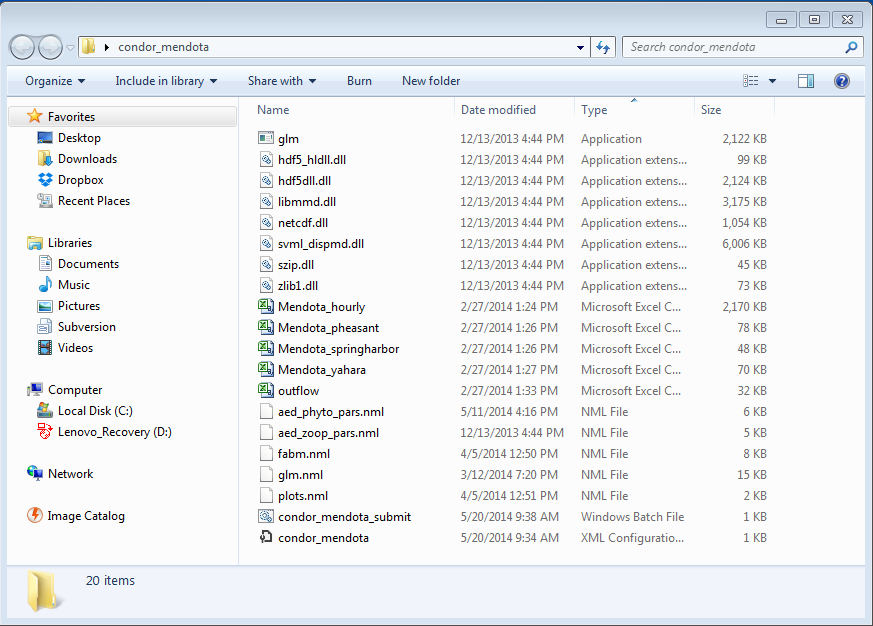
- HTCondor Configuration and Submission Batch Files
- HTCondor configuration file for lake Mendota simulation: condor_mendota.config (See APPENDIX A for details)
- HTCondor job submission batch file: condor_mendota_submit.bat (See APPENDIX B for details)
- GLM Application Files
- GLM simulation execution file: glm.exe
- GLM dll files: hdf5_hldll.dll, hdf5dll.dll, libmmd.dll, libmmd.dll, svml_dispmd.dll, szip.dll, zlib1.dll
- Mendota-related GLM Configuration Files
(You have to modify these configuration files for your own simulation.)
- GLM configuration file: glm.nml (Please see APPENDIX C for details)
- GLM parameters file: fabm.nml
- GLM plots file: plots.nml
- Specialist AED module parameter files: aed_phyto_pars.nml, aed_zoop_pars.nml
- Mendota-related Input Files
(You have to modify these input files for your own simulation.)
- Meteorology input file: Mendota_hourly.csv
- Inflow input files: Mendota_pheasant.csv, Mendota_springharbor.csv, _Mendota_yahara.csv
- Outflow input file: outflow.csv
- HTCondor Configuration and Submission Batch Files
-
Double-click on condor_mendota_submit.bat to submit a Mendota simulation into the HTCondor server.
!! If you see an error message like "No credential stored for username@machinename",
1) Type the following condor command 'condor_store_cred add' and enter your Windows password. This procedure is to add a Windows user (You) to a HTCondor server. 2) Then, double-click on 'condor_mendota_submit.bat'. -
After few seconds, the simulation will be finished and you can find output files in the 'condor_mendota' folder.
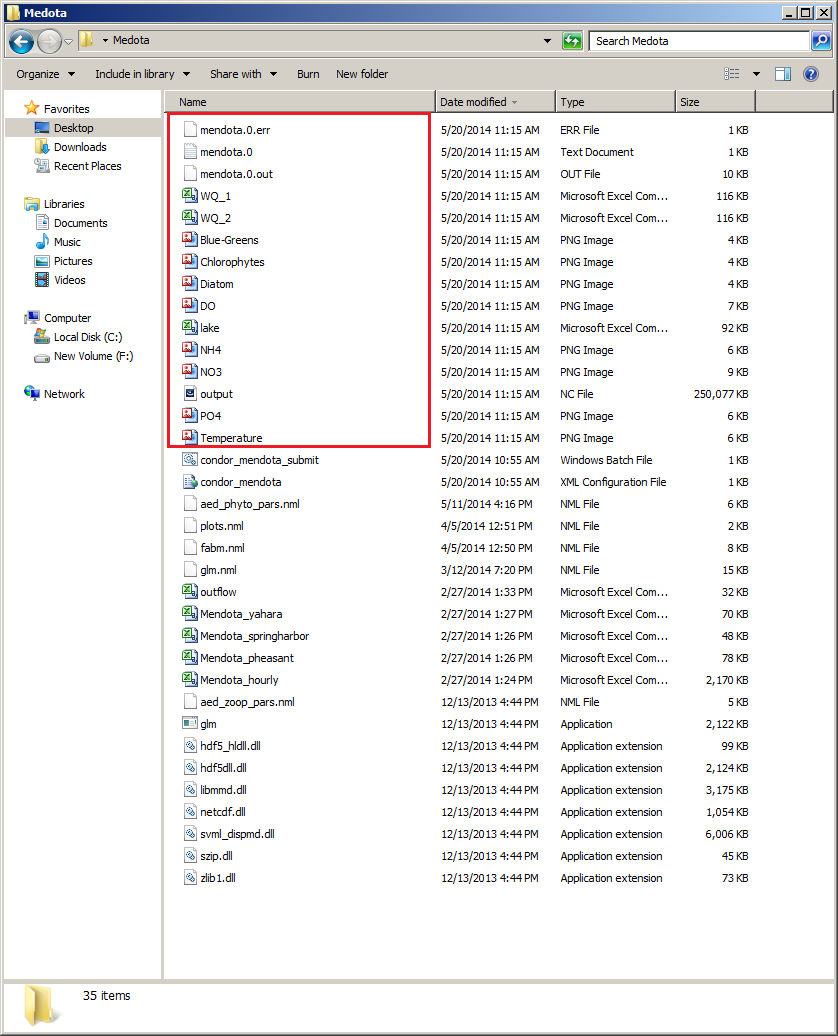
- NETCDF file: output.nc
- Lake properties: lake.csv
- Time series output for a selected depth: WQ_1.csv and WQ_2.csv
- Error and log files: mendota.0.err
APPENDIX A. condor_mendota.config
          ```bash
          executable=glm.exe
          arguments=--xdisp --saveall
          transfer_input_files=glm.exe,glm.nml,fabm.nml,aed_phyto_pars.nml,aed_zoop_pars.nml,plots.nml,
          hdf5dll.dll,hdf5_hldll.dll,libmmd.dll,netcdf.dll,svml_dispmd.dll,szip.dll,zlib1.dll,
          Mendota_hourly.csv, Mendota_pheasant.csv,Mendota_springharbor.csv,Mendota_yahara.csv,outflow.csv,
          universe   = vanilla
          output = $(Process).out
          error = $(Process).err
          log = $(Process).log
          requirements = (TARGET.Arch == "X86_64") && ((TARGET.OpSys == "WINDOWS"))
          should_transfer_files = YES
          when_to_transfer_output = ON_EXIT
          notification = never
          queue
          ```

    * HTCondor job submission batch file: _condor_mendota_submit.bat_

          ```bash
          condor_submit condor_mendota.config
          pause
          ```
APPENDIX B. condor_mendota_submit.bat
          ```bash
          condor_submit condor_mendota.config
          pause
          ```
APPENDIX C. glm.nml
          ```bash
          &glm_setup
          sim_name = 'Mendota_AED_default'
          max_layers = 1000
          min_layer_vol = 0.5
          min_layer_thick = 0.1
          max_layer_thick = 1.0
          Kw = 1.0268
          coef_inf_entrain = 0.0
          coef_mix_conv =0.20
          coef_wind_stir =0.225
          coef_mix_shear =0.30
          coef_mix_turb =0.51
          coef_mix_KH =0.30
          coef_mix_hyp =0.30
          /
          &fabm_setup
          ode_method = 1
          split_factor = 1
          bioshade_feedback = .true.
          repair_state = .true.
          fabm_nml_file = 'fabm.nml'
          multi_ben = .true.  !fluxes from sediments, P
          /
          &morphometry
          lake_name  = 'Mendota'
          latitude   = 43
          longitude  = -89
          base_elev  = 375.0 !was 375.01
          crest_elev = 400.0 !
          bsn_len    = 3.9581e+07
          bsn_wid    = 1.9791e+07
          bsn_vals   = 15
          H = 375.00640,376.79166,378.57691,380.36217,382.14743,383.93269,385.71794,387.50320,
              389.28846,391.07371,392.85897,394.64423, 396.42949,398.21474,400.00000
          A = 0.00000,2827.22639,5654.45279,8481.67918,11308.90558,14136.13197,16963.35837,19790.58476,
              22617.81116,25445.03755,28272.26395,31099.49034, 33926.71674,36753.94313,39581.16952
          /
          &time
          timefmt = 2
          start = '2009-04-15 00:00:00'
          stop = '2009-12-29 23:00:00'
          dt = 3600.0
          num_days=2000
          /
          &output
          out_dir = '.'
          out_fn = 'output'
          out_lkn = .true.
          nsave = 12
          csv_point_nlevs = 2
          csv_point_fname = 'WQ_'
          csv_point_at = 1.0, 2.0,
          csv_point_nvars = 16
          csv_point_vars = 'temp', 'salt', 'aed_oxygen_oxy', 'aed_silica_rsi','aed_nitrogen_amm',
          'aed_nitrogen_nit', 'aed_phosphorus_frp','aed_organic_matter_don', 'aed_organic_matter_pon',
          'aed_organic_matter_dop', 'aed_organic_matter_pop', 'aed_organic_matter_doc',
          'aed_organic_matter_poc', 'aed_phytoplankton_green', 'aed_phytoplankton_crypto',
          'aed_phytoplankton_diatom'
          csv_lake_fname = 'lake'
          /
          &init_profiles
           num_depths = 6
           the_depths = 0.0, 4.0, 8.0, 12.0, 16.0, 20.0
           the_temps  = 5.1, 5.0, 4.9, 4.9, 4.8, 4.8
           the_sals   = 0.00, 0.00, 0.00, 0.00, 0.00, 0.00
           lake_depth = 25
           num_wq_vars = 7
           wq_names =  'aed_nitrogen_nit'
			'aed_nitrogen_amm'
			'aed_phosphorus_frp'
			'aed_carbon_dic'
			'aed_organic_matter_doc'
			'aed_oxygen_oxy'
			'aed_silica_rsi'
       	wq_init_vals = 	124.19700, 104.21128, 105.63883, 105.63883, 105.63883,  34.97502
				7.994290, 6.638116, 6.423983, 5.567452, 6.709493, 1.784440
				1.0332580,  1.1947046,  0.9686794,  1.0655473,  0.9686794, 0.9686794
				4023.314, 4014.988, 4054.954, 4178.740, 4302.526, 4426.311
				409.6586, 397.1690, 396.3364, 417.1524, 418.8177, 416.3197
				396.875, 393.750, 396.875, 412.500, 425.000, 425.000
				190.1337, 181.9444, 180.8763, 190.8458, 186.2171, 185.8610
      /
          &meteorology
          met_sw     = .true.
          lw_type    = 'LW_IN'
          rain_sw    = .false.
          snow_sw    = .true.
          atm_stab   = .true.
          meteo_fl   = 'Mendota_hourly.csv'
          wind_factor = 1.0
          ce =0.0014
          ch = 0.0014
          coef_wind_drag =0.0012
          subdaily = .true.
          /
          &inflow
          num_inflows    = 3
          names_of_strms = 'Yahara','Pheasant','SpringHarbor'
          strm_hf_angle  = 65.0,65.0,65.0
          strmbd_slope   = 3.0,3.0,3.0
          strmbd_drag    = 0.0160,0.0160,0.0160
          inflow_factor  = 1.0,1.0,1.0
          inflow_fl      = 'Mendota_yahara.csv','Mendota_pheasant.csv','Mendota_springharbor.csv'
          inflow_varnum  = 4
          inflow_vars    = 'FLOW', 'TEMP','aed_nitrogen_nit','aed_phosphorus_frp'
          /
          &outflow
          num_outlet   = 1
          flt_off_sw   = .false.
          outl_elvs    = 396
          bsn_len_outl = 799
          bsn_wid_outl = 398
          outflow_fl   = 'outflow.csv'
          outflow_factor = 1.0
          /
          ```