Repository navigation
Assembly Studio
Assembly Studio combines saved structure templates into a modular structure. Open the structure library and choose Assembly Studio, or use /worldsunwritten assembly. Authoring requires operator level 2 and a preset that permits the structure library. Preset export also requires level 3 and developer_mode.
- Capture or import each source template through the structure library. Set its placement rules and safe spawn markers before adding it.
- Choose New draft and enter an assembly ID such as
my_pack:watchtowerand a registered biome ID. - Choose Add module, select a saved template, and give the module a unique name. Set its local offsets, rotation and mirror.
- Add the remaining modules. Use the arrows to orbit the complete voxel preview. Gold points show transformed spawn markers. Select the module name to review its source revision, placement rules and dependencies.
- Use Settings for the assembly height offset, maximum supported slope and random rotation of the whole structure. Each module also retains its own placement rules.
- Choose Save draft. Reopen the saved document to continue later.
Limits are 16 modules, 96 blocks per axis and 65,536 occupied cells. Each source template is limited to 32 blocks per axis. Saved draft JSON is limited to 8 MiB; complex states or metadata may reach that limit before the cell limit. Offsets are 0–95; a template extending past 96 makes the assembly invalid. Modules cannot share occupied cells or obstruct a marker's two air cells. An unfinished draft can be saved while its geometry is invalid, but it cannot be exported.
Modules contain captured templates, block states, permitted decorative metadata and markers. Changing or deleting a library source later does not change an assembly. To take a newer source revision, remove that module and add it again. Rotation and mirroring transform states and marker directions together. Preview colours identify block types; the preview does not display block textures or container contents.
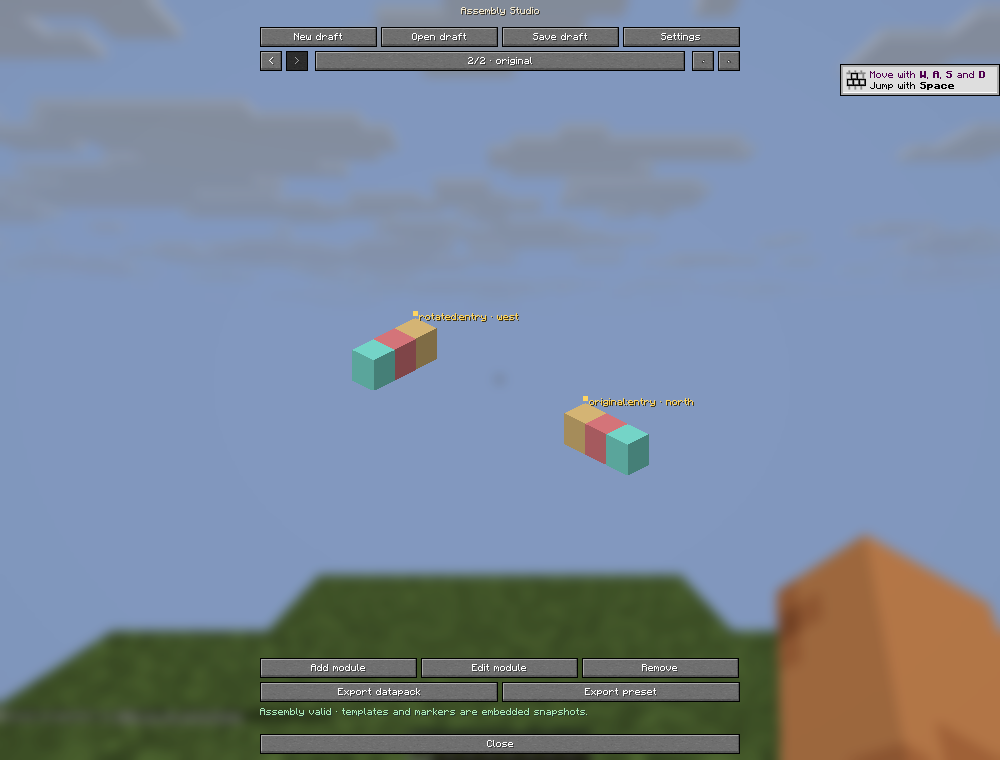
Export datapack writes a ZIP under the world's generated/worldsunwritten/assembly-exports/ directory. It contains the registered structure definition and a native random-spread placement set. Install it in a new world or modpack. Select the structure in a managed Single Block or Layered dimension with the matching biome. Modular assemblies require managed solid terrain; Original Generation and Void do not supply their placement surface.
Export preset creates a validated bundle in config/worldsunwritten/exports/. Choose an unused export ID, target dimension, release and seed. The selected dimension becomes flat stone with the assembly enabled. Other dimension profiles are retained. A compatible native End keeps its central dragon arena. Modded dimensions require a compatible Single Block adapter. The export includes the definition and captured resources; supplying mods and dimension datapacks must still be installed.
Exports are inert files. They do not install resources or change the world where you authored them. Existing export files and preset revisions cannot be overwritten. Install a bundle through the modpack configuration, then restart before creating a new world.
Drafts live in world/data/worldsunwritten/assemblies/<namespace>/<path>.json, separately from immutable generation snapshots. Two authors may open the same revision. After one saves, the other must reopen before saving; the server refuses an obsolete save.
Editing sessions expire after 30 minutes without an action. Save before leaving. A server retains at most 16 sessions and an estimated 64 MiB working set; it refuses new work when that budget is full. Closing an editor releases its session. Save/export actions recheck permissions and the server's current editor token.
Back up drafts with the complete world. Exporting a revised assembly affects new worlds; existing saves continue using their pinned definitions and templates.
Version 1.3 adds Procedural Pools for seeded branching layouts. Static assemblies retain their existing definition and placement path.
Preset exports read the live dimension registry, including mod-added dimensions outside the selected starting preset. Replacing a modded dimension still requires its registered adapter to support Single Block terrain.
Use History / organize for Undo/Redo, module duplication and module ordering. Pool choices can also be reordered from their diagnostics menu. Completed edits write a separate recovery document. Reopening after a disconnect requires an explicit Restore/Discard choice; a newer saved revision is never overwritten by old recovery. Histories share the existing server memory budget, and edits keep current permission/token/serial/revision checks. See Draft History and constrained pools.
In 1.5, Settings → Placement anchor offers legacy, surface, seabed and fixed. Legacy omits the new setting and preserves the original ocean-floor anchor. Surface uses the first free base world-surface height, including fluids; seabed uses the base ocean-floor height. Fixed uses its exact Y value. The existing height offset is added once. Every occupied cell must still fit its dimension and template rules.
An explicit definition uses, for example, "placement": {"version": 1, "mode": "fixed", "fixed_y": 100}. Surface/seabed anchors omit fixed_y or set it to zero. Static assemblies anchor their existing origin; format-3 pools anchor their root module.
Settings → Selected module collision changes that module's captured rule without editing the library source. air remains the default. matching additionally accepts identical existing states without block entities. air_or_water accepts air and actual source/flowing water blocks; it never permits lava, waterlogged solid blocks or containers. Empty template spaces remain wet. A submerged spawn marker is still unsafe and rejects placement.
Anchors set the starting height. Use the site inspector to understand rejected sites and the coastal example for water placement.
In 1.6, Settings → Foundation and clearance enables preparation for generated structures. none retains existing behavior. posts supports the occupied columns nearest the four footprint corners; footprint supports every occupied column. Choose a stable full support block, a maximum added depth of 1–16 and clearance of 0–8 cells upward from each column's lowest template cell. Preparation follows the occupied footprint, including holes and transformed modules. It does not excavate an arbitrary bounding box.
Supports must reach stable base terrain within the chosen depth. Clearance can remove ordinary breakable terrain. Water requires explicit opt-in; containers, protected blocks, lava and waterlogged solids are refused. A complete plan supports at most 4,096 preparation cells and 32 preparation pieces, within the overall 65,536-cell assembly budget. Height, world bounds, biome restrictions, generation-rule write filtering and native End reservations apply to preparation too. A failed base-terrain plan rejects the whole start. If later world generation introduces protected live blocks, the affected piece skips that chunk's writes and preserves them.
Definitions add "foundation": {"version": 1, "mode": "footprint", "material": "minecraft:cobblestone", "max_depth": 8, "clear_height": 2, "replace_water": false}. Saved native pieces carry their preparation and embedded snapshots across restarts. Existing definitions omit the field and keep their previous behavior. Preview the result and test actual generated chunks before shipping a pack; manual structure-library placement does not run this preparation.
Settings → Themes and variants edits weighted palettes and captured template alternatives. A palette contains block-ID mappings and a weight from 1–100. Adding a mapping with the same palette and source block updates it. One palette is selected for an entire assembly candidate; compatible block properties such as stair facing can be retained. Include an identity palette if the original material should remain an alternative. Mappings cannot change block-entity types or introduce restricted blocks. Missing blocks and incompatible properties fail validation.
A variant records a name, existing module name, weight and saved library ID. It captures that template immediately, including permitted metadata, placement rules and markers. It must retain the module's bounds and every base marker name, and satisfy its pool connections. One weighted variant is selected per catalog module for each candidate; repeated instances of that module share the choice. Include the original snapshot as a variant if it should remain a possible choice. Rotations and mirrors transform captured states and markers together. Editing or deleting a library source later cannot change the captured catalog.
Palettes and variants use a separate seeded random stream, preserving existing pool planning. Limits are eight palettes, 32 mappings per palette and sixteen variants. The complete base and variant catalog must also fit 65,536 cells. Every captured template is checked against every palette before export; selected layouts also pass the production placement checks. Undo, redo, recovery, revision conflicts, current permissions and pack locks apply to these edits.
The optional themes object has version: 1, a palettes list (name, weight, mappings with from, to, preserve_properties) and a variants list (name, module, weight, source, embedded snapshot). See the foundation example and theme example for complete definitions.