Repository navigation
Open Engine 2026.11.0-alpha.1
Pre-release
Open Engine 2026.11.0-alpha.1
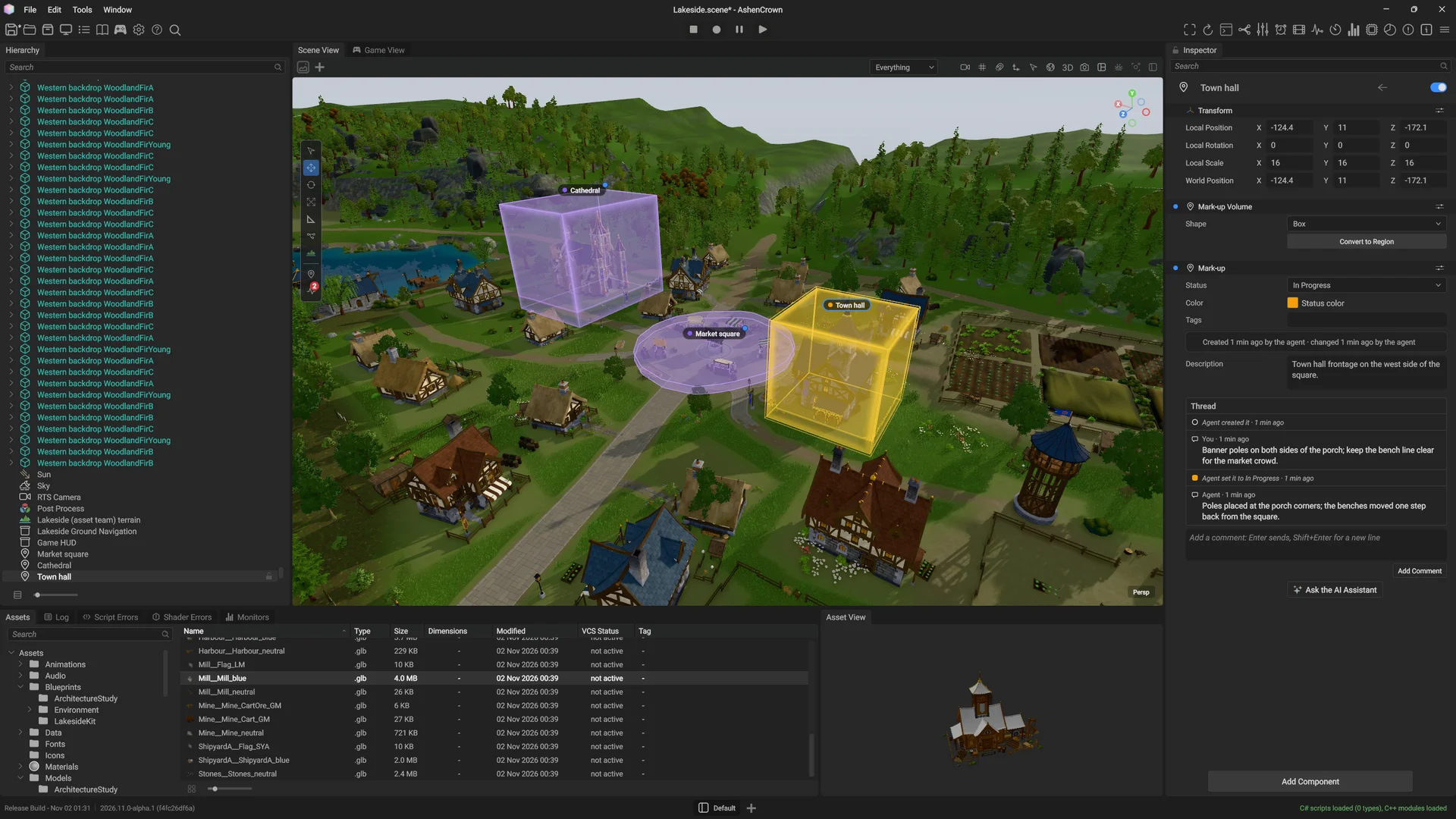
Prefabs
Turn a group of entities into a prefab, place it as often as you need, and see what each copy changes.
- Select entities and press Ctrl+Shift+P to create a prefab: a
.prefabfile that holds the tree of entities. In the Assets panel, a prefab shows the teal prefab cube. - Drop a prefab into the Scene View to place it. The Hierarchy shows prefab members in teal.
- In the Inspector, each instance has a prefab bar. Every field, added component and removed component that differs from the prefab is marked.
- Click the count on the bar to open the Overrides list. Apply or revert one override from its row, or all of them at once.
- A game spawns prefabs from C# (
PrefabRefandEntityCommands.Spawn), from a game system or from the game graph's Spawn Prefab action.

A new prefab in the Assets panel, at a UI scale of 2.
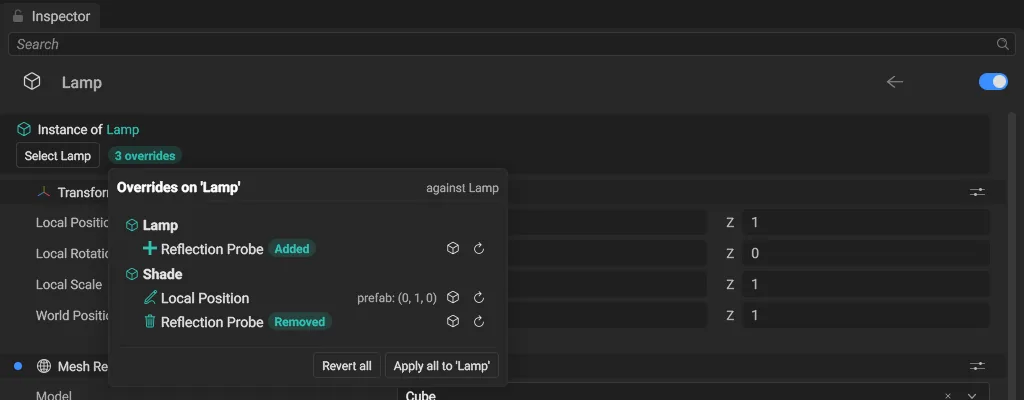
The Overrides list, opened from the count on the prefab bar.
Roads and junction tools
Draw roads with the spline tool, and they join into a network of junctions and paved squares. The video shows one stroke per road, the junction, the paved square and the paths.
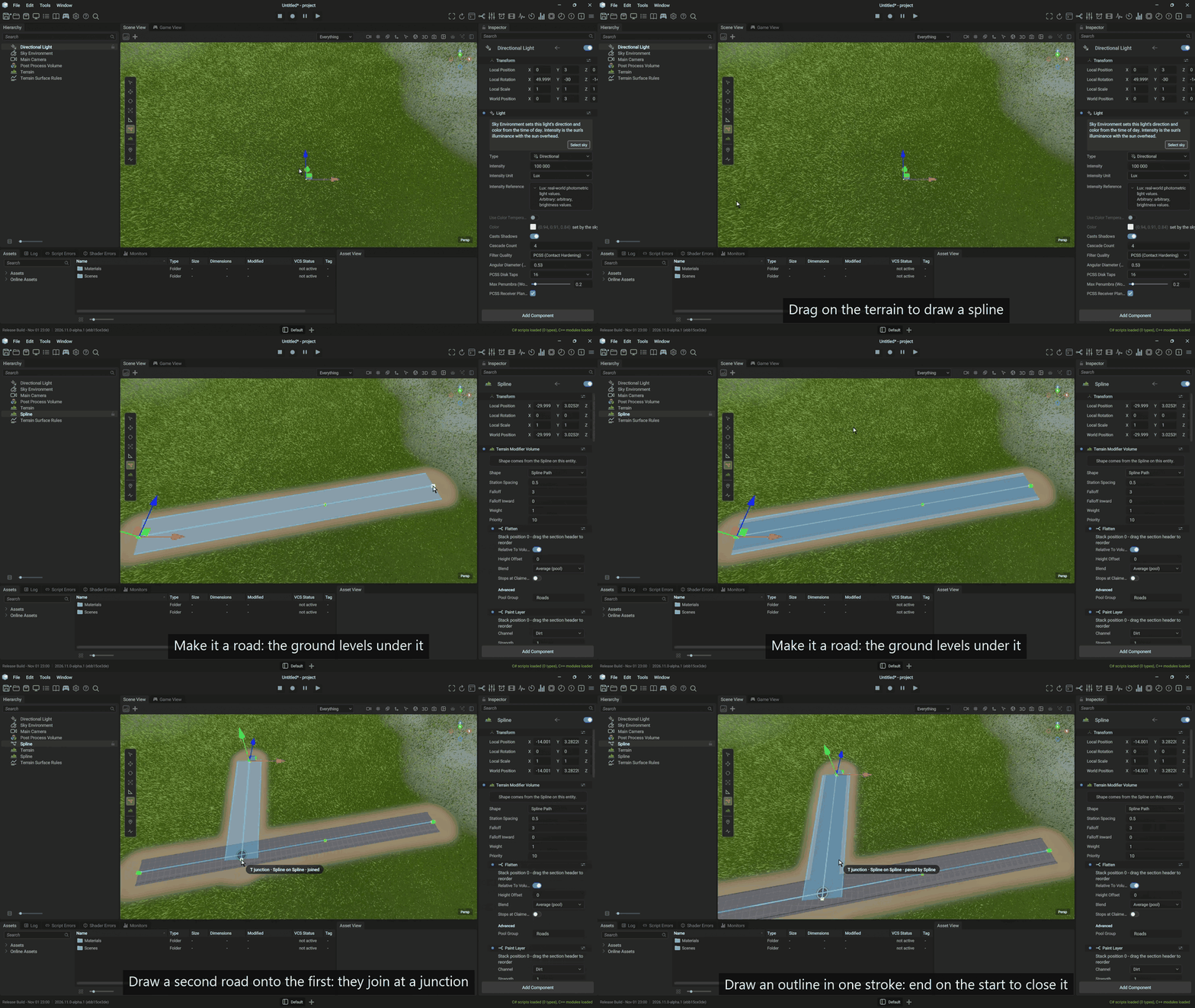
Two roads and their junction, from the drawing session. Watch the full take (39 s, 47 MB, MP4)
- Where a road ends on another road, crosses it or enters a square, a junction forms, and the Scene View marks it with a ring. Drag a road's end near another road or a square's outline, and it snaps on.
- Add a Spline Paving to a closed spline to pave a square with a curb. Each road enters the square through a flared or straight mouth, and the road's verge meets the curb in one seam.
- The ground is graded to the square's rim and cleared of grass. On a slope, the square follows one smooth grade and meets each road at the road's grade. Grass beside a road or a square fades into the dirt.
- The inspector shows its options as pictures, lists the splines the square touches with the state of each junction, and tells you what to change when a road meets the square at a different height.
- The Player builds the same roads, walls, fences and placements as the editor, and a game can wait for them before it hides its loading screen.
Terrain and grass
Large terrains draw to the horizon in the editor and the Player, and grass comes from presets you pick from pictures.
- Terrain draws in the Player. It settles to one mesh when the camera stops and keeps its detail to the horizon.
- Physics, picking, placement, grass and the navigation bake read the streamed height, so they work far from the camera. A streamed tile loads or unloads without a stall.
- Pick a grass preset from pictures: Meadow, Lawn, Steppe or Stylized.
- Grass takes its color from the ground, and a terrain color map tints the ground and the grass roots.
- When a scene holds several terrains, one draws and the others say which one.
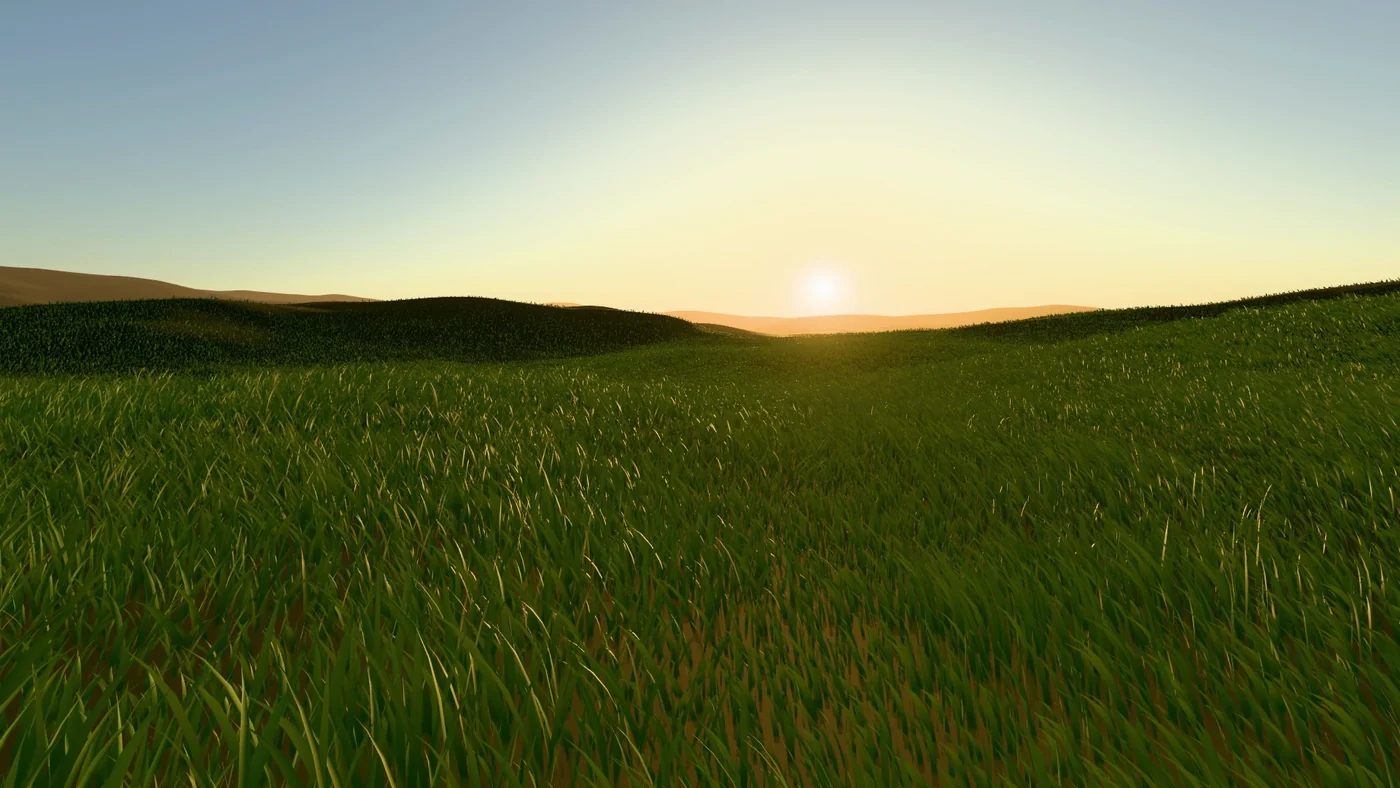
The Stylized grass preset at 17:30, seen from eye height.
Sky and day cycle
Author how the sun, the sky and the light change over the day, and pick a night sky from presets.
- The day cycle is an asset. Edit it in the Day Cycle window, and move the playhead to preview any hour.
- The Day Cycle window's layout is still being polished.
- The sky has star presets (Vivid, Restrained, Classic, Physical), with a picture of each to pick from.
- The sky can show falling stars, and you can customize them.

A falling star in the night sky.
Image quality
Images are sharper and steadier, with less flicker and less sparkle.
- Water reflects the sun as one highlight shaped by its roughness.
- With MSAA, edges over a bright background stay bright, and small bright lights keep their bloom.
- A still reflection stays steady with screen-space reflections and TAA, and swaying trees and grass stay sharp under TAA.
- Normal-mapped surfaces stay smooth at a distance, without sparkle.
- Shadow Casting on a Mesh Renderer can be Off, On or Shadows Only.
Editor
The editor is easier to read and to drive: the menu sits in the title bar, the Log panel sorts messages by channel, and every panel has its search bar at the top.
- The title bar holds the menu (File, Edit, Tools, Window) and shows the scene and the project.
- Each engine module logs to its own channel with its own level. The Log panel has a Channels list, a detail pane for the selected entry and a right-click menu.
- F2 renames, a middle click closes a tab, and entering Play gives the Game View the keyboard focus.
- Explanations in the inspector and the settings show as info cards, and a tooltip's arrow points at its control.
- The Asset View shows the selected asset in its own 3D view. The Hierarchy hides the entities that the engine makes at run time.
- A new project builds its startup scene, and the exported Player starts.

The Log panel, with the full text of the selected entry in the detail pane.
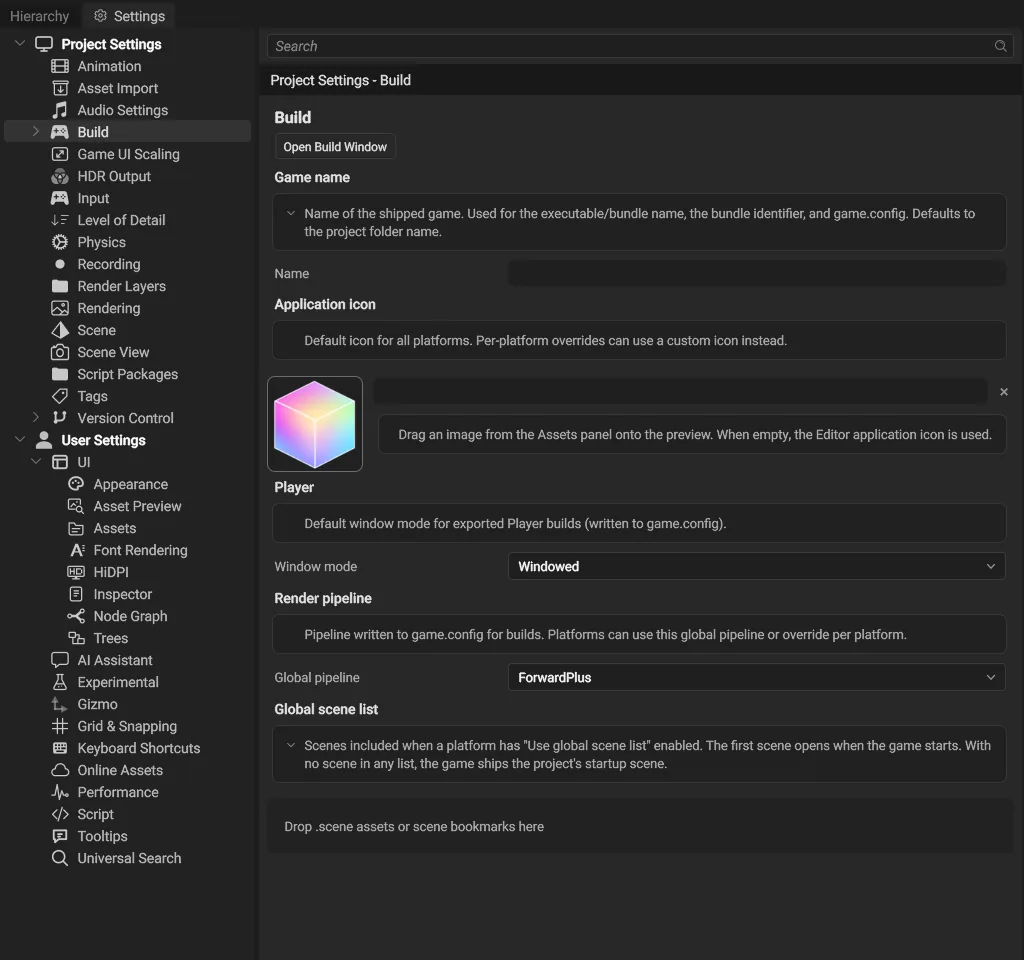
Info cards on the Build page of the Project Settings.
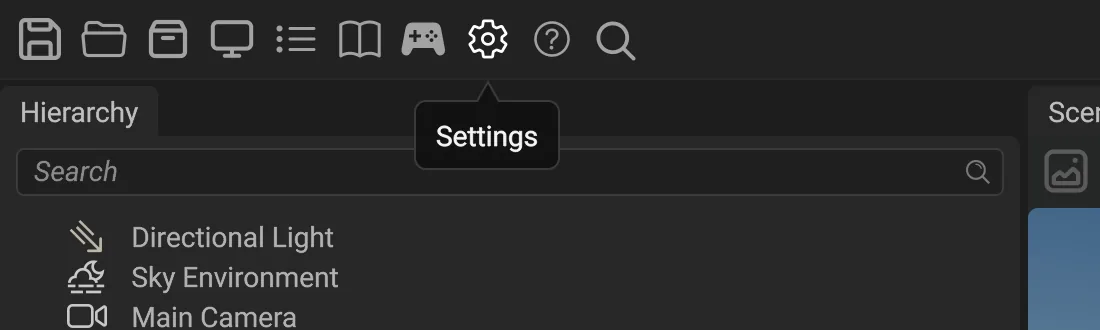
The Settings tooltip at a UI scale of 2.
Scripting
Game code reaches more of the engine from C#: every component, the UI, raycasts and navigation.
- Every engine component is reachable from C#. Scripts can raycast the scene, and
Application.RequestExitends a game. - A script can move a UI element by an offset, bring it to the front, read its rectangle and hold the pointer through a drag. A tooltip can be a layout template, for a rich tooltip with a title, a cost row and a hotkey.
- User systems run in a declared order. NuGet packages in a script project compile and hot reload.
- A Navigation Agent names its surface and tells you why it cannot reach its goal. Generated road pieces are walkable, and a kinematic body follows its Transform.
- C++ code can build UI trees from data with a typed element builder. An unknown attribute in a
.uxmllayout is logged with its file, line, element and name.
Faster start-up
The editor and the Player show their first frame sooner, and each frame costs less.
- Start-up does not wait for the gamepad scan, the .NET version check, the package cache sweep or the star catalog.
- On NVIDIA, the depth buffers are created at start without a 700 ms wait.
- Opening a project decodes embedded model textures in the background.
- The navigation bake runs in the background, so a long bake (21 s in a test scene) does not freeze the editor.
- A still frame keeps its draw order, which saves about 0.5 ms of CPU per frame in a scene of 21,000 objects.
Community contributions
Thank you to everyone who sent a change: Linux builds with GCC and a Linux Web panel, editor packages that read .zip archives, the reverse-Z depth convention in one place and proven on Vulkan and Metal, value drags that run past the screen edge, script access to a UI element's position and the pointer, fonts that load and measure correctly in the Player, 2D splines in the selected entity's plane, orthographic views that keep their geometry, the Animation panel's buttons after a layout reload, dock and splitter fixes, graph materials on case-insensitive file systems, and a typed C++ builder for UI built from data and the editor's title bar menu (thank you, AmeliaMesdag).
In this release
- The source, built from a clean checkout with the steps in README.md and BUILD.md; the documentation at https://openengine.dev/docs/.
- An experimental Windows x64 build of the Editor,
OpenEngine-Editor-2026.11.0-alpha.1-win-x64.zip(208.4 MB, SHA-256c9d2df0ad9c80b0835549927a372cc452e50affc8edb4a28345fb5c966b86996). - An experimental macOS arm64 build of the Editor,
OpenEngine-Editor-2026.11.0-alpha.1-macos-arm64.zip(258.7 MB, SHA-25699dff93163a310cccaf8cd3bb65d124482cbd1c45a794a8e4a8e345b9284eb9d), ad-hoc signed, not notarized. - An experimental Linux x64 build of the Editor,
OpenEngine-Editor-2026.11.0-alpha.1-linux-x64.zip(309.5 MB, SHA-256db21aea2abf0809d73a92bebfe29f0a85fe4599535ffc4b37dfeedd7466b83eb). - The web package for this release is withdrawn: the 2026.11.0-alpha.1 build on npm draws nothing (its engine pack lacks the draw-stream shaders).
npm install @game-crafters-guild/openengine-web@alphainstalls the last working build, 2026.10.0-alpha.5, and the live examples at https://game-crafters-guild.github.io/opengine-web/ run that build. A fixed 2026.11.0-alpha.2 follows.
An early release
This is an alpha: APIs and file formats may change between releases.
The engine is yours as much as ours: open issues, send pull requests, and help shape it.
Join us on Discord: https://discord.gg/c8JASm4q8
Changes to your project
- A project file that nests the startup scene under
project.startupSceneis refused at open, and the message names the key to use. Move the value to that key.
All changes since 2026.10.0-alpha.6 (264 merges)
Roads, junctions and paved squares
- Roads join into a spline network that records its junctions.
- The Player builds the same roads, walls, fences and placements as the editor, and a game can wait for them.
- The spline recipe inspectors show extrude rows by mode with Floor Height, the fence's parts as one list and placement modes as words.
- The spline fence inspector lists span overrides, and a state line names its warnings.
- The spline fence inspector shows a preview strip that lays the recipe out on a sample run.
- Spline Paving: a closed spline paves the area it encloses, and roads trim at its edge.
- The spline joint is spelled Miter everywhere.
- Spline geometry triangulates concave arcs without sliver triangles.
- A road enters a paved square through a flared or straight mouth.
- The Spline Paving inspector shows its options as pictures, in sections, with units.
- A road carries a verge that meets the square's curb at the mouth in one seam.
- Generated road pieces are walkable under the authored entity's navigation policy.
- The Scene View marks spline junctions with a ring, and a dragged or drawn end snaps to a nearby spline.
- A paved square grades the ground to its rim and clears the grass under it.
- A world with no spline recipes counts as settled, so a game that waits for its roads does not wait on an empty world.
- The Ground Authority tooltip on Spline Paving and Spline Extrude says what the setting does.
- A paved square on a slope grades to a smooth surface through its rim and meets each road at the road's grade.
- A spline stroke that starts on a paved area saves an open spline, and a stroke does not stick to generated geometry.
- A crowned road eases to the junction's edge level over one road width, so it meets a paved square without a step.
Prefabs
- The
.prefabasset: a prefab file loads, and edits to an instance's children save as overrides. - C++ code spawns prefabs with
Scene::SpawnPrefabandPrefabRef, from a shared prefab library. - A game spawns prefabs from C# (
PrefabRefandEntityCommands.Spawn) or from the game graph's Spawn Prefab action. - Drop a prefab in the Scene View to place it, see instance rows marked in the Hierarchy and create a prefab from an entity.
- The Hierarchy shows prefab members in teal with a badge on the icon.
- A prefab instance has Select Asset, Unpack, Unpack Completely and Duplicate. Ctrl+Shift+P creates one prefab per selected root, and a
.prefabfile has its own tile. - The Hierarchy's prefab member badge is a small prefab cube.
- Each prefab instance has a prefab bar in the Inspector, and overridden rows and components are marked.
- The prefab bar shows the prefab icon and teal name, the override count on a second line and override pills in teal.
- A prefab reference shows the prefab's icon and name as one linked field, never its GUID.
- Apply or revert one prefab override from the Inspector.
- The Overrides list opens from the count on the prefab bar, with Revert all, Apply all and Discard for a stale override.
Day cycle and sky
- The day cycle is an asset. Edit it in the Day Cycle window, with a profile inspector and a preview hour.
- The sky uses one main camera for the sun state, the sky-view band and the volume blend.
- Each star keeps its light as the camera moves.
- Pick a star preset from a list with a picture for each look. Seen by is two picture tiles.
- Each falling star flies a seeded path and leaves a streak for a tenth of a second, with one dial.
- Sun glare dims by the share of the sun's disc that the shadows let through.
- The sky color fields use the shared color row, and the color picker opens on the color the swatch shows.
Terrain and grass
- Grass tuning: a 20-degree leaf channel, half the canopy shade, deeper roots and a turf grass layer.
- A terrain color map tints the ground and the grass roots, with Darken Ground.
- The grass leaf color carries its face-on reflection.
- Grass Root Fade has its plain form and ends at 0.275 by default.
- A Color effect on a modifier volume colors the ground and the grass roots in its area.
- A streamed tile's arrival work runs on the job pool with a per-frame budget, so a tile loads without a stall.
- With an automatic Root Color, a grass blade starts from the color of its ground.
- A streamed tile that leaves updates only its own part of the terrain, without a rebuild of the whole tree.
- A streamed tile that arrives under a height modifier updates only its own part of the terrain.
- Under a dense grass canopy, the specular dims with the diffuse.
- Picking reads a streamed terrain's height wherever it is asked.
- The terrain splits steadily with depth and does not split ground that the draw shows flat.
- Placement, grass and the navigation bake read the streamed terrain height, so they work far from the camera.
- The grass percent box holds 100 %, and the modifier effects share one name.
- Grass Ground Tint Height defaults to 0.5, so the upper half of each blade keeps the leaf color.
- Physics reads the streamed terrain, with one collider per finest page.
- Terrain draws in the Player.
- A tilted plain stops splitting, and the 4 km terrain preset rests at the lowest pressure step.
- Pick a grass preset from a list with a picture and a line for each. A pick is one undo step.
- A sculpt dab rebuilds only the terrain under it.
- A still camera's terrain mesh settles.
- Planets (in progress): a planet cooks as six cube faces that join without seams.
- The terrain's merge measures the same edge as its split, so the two agree.
- The terrain surface bake writes streamed pages, coarse levels first, and a paint stroke rebakes only its own pages.
- Planets (in progress): a planet streams height pages on six faces, with sample planet scenes.
- With 4x MSAA, the terrain no longer draws a dotted line along its facet edges.
- The terrain surface bake runs as a background job, and the frame never waits for it.
- Planets (in progress): the sphere draws from its height pages.
- Planets (in progress): the planet shades from its height pages, and every edited face updates in one step.
- A Stylized grass preset: short, dense and moss green.
- The terrain rebuilds its mesh when another terrain becomes the one that draws.
- When a scene holds several terrains, one draws by a stable choice, and the others say which one.
- Planets (in progress): a height edit or a test page reaches a planet face.
- The terrain draws its surface from the streamed pages.
- A restarted terrain draws its settled shape from its first frame.
- Under tile pool pressure, the off-screen terrain settles to one shape per pose.
- Grass follows the ground that the terrain draws.
- The terrain height bake reports its path and its first refusal, and the slow-edit notice names the refusal.
- Terrain modifiers of equal priority bake in a stable order.
- A terrain camera that stops while the tile pool is under pressure settles in one step.
- Grass beside roads and paved areas fades into the dirt instead of ending in a staircase of texels.
Sharper, steadier images
- The seabed seen through water is fogged once, by the water's distance.
- Shadow Casting on a Mesh Renderer can be Off, On or Shadows Only.
- Rough reflections use a corrected environment lighting table.
- Glass keeps screen-space reflections off its pixels.
- Water reflects the environment once.
- The Ground primitive is cut into 50 m cells, so its grid lines hold still as the camera moves.
- Swaying trees and grass stay sharp under TAA: motion vectors for vertex deformation are on by default.
- A deforming mesh's culling bounds widen by its vertex modifier's reach, so swaying trees are not culled too early.
- Water reflects the sun once, as one highlight shaped by its Roughness.
- The water's reflection is the part that screen-space reflections replace, so it is not counted twice.
- Ambient occlusion settles when the camera stops, so leaves no longer shimmer.
- A texture read back from the GPU keeps its contents when another queue wrote it.
- Generated mesh levels keep thin parts, such as barrel lids that sit against other parts.
- Each view that sees water has its own planar reflection, so the Game View and recordings reflect their own camera.
- Water keeps every planar reflection while a view is idle.
- The sky no longer flashes dark for one frame when auto exposure steps.
- A large Plane floor no longer jumps near the camera: the Plane primitive is a 32 x 32 grid.
- With MSAA, bright HDR edges soften, and small bright lights keep their bloom.
- With MSAA, each pixel shows the mean light of its samples, so edges over a bright background no longer go dark.
- Normal-mapped surfaces no longer sparkle at a distance: the texture cook keeps the bump detail that each mip averages out, and shading widens the roughness there.
- A still reflection flickers far less with screen-space reflections when nothing in the view moves.
- Screen-space reflections and TAA hold steady at rest when the view's depth does not change, with flat water too.
Editor
- The engine waits for asset decodes to finish before it shuts the asset registry down.
- The Scene View eye hides an entity in the Scene View only.
- The ShadowStress sample's sun states its unit (Lux), so its exposure no longer pins at the ceiling.
- The audio control is in the Play menu, with a speaker icon that shows its state.
- F2 renames in the Hierarchy and the Assets panel, the entity menu has Delete, and submenus open beside their parents.
- The Scene View layer filter text has the same brightness as the Hierarchy's.
- Search bars sit at the top of every panel by default.
- A dropdown option can carry a picture and a line of text, and a dropdown can show a state that is not an entry.
- Component names read as words (Animated Sprite 2D), and DDGI dropdown labels are in title case.
- The Log panel shows the selected entry's detail, confirms each copy and has a right-click menu.
- The panel search looks like a field at rest.
- American spelling in the DDGI, ocean, spline wall, planet relief and particle tooltips.
- The Hierarchy's row size slider starts with a rows icon.
- Material, shader, shader graph, Game Graph and curve preset names read as words.
- Mark-up status words and labels read in title case.
- Each engine module logs to its own channel with its own level, and every record carries its call site (from a proposal by Tim Aidley, OpenEngine #58).
- The Log panel's Channels list: a search field over a scrolling list, with each channel's show switch and level.
- Entering Play gives the Game View the keyboard focus and brings it to the front. Stop gives the focus back.
- A middle click on a dock tab closes its panel.
- The scene load report drops a row when its entity or component goes away.
- The Hierarchy no longer lists the entities that the engine makes at run time.
- The Scene View shows a notice when its exposure differs from the game camera's, with Match game camera and Dismiss.
- A project file that nests the startup scene under
project.startupSceneis refused, and the message names the key to use. - The Asset View shows the selected asset in its own 3D view.
- A tooltip's arrow takes the bubble's fill and border and points at its control. A tooltip can be a layout template.
- A mask field whose options shrink while its popup is closed rebuilds its rows.
- A UI image that reuses a freed texture slot in the same frame no longer draws white, as the title bar logo did.
- The custom title bar keeps the window's client area at the size or position a request asks for.
Scripting and gameplay
- C#:
RenderLayers.FindandNameOf. - C#:
Physics.RayCastAllandBoxOverlap. - Navigation surfaces save as
.navsurfacefiles of chart-local tiles with per-tile hashes, so only changed tiles rebake. - Children follow a root whose world transform a system writes directly.
- A kinematic body follows its Transform.
- A Navigation Agent names its surface, moves through SetDestination and gives a reason for every failure.
- C++:
Split,Join,ToUpperAscii,ReplaceAll,ParseIntandParseUnsignedin Types. - C++: one
HashCombineandFnv1a64Valuesin Types, and aFlatSetbesideFlatMap. - Every engine component is reachable from C#, generated from the engine's own definitions.
- Fields with an asset reference get a default inspector, and the field scanner reads included enums.
- Component authors label fields and enumerators with
// @ge-labelmarkers in the header. - C++:
PathUtilsisApplicationPaths. - C++:
SmootherStep,Fract,WrapandToRadiansin Mathematics. - The engine raycasts the scene, terrain and primitives included, and spline conforming gives the same result in every process.
- C++:
Vector3Int, an integer 3D vector. - C++: a log channel is one line in its header (
GE_LOG_CHANNEL). - Unloading a native module releases the finished job tasks that it owns.
- C++:
FunctionRefis in Types, and clang warns when one outlives a temporary. - C++: the chunked
ParallelForstops early as the unit form does. - C++:
LerpforVector2,Vector3andVector4. - C++:
Vector3::NormalizeOrnormalizes with a fallback. - C++:
InlineVectorin Types, and five small per-frame vectors no longer allocate. - C++:
DisjointSetsresets in place and roots each set at its smallest item. - C++:
UIElement::Overrides()isStyle(). - A navigation path to a goal in another region fails at once, without a search.
- C++:
FrameMemorygives memory for this frame and the next to the frame thread and the forks it joins. - An unknown attribute in a
.uxmllayout is logged with its file, line, element and name. - C++:
UIElement::FindById<T>finds a typed element by its id. - Script hot reload no longer holds a thread while a build prepares. The swap starts when the preparation finishes.
- UI: CSS viewport units (
vw,vh,vmin,vmax) resolve against the UI root's size, so a HUD can cap its width at 21:9.
A faster start, lighter frames
- Grass resolves each blade's root color once, at placement.
- Resizing a large terrain no longer builds a tree that nothing reads.
- The grass control field builds off the frame, in row bands.
- A warm project open reads each shader file once, and the file watcher rescans when the platform loses events.
- The package cache sweep runs once per process, so the editor's first frame waits on one scan, not eight.
- The star catalog no longer delays the first frame: its load takes 44 ms instead of 342 ms.
- Physics no longer allocates each frame in a steady state.
- A shader property table cache hit touches no file.
- Opening a project no longer probes the disk for each shader reference.
- Depth buffers no longer cost 700 ms at start on NVIDIA.
- Opening a project decodes embedded model textures in the background.
- The first frame no longer waits on the package cache sweep.
- On Metal, binding descriptor sets allocates no memory once warm.
- The first gamepad scan no longer delays the first frame, so the editor and the Player show it about 95 ms sooner.
- ECS queries reuse the World's archetype matches instead of building their own.
- Editor start no longer waits about 115 ms for the .NET version check.
- The asset registry scan chains its stages, so no worker waits on another stage.
- The navigation bake runs in the background. A bake that froze the editor for 21 s no longer stops it.
- Start-up reads code-module paths with less work: about 70 ms less on the editor's main thread and 40 ms less in the Player.
- Texture and glTF files are read from disk before their decode starts, so decode workers do not wait on the disk.
- A still frame keeps its draw order, which saves about 0.5 ms of CPU per frame in a scene of 21,000 objects.
- The asset database reads its store with less copying.
- The spline gizmo draws a still Scene View frame with no heap allocation.
- The editor creates the render device while the engine starts, so it is ready about 150 ms sooner.
- A job fork that crosses a queue block while its jobs wait no longer allocates memory.
Build, packaging and platforms
- Navigation builds on macOS.
- The Day Cycle profile builds on macOS versions before 26.
- Script packages build with Apple's C++ library.
- The engine compiles with clang and GCC.
- The tests compile under GCC with warnings as errors.
- The Xcode presets generate their project.
- A new project builds its startup scene, and the exported Player links.
- The macOS Release build links.
- Debug and DebugFast builds check standard-library preconditions, so an out-of-range access stops where it happens.
- The tests build with GCC 16.
- The macOS Xcode presets build the Editor with warnings as errors.
- A game exported from the Linux editor is found, staged and runs.
- Exporting a game takes only the Player of the requested configuration.
- macOS builds target macOS 15.0, for the engine and every dependency.
- The
gameenginecliexecutable no longer holds a path from the build machine.
Tests and tooling
- Debug port and CLI:
get_logreturns a filtered delta, and the build, test and capture tools return summaries. - Debug port: every
get_logreply ends with the next call, ready to paste. - Recorder:
movie_recordreads recording until the file closes, and H.264 and HEVC default to constant quality. - Debug port:
get_editor_statelists one page of degraded-scene rows. - Debug port: a mouse drag can capture a frame while the button is held.
- The Player's log file records the level that
GE_LOG_FILE_LEVELnames, so a Player run logs its frame times past frame 19. - Debug port:
start_frame_recordingandstop_frame_recordingwrite every presented frame to PNG files with aframes.csvlisting. - Debug port: a pointer drag follows a path of points, so a driven session can draw a freehand spline stroke and close a loop.
Documentation
- CodingStyle.md: a position, color, matrix or quaternion uses the engine's Mathematics type.
- CodingStyle.md has the existing-first rules for strings, containers, files, UI controls, threading, logging, rendering and math.
- CodingStyle.md names the engine's types and helpers as they exist.
- The Day Cycle documentation page builds on the site.
- CONTRIBUTING.md is written for public contributors.
- BUILD.md states that Linux is x64 only and adds WebKitGTK to the Fedora command.
Contributions
- Ocean spray builds with GCC 16 (contributed by Tim Aidley, OpenEngine #37).
- Resetting a light's Color refreshes its swatch and RGB text, and the Light inspector builds on MSVC 19.52 (contributed by AmeliaMesdag, OpenEngine #34).
- Scripts and the Game View receive pointer presses with their button (contributed by CultivationEra, OpenEngine #40).
- User systems run in a declared order (contributed by Tim Aidley, OpenEngine #31).
- NuGet packages in a script project compile, hot reload and export (contributed by CultivationEra, OpenEngine #41).
- A particle stack loaded before its module's processors register runs once they do (contributed by Tim Aidley, OpenEngine #38).
- Materials that use one surface share compiled shader variants (contributed by Tim Aidley, OpenEngine #36).
- Saved layouts survive reopening the last project at startup (contributed by flipsswitch, OpenEngine #43).
- F and Alt+F in the Scene View fit large and flat objects in view (contributed by flipsswitch, OpenEngine #44).
Application.RequestExitends a game and stops play in the editor (contributed by flipsswitch, OpenEngine #42).- Scripts: a UI element can come to the front of its siblings (contributed by CultivationEra, OpenEngine #49).
- Scripts: a UI element can move by an offset (contributed by CultivationEra, OpenEngine #45).
- Scripts: a UI element can report its rectangle (contributed by CultivationEra, OpenEngine #48).
- Scripts: a UI element can hold the pointer (contributed by CultivationEra, OpenEngine #46).
- Linux builds with GCC, native packages build on GCC, and a git package at the root of its repository fetches (contributed by Tim Aidley, OpenEngine #59, #61, #62).
- The editor layout tests load the core style sheet and fonts, and a killed shell process reports cancelled (contributed by Lars Steenhoff, OpenEngine #54).
- Editor packages can read .zip archives: extract chosen entries or read archives in memory (contributed by Tim Aidley, OpenEngine #63).
- Tests prove the reverse-Z convention at the pixel on Vulkan and Metal (contributed by Lars Steenhoff, OpenEngine #53).
- The reverse-Z depth convention is named in one header, and every depth compare and clear reads it (contributed by Lars Steenhoff, OpenEngine #51).
- Every shader that reads depth uses one exact reverse-Z background test and one linearize helper (contributed by Lars Steenhoff, OpenEngine #52).
- A value drag keeps going past the screen edge, and Escape cancels it (contributed by Lars Steenhoff, OpenEngine #55).
- A game system spawns entities and queues changes through Commands (contributed by CultivationEra, OpenEngine #47).
- The Player stages every bundled font weight and style (contributed by flipsswitch, OpenEngine #76).
- Font families keep their asset names when they resolve (contributed by flipsswitch, OpenEngine #75).
- The Player loads the default HUD font from its bundled assets (contributed by flipsswitch, OpenEngine #67).
- The Hierarchy's row thumbnails no longer scan the whole world on a visibility change in Play (contributed by Tim Aidley, OpenEngine #78).
- Text remeasures and repaints when its font finishes loading (contributed by flipsswitch, OpenEngine #68).
- A 2D spline draws in the selected entity's plane (contributed by Lars Steenhoff, OpenEngine #79).
- The Day Cycle scrub no longer reads the sky after render shutdown (contributed by flipsswitch, OpenEngine #66).
- On Linux, the Web panel shows its web view inside the editor window (contributed by Tim Aidley, OpenEngine #64).
- An orthographic view keeps its visible geometry under occlusion culling (contributed by Lars Steenhoff, OpenEngine #69).
- A graph material keeps its source on case-insensitive file systems (contributed by Lars Steenhoff, OpenEngine #73).
- CSS custom-property overrides are keyed by their hashed name (contributed by Lars Steenhoff).
- A change to a CSS custom property restyles the whole subtree (contributed by Lars Steenhoff).
- A splitter's margins no longer count toward a pane drag (contributed by Lars Steenhoff).
- Opaque world draws come before blended draws across all sources (contributed by Lars Steenhoff).
- Modifier keys reset after a missed key release (contributed by Lars Steenhoff).
- Shader reflection reads
rg32fandrgba16storage images and keeps read-only images read-only (contributed by Lars Steenhoff). - Unsubscribing from a file watch no longer waits on other subscribers (contributed by Lars Steenhoff).
- Job workers' draw submissions and material variant publishes stay separate (contributed by Lars Steenhoff).
- Dock layout rebuilds wait for their owner, and weighted panes size through a style override (contributed by Lars Steenhoff).
- UI work queued late in a frame lands in that frame (contributed by Lars Steenhoff).
- The Animation panel's buttons keep working and keep their state after its layout reloads (contributed by Lars Steenhoff).
- Explanations in the inspector and the settings show as info cards (contributed by Lars Steenhoff).
- C++ code can build UI element trees from data with a typed builder (contributed by AmeliaMesdag, OpenEngine #81).
- Choosing an open Build or Mixer panel in the toolbar focuses it without rebuilding the dock layout (contributed by AmeliaMesdag, OpenEngine #84).
- The editor's title bar holds the menu: File, Edit, Tools and Window (contributed by AmeliaMesdag, OpenEngine #83).
Known gaps
- On uneven ground, the inside of a paved square can stay above its rim, so dirt can show through the paving near its center.
- A paved square with no material assigned paves in flat gray.
- Under the Filmic look, the first frame a new renderer device draws can show wrong colors (MSAA edges at the plain average of their samples, the tonemap reading empty curve tables); later frames are correct. The cause is found (a buffer upload that a submit does not wait for) and the fix is in progress.
- The job system's batch-enqueue benchmark reads 1/2.6 of the per-task loop against its 1/3 bar; no user-facing effect.