Repository navigation
Releases: Game-Crafters-Guild/OpenEngine
Release list
Open Engine 2026.10.0-alpha.6

Open Engine 2026.10.0-alpha.6
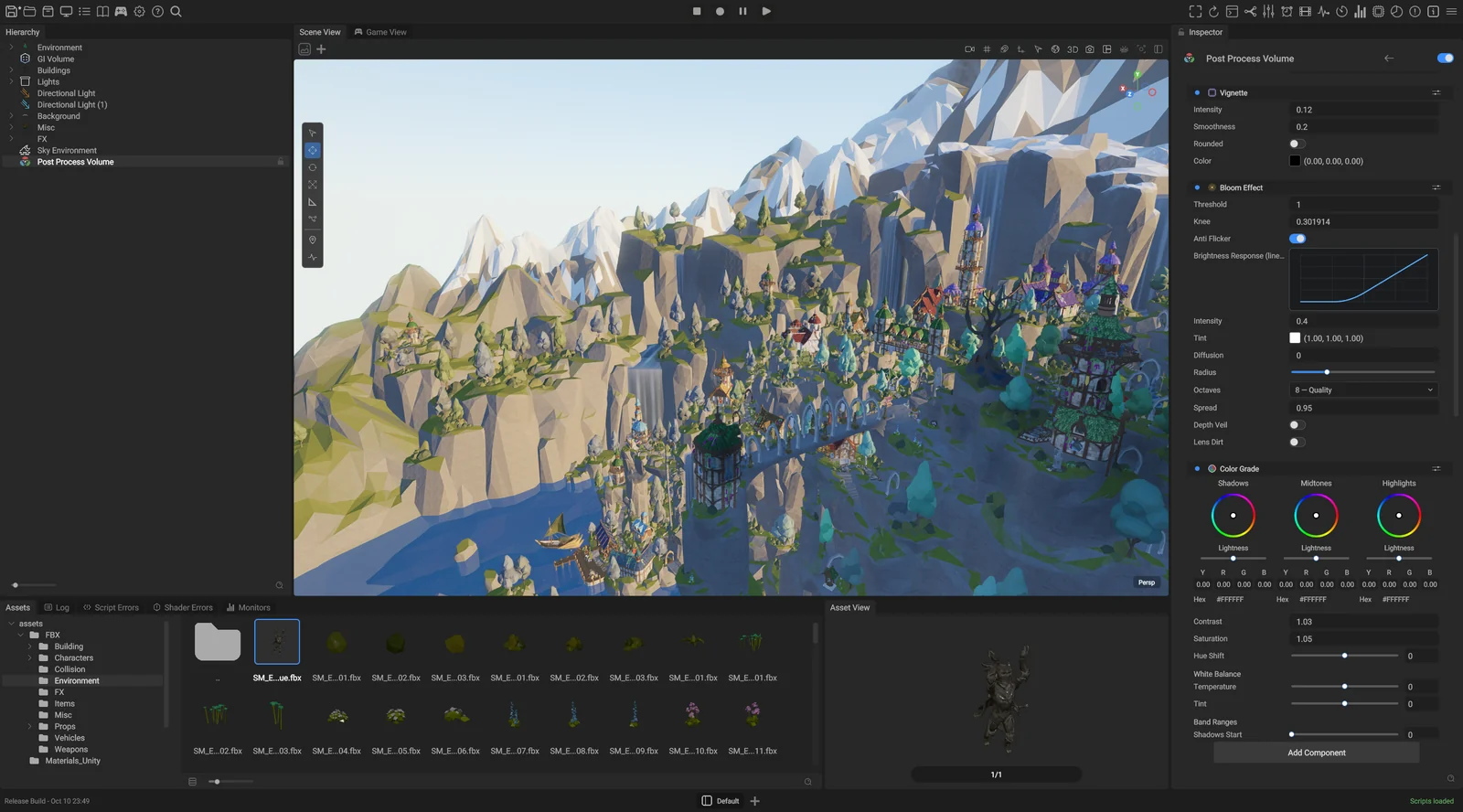
A modern, high-performance, open-source game engine built for the community, by the community, with the goals of bringing power, scale, ease of use and true ownership to game developers.
It also builds for the web: the same engine runs in the browser on WebGPU, shipped as the @game-crafters-guild/openengine-web package with live examples. Its Web API is designed to bring the capabilities and performance of the engine into an HTML canvas anywhere: a few lines of JavaScript put a scene, its lighting and its models on any page.
Foundation
- Open source, MIT licensed.
- A modern C++20 code base.
- Hot-reloadable C# scripting on CoreCLR (.NET 10), and a build without .NET when scripting is off.
- Native C++ scripting.
- A modern renderer built on Vulkan, Metal and WebGPU.
- A cross-platform editor for Windows, macOS, Linux and the web. Yes, the editor runs in the browser.
- An ECS built on a true data-oriented design.
- UI driven by CSS layout and XML, in the editor and in games.
- Built for AI-assisted development: a bundled MCP server and CLI let AI agents drive the running editor, and an in-editor AI assistant ships as a preview.
New in this release
Pictures are on the changelog page for 19 October.
- A night sky full of stars. Fifty thousand stars with true brightness and color and a soft glow, in a star look contributed by Anjey. Auto exposure meters a night by its ground, not by its stars, and keeps it dark, and the scene is stored at the view's own exposure, so a night shows its faint stars and its detail instead of going black or turning into a hazy dusk. Auto exposure can meter either the picture or the light falling on the scene.
- Fog, computed on every surface. Each surface now computes the height fog in its own shader, at its own distance: terrain, grass, the ocean, glass and particles. Smoke in front of the horizon keeps its own color, edges against the sky keep their multisample anti-aliasing (MSAA), and open water fades into the haze at the horizon.
- Grass that takes the light. Blades lean, bend and twist one by one, and sunlight shines through them from behind. Meadow, Lawn and Steppe presets set up a whole field at once; better default values for them come in the next release.
- A generated C# layer, with physics and input. The engine's C# API is now generated: an engine developer marks a C++ function, record, enum or event in a header, and the build generates the native side and the C# from it, so a new call needs no hand-written glue. Physics and input are the first areas on it: C# scripts can ray cast, set a body's velocity, drive the character controller, react to contact and trigger events, and lock the pointer. This feature is not finished: the next release adds text and lists of results (render layers by name,
Physics.RayCastAllandBoxOverlap), and audio, quitting the game, materials, the UI, the web's TypeScript side and components follow on the same layer. - Named render layers. Name your render layers in Project Settings, pick them from a list in the inspector, and filter the Scene View by layer.
- Audio controls, contributed by Tim Aidley. Ogg Vorbis files play, and an Ogg Opus file is refused with a message to re-encode it. A playing sound's volume, pitch and pan can change, it can pause and resume where it stopped, and an Audio Emitter follows edits to its volume and pitch while it plays. Each 3D sound has its own distance falloff: none, inverse, linear or exponential, with a minimum and maximum distance and a rolloff. The controls are in C++; C# follows.
- Textures cook in seconds. A new BC7 encoder compresses a 4096² texture in about a quarter of a second on a 24-thread CPU, so the village sample is fully textured about 12 seconds after its first open instead of ten minutes.
- The web examples run on phones. The live examples now load and draw on Android phones (tested on a Pixel 6 in Chrome; about 10 frames a second in portrait).
Fixes and changes
- CSS
transformandtransform-originwork in the editor and in game UI, and clicks land where the element is drawn (#15, contributed by Tim Aidley). - New scenes and the Blank template start on a clear day with horizon haze over a grid ground.
- C# scripts load when the project opens (#26).
- The editor keeps your panel layout between sessions (#28).
- The rotate gizmo turns the way you drag (#29).
- A speaker button next to Play mutes the editor's audio.
- A
.cubecolor grade has a preview strip with skin tones in the inspector. - Exported games ship one copy of each texture, about three quarters smaller.
- An exported game builds its shaders in parallel the first time it runs.
- The AI Assistant takes dictation on macOS and has a text size slider.
- Editor icons and SVG images in UI stay sharp at any size.
- A scene line the engine cannot read is listed in the load report, with the fix, instead of being ignored silently.
- Damaged model, animation, stylesheet and material files are refused with a message instead of crashing the editor, the Player or the web page.
- A Navigation Source component chooses which meshes a navigation bake uses.
- Paths keep clear of thin walls and the agent's radius.
- Ray casts honor their layer filter, and
RayCastAllreturns every hit. - Create Empty Parent groups the whole selection in one undo step.
- Mark-ups keep their notes through undo.
- Objects no longer go missing from reflection probes.
- Long editor sessions no longer start drawing wrong on some GPUs.
- The editor no longer crashes on exit while shaders are building, or freezes when a package rebuilds.
- A clean checkout configures again: the NVTX download's checksum matches the archive GitHub serves (#34, contributed by Amelia Mesdag).
- Linux builds use patchelf 0.19.2 (#3, contributed by Tim Aidley).
If you are updating a project
- Render layers in scenes are lists:
MeshRenderer.renderLayerMask = 1becomesMeshRenderer.renderLayers = [0](also onTerrain),Camera.cullingMask = 4294967295becomesCamera.visibleLayers = all,Camera.postProcessMask = 4294967295becomesCamera.volumeLayers = all, and HLOD (the merged distant meshes) needs a new bake (render layers). - A custom render pipeline: delete the
HeightFogpass and point the passes that read its output at the color it read. Then copyHeightFogParamsUpload, the fog inputs and the Tonemap node's"serviceTextures": ["uLut3d", "uLut1d"]fromEngine/Assets/RenderPipelines/ForwardPlus.rendergraph. The editor names the pass it refuses (height fog). - C# input calls are generated:
Input.IsKeyDown(KeyCode.W, out bool down)becomesbool down = Input.IsKeyDown(Key.W),InputIds.HashInput(name)becomesStringId.Of(name),Input.Bind(ctx, action, Input.DeviceType.Keyboard, code: KeyCode.Space)becomesInput.BindKey(ctx, action, Key.Space), andRegisterAction(ctx, action, isAxis: false)takesActionKind.Button.GameEngine.Physics.ABIis removed: usePhysics.RayCastandentity.Physics(physics from scripts). - C++ game UI:
GameUI::FindElementByIdAny(id)becomesGameUI::FindElementById(id), and the per-documentFindElementById(entityId, id)becomesGameUI::FindDocumentRoot(entityId)->FindById(id). - Grass:
TerrainGrass.bladeWidthis now the whole leaf's width, so double the value. Grass colors are read as sRGB: to keep an old look, each channel becomes round(255 × sRGB-encode(old / 255)), for example 128 becomes 188.Translucencynow runs from 0 to 1 and 1 is a thin leaf; a scene that set a lower value for the old look shows thicker blades, so try 1 (terrain grass). - A camera that stores
Camera.autoExposureMinEv = 4keeps a black night: delete the line (the default is now -7).SkyEnvironment.MoonPhase01is gone: put its value inMoonArcPosition. Night views get a night tint by default;PostProcessVolume.nightTintStrength = 0turns it off. - A
.cubeasset picks its color encoding from the file. If an old grade looks brighter, set Input Encoding to Linear on the asset. - Every texture recooks once.
In this release
- The source, built from a clean checkout with the steps in README.md and BUILD.md; the documentation at https://openengine.dev/docs/.
- An experimental Windows x64 build of the Editor,
OpenEngine-Editor-2026.10.0-alpha.6-win-x64.zip(201 MB, SHA-256688cfe0f07edf12e402e345356af7d03addb9af4bcab12cac97629d57dc13afb), to try the editor without building it, with thegameengineclicommand-line tool and the MCP server. Requirements and limitations are in its README.txt: a Vulkan 1.3 driver, the .NET 10 SDK, the Visual C++ 2015-2022 x64 redistributable, and Visual Studio 2026 with the C++ workload for game export and C++ scripting; the Claude Code command-line tool for the AI Assistant. - An experimental macOS Apple silicon build of the Editor,
OpenEngine-Editor-2026.10.0-alpha.6-macos-arm64.zip(248 MB, SHA-2563f7ce29322dc7f78fea8cd9577601414e00fa0b141602f1c2770890b4c56d44d), with thegameengineclicommand-line tool and the MC...
Open Engine 2026.10.0-alpha.5
Open Engine 2026.10.0-alpha.5
A modern, high-performance, open-source game engine built for the community, by the community, with the goals of bringing power, scale, ease of use and true ownership to game developers.
It also builds for the web: the same engine runs in the browser on WebGPU, shipped as the @game-crafters-guild/openengine-web package with live examples. Its Web API is designed to bring the capabilities and performance of the engine into an HTML canvas anywhere: a few lines of JavaScript put a scene, its lighting and its models on any page.
Foundation
- Open source, MIT licensed.
- A modern C++20 code base.
- Hot-reloadable C# scripting on CoreCLR (.NET 10).
- Native C++ scripting.
- A modern renderer built on Vulkan, Metal and WebGPU.
- A cross-platform editor for Windows, macOS, Linux and the web. Yes, the editor runs in the browser.
- An ECS built on a true data-oriented design.
- UI driven by CSS layout and XML, in the editor and in games.
- Built for AI-assisted development: a bundled MCP server and CLI let AI agents drive the running editor, and an in-editor AI assistant ships as a preview.
New in this release
- A crisp clear day. The sky's default air is now a crisp clear day instead of pristine air, which made the noon sky a deep navy and the horizon several times brighter than the zenith. The aerosol scatters light the way measured haze does: a bright aureole around the sun, a horizon that brightens toward the sun, and a zenith that keeps its blue. The ground lights the sky from below through the Sky Environment's Ground albedo setting, whose default moves from bright sand to typical land, and the sky is baked for the camera's altitude in bands, so a camera at one kilometer or at ten sees the horizon drop and the atmosphere's limb instead of the ground-level sky. Every scene that uses the physical sky gets the new day; a scene that set its own Ground albedo keeps its value.
- Stars that breathe. Each star has its own brightness and its own twinkle: one in five stays faint, most sit below white at their brightest, and only the brightest few reach it. At the low phase of its twinkle a star dims as a whole, core and points together, and the sparkles turn further off the screen's axes, so a sky of identical upright crosses becomes a field of stars.
- Three looks. The Post Process Volume's list of eight tonemap operators is replaced by one Look with three choices: Neutral (the default) keeps colors as the scene lit them; Filmic lowers the upper mid-tones and rolls the highlights off, so a sun glint reads as a bright shape rather than a clipped patch; Photographic is a wide-latitude transform that desaturates toward white as it brightens. A scene stores the look by name (
PostProcessVolume.look = Filmic). A scene that still stores the old numbered operator renders Neutral and reports one notice when it loads; replace the line withlook = Filmicfor the ACES operator,look = Photographicfor AgX, orlook = Neutralfor the rest. The starter templates and the community projects are updated, and volume exposure keys the engine no longer reads are reported at load instead of dropped silently. - The AI Assistant's replies, drawn from their Markdown. Replies render as formatted text: headings, bold and italic, lists, code, quotes, tables and links. A reply that arrives in pieces around a tool call keeps its pieces apart, and a long file path wraps at its separators. The Markdown text control behind it is part of the UI module, for games too.
- Navigation, UI lookups and frame memory. A frame's grid path requests are solved in parallel on the job system and applied in a fixed order, so results do not depend on timing or on the worker count.
FindPathandFindPathAcrossLinksanswer synchronously; a game that usedRequestPathcallsFindPathinstead. UI lookups by id take a hashed id (a"hud"_sidliteral) rather than a string, and two different ids that hash the same are reported once. The sorted transparency build and the draw batch tables take their working memory from the frame's scratch allocator, so neither allocates on the heap per frame. - Housekeeping. The documentation is live at https://openengine.dev/docs/ with a sidebar per area, and 91 tracker issues were closed with the evidence that each was fixed or no longer applies.
Everything since alpha.4, with pictures: the changelog pages for 13 October (a believable day and night sky in the starter scene, navigation baked in the editor, pointer lock for games, exported games that ship their shaders, the documentation rewrite, and this push) and 11 October.
In this release
- The source, built from a clean checkout with the steps in README.md and BUILD.md; the documentation at https://openengine.dev/docs/.
- An experimental Windows x64 build of the Editor,
OpenEngine-Editor-2026.10.0-alpha.5-win-x64.zip(125 MB, SHA-2561bfcad52dc683d2046ec4260a5c953d2a24d3eeee93c2f653658cf280e5e3800), to try the editor without building it. Requirements and limitations are in its README.txt: a Vulkan 1.3 driver, the .NET 10 SDK, the Visual C++ 2015-2022 x64 redistributable, and Visual Studio 2026 with the C++ workload for game export and C++ scripting; the Claude Code command-line tool for the AI Assistant. - An experimental macOS arm64 build of the Editor,
OpenEngine-Editor-2026.10.0-alpha.5-macos-arm64.zip(189 MB, SHA-2564defdb341e4916a51501f5a8d7a02691b245d41e29144f332a53895ab2dafd57). It needs an installed .NET 10 runtime or SDK as its README describes, and it is ad-hoc signed, not notarized: macOS asks for an explicit allow on first launch. - The web package
@game-crafters-guild/openengine-web2026.10.0-alpha.5 on npm under thealphatag (npm install @game-crafters-guild/openengine-web@alpha), with the live examples at https://game-crafters-guild.github.io/opengine-web/.
An early release
This is an alpha: APIs and file formats may change between releases.
The engine is yours as much as ours: open issues, send pull requests, and help shape it.
Join us on Discord: https://discord.gg/c8JASm4q8
Known issues at this tag
- At night the sky dome reads a dark red-purple until the moon lights the sky and a night exposure lands; being fixed on
main. - The starter scene's horizon haze looks like a solid layer when the camera rises above about 1 km; being fixed on
main. - The headless Player (
Player --headless) has been run on Windows only. - On ARM64 Linux the default build does not link with video support yet; build with video turned off.
- The web examples fail to load on Android phones; being investigated.
Open Engine 2026.10.0-alpha.4
Open Engine 2026.10.0-alpha.4
A modern, high-performance, open-source game engine built for the community, by the community, with the goals of bringing power, scale, ease of use and true ownership to game developers.
It also builds for the web: the same engine runs in the browser on WebGPU, shipped as the @game-crafters-guild/openengine-web package with live examples. Its Web API is designed to bring the capabilities and performance of the engine into an HTML canvas anywhere: a few lines of JavaScript put a scene, its lighting and its models on any page.
Foundation
- Open source, MIT licensed.
- A modern C++20 code base.
- Hot-reloadable C# scripting on CoreCLR (.NET 10).
- Native C++ scripting.
- A modern renderer built on Vulkan, Metal and WebGPU.
- A cross-platform editor for Windows, macOS, Linux and the web. Yes, the editor runs in the browser.
- An ECS built on a true data-oriented design.
- UI driven by CSS layout and XML, in the editor and in games.
- Built for AI-assisted development: a bundled MCP server and CLI let AI agents drive the running editor, and an in-editor AI assistant ships as a preview.
In this release
- The source, built from a clean checkout with the steps in README.md and BUILD.md.
- An experimental Windows x64 build of the Editor,
OpenEngine-Editor-2026.10.0-alpha.4-win-x64.zip(SHA-2563916378808c7a2b41c943a7e7fb6cfc12b23faa90d8c1c932d771b2b17230808), to try the editor without building it. Requirements and limitations are in its README.txt: a Vulkan 1.3 driver, the .NET 10 SDK, the Visual C++ 2015-2022 x64 redistributable, and Visual Studio 2026 with the C++ workload for the add-on packages, game export and C++ scripting; the Claude Code command-line tool for the AI Assistant. - The web package
@game-crafters-guild/openengine-web2026.10.0-alpha.4 on npm under thealphatag, with the live examples at https://game-crafters-guild.github.io/opengine-web/.
An early release
This is an alpha: APIs and file formats may change between releases.
The engine is yours as much as ours: open issues, send pull requests, and help shape it.
Join us on Discord: https://discord.gg/c8JASm4q8
Known issue at this tag
- Building the Editor with the CMake bundled with Visual Studio (4.3.1) fails in the third-party notice staging step (
StageThirdPartyNotices.cmake). Fixed onmainin the follow-up push after the tag; pullmainor use CMake 4.2.x for this tag.