Repository navigation

🚀 Gin Content API
A robust, production-ready RESTful API designed for content management, built with Go, Gin, and PostgreSQL.
📖 Background:
This project was originally developed as a comprehensive implementation of the backend challenges from roadmap.sh, specifically combining concepts from the Blogging Platform API and Todo List API projects. It has since evolved into a well-structured boilerplate demonstrating modern Go practices.
✨ Key Features
- Clean Architecture: Strict separation of concerns across
handlers,repository, andmodels. - Advanced Security:
bcryptpassword hashing, JWT Access & Refresh token rotation, and strict resource ownership validation. - Robust Database: PostgreSQL integration using
pgxpoolfor optimal connection pooling and/migrationsfor reliable schema management. - High Reliability: Includes comprehensive Integration Tests to ensure production readiness.
- Developer Experience: Fully containerized with Docker, automated tasks via
Makefile, and auto-generated Swagger OpenAPI docs. - Content Management: Full CRUD operations with pagination (
limit/offset) and text search.
🧰 Tech Stack
| Component | Technology |
|---|---|
| Language | Go (Golang) |
| Web Framework | Gin |
| Database | PostgreSQL |
| DB Driver | pgxpool |
| Auth | JWT (Access & Refresh) + bcrypt |
| Documentation | Swagger (swaggo) |
| Infrastructure | Docker & Docker Compose |
| Testing | Go testing + Integration Tests |
📂 Project Structure
gin-content-api
│
├── auth/               # Authentication utilities
│   ├── password.go     # Bcrypt password hashing and validation
│   └── token.go        # JWT Access and Refresh token generation/parsing
│
├── db/                 # Database configuration
│   └── database.go     # pgxpool connection initialization
│
├── docs/               # Auto-generated Swagger OpenAPI documentation
│   ├── docs.go
│   ├── swagger.json
│   └── swagger.yaml
│
├── handlers/           # Controllers handling HTTP requests and responses
│   ├── auth.go         # Login, Register, Refresh endpoints
│   ├── me.go           # Get current authenticated user profile
│   ├── ping.go         # Health check endpoint
│   └── posts.go        # CRUD handlers for content
│
├── integration/        # E2E & Integration tests
│   ├── setup_test.go   # Test DB setup and teardown logic
│   └── ..._test.go     # API endpoint tests
│
├── migrations/         # SQL files for database schema migrations
│   ├── 001_...sql      # Users table migration
│   └── 002_...sql      # Posts table migration
│
├── models/             # Domain models and request/response structs
│   ├── post.go         # Post structures
│   └── user.go         # User structures
│
├── repository/         # Data access layer (PostgreSQL queries)
│   ├── posts_repo.go   # Database operations for posts
│   └── users_repo.go   # Database operations for users
│
├── router/             # Gin router configuration and middleware
│   ├── middleware.go   # JWT validation middleware
│   └── router.go       # API route registration
│
├── .env.example        # Example environment variables template
├── .gitignore          # Git ignore rules
├── docker-compose.yml  # Container orchestration (API + DB instances)
├── Dockerfile          # Instructions to build the Go app container
├── Makefile            # Automation commands (run, test, migrate)
└── main.go             # Entry point: wires up DB, repos, handlers, and starts server
🚀 Getting Started
1️⃣ Clone the Repository
First, clone the repository to your local machine:
git clone https://github.com/GanFay/gin-content-api.git
cd gin-content-api
🐳 2️⃣ Using Docker (Recommended)
The easiest way to get the API and the database running together is via Docker Compose.
# Start the application and database in the background
make dev
# OR
docker compose up --build -d
migrate -path migrations -database ${your_db_url} up- The API will be available at:
http://localhost:8080 - Swagger UI will be at:
http://localhost:8080/swagger/index.html
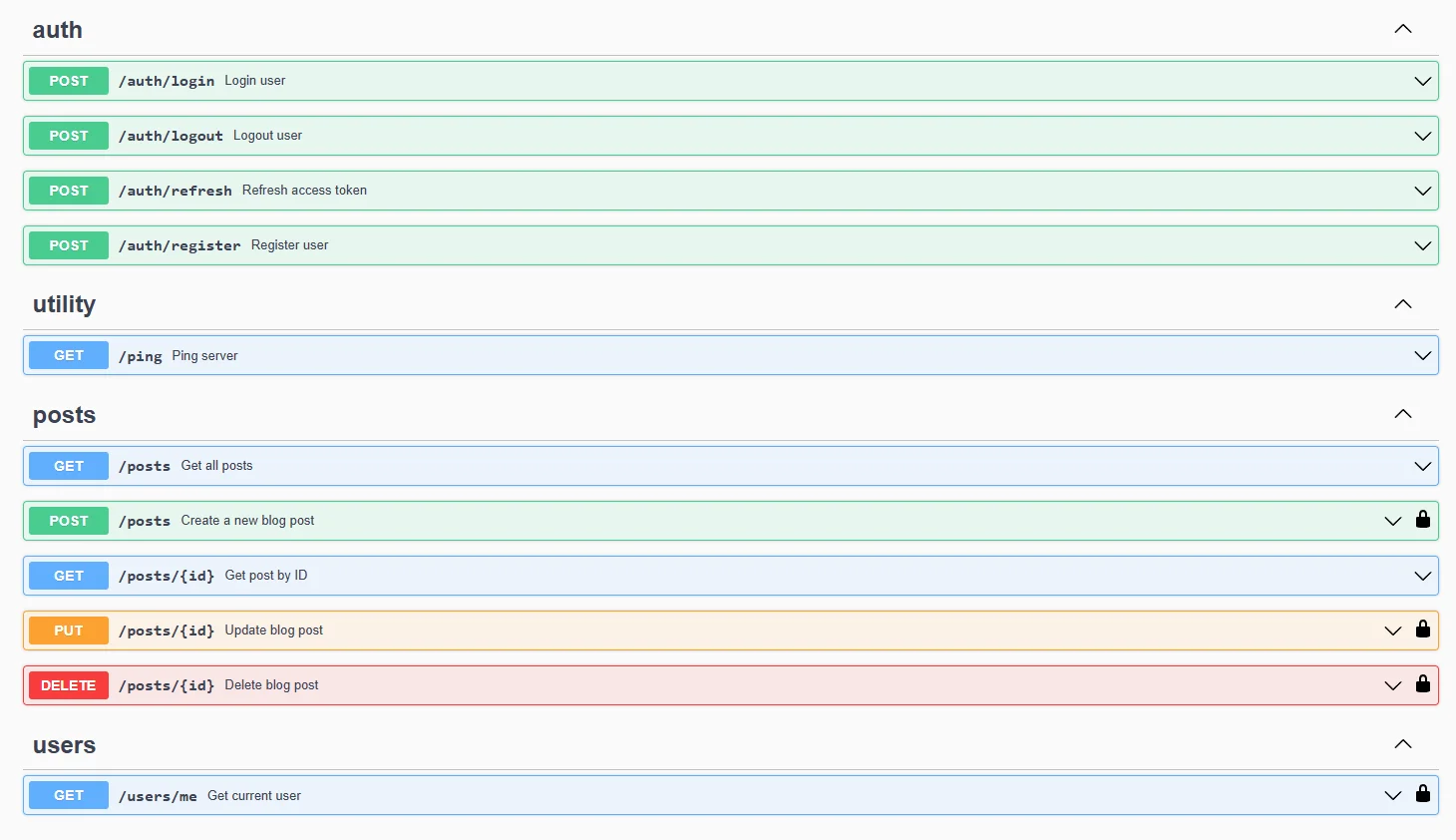
💻 3️⃣ Running Locally
If you prefer to run the Go app directly on your machine, you must set up the database manually.
- Start PostgreSQL: You can run just the database container or use a native local installation.
docker-compose up -d postgres # OR locally run postgresql - Install Dependencies:
go mod tidy
- Environment Variables: Create a
.envfile in the root directory based on.env.example. - Apply Migrations: Ensure your DB schema is up to date using the
/migrationsfolder.
make migrations-up
# OR
migrate -path migrations -database ${your_db_url} up- Run the Application:
make run-app
# OR
go run main.go
🧪 Running Tests
To execute all tests, ensure your database is running and execute:
go test ./... -v⚙️ Environment Variables
Create a .env file in the root of your project:
# Full database connection string
DB_URL=postgres://your_user:your_password@localhost:5432/your_db_name?sslmode=disable

# JWT secrets for authentication (replace with secure random strings)
JWT_SECRET_ACCESS=your_strongest_jwt_access_key
JWT_SECRET_REFRESH=your_strongest_jwt_refresh_key

# Individual database credentials (must match the values in DB_URL)
PG_USER=your_user
PG_PASSWORD=your_password
PG_DB=your_db_name
📡 API Endpoints
🌐 Public Endpoints
| Method | Endpoint | Description |
|---|---|---|
GET |
/ping |
Health check |
POST |
/auth/register |
Register a new user |
POST |
/auth/login |
Login user (returns Access & Refresh tokens) |
GET |
/auth/refresh |
Refresh an expired access token(require a cookie token) |
🔒 Protected Endpoints (Requires JWT)
Header: Authorization: Bearer <access_token>
| Method | Endpoint | Description |
|---|---|---|
GET |
/users/me |
Get current authenticated user details |
POST |
/auth/logout |
Logout user (invalidates refresh token) |
POST |
/posts |
Create a new post |
GET |
/posts |
Get all posts (supports limit and offset) |
GET |
/posts/:id |
Get post by ID |
PUT |
/posts/:id |
Update post (Author only) |
DELETE |
/posts/:id |
Delete post (Author only) |
🔑 Authentication Flow
- Login: Send
POST /auth/loginwithemailandpassword. The API returns anaccess_tokenandrefresh_token. - Access API: Attach
Authorization: Bearer <access_token>to protected requests. - Refresh: When the
access_tokenexpires, send a request toGET /auth/refreshusing your refresh token to obtain a new pair. - Logout: Send
POST /auth/logoutto securely revoke tokens.
📄 Pagination & Search
The /posts endpoint supports query parameters for pagination and filtering:
GET /posts?limit=10&offset=0&term=golang| Parameter | Type | Description |
|---|---|---|
limit |
int | Number of records to return (e.g., 10) |
offset |
int | Number of records to skip |
term |
string | Search posts by text (title/content) |
🗄 Database Schema
The schema is strictly managed via the /migrations directory.
users
| Column | Description |
|---|---|
id |
Primary Key |
username |
Unique username |
email |
Unique email |
password_hash |
Bcrypt hashed password |
created_at |
Account creation timestamp |
posts
| Column | Description |
|---|---|
id |
Primary Key |
author_id |
Foreign key referencing users(id) |
title |
Post title |
content |
Post body |
category |
Category tag |
tags |
Associated tags array |
created_at |
Creation timestamp |
updated_at |
Last update timestamp |
📜 License
This project is licensed under the MIT License.