Repository navigation
Samples
Versión en español · Illustrated manual · Alpha 0.15
⚠️ Alpha 0.15 is experimental: the FX sequencer and the looper (Alpha 0.13) have been tried on the device; most other things since Alpha 0.04 mostly in emulation. Back up your SD card.
How to get there: the Samples button twice
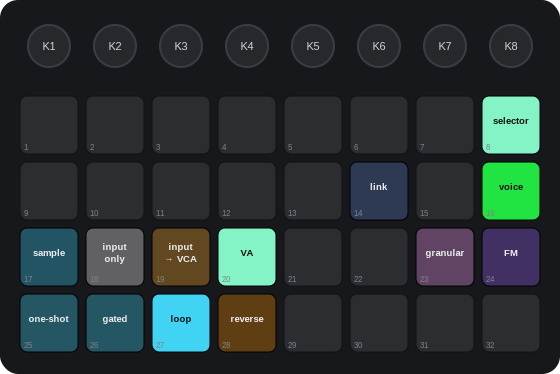
Sample mode with the selector open (a VA track).
| Gesture | What it does |
|---|---|
| Pads 1 / 2 (the original's) | fit the sample to the pattern by changing its pitch; since Alpha 0.04 they switch the stretch off first |
| Pads 9 / 10 | ★ the same with the stretch (Stock+'s K7), keeping the pitch: the next / the previous length (since Alpha 0.04) |
| Pad 19 | ★ the selected track's loop de-clicker (a 256-sample crossfade) and its retriggers' in any mode, reverse too (Alpha 0.12), on / off (blue bright / dim); on by default, saved with the project (since Alpha 0.04) |
| Pad 14 | ★ stereo link with the next track (steel blue) |
| Pad 8 | ★ the engine selector (Alpha 0.12): opens and closes the engine row (in the track's engine colour: open bright, closed dim) |
With the selector open (pad 8 again, or leaving Sample mode, closes it; picking an engine keeps it open). Rows 1-3 belong to the selector; the sample-only options (1 / 2, 9 / 10, 19, the slices 22-24 and 31 / 32) are hidden; 25-30 as always:
| Pad | What it does |
|---|---|
| 17 | sample (cyan) |
| 18 | input only (white): the line input straight to the mix, without filter or VCA; its source on pad 2 |
| 19 | input → VCA / VCF / FX (amber): with the track's filter and envelope; its source on pad 3 |
| 20 | VA (mint): OSC 1 / OSC 2 |
| 21 / 22 | VA-drum and wavetable: dark, not on the Rhythm yet |
| 23 | granular (lilac): Granular |
| 24 | FM (lavender): 8-operator FM; with FM already on, a tap = the FM page, held = the 24 instruments on rows 1, 2 and 4 |
| 16 | the voice (VA and FM): tap = polyphony, held = the voice modes on 17-24 |
| 14 | the stereo link |
| 8 | closes |
The track's engine bright, the others dim. The input's source: the inputs (dim amber), the reverb return (cream), the delay return (peach).
Shift + these pads, as the original. Very short loops play at their own length (the original repeated them every ~128 samples). Up to Alpha 0.11 the sound was on pads 5-8, the input on 15 / 16 and VA / FM / poly on 11-13.
How to get there: the Sample Rec button
| Gesture | What it does |
|---|---|
| Pad 23 | ★ every track's loop de-clicker, on / off (on at power-up) (since Alpha 0.04) |
| Pad 24 | ★ stereo recording: L into the chosen slot, R into the next one (which must be empty; otherwise only the first, in mono); off at power-up (since Alpha 0.04) |
| Duplicate + slot A, Duplicate + slot B | ★ copies sample A into B, also from another pack (not in the S versions) (since Alpha 0.01) |
| Fixed Recording (pads 17-21, the original's) | with an external MIDI clock, it uses the incoming clock's tempo (since Alpha 0.02) |
Copying a sample (transport stopped): Duplicate + a slot with a sample (blinks yellow); Duplicate + slot B (in this pack or, after loading another, in that one): green ~1.5 s and B plays at once. If B has a sample, it blinks white and Duplicate + B again within ~5 s overwrites it. Red = it couldn't (memory full, device busy or the internal pack).
How to get there: Sample mode: hold an engine pad, or pad 8
Each pack has 64 synth and granular patches in its patch bank on the card (Alpha 0.13).
| Gesture | What it does |
|---|---|
| Pad 8 held (with the selector open or closed) | the pack's 64 patches on rows 1, 2 and 4; ▲ / ▼ = the page |
| In the list: a tap | loads the patch on the track (sets its engine) |
| Clear + patch, twice | saves the track's sound in that slot |
| Duplicate + A, then B | swaps A and B; Duplicate + A, another pack, Duplicate + B = copies A to B |
| Engine pad held (20 VA, 23 granular, 24 FM) | its starters: 8 VA, 8 granular or the 24 FM instruments; a tap loads |
| Clear + track button (track views) | the track goes back to the last patch or starter it loaded |
| Clear + knob (OSC 1 / OSC 2, Granular, FM) | that knob goes back to the loaded patch's value |
An empty slot of the pack first shows an example patch until you save over it. Not in Alpha 0.13S, 0.14S or 0.15S (they write to the card).