Repository navigation
Releases
Notchest 0.7.3

Smoother notch motion
- Reverse an opening or closing animation at any point. The island continues from its current size, with its top edge anchored and its cards and text in place.
- An unpinned island now recovers when it misses the pointer leaving Settings or another tab. You can click outside to dismiss it. After collapsing it manually, move the pointer out of the header and back to open it again.
- Pinning the island, typing in an editor, and using a file picker keep it open when the pointer moves away. After first-time setup, Notchest starts compact.
حركة النوتش والإغلاق
- يمكنك عكس حركة الفتح أو الطي في أي لحظة. تستمر الحركة من الحجم الظاهر، وتبقى الحافة العليا والبطاقات والنصوص في مواضعها.
- عالجنا بقاء النافذة مفتوحة أحيانًا بعد مغادرة المؤشر للإعدادات أو لتبويب آخر. يمكنك طيّها بالنقر خارجها، وعند طيّها يدويًا يكفي إخراج المؤشر من الشريط ثم إعادته لفتحها.
- تبقى النافذة مفتوحة عند تحريك المؤشر أثناء الكتابة أو اختيار ملف أو عند تثبيتها. وبعد إكمال الإعداد الأول يبدأ التطبيق مصغّرًا.
Install or update · التثبيت والتحديث
Quit the running copy of Notchest. Open the DMG and drag Notchest into Applications, or extract the ZIP. Both packages include a bilingual first-open guide for this ad-hoc signed build.
أنهِ النسخة المفتوحة من Notchest، ثم افتح ملف DMG واسحب التطبيق إلى مجلد التطبيقات، أو فكّ ضغط ZIP. ستجد في الحزمتين دليلًا بالعربية والإنجليزية لفتح التطبيق لأول مرة.
SHA-256
211bb3595c45431457c2cb2705b7279a992f8e0f65ea2148648f4cc5c5033951  Notchest-0.7.3.dmg
4f8ca755da447c972c253a444eada2fdea61708e30cf1995f2c3251bac128e32  Notchest-0.7.3.zip
Notchest 0.7.2
Notchest 0.7.2 ships the bilingual first-open guide inside both packages — the DMG and the ZIP.
What's new
- The DMG now explains itself: opening the disk image shows the app, the Applications destination, and a
READ-ME-FIRST.txtguide positioned between them — Arabic and English, three install steps, the exact one-time macOS approval (Open Anyway), an optional Terminal alternative, and why the warning appears. - The ZIP keeps its guide: extraction shows the same
READ-ME-FIRST.txtbeside the app. - The installer validator now asserts the guide ships inside the DMG (presence, size, and icon position) alongside the app signature, executable permissions, and layout checks it already performs.
Install or update — pick your path
ZIP (quickest): download Notchest-0.7.2.zip, extract it, open READ-ME-FIRST.txt, follow its three steps — extract, (optionally) move to Applications, approve once.
DMG (classic Mac flow): download Notchest-0.7.2.dmg, open it, and the installer window shows everything: drag Notchest onto Applications, then follow the guide icon's one-time approval steps.
Either way, if macOS blocks the first launch: right-click → Open (macOS 13–14), or System Settings → Privacy & Security → Open Anyway (macOS 15+). Once approved, the warning never returns for that version. If an older copy is running, quit it from the menu bar before replacing it.
A SHA-256 checksum file is included with the release assets.
SHA-256
df8685dd55e13be5837c8f9adea69478c4870f9a52fab98b17bcb1f3a4dc6723  Notchest-0.7.2.dmg
a9424d4ce097608f7729285efe020fac727a2172e71b4b138c307761ad45bb60  Notchest-0.7.2.zip
Notchest 0.7.1
Notchest 0.7.1 makes the portable ZIP the easiest way to install for first-time users.
What's new
- A bilingual guide inside the ZIP: every ZIP release now carries a
READ-ME-FIRST.txtbeside the app — Arabic and English, three install steps, the exact one-time macOS approval (Open Anyway) in the easiest order, an optional Terminal alternative, and why the warning appears. No more guessing after extraction. - The ZIP is the direct path: extract, double-click the app, approve once. The DMG with its branded drag-to-Applications window remains for those who prefer the familiar Mac flow.
- Packaging now verifies the guide ships inside every ZIP before publication.
Install or update
From Releases, download Notchest-0.7.1.zip for the quickest route: extract it, read READ-ME-FIRST.txt, and follow its three steps — or pick Notchest-0.7.1.dmg for the classic drag-to-Applications window. If an older copy is running, quit it from the menu bar before replacing it.
If macOS blocks first launch
The build is not yet Developer-ID signed or notarized, so macOS asks for a one-time confirmation: right-click → Open (macOS 13–14), or System Settings → Privacy & Security → Open Anyway (macOS 15+). The guide inside the ZIP walks through it step by step, in Arabic and English.
A SHA-256 checksum file is included with the release assets.
SHA-256
a8e8d5309707a393454ec05ab78643f3e16d7d5905ec40c52a3aaf650ea7ae16  Notchest-0.7.1.dmg
677101a40ea81ad60f8f21ef8f5bd774e7e8681cc8df35e226336a428e7e3a84  Notchest-0.7.1.zip
Notchest 0.7.0
Notchest 0.7.0 brings system notifications, a fully transparent glass island, first-run setup, and smarter AI-usage tracking.
What's new
- System notifications (opt-in): focus-session completion, new files in Downloads, connected drives, and stock price alerts — through the standard macOS notification center, following the app language. Enable once in Settings; island toasts and the activity feed keep working independently.
- One glass island, collapsed or expanded: the slim collapsed bar now shares the same transparent glass surface as the expanded island instead of rendering as a solid black block, with a slightly stronger top scrim so status text stays readable. Reduce-transparency and increased-contrast keep solid fallbacks.
- First-run setup: connection checks and Developer/Focus/Everyday presets, with persistent, reorderable home cards and an adjustable background-transparency control.
- Sharper AI usage tracking: side-by-side local Codex/Claude summaries, optional 80%/95% usage alerts, automatic five-second refreshes, and opt-in live Codex limit refreshes that keep the last snapshot visibly marked when stale.
- Opt-in agent hooks and project tracking: native hooks for task states with metadata-only local delivery, plus GitHub Actions tracking for a selected project.
- Update awareness: periodic stable-release checks with official download-page links.
Under the hood
- A large-log memory leak is fixed: peak sampled RSS during a big local scan dropped from ~536 MiB to ~103 MiB.
- Appended JSONL records are read incrementally with retry and rebuild-after-truncation semantics.
- The site version and download links follow the app bundle metadata, and pages are validated before every deployment.
Install or update
Download Notchest-0.7.0.dmg, open it, and drag Notchest into Applications. If an older copy is running, quit it from the menu bar before replacing it, then open the new copy. Preferences stay under the same app identifier. A portable ZIP is also available.
The packaged build is for Apple Silicon. Source targets macOS 13+; Apple Translation needs macOS 15+, and native Liquid Glass needs macOS 26+. Older-system and Intel validation remain planned.
If macOS blocks first launch
The build is not yet Developer-ID signed or notarized, so macOS asks for a one-time confirmation: right-click → Open (macOS 13–14), or System Settings → Privacy & Security → Open Anyway (macOS 15+).
A SHA-256 checksum file is included with the release assets.
SHA-256
f354288387f3d71696be78461d2da5f45c6425ce5471c6b1cc06e4b2621b23f5  Notchest-0.7.0.dmg
22c35efeba5a585c727155e72e539c57728c8d744937da4bf4ec96734a571dad  Notchest-0.7.0.zip
Notchest 0.6.0
Notchest 0.6.0 brings a more colorful identity, a polished Mac installation window, and clearer language handling.
What's improved
- Aurora Orbit icon: vivid turquoise, violet and pink glass with a warm coral center, with dedicated artwork for every macOS icon size.
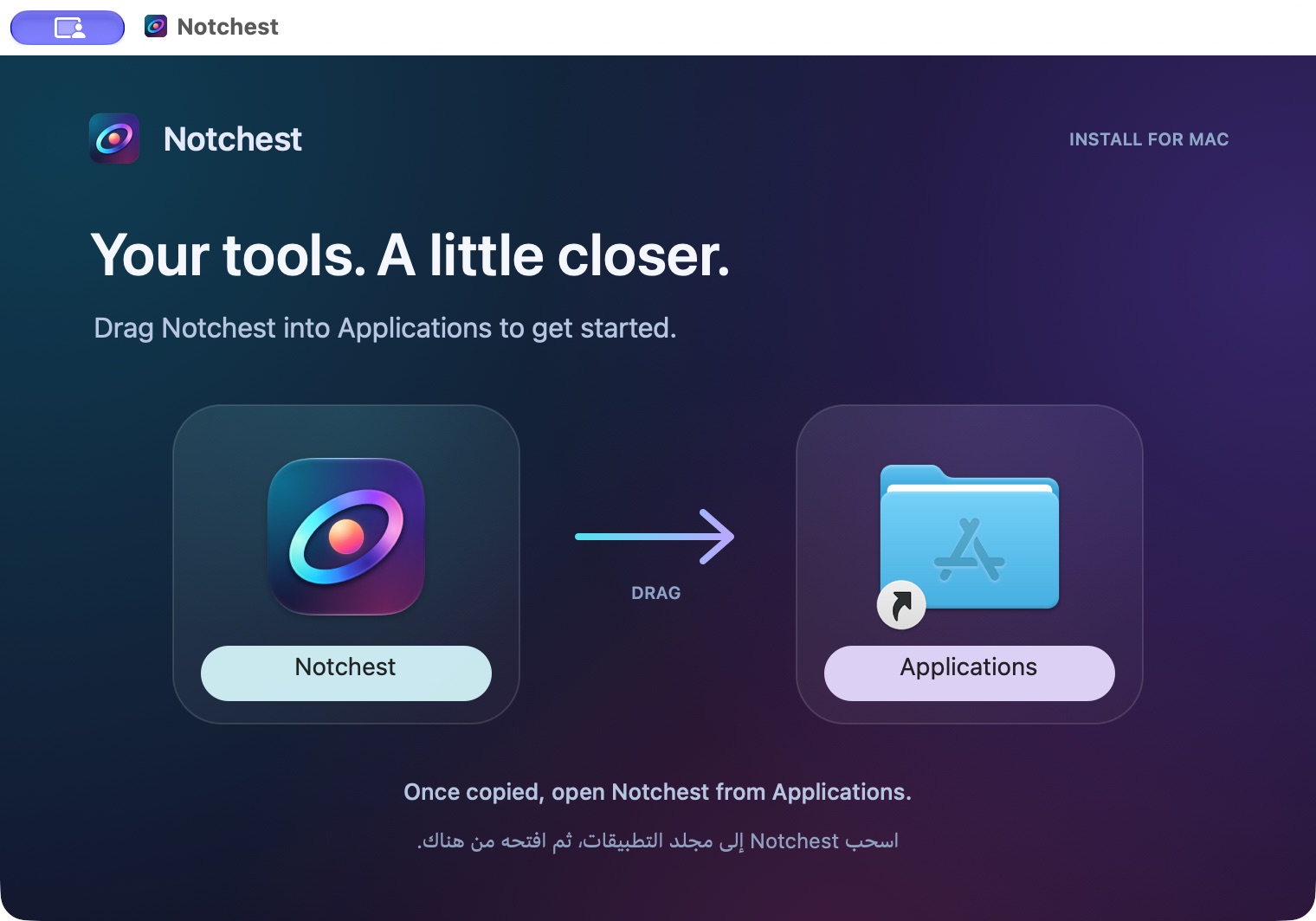
- A new installation experience: a Retina drag-to-Applications window with a matching background, clear direction arrow and English/Arabic instructions.
- Consistent interface language: service messages, weather, stocks, translation, notifications and developer-tool guidance follow the language selected in the app.
- Clearer live Codex limits: account limits stay visible when local usage logs are missing or paused.
- Developer tool fixes: find GitHub CLI installed in
~/.local/binwhen opening from Finder; Regex and text-count summaries now follow the app language. - More reliable packaging: the mounted DMG and extracted ZIP are checked before publication, including the app signature, executable permissions, install destination and package contents. A SHA-256 checksum file is included.
Install or update
Download Notchest-0.6.0.dmg, open it, and drag Notchest into Applications. If an older copy is running, quit it from the menu bar before replacing it, then open the new copy. Preferences stay under the same app identifier. A portable ZIP is also available.
The packaged build is for Apple Silicon. Source targets macOS 13+; Apple Translation needs macOS 15+, and native Liquid Glass navigation needs macOS 26+. Older-system and Intel validation remain planned.
If macOS blocks first launch
This development build uses ad-hoc signing and is not yet Developer-ID signed or Apple-notarized. If macOS says “Apple could not verify Notchest,” and you downloaded this official release and trust the source:
- Move the app to Applications and try opening it once.
- Open System Settings → Privacy & Security, then scroll to Security.
- Click Open Anyway beside Notchest and confirm Open. If the button is missing, try opening the app again first.
Apple’s official instructions.
بالعربية
يتضمن الإصدار 0.6.0 أيقونة Aurora Orbit بألوان نابضة، ونافذة تثبيت خاصة تدعم شاشات Retina، وتحسين رسائل الأدوات لتتبع لغة الواجهة المختارة، وإظهار حدود Codex الحية حتى عند إيقاف قراءة السجلات المحلية.
للتحديث: أنهِ النسخة القديمة من شريط القوائم، وافتح ملف DMG، واسحب Notchest إلى Applications واستبدل النسخة السابقة، ثم افتحه. يُستخدم معرّف التطبيق نفسه للحفاظ على الإعدادات. الحزمة مخصصة لـ Apple Silicon، وهي إصدار تطوير لم يُصدّق بعد من Apple.
إذا منع macOS أول تشغيل: بعد تنزيل النسخة الرسمية ونقلها إلى Applications، وإذا كنت تثق بالمصدر، حاول فتح التطبيق ثم انتقل إلى إعدادات النظام ← الخصوصية والأمان ← الأمان ← فتح على أي حال بجانب Notchest وأكّد الفتح. إذا لم يظهر الزر، أعد محاولة فتح التطبيق أولًا. تعليمات Apple.
SHA-256
dcc144961c7627df85acae7cdfa59bbbb6d54f54f9a110f4050f6d913bb69911  Notchest-0.6.0.dmg
478c63a4f5db76effafae0f42b9c709050dbd9cffa1b28163c11600d4445d6b3  Notchest-0.6.0.zip
Notchest 0.5.0 — first public baseline

First public baseline of Notchest, the notch island for everyday tools, focus sessions, and a developer workspace. English-first with a full Arabic (RTL) interface.
Install (DMG, recommended): open the DMG, drag Notchest onto the Applications arrow, eject — no installer screens, no admin password.
First open: the app is not yet Developer-ID signed/notarized, so macOS asks for a one-time confirmation — right-click → Open (macOS 13–14) or System Settings → Privacy & Security → Open Anyway (macOS 15+).
Requires macOS 13+ on Apple Silicon.
SHA-256:
Notchest-0.5.0.dmgaeeb9e4efb809f6764dad9cf5c45a16d323d7d1c5cf488a8f6ceb5e31b1e4854Notchest-0.5.0.zipaf773578220974c50d3fe9b4fcd4d93e6cbffe18fac30468b1d241566cef281c
See the changelog for what this baseline includes and the roadmap for what is next.