Repository navigation
Releases
Open-SCRL 2.0 for Web

What's new
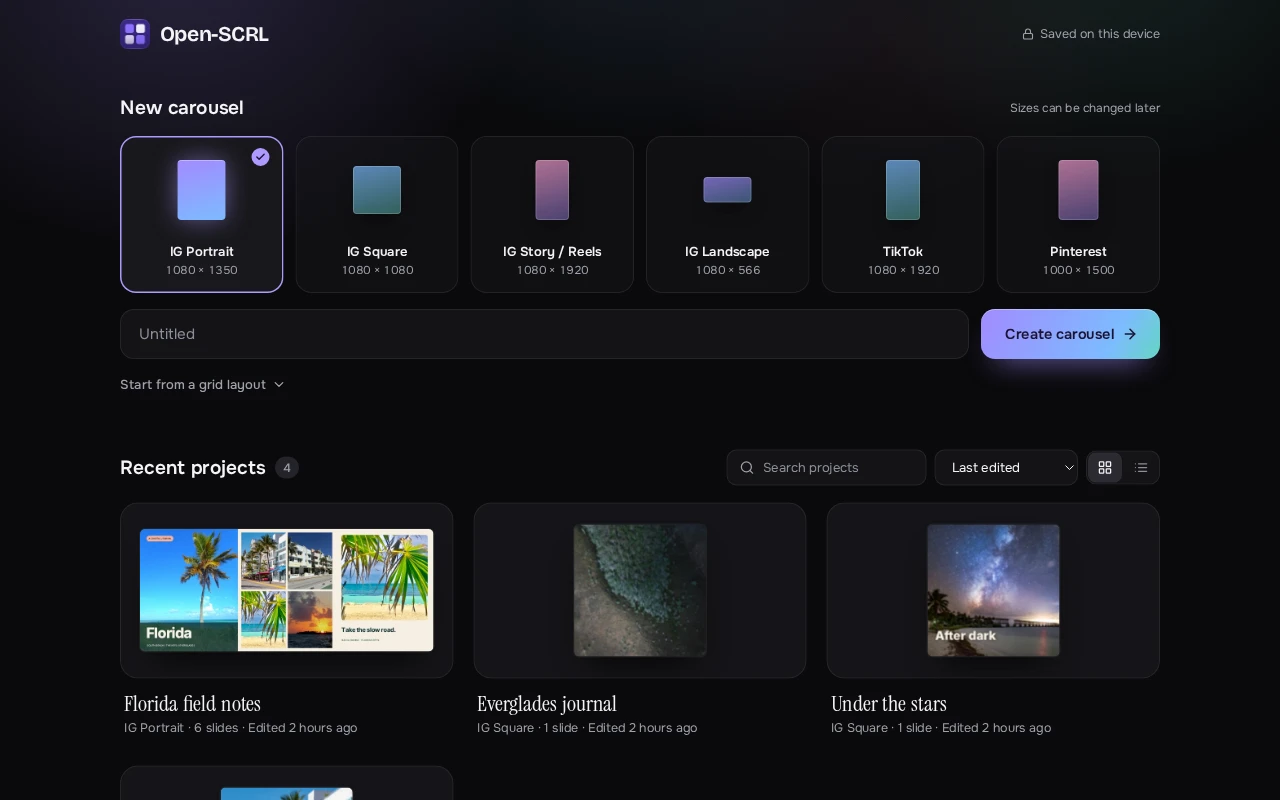
Open-SCRL for the web gets a new look on desktop and phones, a home screen that shows your carousels at a glance, and a much more capable export.
A new look
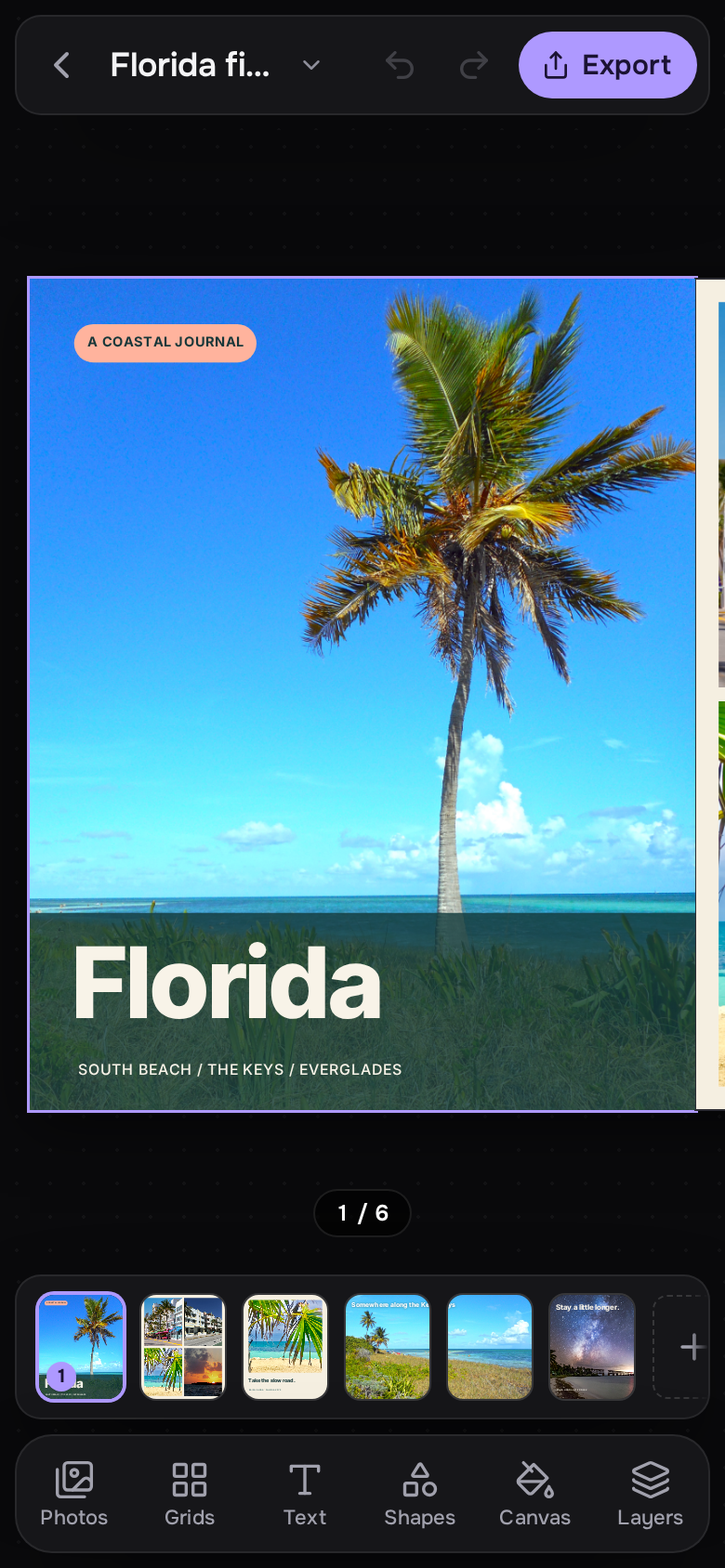
- A calm dark design with floating tool and Properties cards, a slide timeline, and a lilac, blue and teal palette taken from the Mac app's icon, which is now the web app's logo and install icon too.
- Cleaner type throughout, with project names set in Instrument Serif.
- The app opens straight onto a dark screen, with no white flash or loading text.
- The Library panel glides open and closed, and the canvas slides over smoothly instead of jumping.
Home screen
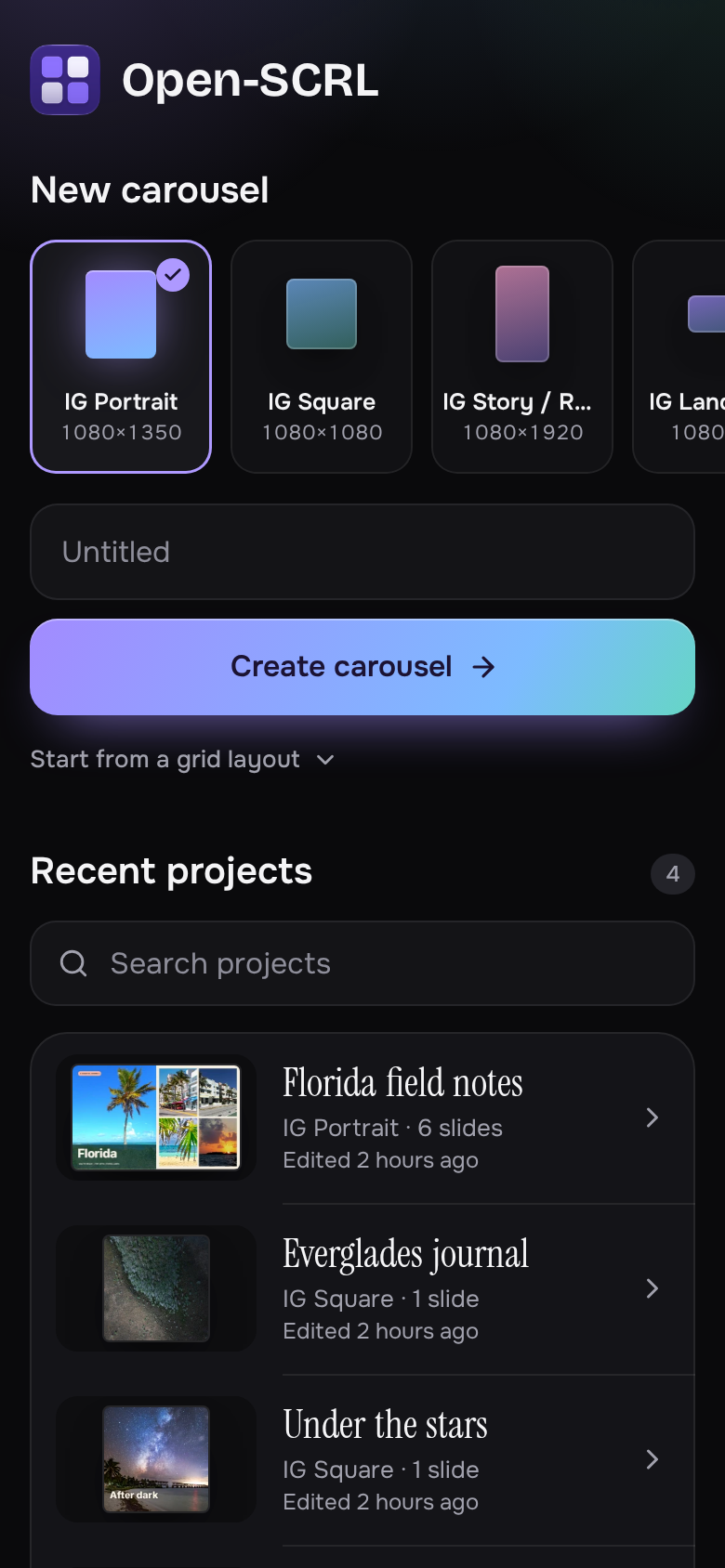
- Pick a size, name your carousel and create it from one row, or start from one of eight photo grid layouts.
- Recent projects show each carousel as a strip of its opening slides, so you can spot the one you want.
- Search, sort, and grid or list views for larger libraries.
Export
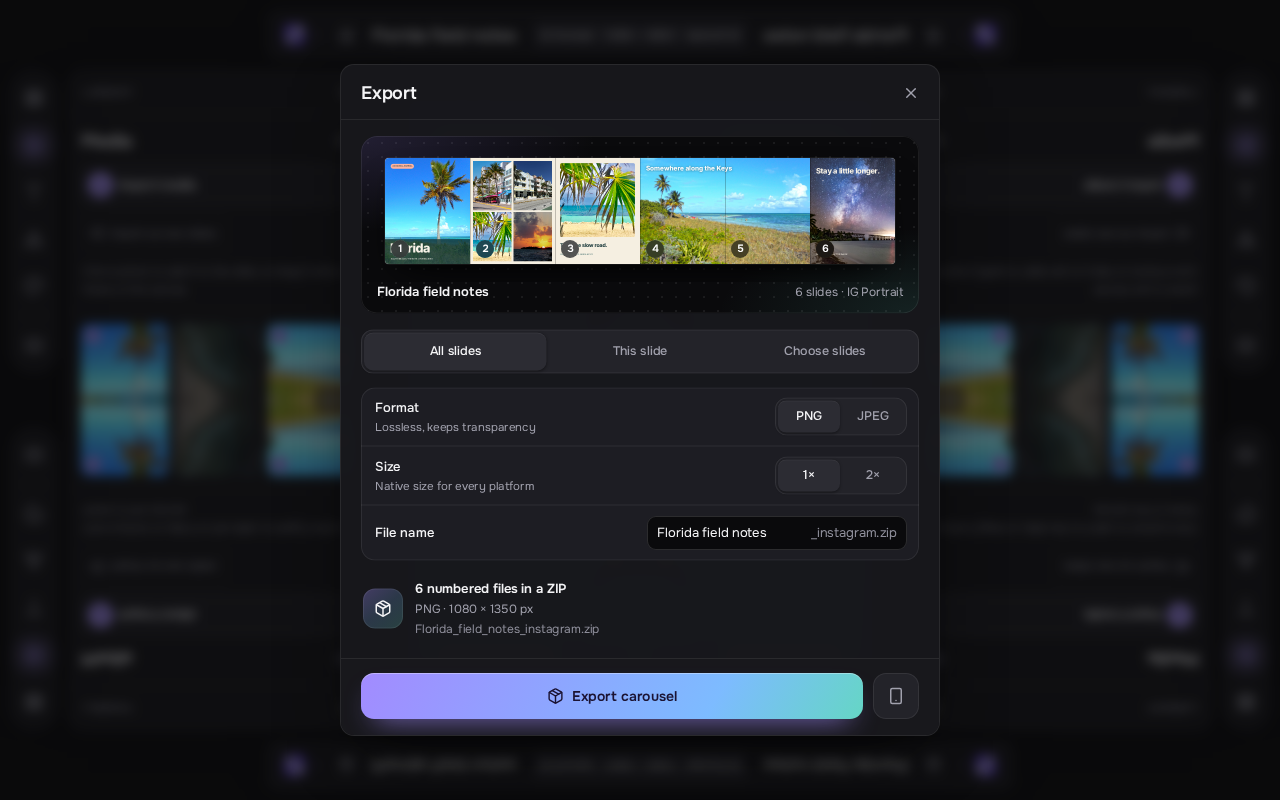
- See your whole carousel as one panorama before exporting, with photos lining up across the seams.
- Export every slide, the current slide, or tap slides in the panorama to choose them; files keep their original numbers.
- Choose PNG or JPEG, original or double size, and JPEG quality. Keep animated slides as MP4 or export them as still images.
- Rename the download, follow progress, and cancel an export at any time.
On your phone
- A touch-first home screen and editor: tool sheets, pinch to zoom, two fingers to scale and rotate, double-tap text to type in place, and the tools beside the canvas when you turn the phone sideways.
- Photo and text selection is more reliable, including after moving a layer across slides.
Reliability
- App updates wait until saving, imports, exports and in-progress edits have finished, so an update never interrupts your work.
- Importing photos works when the app is opened from another device on your network over a plain HTTP address.
Projects stay in your browser and nothing is uploaded. Web and Mac projects are stored separately.
Run it
Requires Node 22.12 or later.
git clone https://github.com/HeyPortal/open-scrl.git
cd open-scrl
npm install
npm run devOpen-SCRL for Mac 0.5.6
What's new
Fine-tune photo grid spacing before and after adding your photos.
- Set the gap between photos and the outer margin around a grid in Photo Grids, then adjust them later in the slide inspector's Photo Grid section without replacing your photos.
- Link gap and outer margin to keep them equal. Spacing adjusts to fit each layout, and undo keeps the link control in step with the saved spacing.
- Apply a slide's grid spacing to every grid slide in one undo step. Each slide keeps its own layout.
- Photo frames moved or resized by hand stay where you put them when grid spacing changes. Choose Re-attach Moved Slots to return them to the grid and have them follow the spacing controls again.
- Grid settings survive saving, reopening, and duplicating slides.
Grid features were implemented in PR #14; release preparation and validation are in PR #28.
Download and install
Version 0.5.6, build 8. Requires macOS 27 on a Mac with Apple silicon.
- Open the DMG and drag Open-SCRL onto Applications, replacing the existing copy if prompted.
- Open Open-SCRL from Applications.
- This build is ad-hoc signed and isn't notarized by Apple. If macOS blocks the first launch, go to System Settings ▸ Privacy & Security and choose Open Anyway.
You can also remove the download quarantine in Terminal:
xattr -dr com.apple.quarantine /Applications/Open-SCRL.appVerify your download
The release includes SHA256SUMS.txt. SHA-256 of Open-SCRL-0.5.6.dmg:
c4af49e6c7f2e6fe1d722952b14b5a09c416b5bf6390e928b1b4e45f292f4031
Changelog and source
CHANGELOG.md is attached to this release and lists every version of the Mac app. Changelog · Changes since 0.5.5
Download the source or follow the Mac build instructions. Building requires Xcode 27 and its Metal Toolchain.
Open-SCRL for Mac 0.5.5
What's new
Smoother scrolling and zooming on the canvas.
- No more white flashes. Slides no longer flash white at their edges while you scroll or zoom.
- Photos stay put. Photos stay in place under slide outlines, slide headers, and selection handles while the canvas moves, instead of shifting against them.
- Keeps up on large projects. On a 20-slide project of 13-megapixel photos, the canvas skipped about a third of its frames while scrolling zoomed in; it now draws nearly all of them.
- Steadier Blend Groups. Groups whose photos only touch at an edge no longer slow down every frame, blend seams no longer shift slightly with each zoom step, and dragging a blended photo is more responsive.
Exports are unchanged.
Implemented in PR #27.
Download and install
Version 0.5.5, build 7. Requires macOS 27 on a Mac with Apple silicon.
- Open the DMG and drag Open-SCRL onto Applications, replacing the existing copy if prompted.
- Open Open-SCRL from Applications.
- This build is ad-hoc signed and isn't notarized by Apple. If macOS blocks the first launch, go to System Settings ▸ Privacy & Security and choose Open Anyway.
You can also remove the download quarantine in Terminal:
xattr -dr com.apple.quarantine /Applications/Open-SCRL.appVerify your download
The release includes SHA256SUMS.txt. SHA-256 of Open-SCRL-0.5.5.dmg:
4a05a8d43fbfcb76c18d5688c71d7d7d55aae39be8ae087bea28844d362cc1f0
Changelog and source
CHANGELOG.md is attached to this release and lists every version of the Mac app. Changelog · Changes since 0.5.0
Download the source or follow the Mac build instructions. Building requires Xcode 27 and its Metal Toolchain.
Open-SCRL for Mac 0.5.0
What's new
- Replace photos while keeping the layout. Click media with a photo frame selected, or drop a photo onto a frame. Its size, rotation, styling, and lock stay in place, and the crop resets.
- Place several photos at once. Drop files onto a frame to replace its photo and fill the slide's other visible empty frames in order. The placement message reports how many fit, and extras stay in Media. Drops onto empty canvas add new photo layers.
- Shuffle the current slide. Choose Shuffle Photos in the slide inspector to try another arrangement. Filled visible frames take part, including locked frames. Duplicate photos are supported, and the button is disabled when no different arrangement is possible.
- Swap or move photos explicitly. Select two frames to Swap Photos, or choose a partner from a photo's inspector. Partners can be on another slide. Choosing an empty frame moves the photo and leaves the source empty.
- Undo in one step. Replacement, batch placement, shuffle, swap, and move each use one undo step.
These actions work with existing photo frames. Replacing a member of a Blend Group preserves its joins and clears the old matching analysis; Blend Group members are excluded from shuffle and swap. Long-press dragging and edge auto-scroll remain deferred.
Implemented in PR #26, addressing #21, #20, and #22 through explicit swap and move controls.
Download and install
Version 0.5.0, build 6. Requires macOS 27 on a Mac with Apple silicon.
- Open the DMG and drag Open-SCRL onto Applications, replacing the existing copy if prompted.
- Open Open-SCRL from Applications.
- This build is ad-hoc signed and isn't notarized by Apple. If macOS blocks the first launch, go to System Settings ▸ Privacy & Security and choose Open Anyway.
You can also remove the download quarantine in Terminal:
xattr -dr com.apple.quarantine /Applications/Open-SCRL.appVerify your download
The release includes SHA256SUMS.txt. SHA-256 of Open-SCRL-0.5.0.dmg:
471534c8a060d68ece08b435c7c74c7c769021ed85fcbc73dc1eafa1b539718f
Changelog and source
Mac changelog · Changes since 0.4.1
Download the source or follow the Mac build instructions. Building requires Xcode 27 and its Metal Toolchain.
Open-SCRL for Mac 0.4.1
What's new
Blend several photos into one composition
Select two or more photo or video layers and choose Arrange ▸ Blend Photos to create a Blend Group. Move or resize the photos together, add another photo, or tune an individual join from the inspector.
- Automatic chooses a blend style for you. Seamless aligns shared scene detail and matches colors near the join; Soft creates a gentler transition while preserving each photo's colors.
- Give the join a Clean, Organic, or Glow edge, then adjust its width, position, color matching, and alignment.
- Crop or replace one photo without losing the group. Separate Photos restores independent layers in one undoable step.
Original media stays untouched. Existing saved blends keep their appearance until you edit their blend settings or geometry, or choose Update Match. Video matching uses the opening frames and keeps that correction steady during playback and export.
Style more, arrange less by hand
- Edit several layers at once. Shift-click or drag a selection box, then move, resize, rotate, duplicate, align, or distribute the selection. Group layers with ⌘G and double-click a group to work on one member.
- Give text more character. Add outlines, shadows, highlights, and gradient fills, or use shrink-to-fit for longer captions.
- Frame your photos. Use masks such as arches, blobs, stars, and hearts, with borders and shadows.
- Build richer backgrounds. Choose radial or multi-stop gradients, use a photo with blur and dim controls, or export a PNG with a transparent background.
See the post before you publish it
Open Phone Preview with P or ⌥⌘P to see your carousel in a phone feed, a story layout for tall formats, or a profile grid with the 3:4 crop. Swipe or use the arrow keys to check each slide; press F for full screen.
A smoother Mac workflow
- GPU-accelerated rendering powers the canvas, photo effects, and exports. Dragging, resizing, rotating, and cropping use a live preview while keeping each gesture as one undo step.
- Drag a slide straight from the filmstrip into Finder, Messages, or Mail as a full-resolution PNG. Animated slides use their first frame.
- Feel alignment snap into place with trackpad haptics.
- Keep track of longer exports with progress on the Dock icon and optional completion notifications when a video export finishes in the background.
Download and install
Requires macOS 27 on a Mac with Apple silicon.
- Open the DMG and drag Open-SCRL onto Applications. Replace your existing copy if prompted.
- Open Open-SCRL from Applications.
- This build is ad-hoc signed and isn't notarized by Apple. If macOS blocks the first launch, go to System Settings ▸ Privacy & Security and choose Open Anyway.
You can also remove the download quarantine in Terminal:
xattr -dr com.apple.quarantine /Applications/Open-SCRL.appVerify your download
SHA-256 of Open-SCRL-0.4.1.dmg:
4028e6f6ac0234b328064c7e5d698946fc8ddf69f14747ded18004d740b94c7e
Source and build instructions
Download the source or follow the Mac build instructions. Building requires Xcode 27 and its Metal Toolchain.
Open-SCRL for Mac 0.2.0
Download
| Mac app | Open-SCRL-0.2.0.dmg |
| Source code | open-scrl-macos-v0.2.0.zip |
Requires macOS 27 on a Mac with Apple silicon.
Install
- Open Open-SCRL-0.2.0.dmg and drag Open-SCRL onto the Applications folder. If you have 0.1.0 installed, replace it.
- Open Open-SCRL from Applications.
- This release isn't notarized by Apple yet, so macOS blocks the first launch. Go to System Settings ▸ Privacy & Security and click Open Anyway. You only need to do this once.
If you prefer Terminal, this removes the download quarantine instead:
xattr -dr com.apple.quarantine /Applications/Open-SCRL.appWhat's new
Add, duplicate, and delete slides right on the canvas. Next to each slide's number above the canvas there are now New Slide After, Duplicate, and Delete buttons. They show on the selected slide, and on any other slide when you point at it, so you don't have to select a slide and then go to the filmstrip or a menu. If a slide is partly scrolled out of view, its buttons stay at the visible edge. When you're zoomed out too far for them to fit, only the slide number shows.
Deleting another slide keeps your place. If you delete a slide you aren't editing, the slide you're working on stays selected.
Build from source
You need Xcode 27. See the README for the steps.
Verify your download
SHA-256 of Open-SCRL-0.2.0.dmg:
d795252d6234171284dcf5269cdbe860eebf702c2159160479e40a4d1d0e2737
The slide controls were added in #12. Full changes: macos-v0.1.0...macos-v0.2.0.
Open-SCRL for Mac 0.1.0
Open-SCRL for Mac is a free, open-source app for making photo grids and seamless multi-slide carousels for Instagram, TikTok, and Pinterest. It's the native Mac version of the Open-SCRL web app: local-first, with no account, no subscription, and no tracking.
Download
| Mac app | Open-SCRL-0.1.0.dmg |
| Source code | open-scrl-macos-v0.1.0.zip |
Requires macOS 27 on a Mac with Apple silicon.
Install
- Open Open-SCRL-0.1.0.dmg and drag Open-SCRL onto the Applications folder.
- Open Open-SCRL from Applications.
- This release isn't notarized by Apple yet, so macOS blocks the first launch. Go to System Settings ▸ Privacy & Security and click Open Anyway. You only need to do this once.
If you prefer Terminal, this removes the download quarantine instead:
xattr -dr com.apple.quarantine /Applications/Open-SCRL.appHighlights
Your projects are files. Each project is a single .openscrl file that holds its photos and videos. Rename it, move it, back it up, or send it to someone. Autosave, Revert To, Open Recent, and Finder previews work like any Mac document.
Made for macOS 27. A Liquid Glass toolbar and floating filmstrip, a tool sidebar for grids, media, text, shapes, and backgrounds, an inspector with Design and Layers tabs, full menu-bar commands, and a ⌘K command palette.
Edit right on the canvas. Move, resize, and rotate with smart guides and slide-seam indicators. Option-drag to duplicate, double-click text to type in place, and double-click a photo to reposition its crop. Pinch or ⌘-scroll to zoom.
Carousels in seconds. Drop photos or videos on the Dock icon to start a carousel with one slide per item. Panoramas spread across slides automatically, so the swipe stays seamless. Choose from 25 photo grid layouts, and import straight from your Photos library, including HEIC photos.
Export and share. Export every slide in posting order to a folder or ZIP, as PNG, JPEG, or HEIC at 1× or 2×. Slides with GIFs or videos become H.264 MP4s, rendered faster than real time. Share Carousel sends every slide with AirDrop, Messages, or Mail.
Known issues
This is the first release of the Mac app, and a few things are still rough:
- Some interactions haven't had much real-world testing yet: typing in the in-place text editor, dragging to reposition a photo in crop mode, paste, dragging media from the library onto the canvas, reordering slides in the filmstrip, and right-click menus. Please open an issue if something misbehaves.
- The welcome window stays open when you open a project from Finder.
- When a project's name already ends in "Carousel", the export folder name repeats it.
- Projects from the web app can't be opened in the Mac app yet.
Build from source
You need Xcode 27. See the README for the steps.
Verify your download
SHA-256 of Open-SCRL-0.1.0.dmg:
8c4da49726ef1780aa64513865625f862876112a2d3c1ac452d9d6ab65d645a8
The Mac app was added in #10.