The purpose of this repo is to collaborate and house all solutions to  open kattis problems and organize your files and folders.
-
To get started, create a directory on your machine to house all of your project files. "folder name: [your name]"

Documentation: This folder should contain any relevant documentation related to your project, if project has multiple files consider creating sub-folders to keep relavant files together.
By creating these sub-folders, you can keep your files organized and easily accessible. Additionally, you can use this structure as a starting point and modify it to suit your specific needs.
Source Code: This folder should contain all of your source code files.
Data: This folder should contain any data files needed for your project, such as spreadsheets, text files, or images.
-
Navigate to the ICPC-practice repo icpc-ractice
-
In the top right corner of the page , click FORK
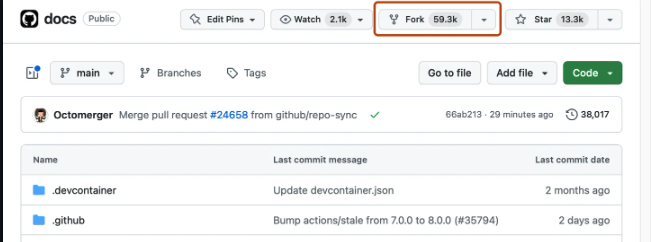
More info can be found here
-
You now have a copy of the project in your own Github. form your copy (in your profile) Clone the icpc-practice project to you local machine and add the folder you created (created in step 1 ) to the project and then you may add or delete files inside your folder
Documentation: How to clone a repo

Add the repository you created on you machine to the clone projects, add your solution files to the folder with your name, only modify your personal repository
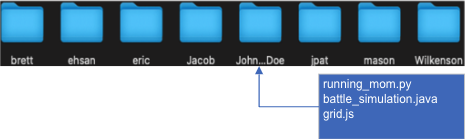
To see the list of attempted problems and recommended problems for new members visit the documents folder