creating a spiral in imagemagick #3245

Replies: 6 comments 4 replies

-
|
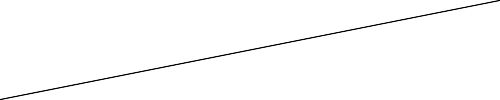
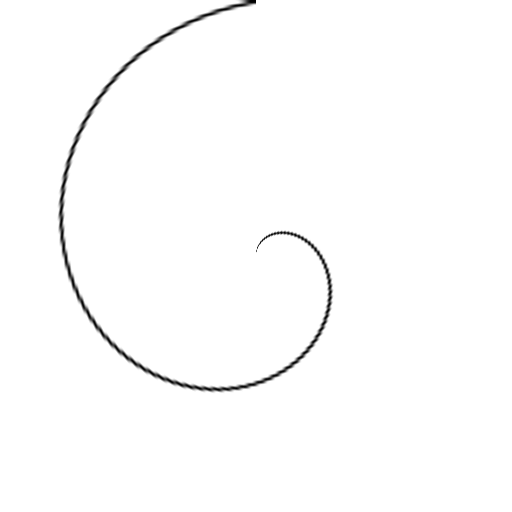
What version of IM, on what platform? I'll assume IM v7 on Widows BAT. Many methods can be used. For example, we regard a spiral as a polar distortion of a line. We don't need to write spiral_base.png, but it helps us to understand: spiral_out.png is: |
Beta Was this translation helpful? Give feedback.

-
|
I want more circles in it . Thanks. |
Beta Was this translation helpful? Give feedback.

-
|
As snibgo mentioned, there are several ways to create a spiral using ImageMagick. This example lets you easily choose how many "rings" you want and the spacing between them. That creates this image...
The thickness of the line is set by the height specified in The command starts by creating a black rectangle 640 by 4 pixels, adds a single transparent row to the top, and extends it with a transparent background to 36 pixels high. That stripe is duplicated to make the desired number of "rings", and all of those are appended vertically to make a block of stripes. Next the Then the The output here will be on a white background. If you want a transparent background just omit the This should work in almost any version of IM from 6.8 to current by using |

Beta Was this translation helpful? Give feedback.
-
|
Thanks . One more thing - if you compare the eight turn spiral to single turn spiral by snibgo then it seems that in your case the radius of spiral is not changing continuously . I think you are combining semi circles whose centre have been shifted. I am looking for eight turn spiral version of snibgo. Is it possible to get that ? |
Beta Was this translation helpful? Give feedback.

-
|
Geemack - in your spiral the distance between turns is constant . Can you suggest for this specific requirement ? Thanks. |
Beta Was this translation helpful? Give feedback.
-
|
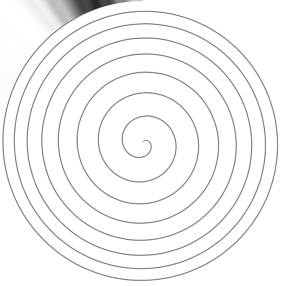
The commands by GeeMack and me create Archimedean spirals. They both work by applying a polar transformation to a straight line. We can make a logarithmic spiral by applying a polar transformation to an exponential curve. IM does not contain simple facilities for creating curves from mathematical functions. gnuplot is a better program for that. But it can be done in IM. For example:
The script graphLineCol.bat is shown at Clut cookbook. EDIT: For an expanding interval, use eg "-evaluate Pow 0.3". EDIT2: To get rid of the dark smudge, insert "-virtual-pixel White" before "+distort polar -1". |
Beta Was this translation helpful? Give feedback.
-
|
yes I am looking for spiral in which lines go father and farther away from each other. what is %PICTBAT% here ? |
Beta Was this translation helpful? Give feedback.
-
|
%PICTBAT% is the path to the directory where I keep image processing BAT scripts. Similarly, %IMG7% is the path to the directory of IM executables. |
Beta Was this translation helpful? Give feedback.
-
|
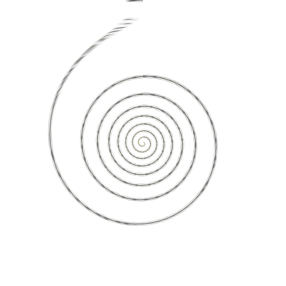
Thank you. Though there was an error after running
But I got the output as you have shown. For expanding rings I got Thanks a lot. |
Beta Was this translation helpful? Give feedback.
-
|
All my published BAT scripts are available in a single ZIP file: http://im.snibgo.com/imsnibgoBats.zip . (This also includes C code for my published filters.) The scripts are described at Zipped BAT files. A index to my published pages about image processing with ImageMagick is at Index. |
Beta Was this translation helpful? Give feedback.


Uh oh!
There was an error while loading. Please reload this page.
-
hi,
I have seen https://legacy.imagemagick.org/Usage/transform/ where there is mention of polaroid transformation .
But , I am not able to draw a simple spiral curve .
How can I do that ?
I can give as input the centre coordinates , the maximum radius of curve and some factor which specifies that how quickly should the curve complete a rotation and rate of increase of radius .
Is there something inbuilt for this in im or some script created by expert users ?
BTW,
I am using
[code]
magick.exe --version
Version: ImageMagick 7.0.10-50 Q16 x64 2020-12-16 http://www.imagemagick.org
Copyright: Copyright (C) 1999-2018 ImageMagick Studio LLC
License: http://www.imagemagick.org/script/license.php
Visual C++: 192829335
Features: Cipher DPC HDRI Modules OpenCL OpenMP(2.0)
Delegates (built-in): bzlib cairo flif freetype gslib heic jng jp2 jpeg lcms lqr lzma openexr pangocairo png ps raw rsvg tiff webp xml zlib
[/code]
Thanks.
Beta Was this translation helpful? Give feedback.
All reactions