Repository navigation
Sonara v2.1.2

6675e6a  Inventor365
Yuki
Sonara v2.1.2 (versionCode = 51)
Import from Apple Music, a calmer player, clearer tiles.
What's new in 2.1.2
- Import Apple Music playlists. A new Import Apple Music tile beside Import Spotify in Library. Paste a public playlist link (
music.apple.com/…/playlist/…, editorial or shared from your library); its songs are matched on YouTube Music and saved as a new playlist, with any that couldn't be found listed. Either link works in either dialog, on Android and desktop. - The player's type, back in one family. Playing from … and the elapsed and remaining times are set in the player's own face again rather than in monospace; the times use tabular figures, so they still hold their place as they tick.
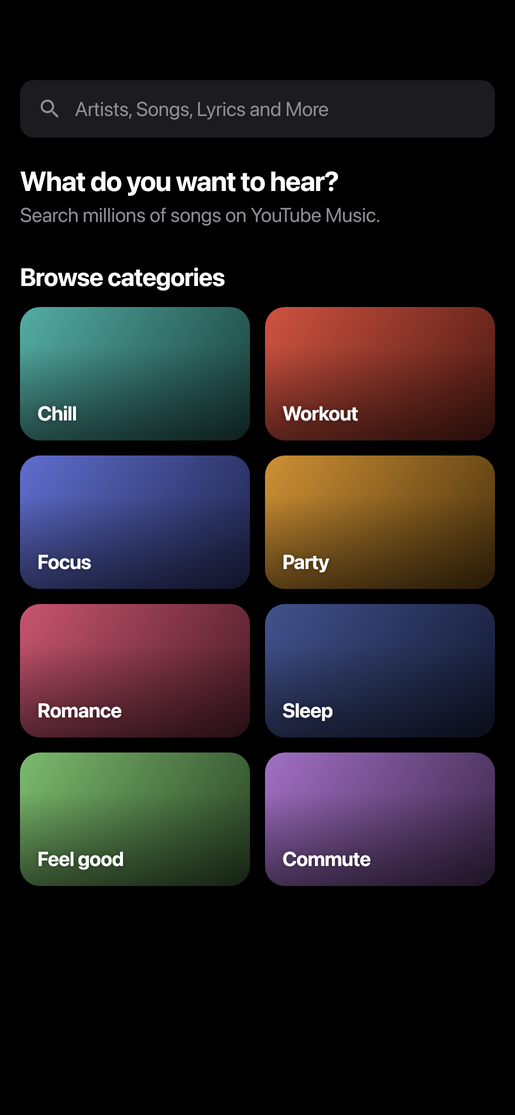
- Explore and Search tiles hold their cover art further back, so words printed on a cover never compete with the tile's own title.
- Category pages carry the same EXPLORE · N PLAYLISTS label as Explore.
- The development build is named Sonara Dev everywhere, including the permission prompts.
Sonara v2.1.1
Explore and the player join the redesign; collaborative playlists find every playlist, ride out YouTube's hiccups, and stay compatible with BitChord PlusPC.
What's new in 2.1.1
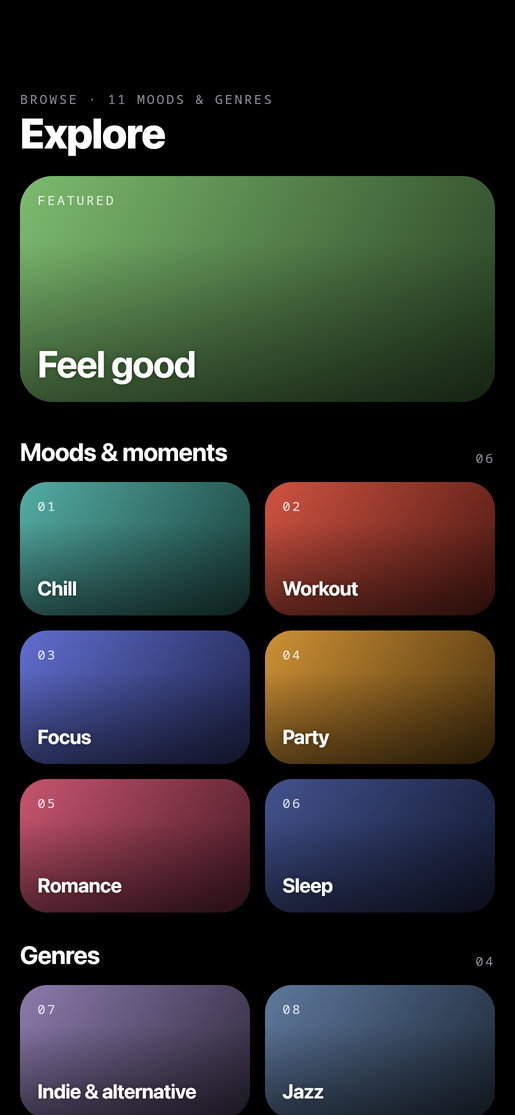
- Explore, redrawn. A ticket-print header with the number of moods and genres, a wide Featured card, and YouTube's own groupings (Moods & moments, Genres) as titled sections. Every tile is now the category's colour as a gradient with its cover fading into it, a numbered index and the title at the foot — the same tiles appear on Search's empty page and on TV.
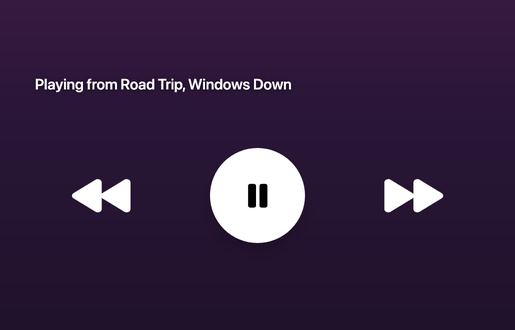
- The player, in Sonara's hand. Play and pause sit in a solid white disc that gives under the finger (the loading spinner turns inside it, so the controls never jump); elapsed and remaining time are fixed-width so the digits stop jostling; Playing from … is set in ticket print.
- Collaborative playlists
- Every playlist is found. Discovery looked at only your first 30 library playlists (24 on the web), so one joined on another device or in an older BitChord build could stay hidden; it now checks up to 150, and remembers which playlists are plain so a refresh doesn't browse them all again.
- Riding out YouTube's hiccups. A 429 Too Many Requests or a momentary 5xx from YouTube Music is asked again after the pause the server names (or a doubling one), instead of silently dropping that playlist from your list — on Android, desktop and web.
- Right song counts. Playlists over a hundred songs showed their first page's count until opened; the count now comes from the playlist's own header.
- Compatible with BitChord PlusPC. Invite links stay the plain
music.youtube.comlinks every version (and YouTube Music itself) opens, and the oldbitchord://links still work. On Windows, 2.0.0 and 2.1.0 had moved the collaborative state to a newSonarafolder, so an upgraded install lost its tracked playlists and invite links; it reads the originalBitChordfolder again, and keeps anything already saved underSonara. Desktop downloads go to your existingMusic/BitChordfolder when you have one.
Sonara v2.1.0
Sonara's own look — Android, Android Auto, Android TV, Wear OS, macOS (Apple Silicon & Intel), Windows, Linux & Web
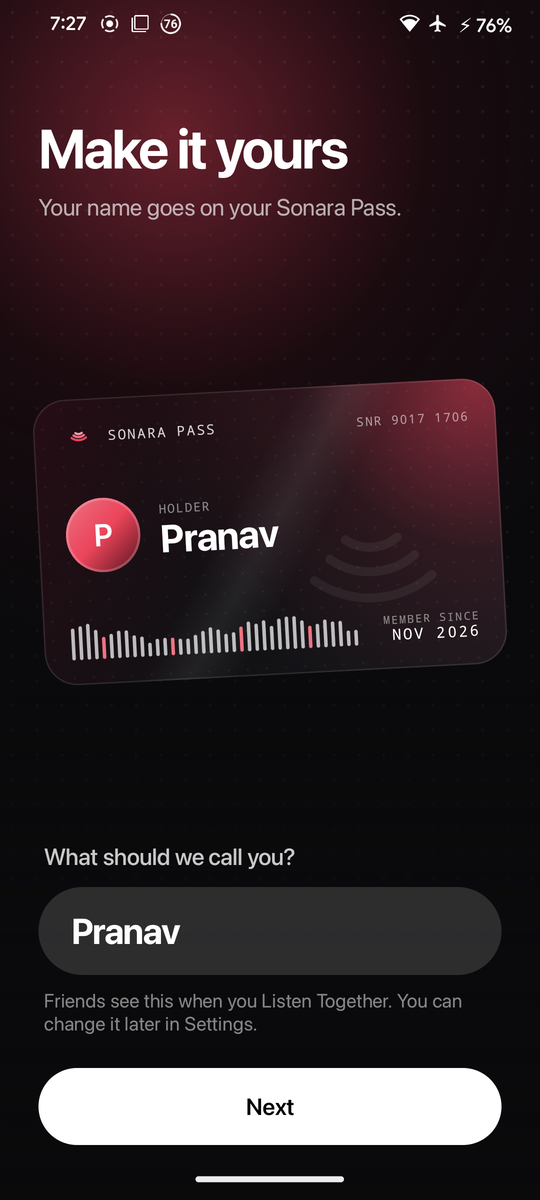
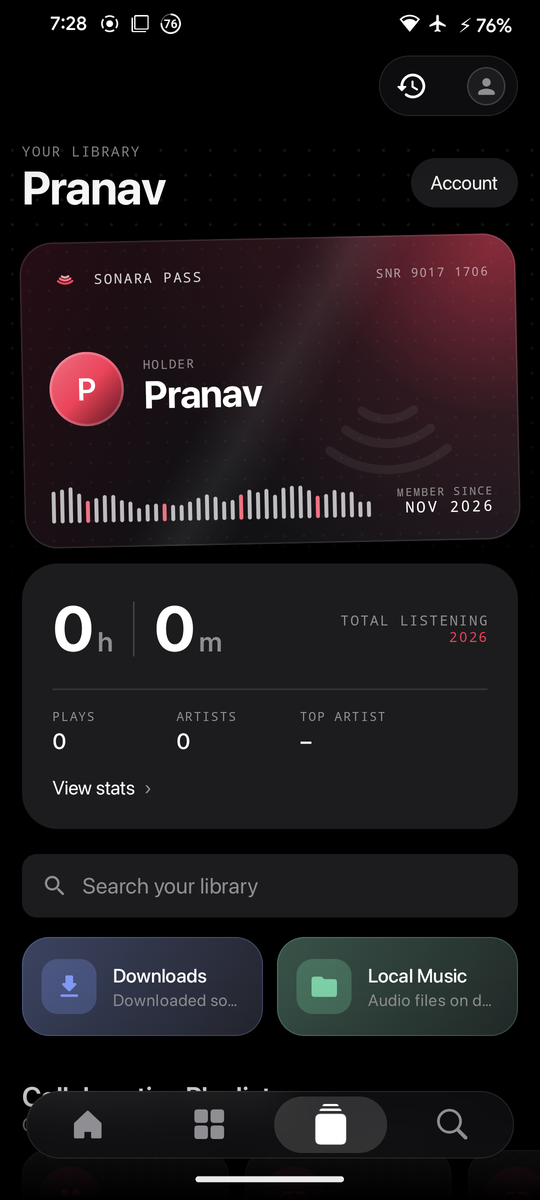
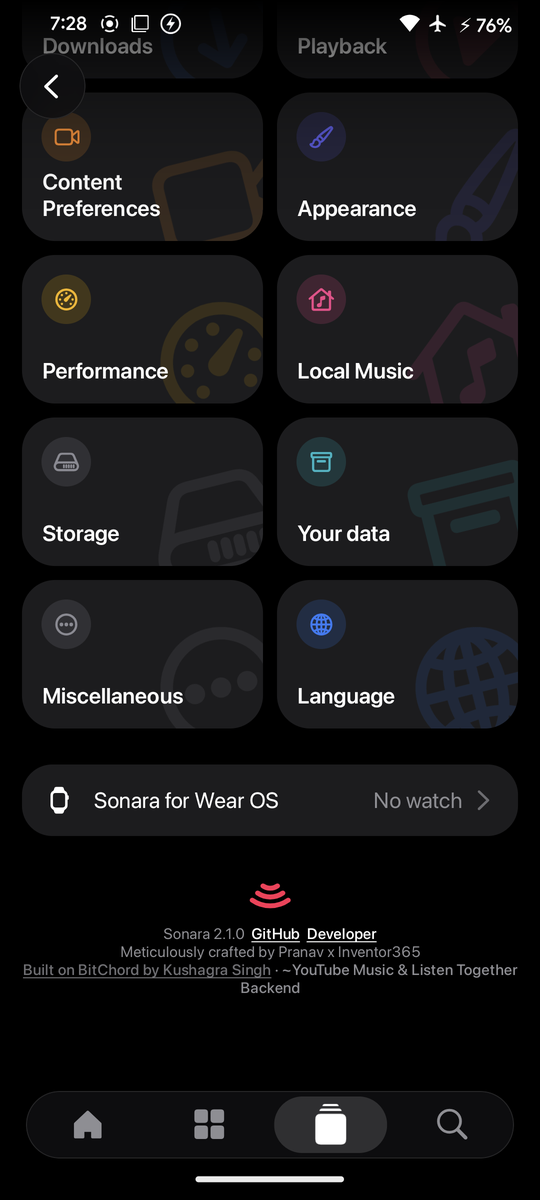
This is where Sonara stops looking like the player it grew out of. BitChord PlusPC became Sonara in v2.0.0; this release gives it a face of its own, and it installs over any BitChord PlusPC or Sonara build in place.
What's new in 2.1.0
- A design language of its own. Ink and grey, the mark's red used sparingly, monospace "ticket print" for small labels, and floating cards with generous corners in place of iOS-style lists. Switches glow Sonara red; the tab bar shows icons only (labels can be turned back on in Settings → Appearance).
- The Sonara Pass. Your card: your name, a pass number, the month you joined, and a soundprint — a bar code of sound drawn from your pass number, so no two are alike.
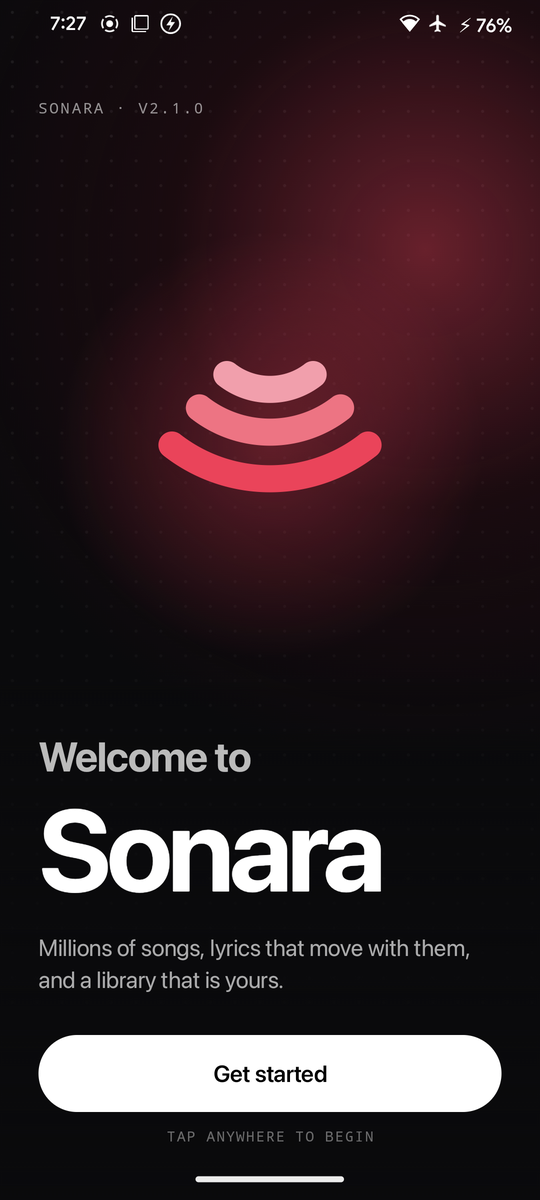
- A new welcome. A title page with the mark drawn live; then Make it yours, where the Pass fills in as you type your name; then sign-in, with your finished Pass beside it.
- Library is your profile. Your Pass at the top, then your listening time in hours and minutes with plays, artists and your top artist — one tap from the full stats.
- Settings opens on a grid of tiles, each with its own colour and a large faint glyph; group headings are set in ticket print and cards have softer corners.
- Tiles for actions. New playlist, Import Spotify, New collaborative and Join via invite are drawn as tiles of their own rather than blank grey squares.
- Home greets you by the name on your Pass, and its sign-in card is made from the Pass's materials.
From 2.0.0
- Home greets you by time of day; Search opens on a grid of moods and genres; Settings leads with your account.
- Collaborative playlists: any Google account can join; removing, leaving and deleting ask first.
A new name
Sonara is the app that was BitChord PlusPC, a fork of kushagrasinghx/BitChord. It now has its own name, mark and roadmap, and is developed by Pranav (@Inventor365). The player core, lyrics and streaming it is built on are the work of Kushagra Singh and the BitChord contributors, used under the GPL-3.0 with thanks.
Updating from BitChord PlusPC keeps everything. Same application id, same signing certificate: on Android, Windows and Linux this installs over v1.10.x in place, with your library, downloads, settings and sign-in intact. Existing bitchord:// invite and party links keep working.
What's new
- A new mark and a livelier welcome: the first screen draws the Sonara arcs in and lets them breathe.
- Home greets you by the time of day and by name, under the mark in its own red, with a soft glow at the head of the page. Shelf headings are larger, and Show all is a pill you can actually hit.
- Search opens on a question rather than a blank page — What do you want to hear? — with a grid of mood and genre categories to browse (tap one to open it in Explore). Result sections have clearer headings.
- Settings leads with your account card (picture, name, address) and gives every category a coloured icon tile, so a row is found by colour before it is read. The foot of the page is signed with the Sonara mark and credits the BitChord project it is built on.
- Library: the folder list is now a grid of tinted cards that ease in and give under the finger.
- Motion you can feel: shelf, top-pick and mood cards respond to touch throughout the app, on 60, 90 and 120 Hz displays alike (Settings → Appearance keeps the high-refresh switch).
- Collaborative playlists
- The page glows in the playlist's own colour, the cover sits on a soft shadow, and rows slide into place as songs are added, removed or moved.
- Any Google account can join: one that has never used YouTube is given its YouTube channel automatically.
- Removing a song, leaving a playlist and deleting one ask first, with haptics and a confirmation.
- Everything from 1.10.x: reliable invite joins, conversion that carries every song, title / description / cover editing, instant adds.
- Discord: the card shows the album when there is no audio-format line to show.
macOS
The .dmg, .pkg and .zip are built on macOS and each is installed and launched on a Mac before release. The app is ad-hoc signed and not notarized by Apple, so macOS asks once:
- Open the
.dmgand drag Sonara to Applications (or run the.pkg). - Open Sonara once; macOS will refuse.
- System Settings → Privacy & Security → Open Anyway. (Or in Terminal:
xattr -dr com.apple.quarantine /Applications/Sonara.app.)
Sonara installs as its own app on macOS; an older BitChord.app can be moved to the Bin afterwards. Pick arm64 for Apple Silicon and x64 for Intel.
Downloads
- Android phone & Auto:
Sonara-v2.0.0.apk(universal) or thearm64-v8a/armeabi-v7a/x86_64build - Android TV / Fire TV:
SonaraTV-v2.0.0.apkor the per-ABI builds - Wear OS:
SonaraWear-v2.0.0.apk(also bundled in the phone app) - macOS:
Sonara-2.0.0-macos-arm64.dmg/.pkg/.zip,Sonara-2.0.0-macos-x64.dmg/.pkg/.zip - Windows:
Sonara-2.0.0-windows-x64-setup.exe,.msi,-portable.zip - Linux:
Sonara-2.0.0-linux-x86_64.AppImage,-linux-amd64.deb,-linux-x86_64.rpm
Signed with the permanent release certificate (SHA-256: d6d9c697c070a5ca5f4e172a13b6263fe2f3a35fff5d110596509126320c3bb2).
Full history: CHANGELOG.md