Repository navigation
Releases
Sonara v2.1.6

Sonara v2.1.6 (versionCode = 55)
Rename your Sonara Pass, start over from Settings, see every theme at once, and a quicker Google sign-in.
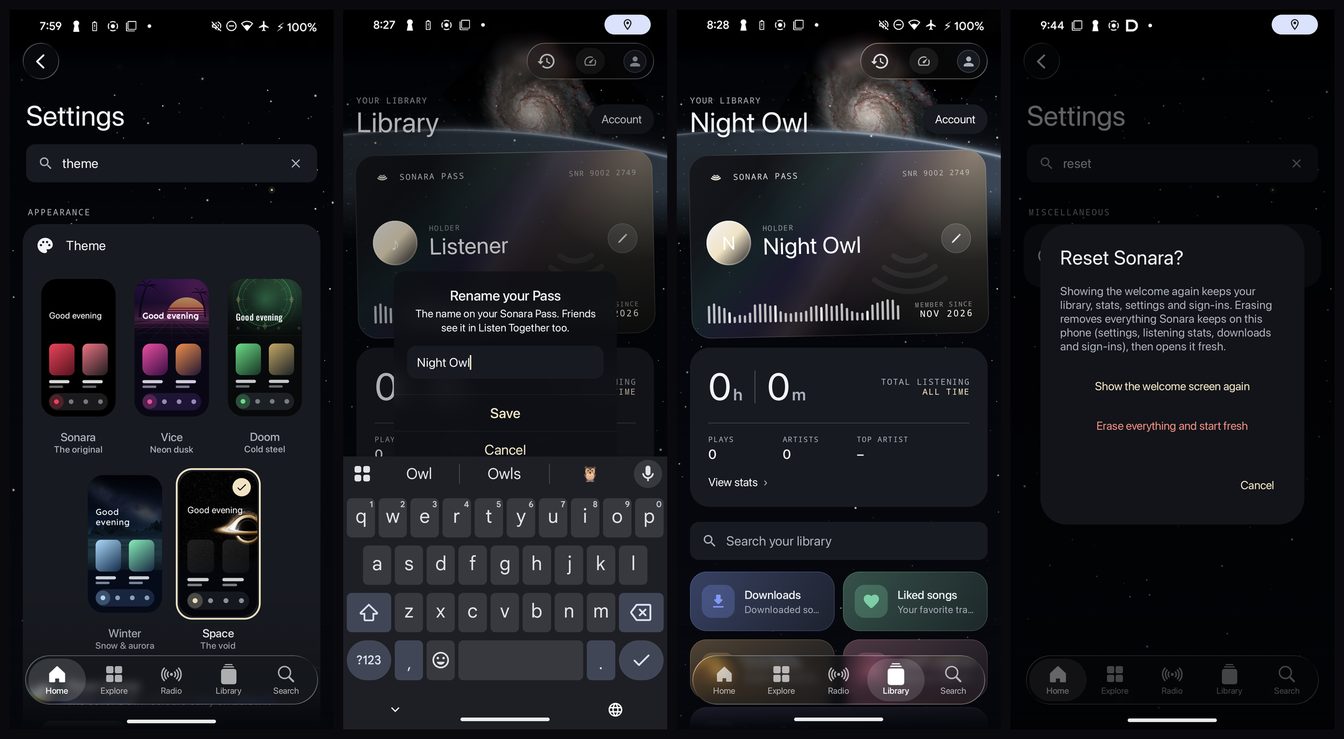
What's new in 2.1.6
- Rename your Pass. A pencil on the Sonara Pass in Library changes the name on it, and the Library title follows at once. It's the same name friends see in Listen Together. A name restored from your phone's backup after a reinstall can now be changed in two taps.
- Reset Sonara. Settings → Miscellaneous → Reset Sonara has two choices:
- Show the welcome screen again: your library, stats, settings and sign-ins stay.
- Erase everything and start fresh: clears everything Sonara keeps on the phone (settings, listening stats, downloads and sign-ins), then reopens the app on the welcome screen, as on a new install.
- Every theme in view. Settings → Appearance → Theme is now a grid that fits the screen: three across a phone, all five in a row on a tablet. Space is no longer hidden past the edge.
- A quicker Google sign-in.
- No "Use this profile" tap. After Google, an account with a single YouTube channel is signed in straight away. An account with brand channels still picks one.
- Next is pressed for you. With the account you picked from your phone, Sonara presses Google's Next on the pre-filled email. It does the same on a password your password manager filled in, but never on one you are typing.
- Google's own check stays. You'll still see "Verify it's you" on another of your devices; Google asks for it when a sign-in comes from a browser it hasn't seen, and no app outside Google can skip it.
- Under the hood: the sign-in screen and the update sheet are their own components, keeping the app's main screen under Android's method size limit.
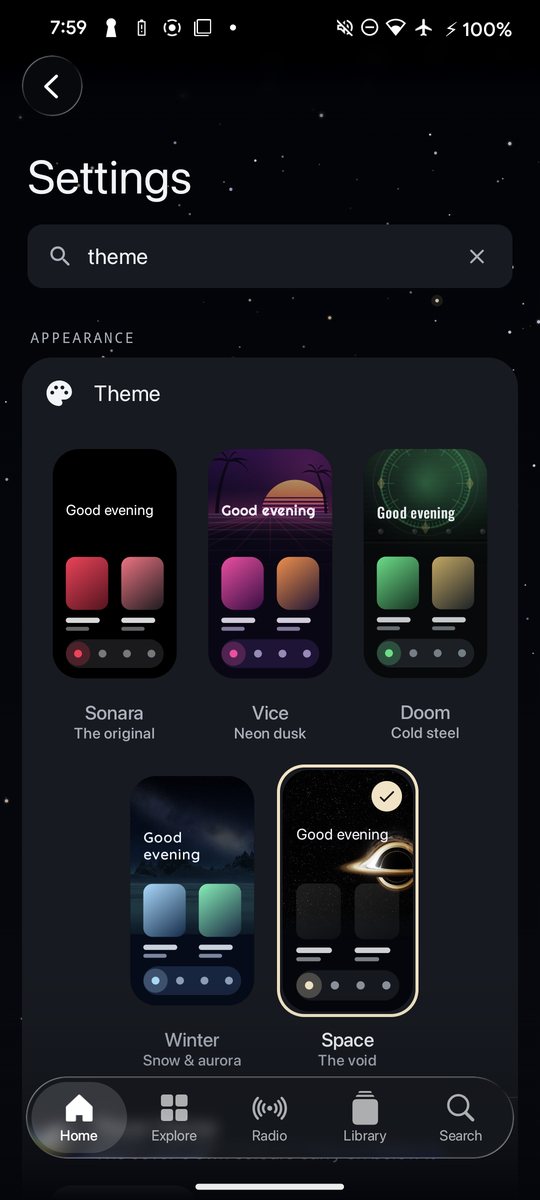 Every theme in view |
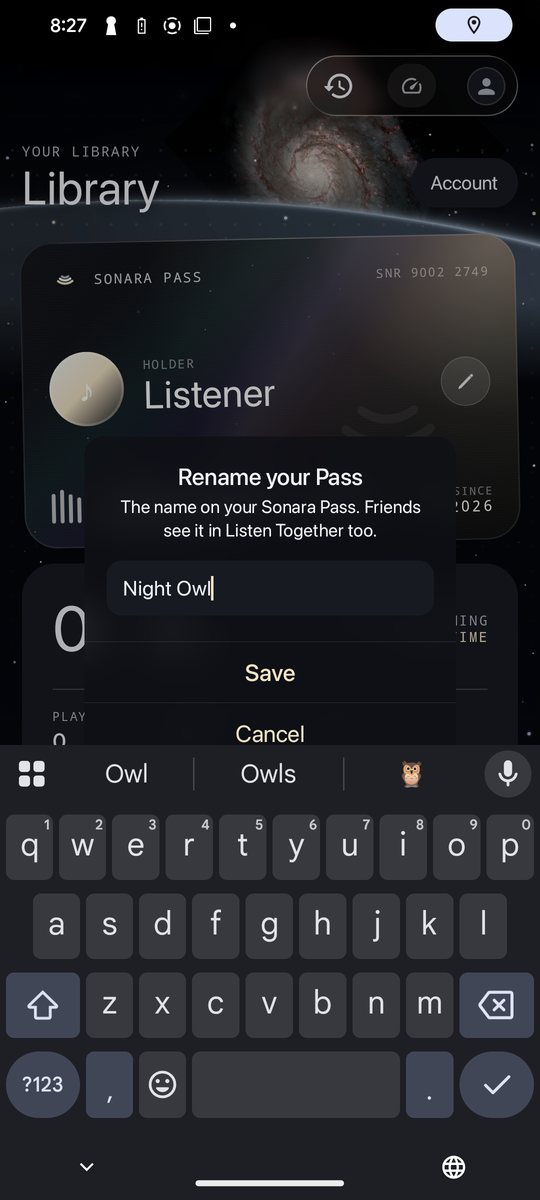 Rename your Pass |
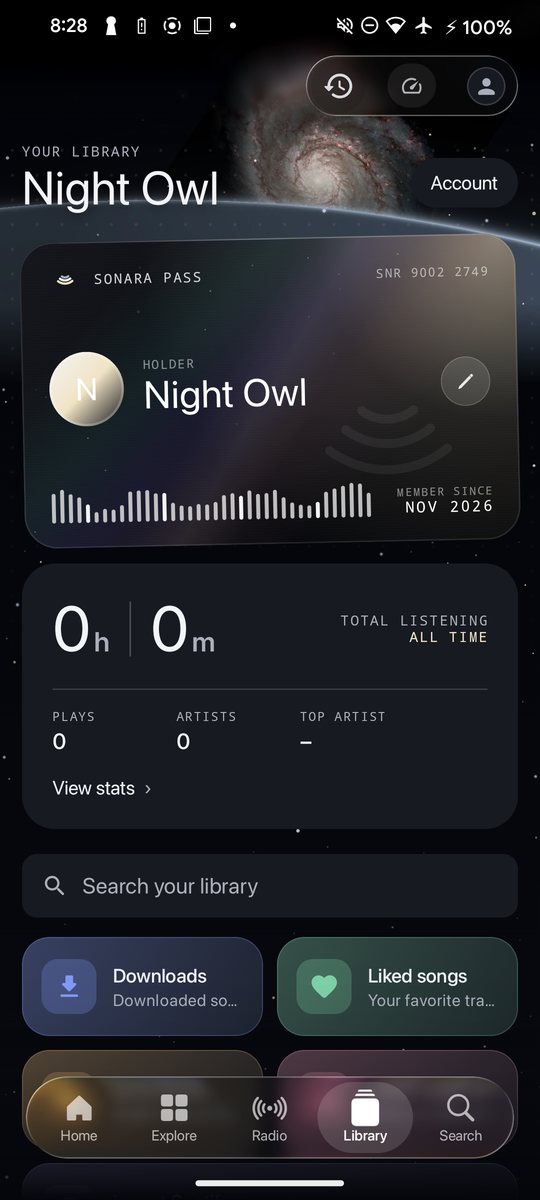 The name follows at once |
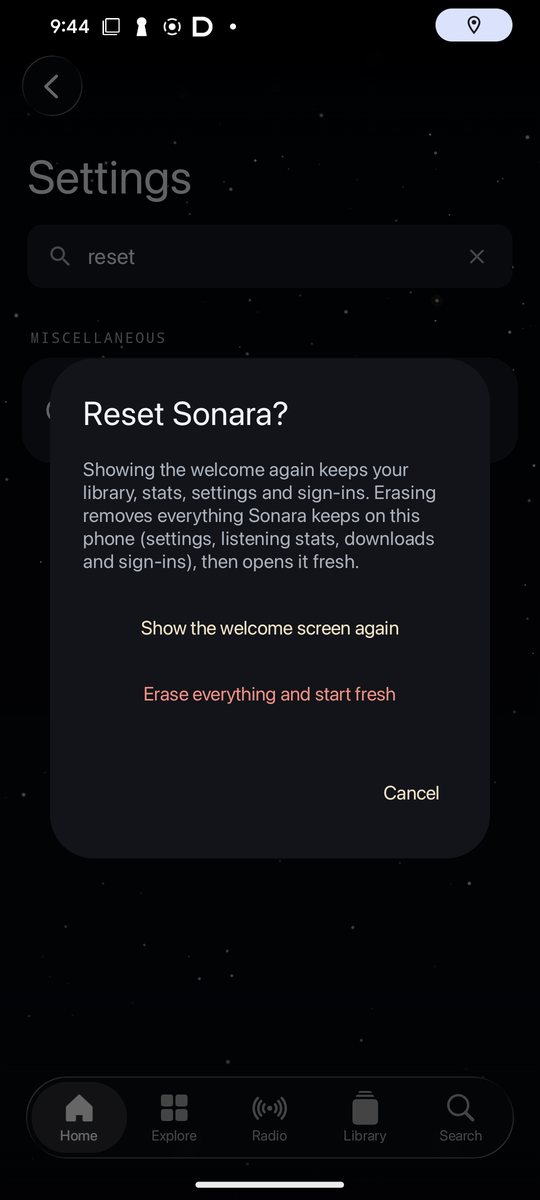 Reset Sonara |
Installs over 2.1.5 and every earlier Sonara or BitChord PlusPC build in place: same app, same signature, same data.
Sonara v2.1.5 (versionCode = 54)
Everything new in BitChord, merged in: AutoMix artwork transitions, a new queue, a Radio tab and much more. Plus 17 community fixes and features, a plain player again in Space, and your listening back after a reinstall.
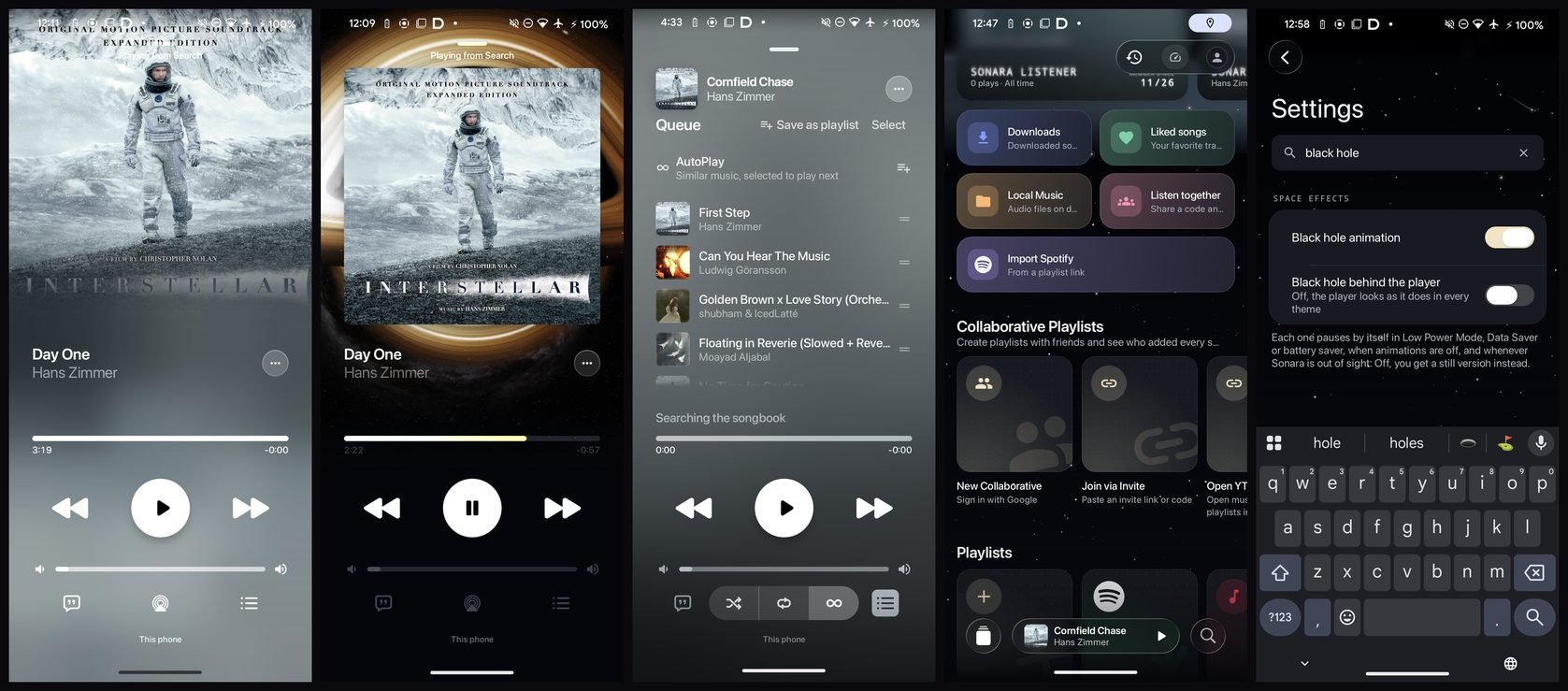
What's new in 2.1.5
Your listening comes back after a reinstall
- Uninstall, reinstall, and your listening time, plays, top artists, Replay, settings, Sonara Pass name and last song come back by themselves from the phone's own Google backup (Android Settings → Google → Backup has to be on).
- The backup no longer carries 11 MB of player cache. Downloads and the AutoMix models are left out too, so they can never push it past Android's 25 MB limit; past that limit Android skips an app's backup entirely.
- Your Google sign-in is not part of the backup, as before. Sign in again after reinstalling; your YouTube Music history and playlists come back with your account.
Space: the player is the normal one again
- The black hole behind the player is now a switch, off by default. Under Space the player looks the same as in every other theme: full artwork over the cover's own colours.
- To get it back: Settings → Appearance → Space effects → Black hole behind the player. The audio-reactive disk is only offered while it's on.
From BitChord (272 changes merged)
- AutoMix artwork transitions. Covers and Spotify Canvas clips dissolve into the next song with an organic reveal, in the full player and the mini players. The seek bar glows through the mix, and the Mixing badge has a light sweep. Each part has its own switch under AutoMix.
- A new queue.
- Swipe a song to remove it or to play it next.
- Select for bulk actions, Save as playlist, and Undo after any removal.
- It opens at what's coming up, not at history.
- Radio, its own tab.
- Player:
- Apple Music-style play/pause and skip animations.
- Song details slide in when the song changes.
- Lyrics can be shared as an animated video synced to the song.
- A setting to show the total duration instead of the time remaining.
- Song credits in Song info.
- High-res covers for video tracks.
- Lyrics: YouTube Music's own timed lyrics, and a Hide lyrics switch for the preview.
- Search can be limited to your library, and song results can be swiped into the queue while you type.
- Playlists:
- Add to playlist has a search.
- Albums can be added to playlists.
- Liked songs can be kept downloaded.
- Also:
- A sleep timer that fades out over its last 30 seconds.
- A Quick Settings tile that plays or pauses.
- Tapping the current tab scrolls to the top.
- YouTube Premium audio for Premium accounts.
- AC-4 decoding.
- Listening on remote speakers counts in your stats.
- Fixed Android Auto and notification buttons.
- A smaller APK.
Community pull requests (17)
- Library links to Liked songs and Import Spotify (kushagrasinghx#1761).
- New settings:
- Keep screen on while the player is open (kushagrasinghx#1684).
- Hide the status bar everywhere (kushagrasinghx#1760).
- Disable gradient on albums and playlists (kushagrasinghx#1744).
- Auto decrease DAC volume for USB DACs (kushagrasinghx#1776).
- Fixes:
- "Recently added" puts a playlist's newest songs on top (kushagrasinghx#1864).
- Long titles scroll in the mini players and the queue header (kushagrasinghx#1815).
- Search keeps album and playlist results above the keyboard (kushagrasinghx#1604), and the keyboard hides when you scroll (kushagrasinghx#1602).
- Wi-Fi is detected correctly for download restrictions (kushagrasinghx#1628).
- Sign-in works with a blank channel name (kushagrasinghx#1823).
- Discord links for local songs (kushagrasinghx#1824).
- Replay keeps artists with "&" or commas in their names whole (kushagrasinghx#1826).
- Titles written fully in brackets are now matched (kushagrasinghx#1855).
- Web crossfade fixes (kushagrasinghx#1847).
- The total-duration setting moved to Miscellaneous (kushagrasinghx#1813).
- In-app updates download the APK built for your phone's CPU, about half the size of the universal one (kushagrasinghx#1473).
Changed
- Search uses your signed-in account, as BitChord does. Your searches show up in your YouTube history and results follow your taste.
- The Diwali screen is gone; BitChord removed its festive screens.
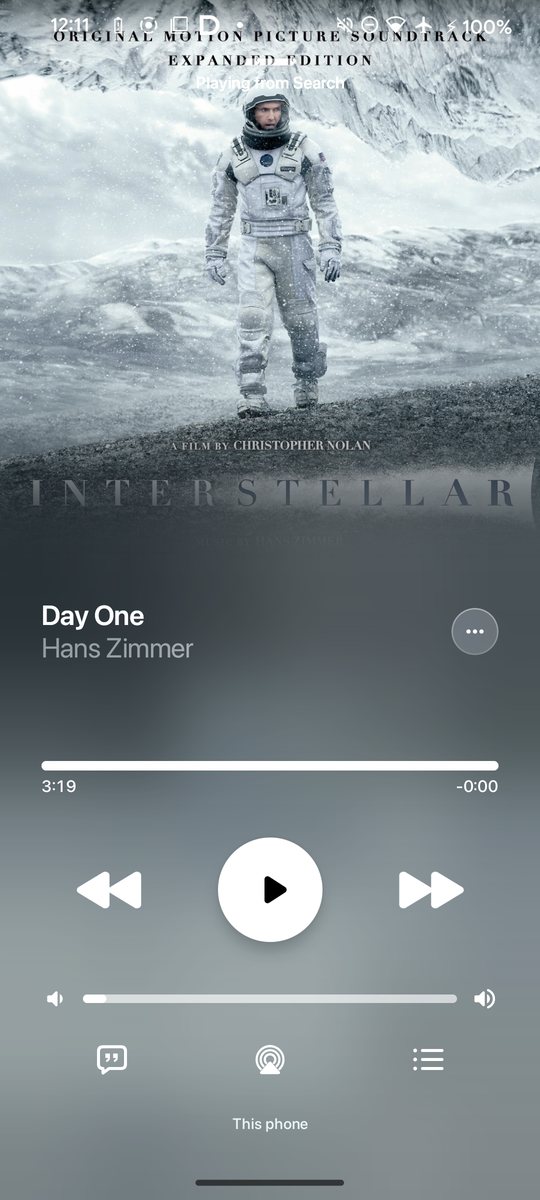 Player · Space (default) |
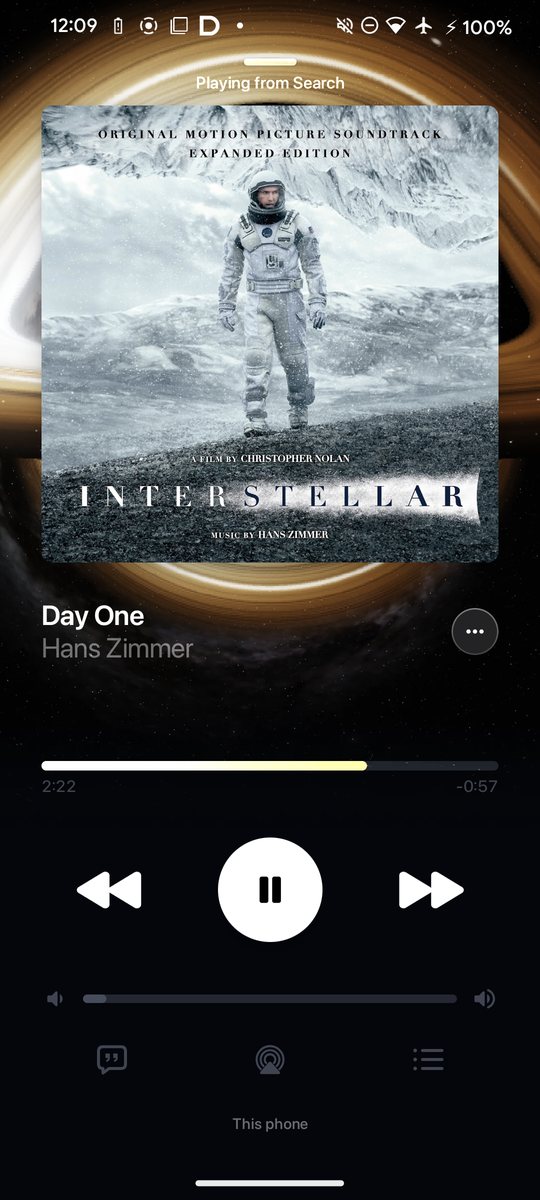 Black hole on |
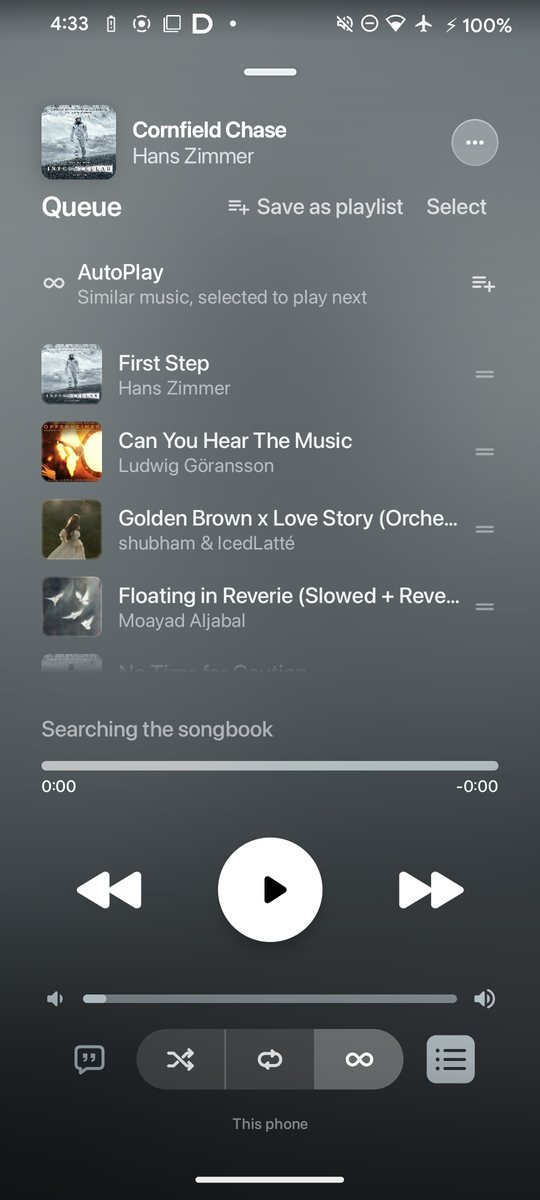 The new queue |
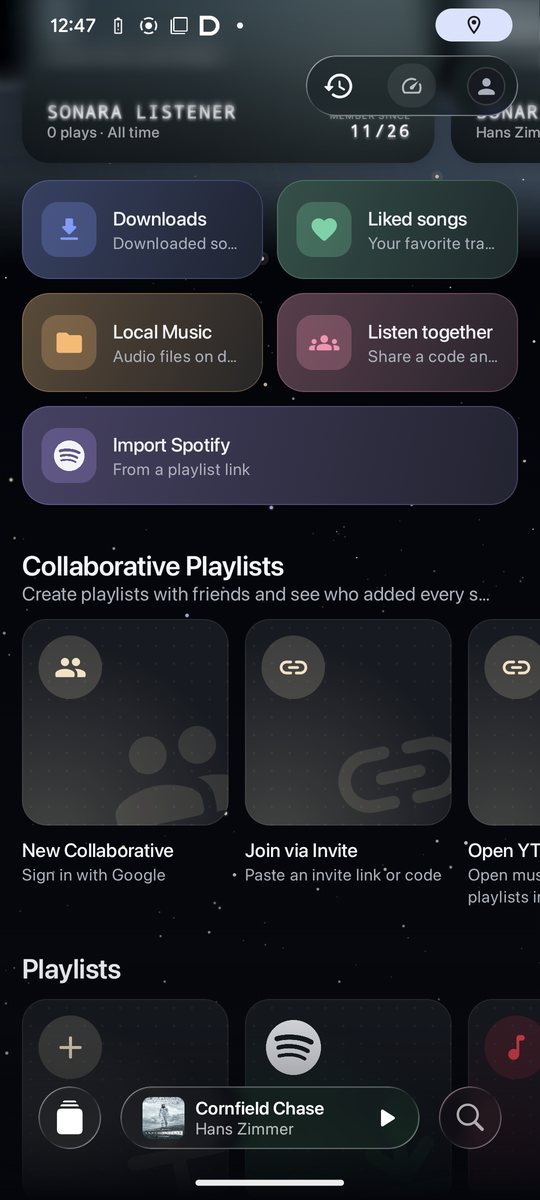 Library links |
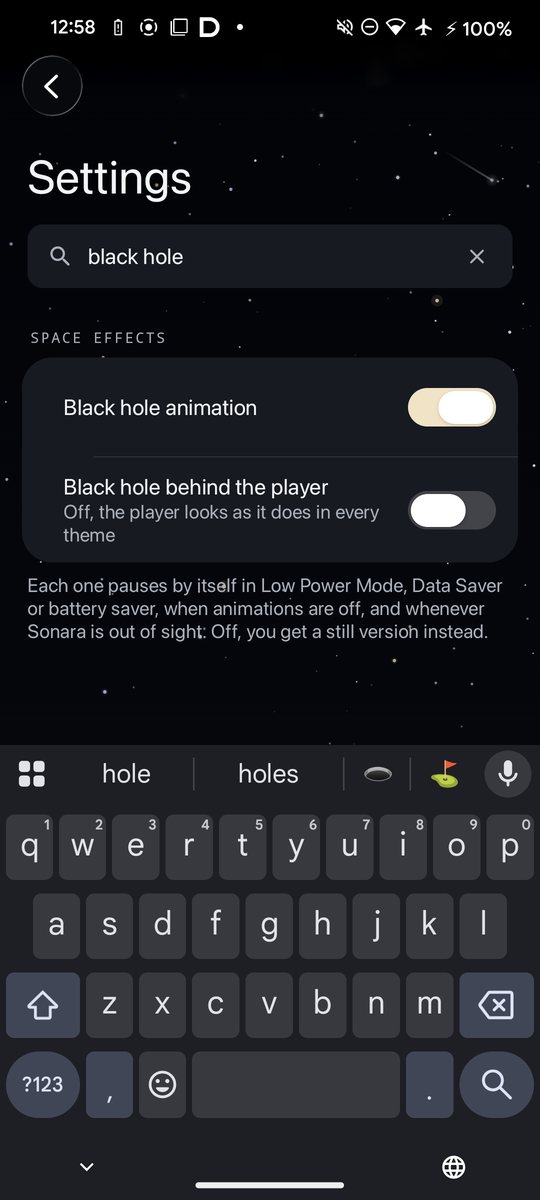 The new switch |
Installs over 2.1.4 and every earlier Sonara or BitChord PlusPC build in place: same app, same signature, same data.
Sonara v2.1.4 (versionCode = 53)
Two new looks: Winter, with a live aurora over the glaciers, and Space, with a ray-traced black hole. Listen Together stays in time, desktop lyrics follow the song, and big playlist imports go all the way.
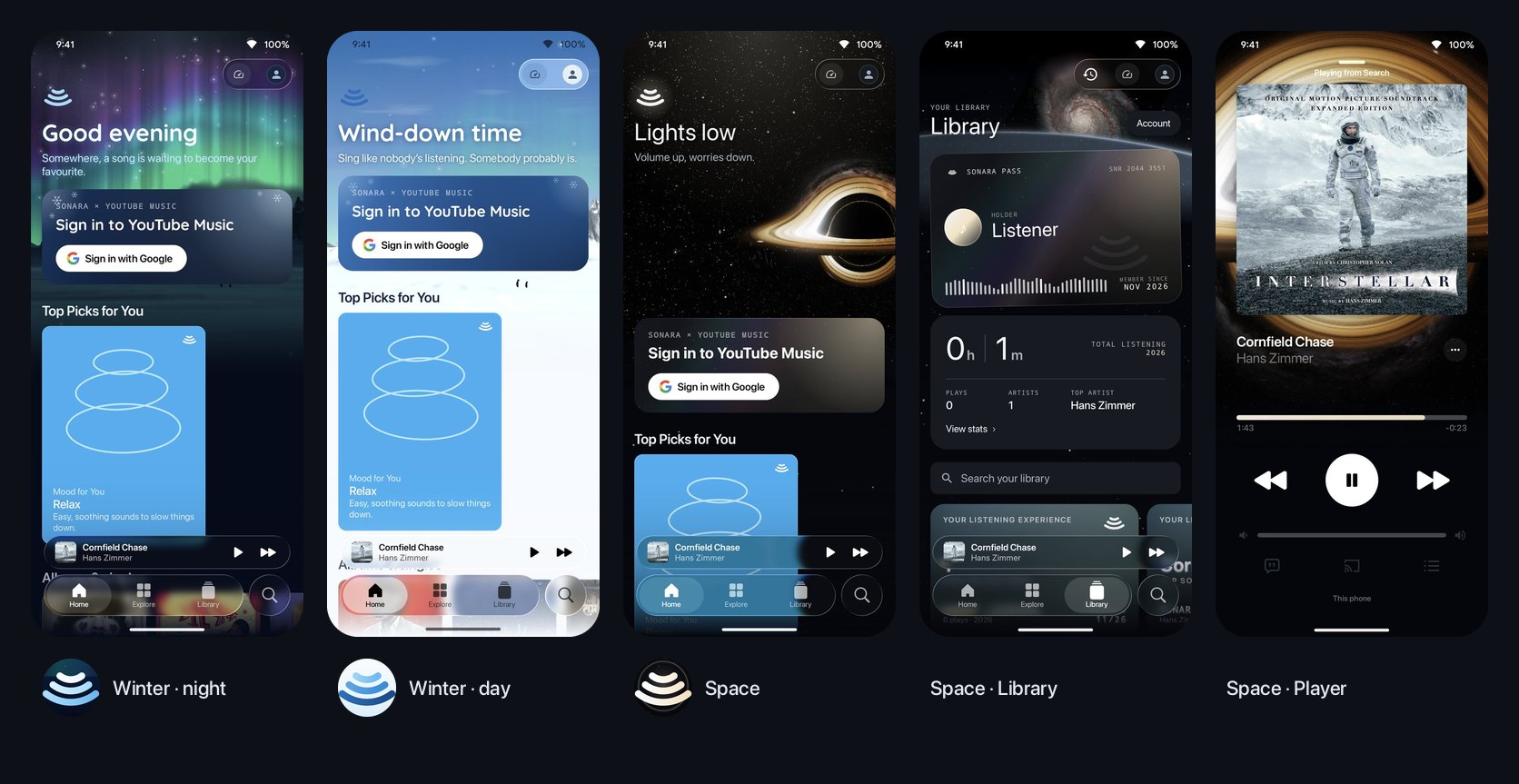
What's new in 2.1.4
- Winter. An arctic scene behind every page. At night a live aurora moves over backlit glaciers, with stars, snowfall and two penguins far out on the ice; by day a small sun crosses the sky with the time of day. Its own type (Quicksand), frosted glass, and a night icon and a day icon.
- Space. A black hole in the void, ray traced through curved spacetime like a still from a space film. Its lensed disk turns faster inside than out, matter falls in and the odd star is torn apart, stars bend around it, and shooting stars cross the sky. Library has a spiral galaxy rising over a planet, Explore a nebula, Search the Hubble Ultra Deep Field, and in the player the cover floats in front of its own black hole. The...
Sonara v2.1.5
23cd21d  Inventor365
Yuki
Sonara v2.1.5 (versionCode = 54)
Everything new in BitChord, merged in: AutoMix artwork transitions, a new queue, a Radio tab and much more. Plus 17 community fixes and features, a plain player again in Space, and your listening back after a reinstall.
What's new in 2.1.5
Your listening comes back after a reinstall
- Uninstall, reinstall, and your listening time, plays, top artists, Replay, settings, Sonara Pass name and last song come back by themselves from the phone's own Google backup (Android Settings → Google → Backup has to be on).
- The backup no longer carries 11 MB of player cache. Downloads and the AutoMix models are left out too, so they can never push it past Android's 25 MB limit; past that limit Android skips an app's backup entirely.
- Your Google sign-in is not part of the backup, as before. Sign in again after reinstalling; your YouTube Music history and playlists come back with your account.
Space: the player is the normal one again
- The black hole behind the player is now a switch, off by default. Under Space the player looks the same as in every other theme: full artwork over the cover's own colours.
- To get it back: Settings → Appearance → Space effects → Black hole behind the player. The audio-reactive disk is only offered while it's on.
From BitChord (272 changes merged)
- AutoMix artwork transitions. Covers and Spotify Canvas clips dissolve into the next song with an organic reveal, in the full player and the mini players. The seek bar glows through the mix, and the Mixing badge has a light sweep. Each part has its own switch under AutoMix.
- A new queue.
- Swipe a song to remove it or to play it next.
- Select for bulk actions, Save as playlist, and Undo after any removal.
- It opens at what's coming up, not at history.
- Radio, its own tab.
- Player:
- Apple Music-style play/pause and skip animations.
- Song details slide in when the song changes.
- Lyrics can be shared as an animated video synced to the song.
- A setting to show the total duration instead of the time remaining.
- Song credits in Song info.
- High-res covers for video tracks.
- Lyrics: YouTube Music's own timed lyrics, and a Hide lyrics switch for the preview.
- Search can be limited to your library, and song results can be swiped into the queue while you type.
- Playlists:
- Add to playlist has a search.
- Albums can be added to playlists.
- Liked songs can be kept downloaded.
- Also:
- A sleep timer that fades out over its last 30 seconds.
- A Quick Settings tile that plays or pauses.
- Tapping the current tab scrolls to the top.
- YouTube Premium audio for Premium accounts.
- AC-4 decoding.
- Listening on remote speakers counts in your stats.
- Fixed Android Auto and notification buttons.
- A smaller APK.
Community pull requests (17)
- Library links to Liked songs and Import Spotify (kushagrasinghx#1761).
- New settings:
- Keep screen on while the player is open (kushagrasinghx#1684).
- Hide the status bar everywhere (kushagrasinghx#1760).
- Disable gradient on albums and playlists (kushagrasinghx#1744).
- Auto decrease DAC volume for USB DACs (kushagrasinghx#1776).
- Fixes:
- "Recently added" puts a playlist's newest songs on top (kushagrasinghx#1864).
- Long titles scroll in the mini players and the queue header (kushagrasinghx#1815).
- Search keeps album and playlist results above the keyboard (kushagrasinghx#1604), and the keyboard hides when you scroll (kushagrasinghx#1602).
- Wi-Fi is detected correctly for download restrictions (kushagrasinghx#1628).
- Sign-in works with a blank channel name (kushagrasinghx#1823).
- Discord links for local songs (kushagrasinghx#1824).
- Replay keeps artists with "&" or commas in their names whole (kushagrasinghx#1826).
- Titles written fully in brackets are now matched (kushagrasinghx#1855).
- Web crossfade fixes (kushagrasinghx#1847).
- The total-duration setting moved to Miscellaneous (kushagrasinghx#1813).
- In-app updates download the APK built for your phone's CPU, about half the size of the universal one (kushagrasinghx#1473).
Changed
- Search uses your signed-in account, as BitChord does. Your searches show up in your YouTube history and results follow your taste.
- The Diwali screen is gone; BitChord removed its festive screens.
Player · Space (default) |
Black hole on |
The new queue |
Library links |
The new switch |
Installs over 2.1.4 and every earlier Sonara or BitChord PlusPC build in place: same app, same signature, same data.
Sonara v2.1.4 (versionCode = 53)
Two new looks: Winter, with a live aurora over the glaciers, and Space, with a ray-traced black hole. Listen Together stays in time, desktop lyrics follow the song, and big playlist imports go all the way.
What's new in 2.1.4
- Winter. An arctic scene behind every page. At night a live aurora moves over backlit glaciers, with stars, snowfall and two penguins far out on the ice; by day a small sun crosses the sky with the time of day. Its own type (Quicksand), frosted glass, and a night icon and a day icon.
- Space. A black hole in the void, ray traced through curved spacetime like a still from a space film. Its lensed disk turns faster inside than out, matter falls in and the odd star is torn apart, stars bend around it, and shooting stars cross the sky. Library has a spiral galaxy rising over a planet, Explore a nebula, Search the Hubble Ultra Deep Field, and in the player the cover floats in front of its own black hole. The skies are real ESO, Hubble and Webb images, credited in the app.
- Every effect is a switch. Settings → Appearance shows Winter's and Space's effects while that theme is on, each taking effect live, plus a shooting-star frequency and a moving-stars count for Space. Low Power Mode, Data Saver, battery saver and "remove animations" hold everything still.
- The app icon changes the moment you pick a theme, now for every theme, and the app stays open.
- Listen Together stays in sync. Devices that started a song before it had buffered used to play about a second behind; small gaps are now closed by playing a touch faster or slower, larger ones by an aimed seek. Listen Together is also in Library now.
- Desktop lyrics follow the song that is actually playing, and stay in time with it.
- Big playlist imports finish. Spotify and Apple Music playlists of any length are read in full, songs are added in batches YouTube accepts, and a summary lists anything that couldn't be matched, with Retry unmatched.
- Sign in with an account on your phone opens Google's sign-in already filled in, instead of a refused one-time link.
- Android Auto gets Albums and Artists folders, and the car always shows the real title and artist, never a lyric line.
- Also: a one-liner under the Home greeting that changes every visit, lyrics on the lock screen (Settings → Lyrics, off by default), and long screenshots no longer repeat the top of Home.
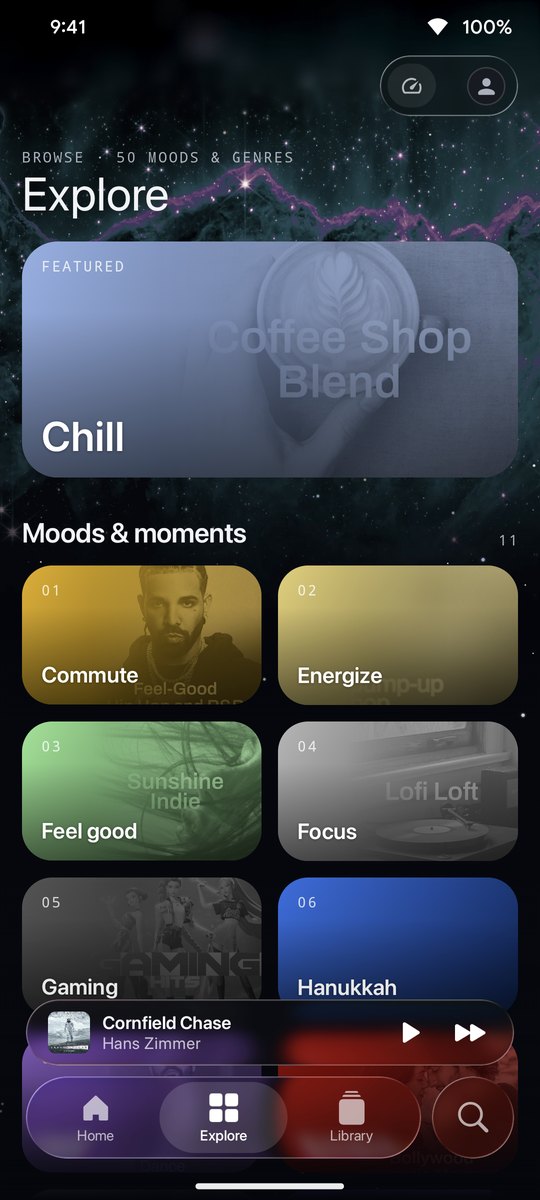 Explore · Space |
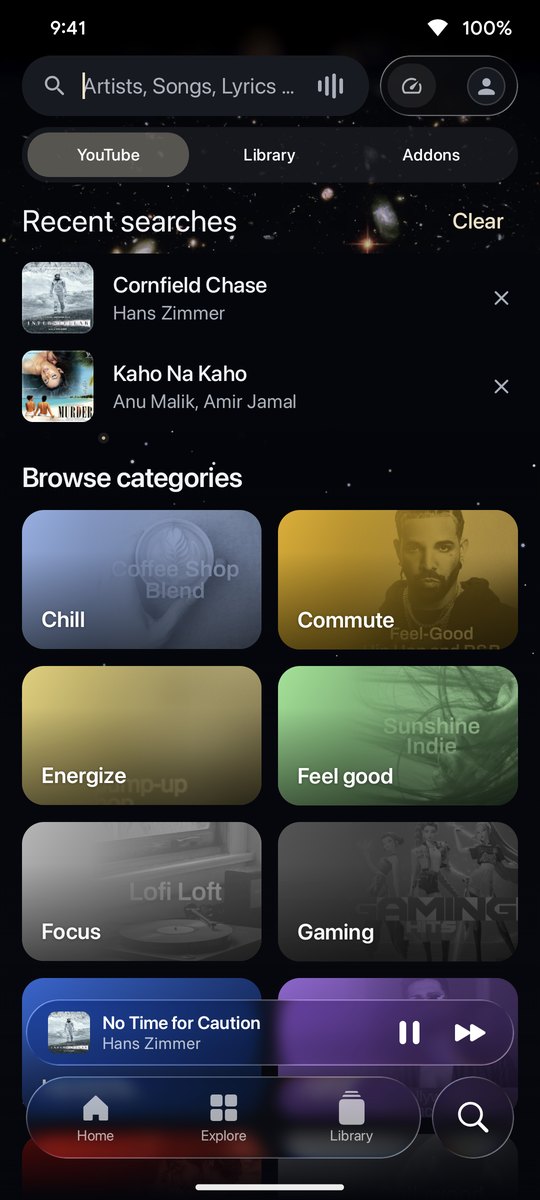 Search · Space |
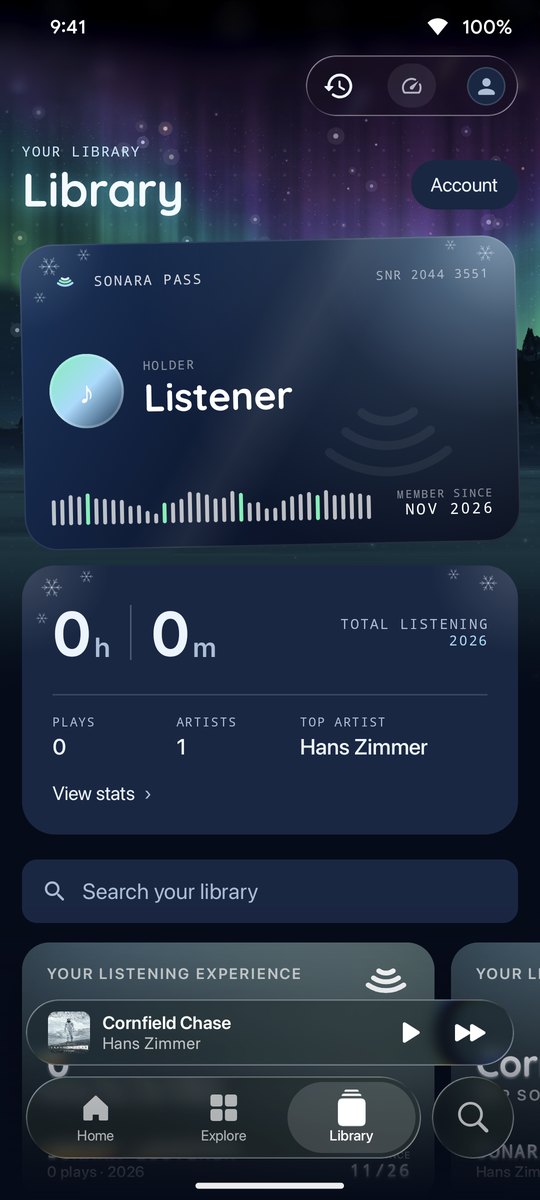 Library · Winter |
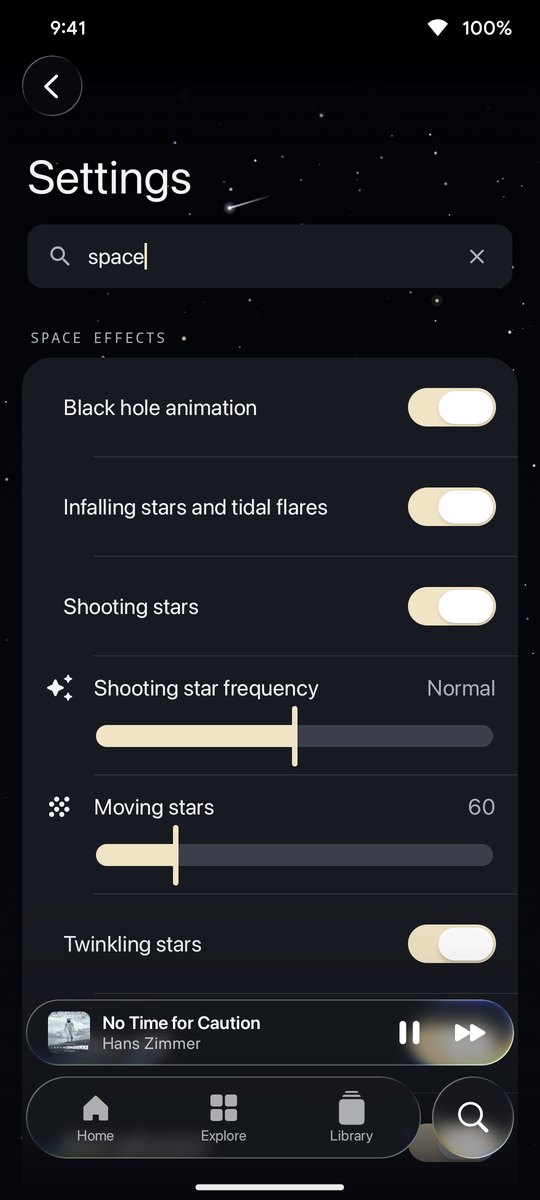 Space effects |
Installs over 2.1.3 and every earlier Sonara or BitChord PlusPC build in place: same app, same signature, same data.
Sonara v2.1.3 (versionCode = 52)
Two new looks, Vice and Doom; Data Saver and Low Power Mode; smoother motion; sign in with the accounts already on your phone.
What's new in 2.1.3
- Themes. Settings → Appearance → Theme now offers Vice — neon dusk, a synthwave sun over palms, hot pink and sunset orange — and Doom — cold steel, chamfered plates and an emerald glow — beside the o...
Sonara v2.1.4
951b9f8
Inventor365
Yuki
Sonara v2.1.4 (versionCode = 53)
Two new looks: Winter, with a live aurora over the glaciers, and Space, with a ray-traced black hole. Listen Together stays in time, desktop lyrics follow the song, and big playlist imports go all the way.
What's new in 2.1.4
- Winter. An arctic scene behind every page. At night a live aurora moves over backlit glaciers, with stars, snowfall and two penguins far out on the ice; by day a small sun crosses the sky with the time of day. Its own type (Quicksand), frosted glass, and a night icon and a day icon.
- Space. A black hole in the void, ray traced through curved spacetime like a still from a space film. Its lensed disk turns faster inside than out, matter falls in and the odd star is torn apart, stars bend around it, and shooting stars cross the sky. Library has a spiral galaxy rising over a planet, Explore a nebula, Search the Hubble Ultra Deep Field, and in the player the cover floats in front of its own black hole. The skies are real ESO, Hubble and Webb images, credited in the app.
- Every effect is a switch. Settings → Appearance shows Winter's and Space's effects while that theme is on, each taking effect live, plus a shooting-star frequency and a moving-stars count for Space. Low Power Mode, Data Saver, battery saver and "remove animations" hold everything still.
- The app icon changes the moment you pick a theme, now for every theme, and the app stays open.
- Listen Together stays in sync. Devices that started a song before it had buffered used to play about a second behind; small gaps are now closed by playing a touch faster or slower, larger ones by an aimed seek. Listen Together is also in Library now.
- Desktop lyrics follow the song that is actually playing, and stay in time with it.
- Big playlist imports finish. Spotify and Apple Music playlists of any length are read in full, songs are added in batches YouTube accepts, and a summary lists anything that couldn't be matched, with Retry unmatched.
- Sign in with an account on your phone opens Google's sign-in already filled in, instead of a refused one-time link.
- Android Auto gets Albums and Artists folders, and the car always shows the real title and artist, never a lyric line.
- Also: a one-liner under the Home greeting that changes every visit, lyrics on the lock screen (Settings → Lyrics, off by default), and long screenshots no longer repeat the top of Home.
Explore · Space |
Search · Space |
Library · Winter |
Space effects |
Installs over 2.1.3 and every earlier Sonara or BitChord PlusPC build in place: same app, same signature, same data.
Sonara v2.1.3 (versionCode = 52)
Two new looks, Vice and Doom; Data Saver and Low Power Mode; smoother motion; sign in with the accounts already on your phone.
What's new in 2.1.3
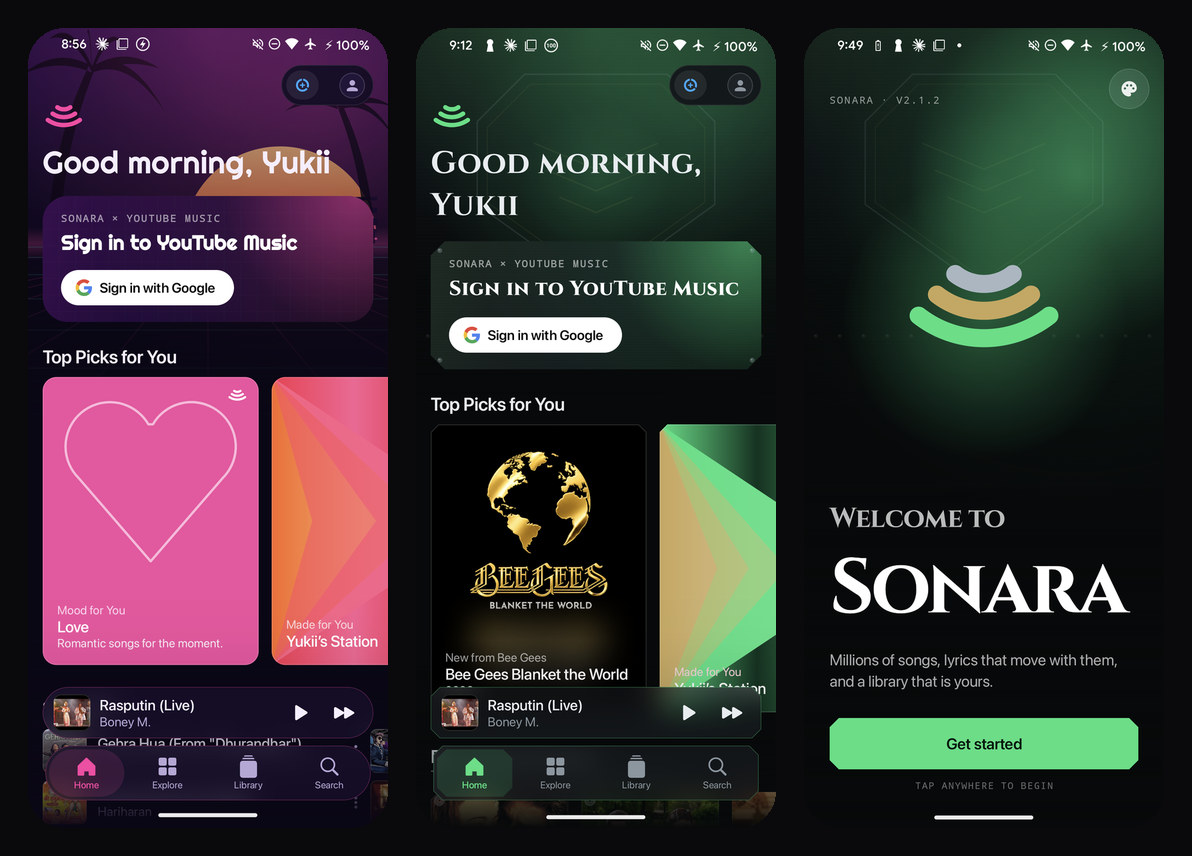
- Themes. Settings → Appearance → Theme now offers Vice — neon dusk, a synthwave sun over palms, hot pink and sunset orange — and Doom — cold steel, chamfered plates and an emerald glow — beside the original Sonara. Each theme restyles every screen, the player's progress bar and lyric glow, the Sonara Pass and the welcome screen, and brings its own home-screen icon (changed when you leave the app; turn Match app icon off to keep yours). You can also pick a theme from the first screen of a fresh install.
- Data Saver. Off, On or On mobile data (it also follows Android's own Data Saver). It caps audio quality, turns music video into a still banner, loads smaller artwork, preloads only the next song and holds updates and background sync for Wi-Fi.
- Low Power Mode. Manual or automatic — at a battery level you choose or with the system battery saver — and off again when you plug in. It caps the screen at 60 Hz, reduces animation and blur, stills animated covers and the idle Home page, and pauses background work. Playback itself is never limited.
- A modes button in the top bar shows which of Data Saver, Low Power and High Performance is on and switches them in one tap.
- Smoother motion. A Refresh rate setting (Adaptive, or a fixed rate your screen supports); Adaptive rests at 60 Hz and goes to the top rate the moment you touch or something moves. Page and tab changes have new transitions. High Performance now boosts on motion instead of holding the top rate, which was the cause of judder.
- Video off. The video quality menu has a Video off (static banner) choice that releases the video entirely while the audio keeps playing.
- Sign in with an account already on your phone. Sign in with Google opens Android's account chooser; the web sign-in is still there behind it.
- Import from Amazon Music by pasting a playlist's track list or a CSV export.
- Tab labels under the bottom bar's icons, on by default.
- Fixed: the full player could show a different song from the one actually playing after a track switched to its audio or video version mid-way.
Sonara v2.1.2
Import from Apple Music, a calmer player, clearer tiles.
What's new in 2.1.2
- Import Apple Music playlists. A new Import Apple Music tile beside Import Spotify in Library. Paste a public playlist link (
music.apple.com/…/playlist/…, editorial or shared from your library); its songs are matched on YouTube Music and saved as a new playlist, with any that couldn't be found listed. Either link works in either dialog, on Android and desktop. - The player's type, back in one family. Playing from … and the elapsed and remaining times are set in the player's own face again rather than in monospace; the times use tabular figures, so they still hold their place as they tick.
- Explore and Search tiles hold their cover art further back, so words printed on a cover never compete with the tile's own title.
- Category pages carry the same EXPLORE · N PLAYLISTS label as Explore.
- The development build is named Sonara Dev everywhere, including the permission prompts.
Sonara v2.1.1
Explore and the player join the redesign; collaborative playlists find every playlist, ride out YouTube's hiccups, and stay compatible with BitChord PlusPC.
What's new in 2.1.1
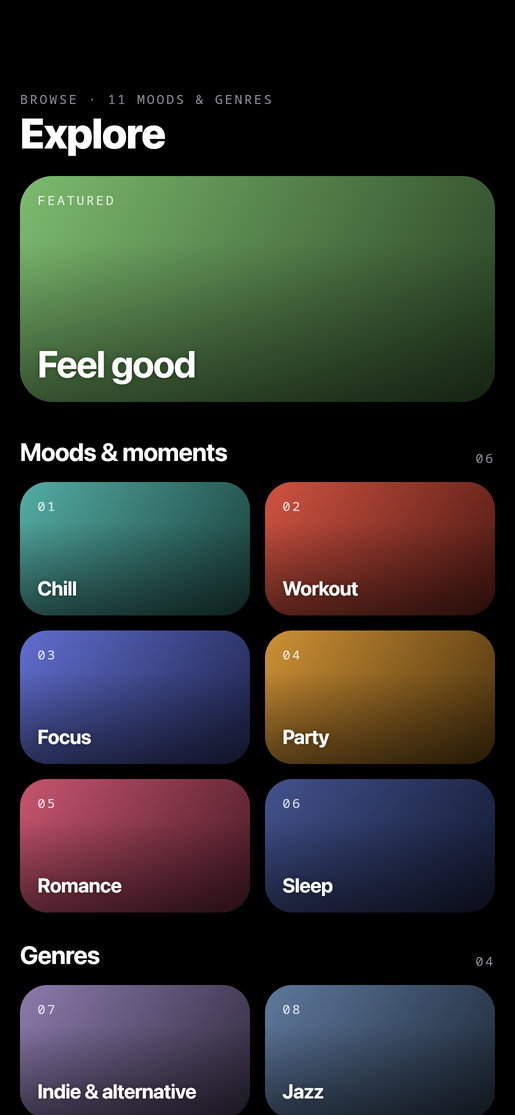
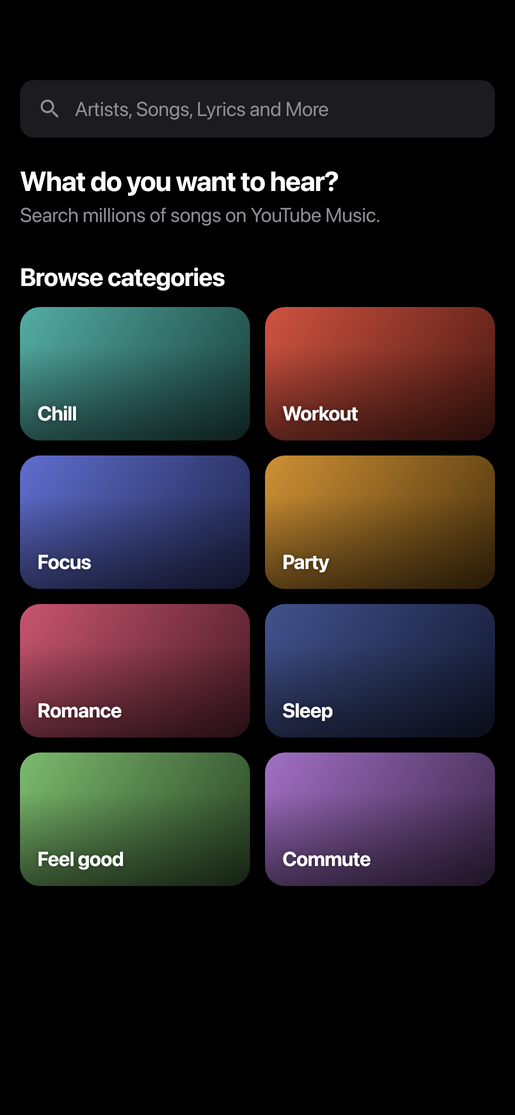
- Explore, redrawn. A ticket-print header with the number of moods and genres, a wide Featured card, and YouTube's own groupings (Moods & moments, Genres) as titled sections. Every tile is now the category's colour as a gradient with its cover fading into it, a numbered index and the title at the foot — the same tiles appear on Search's empty page and on TV.
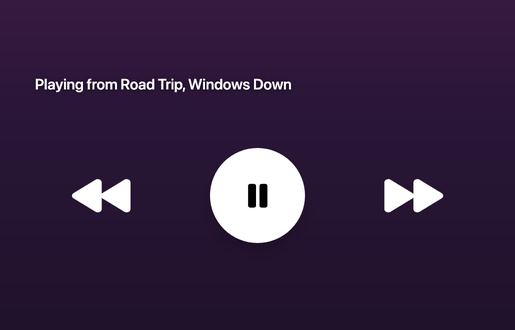
- The player, in Sonara's hand. Play and pause sit in a solid white disc that gives under the finger (the loading spinner turns inside it, so the controls never jump); elapsed and remaining time are fixed-width so the digits stop jostling; Playing from … is set in ticket print.
- Collaborative playlists
- Every playlist is found. Discovery looked at only your first 30 library playlists (24 on the web), so one joined on another device or in an older BitChord build could stay hidden; it now checks up to 150, and remembers which playlists are plain so a refresh doesn't browse them all again.
- Riding out YouTube's hiccups. A 429 Too Many Requests or a momentary 5xx from YouTube Music is asked again after the pause the server names (or a doubling one), instead of silently dropping that playlist from your list — on Android, desktop and web.
- Right song counts. Playlists over a hundred songs showed their first page's count until opened; the count now comes from the playlist's own header.
- Compatible with BitChord PlusPC. Invite links stay the plain
music.youtube.comlinks every version (and YouTube Music itself) opens, and the oldbitchord://links still work. On Windows, 2.0.0 and 2.1.0 had moved the collaborative state to a newSonarafolder, so an upgraded install lost its tracked playlists and invite links; it reads the originalBitChordfolder again, and keeps anything already saved underSonara. Desktop downloads go to your existingMusic/BitChordfolder when you have one.
Sonara v2.1.0
Sonara's own look — Android, Android Auto, Android TV, Wear OS, macOS (Apple Silicon & Intel), Windows, Linux & Web
Sonara v2.1.3
733b8f0
Inventor365
Yuki
Sonara v2.1.3 (versionCode = 52)
Two new looks, Vice and Doom; Data Saver and Low Power Mode; smoother motion; sign in with the accounts already on your phone.
What's new in 2.1.3
- Themes. Settings → Appearance → Theme now offers Vice — neon dusk, a synthwave sun over palms, hot pink and sunset orange — and Doom — cold steel, chamfered plates and an emerald glow — beside the original Sonara. Each theme restyles every screen, the player's progress bar and lyric glow, the Sonara Pass and the welcome screen, and brings its own home-screen icon (changed when you leave the app; turn Match app icon off to keep yours). You can also pick a theme from the first screen of a fresh install.
- Data Saver. Off, On or On mobile data (it also follows Android's own Data Saver). It caps audio quality, turns music video into a still banner, loads smaller artwork, preloads only the next song and holds updates and background sync for Wi-Fi.
- Low Power Mode. Manual or automatic — at a battery level you choose or with the system battery saver — and off again when you plug in. It caps the screen at 60 Hz, reduces animation and blur, stills animated covers and the idle Home page, and pauses background work. Playback itself is never limited.
- A modes button in the top bar shows which of Data Saver, Low Power and High Performance is on and switches them in one tap.
- Smoother motion. A Refresh rate setting (Adaptive, or a fixed rate your screen supports); Adaptive rests at 60 Hz and goes to the top rate the moment you touch or something moves. Page and tab changes have new transitions. High Performance now boosts on motion instead of holding the top rate, which was the cause of judder.
- Video off. The video quality menu has a Video off (static banner) choice that releases the video entirely while the audio keeps playing.
- Sign in with an account already on your phone. Sign in with Google opens Android's account chooser; the web sign-in is still there behind it.
- Import from Amazon Music by pasting a playlist's track list or a CSV export.
- Tab labels under the bottom bar's icons, on by default.
- Fixed: the full player could show a different song from the one actually playing after a track switched to its audio or video version mid-way.
Sonara v2.1.2
Import from Apple Music, a calmer player, clearer tiles.
What's new in 2.1.2
- Import Apple Music playlists. A new Import Apple Music tile beside Import Spotify in Library. Paste a public playlist link (
music.apple.com/…/playlist/…, editorial or shared from your library); its songs are matched on YouTube Music and saved as a new playlist, with any that couldn't be found listed. Either link works in either dialog, on Android and desktop. - The player's type, back in one family. Playing from … and the elapsed and remaining times are set in the player's own face again rather than in monospace; the times use tabular figures, so they still hold their place as they tick.
- Explore and Search tiles hold their cover art further back, so words printed on a cover never compete with the tile's own title.
- Category pages carry the same EXPLORE · N PLAYLISTS label as Explore.
- The development build is named Sonara Dev everywhere, including the permission prompts.
Sonara v2.1.1
Explore and the player join the redesign; collaborative playlists find every playlist, ride out YouTube's hiccups, and stay compatible with BitChord PlusPC.
What's new in 2.1.1
- Explore, redrawn. A ticket-print header with the number of moods and genres, a wide Featured card, and YouTube's own groupings (Moods & moments, Genres) as titled sections. Every tile is now the category's colour as a gradient with its cover fading into it, a numbered index and the title at the foot — the same tiles appear on Search's empty page and on TV.
- The player, in Sonara's hand. Play and pause sit in a solid white disc that gives under the finger (the loading spinner turns inside it, so the controls never jump); elapsed and remaining time are fixed-width so the digits stop jostling; Playing from … is set in ticket print.
- Collaborative playlists
- Every playlist is found. Discovery looked at only your first 30 library playlists (24 on the web), so one joined on another device or in an older BitChord build could stay hidden; it now checks up to 150, and remembers which playlists are plain so a refresh doesn't browse them all again.
- Riding out YouTube's hiccups. A 429 Too Many Requests or a momentary 5xx from YouTube Music is asked again after the pause the server names (or a doubling one), instead of silently dropping that playlist from your list — on Android, desktop and web.
- Right song counts. Playlists over a hundred songs showed their first page's count until opened; the count now comes from the playlist's own header.
- Compatible with BitChord PlusPC. Invite links stay the plain
music.youtube.comlinks every version (and YouTube Music itself) opens, and the oldbitchord://links still work. On Windows, 2.0.0 and 2.1.0 had moved the collaborative state to a newSonarafolder, so an upgraded install lost its tracked playlists and invite links; it reads the originalBitChordfolder again, and keeps anything already saved underSonara. Desktop downloads go to your existingMusic/BitChordfolder when you have one.
Sonara v2.1.0
Sonara's own look — Android, Android Auto, Android TV, Wear OS, macOS (Apple Silicon & Intel), Windows, Linux & Web
This is where Sonara stops looking like the player it grew out of. BitChord PlusPC became Sonara in v2.0.0; this release gives it a face of its own, and it installs over any BitChord PlusPC or Sonara build in place.
What's new in 2.1.0
- A design language of its own. Ink and grey, the mark's red used sparingly, monospace "ticket print" for small labels, and floating cards with generous corners in place of iOS-style lists. Switches glow Sonara red; the tab bar shows icons only (labels can be turned back on in Settings → Appearance).
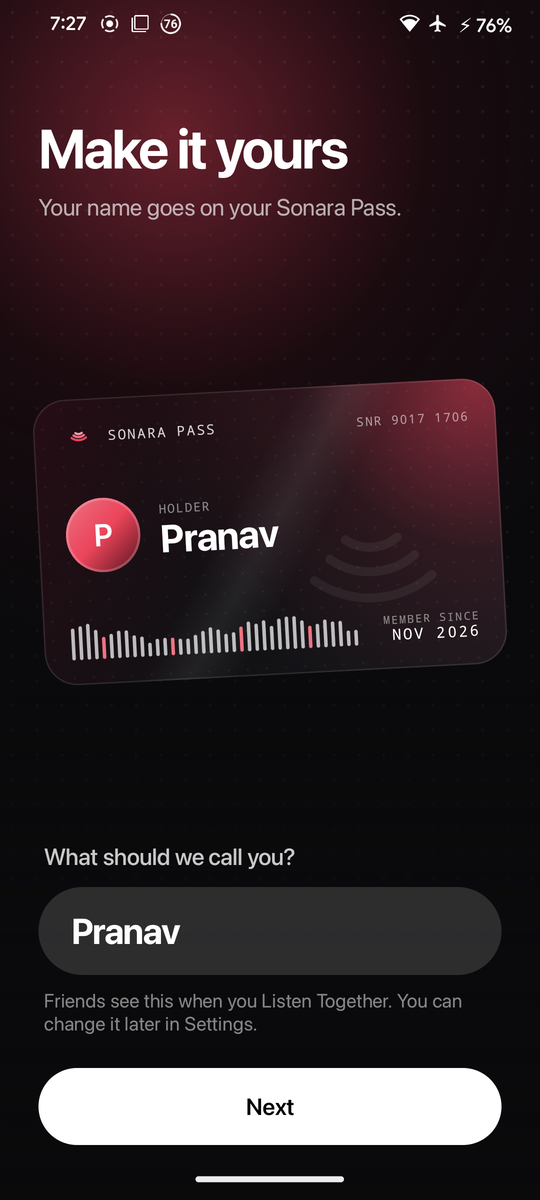
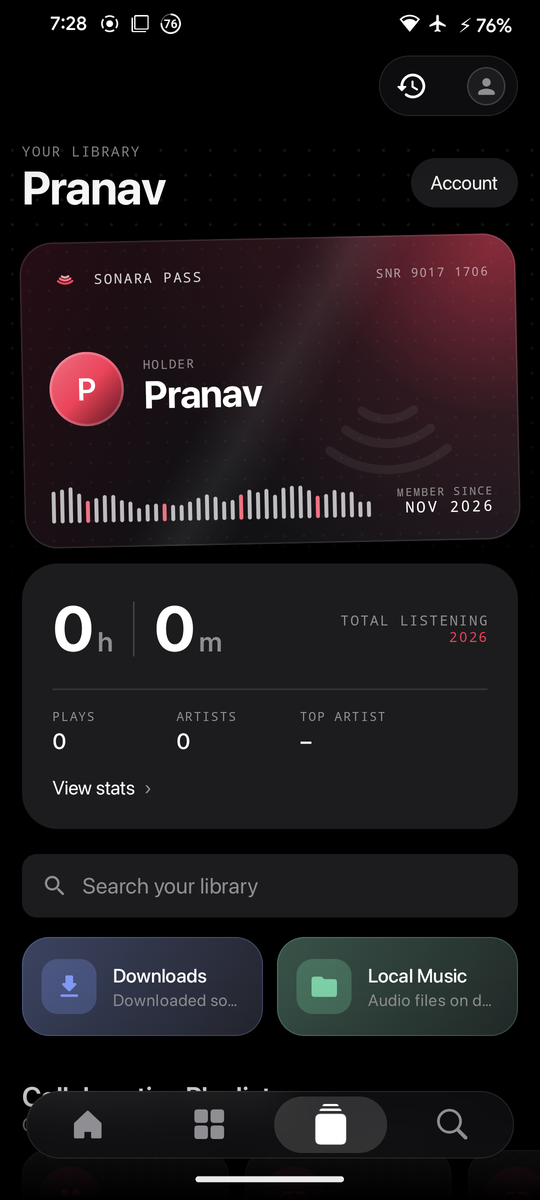
- The Sonara Pass. Your card: your name, a pass number, the month you joined, and a soundprint — a bar code of sound drawn from your pass number, so no two are alike.
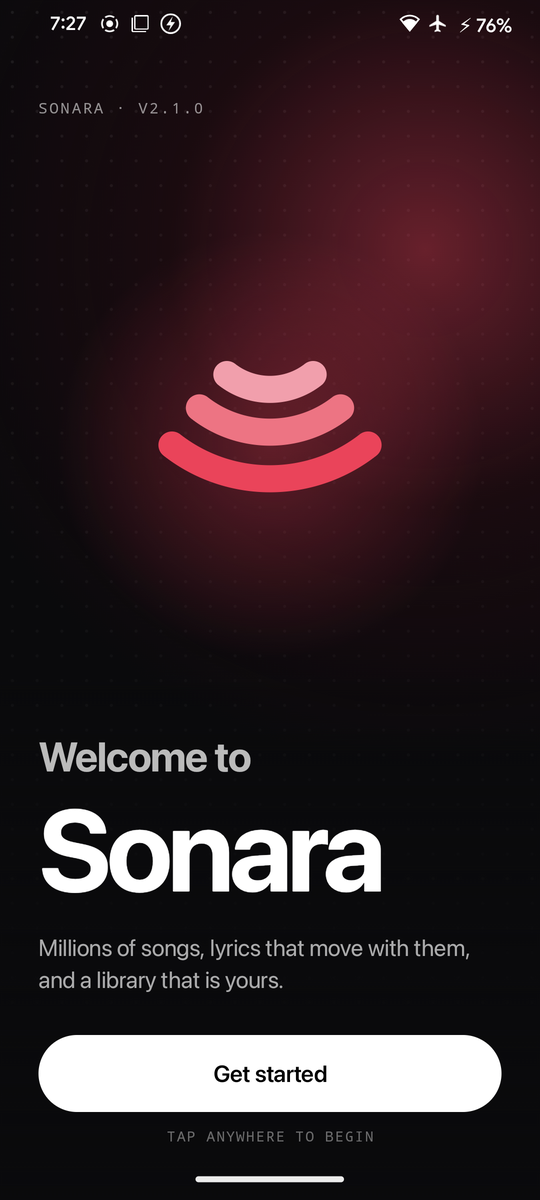
- A new welcome. A title page with the mark drawn live; then Make it yours, where the Pass fills in as you type your name; then sign-in, with your finished Pass beside it.
- Library is your profile. Your Pass at the top, then your listening time in hours and minutes with plays, artists and your top artist — one tap from the full stats.
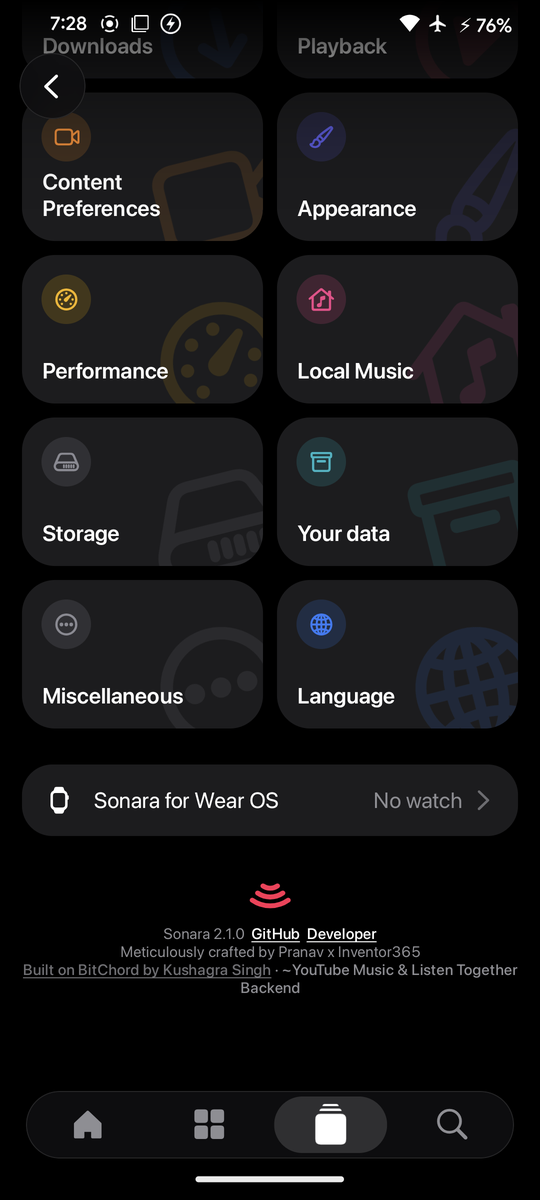
- Settings opens on a grid of tiles, each with its own colour and a large faint glyph; group headings are set in ticket print and cards have softer corners.
- Tiles for actions. New playlist, Import Spotify, New collaborative and Join via invite are drawn as tiles of their own rather than blank grey squares.
- Home greets you by the name on your Pass, and its sign-in card is made from the Pass's materials.
From 2.0.0
- Home greets you by time of day; Search opens on a grid of moods and genres; Settings leads with your account.
- Collaborative playlists: any Google account can join; removing, leaving and deleting ask first.
A new name
Sonara is the app that was BitChord PlusPC, a fork of kushagrasinghx/BitChord. It now has its own name, mark and roadmap, and is developed by Pranav (@Inventor365). The player core, lyrics and streaming it is built on are the work of Kushagra Singh and the BitChord contributors, used under the GPL-3.0 with thanks.
Updating from BitChord PlusPC keeps everything. Same application id, same signing certificate: on Android, Windows and Linux this installs over v1.10.x in place, with your library, downloads, settings and sign-in intact. Existing bitchord:// invite and party links keep working.
What's new
- A new mark and a livelier welcome: the first screen draws the Sonara arcs in and lets them breathe.
- Home greets you by the time of day and by name, under the mark in its own red, with a soft glow at the head of the page. Shelf headings are larger, and Show all is a pill you can actually hit.
- Search opens on a question rather than a blank page — What do you want to hear? — with a grid of mood and genre categories to browse (tap one to open it in Explore). Result sections have clearer headings.
- Settings leads with your account card (picture, name, address) and gives every category a coloured icon tile, so a row is found by colour before it is read. The foot of the page is signed with the Sonara ...
Sonara v2.1.2
6675e6a
Inventor365
Yuki
Sonara v2.1.2 (versionCode = 51)
Import from Apple Music, a calmer player, clearer tiles.
What's new in 2.1.2
- Import Apple Music playlists. A new Import Apple Music tile beside Import Spotify in Library. Paste a public playlist link (
music.apple.com/…/playlist/…, editorial or shared from your library); its songs are matched on YouTube Music and saved as a new playlist, with any that couldn't be found listed. Either link works in either dialog, on Android and desktop. - The player's type, back in one family. Playing from … and the elapsed and remaining times are set in the player's own face again rather than in monospace; the times use tabular figures, so they still hold their place as they tick.
- Explore and Search tiles hold their cover art further back, so words printed on a cover never compete with the tile's own title.
- Category pages carry the same EXPLORE · N PLAYLISTS label as Explore.
- The development build is named Sonara Dev everywhere, including the permission prompts.
Sonara v2.1.1
Explore and the player join the redesign; collaborative playlists find every playlist, ride out YouTube's hiccups, and stay compatible with BitChord PlusPC.
What's new in 2.1.1
- Explore, redrawn. A ticket-print header with the number of moods and genres, a wide Featured card, and YouTube's own groupings (Moods & moments, Genres) as titled sections. Every tile is now the category's colour as a gradient with its cover fading into it, a numbered index and the title at the foot — the same tiles appear on Search's empty page and on TV.
- The player, in Sonara's hand. Play and pause sit in a solid white disc that gives under the finger (the loading spinner turns inside it, so the controls never jump); elapsed and remaining time are fixed-width so the digits stop jostling; Playing from … is set in ticket print.
- Collaborative playlists
- Every playlist is found. Discovery looked at only your first 30 library playlists (24 on the web), so one joined on another device or in an older BitChord build could stay hidden; it now checks up to 150, and remembers which playlists are plain so a refresh doesn't browse them all again.
- Riding out YouTube's hiccups. A 429 Too Many Requests or a momentary 5xx from YouTube Music is asked again after the pause the server names (or a doubling one), instead of silently dropping that playlist from your list — on Android, desktop and web.
- Right song counts. Playlists over a hundred songs showed their first page's count until opened; the count now comes from the playlist's own header.
- Compatible with BitChord PlusPC. Invite links stay the plain
music.youtube.comlinks every version (and YouTube Music itself) opens, and the oldbitchord://links still work. On Windows, 2.0.0 and 2.1.0 had moved the collaborative state to a newSonarafolder, so an upgraded install lost its tracked playlists and invite links; it reads the originalBitChordfolder again, and keeps anything already saved underSonara. Desktop downloads go to your existingMusic/BitChordfolder when you have one.
Sonara v2.1.0
Sonara's own look — Android, Android Auto, Android TV, Wear OS, macOS (Apple Silicon & Intel), Windows, Linux & Web
This is where Sonara stops looking like the player it grew out of. BitChord PlusPC became Sonara in v2.0.0; this release gives it a face of its own, and it installs over any BitChord PlusPC or Sonara build in place.
What's new in 2.1.0
- A design language of its own. Ink and grey, the mark's red used sparingly, monospace "ticket print" for small labels, and floating cards with generous corners in place of iOS-style lists. Switches glow Sonara red; the tab bar shows icons only (labels can be turned back on in Settings → Appearance).
- The Sonara Pass. Your card: your name, a pass number, the month you joined, and a soundprint — a bar code of sound drawn from your pass number, so no two are alike.
- A new welcome. A title page with the mark drawn live; then Make it yours, where the Pass fills in as you type your name; then sign-in, with your finished Pass beside it.
- Library is your profile. Your Pass at the top, then your listening time in hours and minutes with plays, artists and your top artist — one tap from the full stats.
- Settings opens on a grid of tiles, each with its own colour and a large faint glyph; group headings are set in ticket print and cards have softer corners.
- Tiles for actions. New playlist, Import Spotify, New collaborative and Join via invite are drawn as tiles of their own rather than blank grey squares.
- Home greets you by the name on your Pass, and its sign-in card is made from the Pass's materials.
From 2.0.0
- Home greets you by time of day; Search opens on a grid of moods and genres; Settings leads with your account.
- Collaborative playlists: any Google account can join; removing, leaving and deleting ask first.
A new name
Sonara is the app that was BitChord PlusPC, a fork of kushagrasinghx/BitChord. It now has its own name, mark and roadmap, and is developed by Pranav (@Inventor365). The player core, lyrics and streaming it is built on are the work of Kushagra Singh and the BitChord contributors, used under the GPL-3.0 with thanks.
Updating from BitChord PlusPC keeps everything. Same application id, same signing certificate: on Android, Windows and Linux this installs over v1.10.x in place, with your library, downloads, settings and sign-in intact. Existing bitchord:// invite and party links keep working.
What's new
- A new mark and a livelier welcome: the first screen draws the Sonara arcs in and lets them breathe.
- Home greets you by the time of day and by name, under the mark in its own red, with a soft glow at the head of the page. Shelf headings are larger, and Show all is a pill you can actually hit.
- Search opens on a question rather than a blank page — What do you want to hear? — with a grid of mood and genre categories to browse (tap one to open it in Explore). Result sections have clearer headings.
- Settings leads with your account card (picture, name, address) and gives every category a coloured icon tile, so a row is found by colour before it is read. The foot of the page is signed with the Sonara mark and credits the BitChord project it is built on.
- Library: the folder list is now a grid of tinted cards that ease in and give under the finger.
- Motion you can feel: shelf, top-pick and mood cards respond to touch throughout the app, on 60, 90 and 120 Hz displays alike (Settings → Appearance keeps the high-refresh switch).
- Collaborative playlists
- The page glows in the playlist's own colour, the cover sits on a soft shadow, and rows slide into place as songs are added, removed or moved.
- Any Google account can join: one that has never used YouTube is given its YouTube channel automatically.
- Removing a song, leaving a playlist and deleting one ask first, with haptics and a confirmation.
- Everything from 1.10.x: reliable invite joins, conversion that carries every song, title / description / cover editing, instant adds.
- Discord: the card shows the album when there is no audio-format line to show.
macOS
The .dmg, .pkg and .zip are built on macOS and each is installed and launched on a Mac before release. The app is ad-hoc signed and not notarized by Apple, so macOS asks once:
- Open the
.dmgand drag Sonara to Applications (or run the.pkg). - Open Sonara once; macOS will refuse.
- System Settings → Privacy & Security → Open Anyway. (Or in Terminal:
xattr -dr com.apple.quarantine /Applications/Sonara.app.)
Sonara installs as its own app on macOS; an older BitChord.app can be moved to the Bin afterwards. Pick arm64 for Apple Silicon and x64 for Intel.
Downloads
- Android phone & Auto:
Sonara-v2.0.0.apk(universal) or thearm64-v8a/armeabi-v7a/x86_64build - Android TV / Fire TV:
SonaraTV-v2.0.0.apkor the per-ABI builds - Wear OS:
SonaraWear-v2.0.0.apk(also bundled in the phone app) - macOS:
Sonara-2.0.0-macos-arm64.dmg/.pkg/.zip,Sonara-2.0.0-macos-x64.dmg/.pkg/.zip - Windows:
Sonara-2.0.0-windows-x64-setup.exe,.msi,-portable.zip - Linux:
Sonara-2.0.0-linux-x86_64.AppImage,-linux-amd64.deb,-linux-x86_64.rpm
Signed with the permanent release certificate (SHA-256: d6d9c697c070a5ca5f4e172a13b6263fe2f3a35fff5d110596509126320c3bb2).
Full history: CHANGELOG.md
Sonara v2.1.1
11ae44d
Inventor365
Yuki
Sonara v2.1.1 (versionCode = 50)
Explore and the player join the redesign; collaborative playlists find every playlist, ride out YouTube's hiccups, and stay compatible with BitChord PlusPC.
What's new in 2.1.1
- Explore, redrawn. A ticket-print header with the number of moods and genres, a wide Featured card, and YouTube's own groupings (Moods & moments, Genres) as titled sections. Every tile is now the category's colour as a gradient with its cover fading into it, a numbered index and the title at the foot — the same tiles appear on Search's empty page and on TV.
- The player, in Sonara's hand. Play and pause sit in a solid white disc that gives under the finger (the loading spinner turns inside it, so the controls never jump); elapsed and remaining time are fixed-width so the digits stop jostling; Playing from … is set in ticket print.
- Collaborative playlists
- Every playlist is found. Discovery looked at only your first 30 library playlists (24 on the web), so one joined on another device or in an older BitChord build could stay hidden; it now checks up to 150, and remembers which playlists are plain so a refresh doesn't browse them all again.
- Riding out YouTube's hiccups. A 429 Too Many Requests or a momentary 5xx from YouTube Music is asked again after the pause the server names (or a doubling one), instead of silently dropping that playlist from your list — on Android, desktop and web.
- Right song counts. Playlists over a hundred songs showed their first page's count until opened; the count now comes from the playlist's own header.
- Compatible with BitChord PlusPC. Invite links stay the plain
music.youtube.comlinks every version (and YouTube Music itself) opens, and the oldbitchord://links still work. On Windows, 2.0.0 and 2.1.0 had moved the collaborative state to a newSonarafolder, so an upgraded install lost its tracked playlists and invite links; it reads the originalBitChordfolder again, and keeps anything already saved underSonara. Desktop downloads go to your existingMusic/BitChordfolder when you have one.
Sonara v2.1.0
Sonara's own look — Android, Android Auto, Android TV, Wear OS, macOS (Apple Silicon & Intel), Windows, Linux & Web
This is where Sonara stops looking like the player it grew out of. BitChord PlusPC became Sonara in v2.0.0; this release gives it a face of its own, and it installs over any BitChord PlusPC or Sonara build in place.
What's new in 2.1.0
- A design language of its own. Ink and grey, the mark's red used sparingly, monospace "ticket print" for small labels, and floating cards with generous corners in place of iOS-style lists. Switches glow Sonara red; the tab bar shows icons only (labels can be turned back on in Settings → Appearance).
- The Sonara Pass. Your card: your name, a pass number, the month you joined, and a soundprint — a bar code of sound drawn from your pass number, so no two are alike.
- A new welcome. A title page with the mark drawn live; then Make it yours, where the Pass fills in as you type your name; then sign-in, with your finished Pass beside it.
- Library is your profile. Your Pass at the top, then your listening time in hours and minutes with plays, artists and your top artist — one tap from the full stats.
- Settings opens on a grid of tiles, each with its own colour and a large faint glyph; group headings are set in ticket print and cards have softer corners.
- Tiles for actions. New playlist, Import Spotify, New collaborative and Join via invite are drawn as tiles of their own rather than blank grey squares.
- Home greets you by the name on your Pass, and its sign-in card is made from the Pass's materials.
From 2.0.0
- Home greets you by time of day; Search opens on a grid of moods and genres; Settings leads with your account.
- Collaborative playlists: any Google account can join; removing, leaving and deleting ask first.
A new name
Sonara is the app that was BitChord PlusPC, a fork of kushagrasinghx/BitChord. It now has its own name, mark and roadmap, and is developed by Pranav (@Inventor365). The player core, lyrics and streaming it is built on are the work of Kushagra Singh and the BitChord contributors, used under the GPL-3.0 with thanks.
Updating from BitChord PlusPC keeps everything. Same application id, same signing certificate: on Android, Windows and Linux this installs over v1.10.x in place, with your library, downloads, settings and sign-in intact. Existing bitchord:// invite and party links keep working.
What's new
- A new mark and a livelier welcome: the first screen draws the Sonara arcs in and lets them breathe.
- Home greets you by the time of day and by name, under the mark in its own red, with a soft glow at the head of the page. Shelf headings are larger, and Show all is a pill you can actually hit.
- Search opens on a question rather than a blank page — What do you want to hear? — with a grid of mood and genre categories to browse (tap one to open it in Explore). Result sections have clearer headings.
- Settings leads with your account card (picture, name, address) and gives every category a coloured icon tile, so a row is found by colour before it is read. The foot of the page is signed with the Sonara mark and credits the BitChord project it is built on.
- Library: the folder list is now a grid of tinted cards that ease in and give under the finger.
- Motion you can feel: shelf, top-pick and mood cards respond to touch throughout the app, on 60, 90 and 120 Hz displays alike (Settings → Appearance keeps the high-refresh switch).
- Collaborative playlists
- The page glows in the playlist's own colour, the cover sits on a soft shadow, and rows slide into place as songs are added, removed or moved.
- Any Google account can join: one that has never used YouTube is given its YouTube channel automatically.
- Removing a song, leaving a playlist and deleting one ask first, with haptics and a confirmation.
- Everything from 1.10.x: reliable invite joins, conversion that carries every song, title / description / cover editing, instant adds.
- Discord: the card shows the album when there is no audio-format line to show.
macOS
The .dmg, .pkg and .zip are built on macOS and each is installed and launched on a Mac before release. The app is ad-hoc signed and not notarized by Apple, so macOS asks once:
- Open the
.dmgand drag Sonara to Applications (or run the.pkg). - Open Sonara once; macOS will refuse.
- System Settings → Privacy & Security → Open Anyway. (Or in Terminal:
xattr -dr com.apple.quarantine /Applications/Sonara.app.)
Sonara installs as its own app on macOS; an older BitChord.app can be moved to the Bin afterwards. Pick arm64 for Apple Silicon and x64 for Intel.
Downloads
- Android phone & Auto:
Sonara-v2.0.0.apk(universal) or thearm64-v8a/armeabi-v7a/x86_64build - Android TV / Fire TV:
SonaraTV-v2.0.0.apkor the per-ABI builds - Wear OS:
SonaraWear-v2.0.0.apk(also bundled in the phone app) - macOS:
Sonara-2.0.0-macos-arm64.dmg/.pkg/.zip,Sonara-2.0.0-macos-x64.dmg/.pkg/.zip - Windows:
Sonara-2.0.0-windows-x64-setup.exe,.msi,-portable.zip - Linux:
Sonara-2.0.0-linux-x86_64.AppImage,-linux-amd64.deb,-linux-x86_64.rpm
Signed with the permanent release certificate (SHA-256: d6d9c697c070a5ca5f4e172a13b6263fe2f3a35fff5d110596509126320c3bb2).
Full history: CHANGELOG.md
Sonara v2.1.0
fd47b73
Inventor365
Yuki
Sonara v2.1.0 (versionCode = 49)
Sonara's own look — Android, Android Auto, Android TV, Wear OS, macOS (Apple Silicon & Intel), Windows, Linux & Web
This is where Sonara stops looking like the player it grew out of. BitChord PlusPC became Sonara in v2.0.0; this release gives it a face of its own, and it installs over any BitChord PlusPC or Sonara build in place.
What's new in 2.1.0
- A design language of its own. Ink and grey, the mark's red used sparingly, monospace "ticket print" for small labels, and floating cards with generous corners in place of iOS-style lists. Switches glow Sonara red; the tab bar shows icons only (labels can be turned back on in Settings → Appearance).
- The Sonara Pass. Your card: your name, a pass number, the month you joined, and a soundprint — a bar code of sound drawn from your pass number, so no two are alike.
- A new welcome. A title page with the mark drawn live; then Make it yours, where the Pass fills in as you type your name; then sign-in, with your finished Pass beside it.
- Library is your profile. Your Pass at the top, then your listening time in hours and minutes with plays, artists and your top artist — one tap from the full stats.
- Settings opens on a grid of tiles, each with its own colour and a large faint glyph; group headings are set in ticket print and cards have softer corners.
- Tiles for actions. New playlist, Import Spotify, New collaborative and Join via invite are drawn as tiles of their own rather than blank grey squares.
- Home greets you by the name on your Pass, and its sign-in card is made from the Pass's materials.
From 2.0.0
- Home greets you by time of day; Search opens on a grid of moods and genres; Settings leads with your account.
- Collaborative playlists: any Google account can join; removing, leaving and deleting ask first.
A new name
Sonara is the app that was BitChord PlusPC, a fork of kushagrasinghx/BitChord. It now has its own name, mark and roadmap, and is developed by Pranav (@Inventor365). The player core, lyrics and streaming it is built on are the work of Kushagra Singh and the BitChord contributors, used under the GPL-3.0 with thanks.
Updating from BitChord PlusPC keeps everything. Same application id, same signing certificate: on Android, Windows and Linux this installs over v1.10.x in place, with your library, downloads, settings and sign-in intact. Existing bitchord:// invite and party links keep working.
What's new
- A new mark and a livelier welcome: the first screen draws the Sonara arcs in and lets them breathe.
- Home greets you by the time of day and by name, under the mark in its own red, with a soft glow at the head of the page. Shelf headings are larger, and Show all is a pill you can actually hit.
- Search opens on a question rather than a blank page — What do you want to hear? — with a grid of mood and genre categories to browse (tap one to open it in Explore). Result sections have clearer headings.
- Settings leads with your account card (picture, name, address) and gives every category a coloured icon tile, so a row is found by colour before it is read. The foot of the page is signed with the Sonara mark and credits the BitChord project it is built on.
- Library: the folder list is now a grid of tinted cards that ease in and give under the finger.
- Motion you can feel: shelf, top-pick and mood cards respond to touch throughout the app, on 60, 90 and 120 Hz displays alike (Settings → Appearance keeps the high-refresh switch).
- Collaborative playlists
- The page glows in the playlist's own colour, the cover sits on a soft shadow, and rows slide into place as songs are added, removed or moved.
- Any Google account can join: one that has never used YouTube is given its YouTube channel automatically.
- Removing a song, leaving a playlist and deleting one ask first, with haptics and a confirmation.
- Everything from 1.10.x: reliable invite joins, conversion that carries every song, title / description / cover editing, instant adds.
- Discord: the card shows the album when there is no audio-format line to show.
macOS
The .dmg, .pkg and .zip are built on macOS and each is installed and launched on a Mac before release. The app is ad-hoc signed and not notarized by Apple, so macOS asks once:
- Open the
.dmgand drag Sonara to Applications (or run the.pkg). - Open Sonara once; macOS will refuse.
- System Settings → Privacy & Security → Open Anyway. (Or in Terminal:
xattr -dr com.apple.quarantine /Applications/Sonara.app.)
Sonara installs as its own app on macOS; an older BitChord.app can be moved to the Bin afterwards. Pick arm64 for Apple Silicon and x64 for Intel.
Downloads
- Android phone & Auto:
Sonara-v2.0.0.apk(universal) or thearm64-v8a/armeabi-v7a/x86_64build - Android TV / Fire TV:
SonaraTV-v2.0.0.apkor the per-ABI builds - Wear OS:
SonaraWear-v2.0.0.apk(also bundled in the phone app) - macOS:
Sonara-2.0.0-macos-arm64.dmg/.pkg/.zip,Sonara-2.0.0-macos-x64.dmg/.pkg/.zip - Windows:
Sonara-2.0.0-windows-x64-setup.exe,.msi,-portable.zip - Linux:
Sonara-2.0.0-linux-x86_64.AppImage,-linux-amd64.deb,-linux-x86_64.rpm
Signed with the permanent release certificate (SHA-256: d6d9c697c070a5ca5f4e172a13b6263fe2f3a35fff5d110596509126320c3bb2).
Full history: CHANGELOG.md
Sonara v2.0.0
4e99a07
Inventor365
Yuki
Sonara v2.0.0 (versionCode = 48)
BitChord PlusPC is now Sonara — Android, Android Auto, Android TV, Wear OS, macOS (Apple Silicon & Intel), Windows, Linux & Web
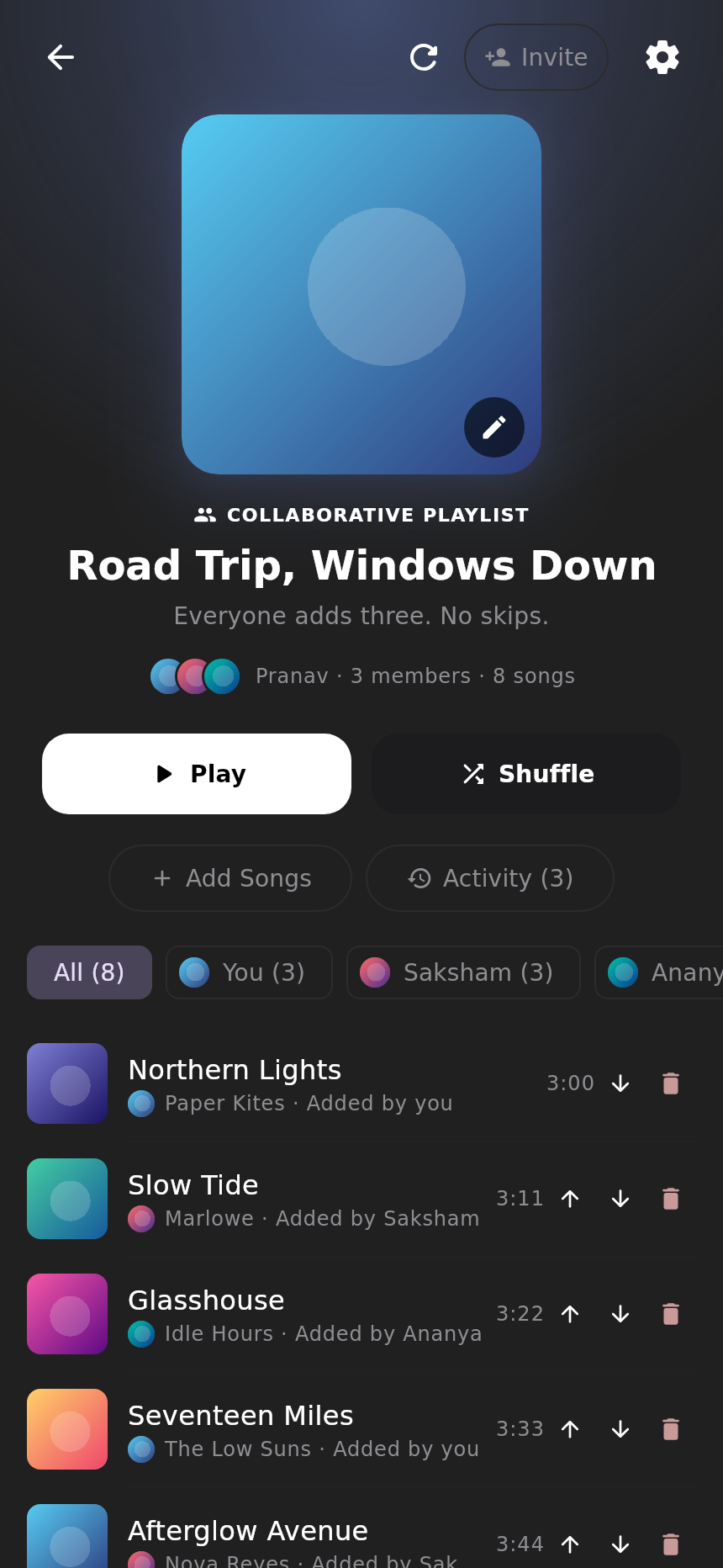
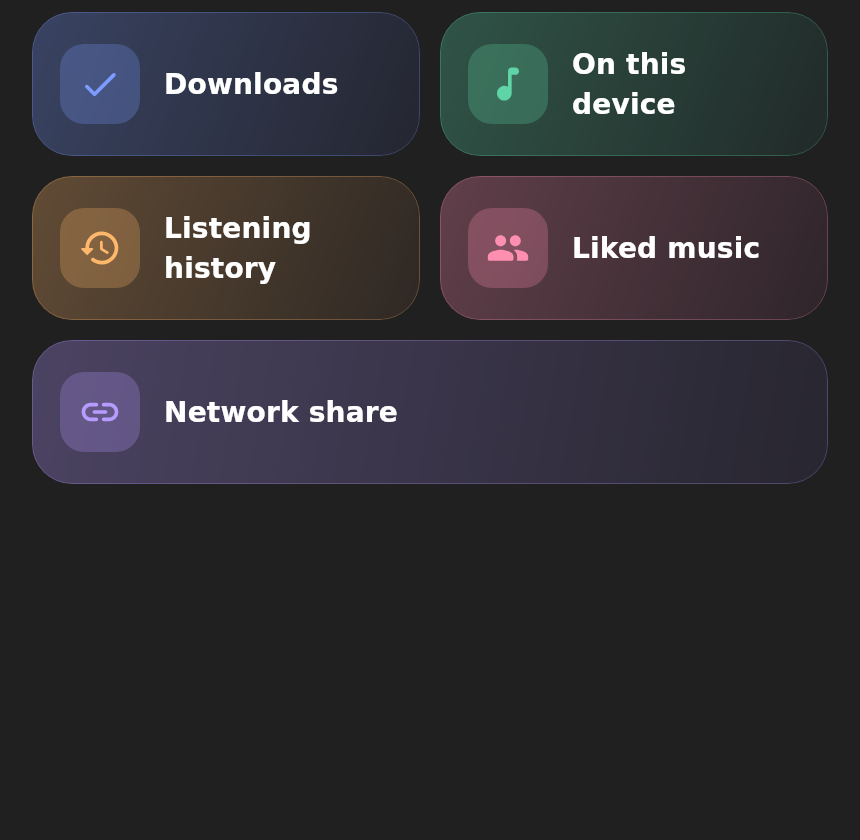
A new name
Sonara is the app that was BitChord PlusPC, a fork of kushagrasinghx/BitChord. It now has its own name, mark and roadmap, and is developed by Pranav (@Inventor365). The player core, lyrics and streaming it is built on are the work of Kushagra Singh and the BitChord contributors, used under the GPL-3.0 with thanks.
Updating from BitChord PlusPC keeps everything. Same application id, same signing certificate: on Android, Windows and Linux this installs over v1.10.x in place, with your library, downloads, settings and sign-in intact. Existing bitchord:// invite and party links keep working.
What's new
- A new mark and a livelier welcome: the first screen draws the Sonara arcs in and lets them breathe.
- Home greets you by the time of day and by name, under the mark in its own red, with a soft glow at the head of the page. Shelf headings are larger, and Show all is a pill you can actually hit.
- Search opens on a question rather than a blank page — What do you want to hear? — with a grid of mood and genre categories to browse (tap one to open it in Explore). Result sections have clearer headings.
- Settings leads with your account card (picture, name, address) and gives every category a coloured icon tile, so a row is found by colour before it is read. The foot of the page is signed with the Sonara mark and credits the BitChord project it is built on.
- Library: the folder list is now a grid of tinted cards that ease in and give under the finger.
- Motion you can feel: shelf, top-pick and mood cards respond to touch throughout the app, on 60, 90 and 120 Hz displays alike (Settings → Appearance keeps the high-refresh switch).
- Collaborative playlists
- The page glows in the playlist's own colour, the cover sits on a soft shadow, and rows slide into place as songs are added, removed or moved.
- Any Google account can join: one that has never used YouTube is given its YouTube channel automatically.
- Removing a song, leaving a playlist and deleting one ask first, with haptics and a confirmation.
- Everything from 1.10.x: reliable invite joins, conversion that carries every song, title / description / cover editing, instant adds.
- Discord: the card shows the album when there is no audio-format line to show.
macOS
The .dmg, .pkg and .zip are built on macOS and each is installed and launched on a Mac before release. The app is ad-hoc signed and not notarized by Apple, so macOS asks once:
- Open the
.dmgand drag Sonara to Applications (or run the.pkg). - Open Sonara once; macOS will refuse.
- System Settings → Privacy & Security → Open Anyway. (Or in Terminal:
xattr -dr com.apple.quarantine /Applications/Sonara.app.)
Sonara installs as its own app on macOS; an older BitChord.app can be moved to the Bin afterwards. Pick arm64 for Apple Silicon and x64 for Intel.
Downloads
- Android phone & Auto:
Sonara-v2.0.0.apk(universal) or thearm64-v8a/armeabi-v7a/x86_64build - Android TV / Fire TV:
SonaraTV-v2.0.0.apkor the per-ABI builds - Wear OS:
SonaraWear-v2.0.0.apk(also bundled in the phone app) - macOS:
Sonara-2.0.0-macos-arm64.dmg/.pkg/.zip,Sonara-2.0.0-macos-x64.dmg/.pkg/.zip - Windows:
Sonara-2.0.0-windows-x64-setup.exe,.msi,-portable.zip - Linux:
Sonara-2.0.0-linux-x86_64.AppImage,-linux-amd64.deb,-linux-x86_64.rpm
Signed with the permanent release certificate (SHA-256: d6d9c697c070a5ca5f4e172a13b6263fe2f3a35fff5d110596509126320c3bb2).
Full history: CHANGELOG.md
BitChord PlusPC v1.10.6 (Collaborative Playlists)
e361e0b
Inventor365
Yuki
BitChord PlusPC v1.10.6 (versionCode = 47)
Collaborative playlists that work end to end — Android, Android Auto, Android TV, Wear OS, macOS (Apple Silicon & Intel), Windows, Linux & Web
This release replaces v1.10.1 and carries everything from 1.10.1 through 1.10.6.
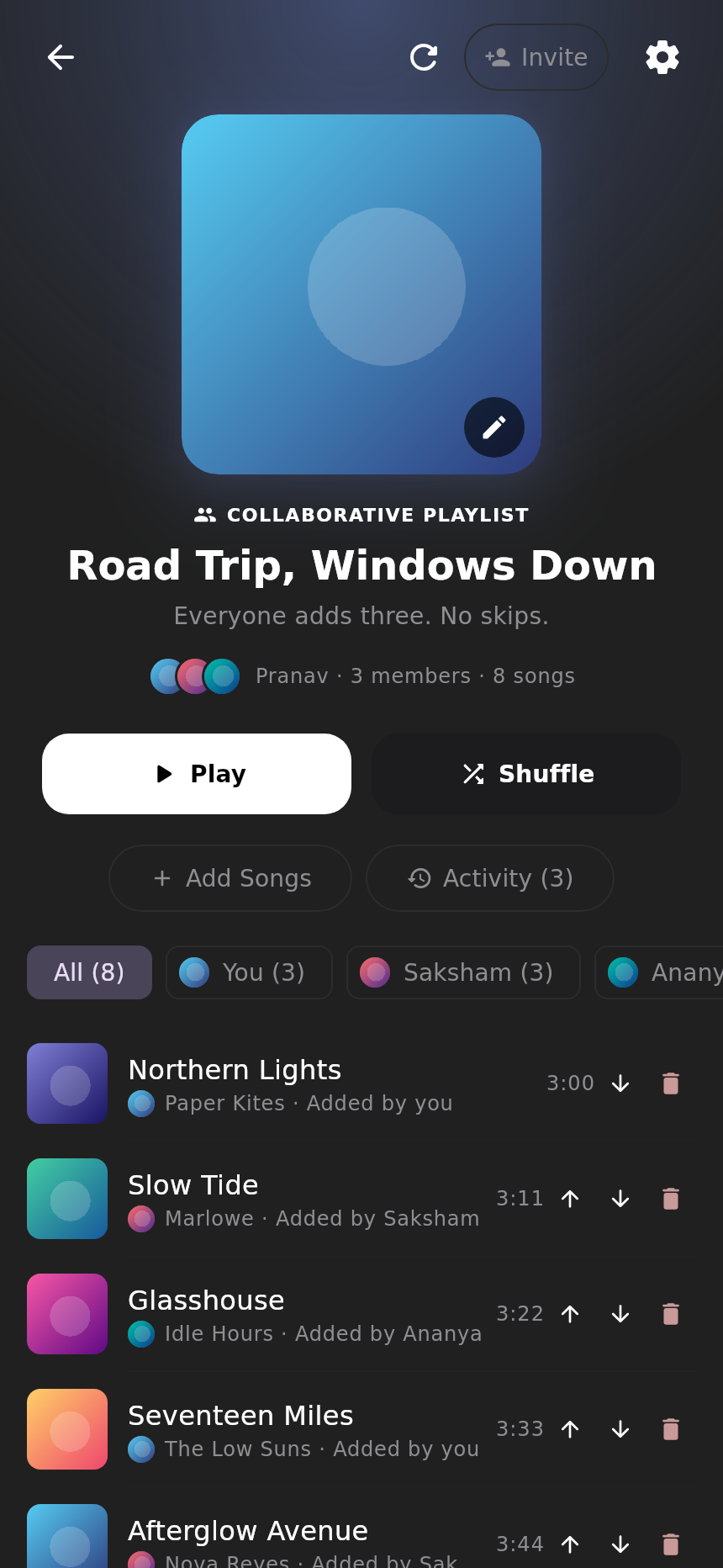
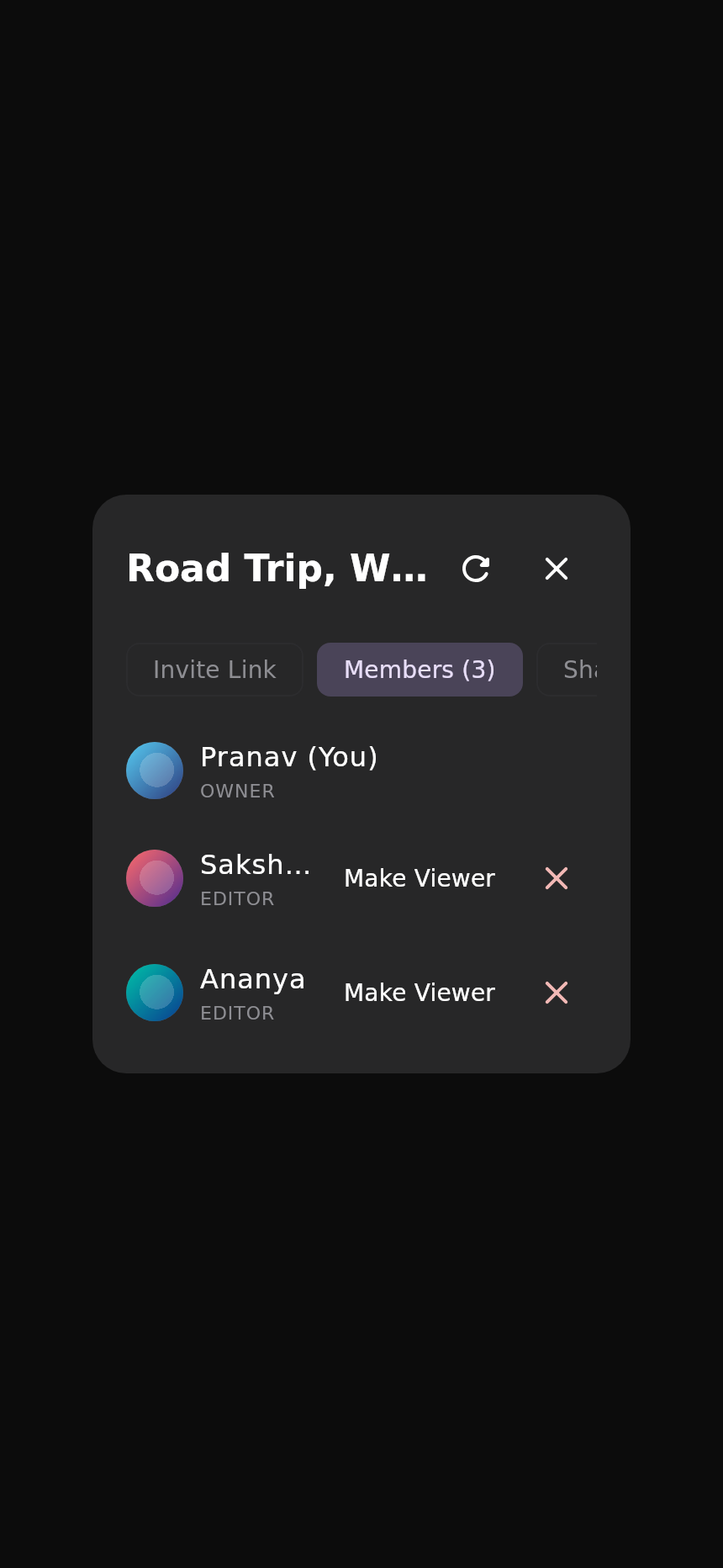
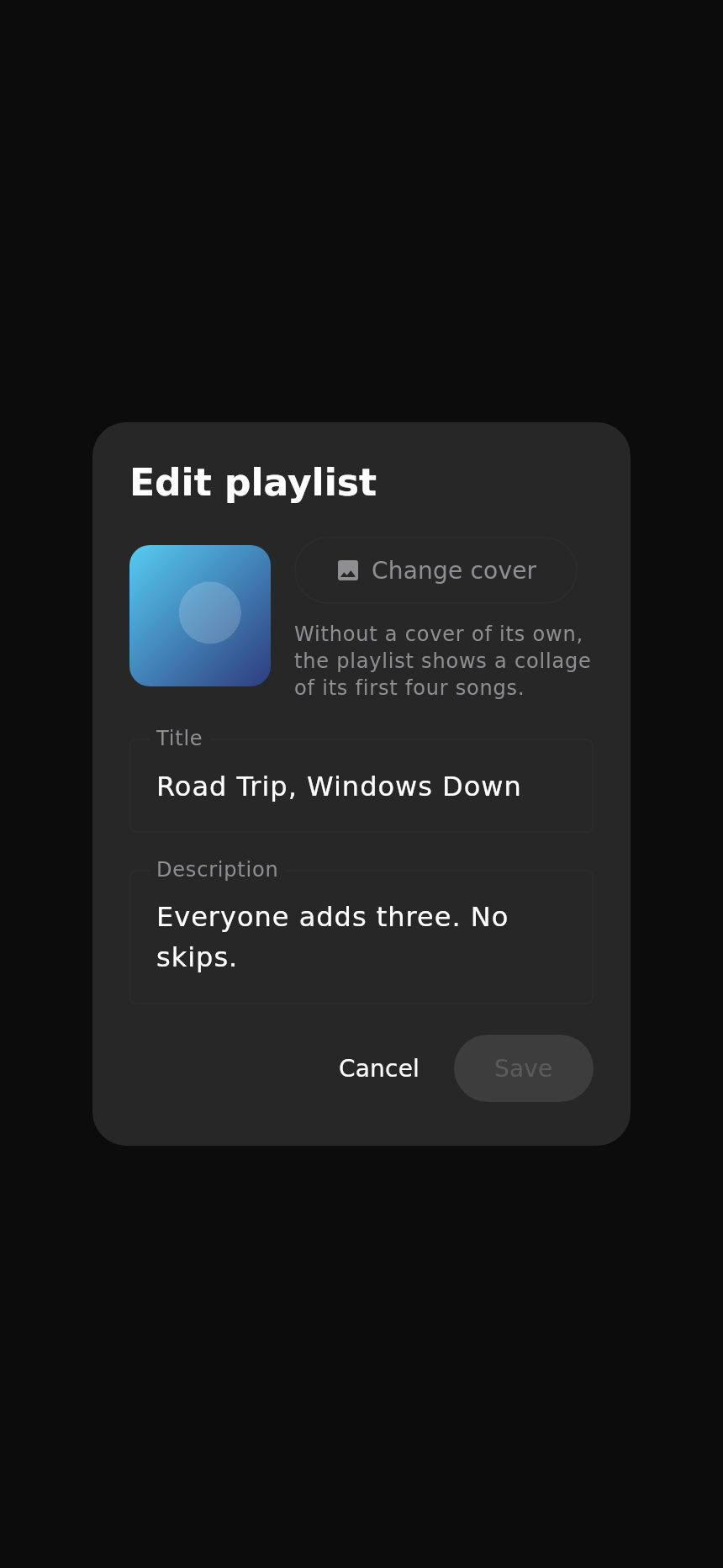
Collaborative playlists
Sign in once, collaborate everywhere
- Your existing BitChord Google / YouTube Music sign-in is all it takes. No separate login, no OAuth client ID, no server to set up.
- Playlists are real YouTube Music collaborative playlists, so a friend can join from BitChord or from YouTube Music itself with the same
music.youtube.com/playlist?list=…&jct=…link. - A self-hosted collaboration server remains available under Advanced for those who want one.
Joining works
- Accepting an invite no longer fails with a raw
HTTP 401dialog. YouTube Music gives that answer both to an account that is already a collaborator and while a new link is still taking effect; BitChord now checks whether you actually have access and retries, instead of giving up on the first refusal. - Opening a link you have already joined — from a second device, or after a reinstall — lets you straight in.
- When a join really is refused, you are told why in a sentence.
- Any Google account can join. An account that has never used YouTube has no YouTube channel, and YouTube Music refuses those as collaborators. BitChord now sets the channel up automatically while joining; where YouTube insists on its own setup screen, BitChord says so and takes you there.
Make any playlist collaborative, with every song
- Make Collaborative now reads the whole source playlist, however long, rather than only the part that was on screen.
- Songs beyond the first fifty could be dropped silently while the new playlist was still being set up on YouTube Music's side. Every batch is now confirmed, and a song YouTube Music will not accept costs only that song — and is named.
- Converting a playlist you converted before adds whatever the shared copy is missing.
- Long collaborative playlists are listed in full.
Faster and clearer
- Creating a collaborative playlist opens it immediately instead of after 15–25 seconds; its invite link is prepared in the background.
- Copy Invite Link is instant once the link exists.
- In Add Songs, song titles are readable on the dark theme, tapping
+shows progress then a check (with haptics on phones), and the song appears in the playlist straight away. - The owner can edit the playlist's title, description and cover. Until a cover is set, YouTube Music shows a collage of the first four songs.
- Removing a song, leaving a playlist and deleting one now ask first, with haptics and a confirmation afterwards, instead of happening the instant the icon is touched.
- The Invite / Members / Sharing tabs no longer wrap on narrow screens, and the member count follows who has actually joined.
- Open
music.youtube.complaylist and invite links directly in BitChord on Android.
Android
- Playback controls on more phones: BitChord now asks for the notification permission the first time something plays (it used to ask only at the first download). On Android 13+ several vendor skins build the lock-screen player and status-bar "island" from the media notification, which they hide from an app without that permission.
- Signed with the permanent BitChord PlusPC certificate (
SHA-256: d6d9c697c070a5ca5f4e172a13b6263fe2f3a35fff5d110596509126320c3bb2); installs overv1.10.xin place.
macOS
- The
.dmg,.pkgand.zipare now built on macOS (hdiutil,pkgbuild,codesign). Earlier macOS packages were assembled on Linux by rewriting an older disk image and did not install; they should not be used. - The app is ad-hoc signed and not notarized by Apple, so macOS asks for confirmation the first time:
- Open the
.dmgand drag BitChord to Applications (or run the.pkg). - Open BitChord once. macOS will refuse.
- Go to System Settings → Privacy & Security, scroll to the message about BitChord and choose Open Anyway.
- Or, in Terminal:
xattr -dr com.apple.quarantine /Applications/BitChord.app
- Open the
- Pick
arm64for Apple Silicon (M1 and later) andx64for Intel Macs. - Every macOS package in this release was installed and launched on a Mac before publishing.
Downloads
- Android phone & Auto:
BitChord-v1.10.6.apk(universal) or thearm64-v8a/armeabi-v7a/x86_64build - Android TV / Fire TV:
BitChordTV-v1.10.6.apkor the per-ABI builds - Wear OS:
BitChordWear-v1.10.6.apk(also bundled in the phone app) - macOS:
BitChord-1.10.6-macos-arm64.dmg/.pkg/.zip(Apple Silicon),BitChord-1.10.6-macos-x64.dmg/.pkg/.zip(Intel) - Windows:
BitChord-1.10.6-windows-x64-setup.exe,.msi,-portable.zip - Linux:
BitChord-1.10.6-linux-x86_64.AppImage,-linux-amd64.deb,-linux-x86_64.rpm
Full history: CHANGELOG.md
BitChord PlusPC v1.10.5 (Collaborative Playlists)

1ac262d
Inventor365
Yuki
BitChord PlusPC v1.10.5 (versionCode = 46)
Collaborative playlists that work end to end — Android, Android Auto, Android TV, Wear OS, macOS (Apple Silicon & Intel), Windows, Linux & Web
This release replaces v1.10.1 and carries everything from 1.10.1 through 1.10.5.
Collaborative playlists
Sign in once, collaborate everywhere
- Your existing BitChord Google / YouTube Music sign-in is all it takes. No separate login, no OAuth client ID, no server to set up.
- Playlists are real YouTube Music collaborative playlists, so a friend can join from BitChord or from YouTube Music itself with the same
music.youtube.com/playlist?list=…&jct=…link. - A self-hosted collaboration server remains available under Advanced for those who want one.
Joining works
- Accepting an invite no longer fails with a raw
HTTP 401dialog. YouTube Music gives that answer both to an account that is already a collaborator and while a new link is still taking effect; BitChord now checks whether you actually have access and retries, instead of giving up on the first refusal. - Opening a link you have already joined — from a second device, or after a reinstall — lets you straight in.
- When a join really is refused, you are told why in a sentence.
Make any playlist collaborative, with every song
- Make Collaborative now reads the whole source playlist, however long, rather than only the part that was on screen.
- Songs beyond the first fifty could be dropped silently while the new playlist was still being set up on YouTube Music's side. Every batch is now confirmed, and a song YouTube Music will not accept costs only that song — and is named.
- Converting a playlist you converted before adds whatever the shared copy is missing.
- Long collaborative playlists are listed in full.
Faster and clearer
- Creating a collaborative playlist opens it immediately instead of after 15–25 seconds; its invite link is prepared in the background.
- Copy Invite Link is instant once the link exists.
- In Add Songs, song titles are readable on the dark theme, tapping
+shows progress then a check (with haptics on phones), and the song appears in the playlist straight away. - The owner can edit the playlist's title, description and cover. Until a cover is set, YouTube Music shows a collage of the first four songs.
- The Invite / Members / Sharing tabs no longer wrap on narrow screens, and the member count follows who has actually joined.
- Open
music.youtube.complaylist and invite links directly in BitChord on Android.
Android
- Playback controls on more phones: BitChord now asks for the notification permission the first time something plays (it used to ask only at the first download). On Android 13+ several vendor skins build the lock-screen player and status-bar "island" from the media notification, which they hide from an app without that permission.
- Signed with the permanent BitChord PlusPC certificate (
SHA-256: d6d9c697c070a5ca5f4e172a13b6263fe2f3a35fff5d110596509126320c3bb2); installs overv1.10.xin place.
macOS
- The
.dmg,.pkgand.zipare now built on macOS (hdiutil,pkgbuild,codesign). Earlier macOS packages were assembled on Linux by rewriting an older disk image and did not install; they should not be used. - The app is ad-hoc signed and not notarized by Apple, so macOS asks for confirmation the first time:
- Open the
.dmgand drag BitChord to Applications (or run the.pkg). - Open BitChord once. macOS will refuse.
- Go to System Settings → Privacy & Security, scroll to the message about BitChord and choose Open Anyway.
- Or, in Terminal:
xattr -dr com.apple.quarantine /Applications/BitChord.app
- Open the
- Pick
x64for Intel Macs. For Apple Silicon (M1 and later) pickarm64when it is listed below; thex64build also runs there through Rosetta. - Every macOS package in this release was installed and launched on a Mac before publishing.
Downloads
- Android phone & Auto:
BitChord-v1.10.5.apk(universal) or thearm64-v8a/armeabi-v7a/x86_64build - Android TV / Fire TV:
BitChordTV-v1.10.5.apkor the per-ABI builds - Wear OS:
BitChordWear-v1.10.5.apk(also bundled in the phone app) - macOS:
BitChord-1.10.5-macos-x64.dmg/.pkg/.zip(Intel, and Apple Silicon through Rosetta);-macos-arm64builds are added as soon as GitHub's Apple Silicon runners produce them - Windows:
BitChord-1.10.5-windows-x64-setup.exe,.msi,-portable.zip - Linux:
BitChord-1.10.5-linux-x86_64.AppImage,-linux-amd64.deb,-linux-x86_64.rpm
Full history: CHANGELOG.md