1. Initial Setup
This page is up to date to the latest version. Previous versions may differ, but the core concepts are still the same.
- Add LockOnTargetComponent to your character.
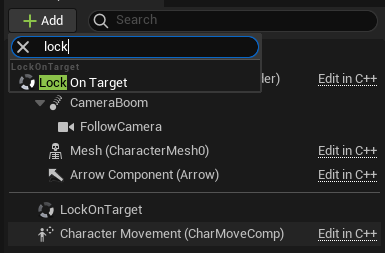
- Set
TargetHandlerImplementationto ThirdPersonTargetHandler.

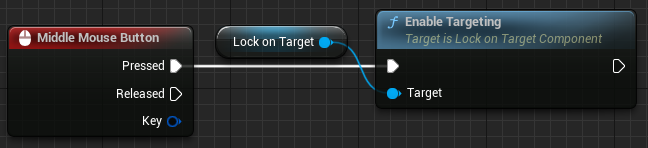
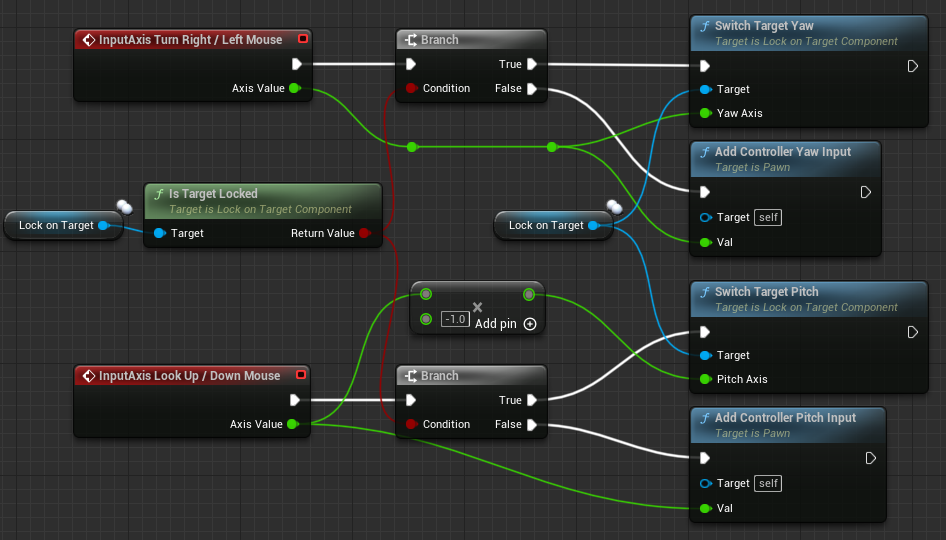
- Input Setup.
Input Overview.
- Target capturing and releasing:
- Target switching with an axis input:
- Make sure to enable
UsePawnControlRotationandEnableCameraLagin SpringArmComponent.


- Add ControllerRotationModule to
DefaultModules.

- (Optional) If you want to smoothly apply camera zoom, you can add CameraZoomModule.

- Add WidgetModule to
DefaultModules.

Acceptable only in standalone games. Network games require a bit more work.
- Add ActorRotationModule to
DefaultModules.

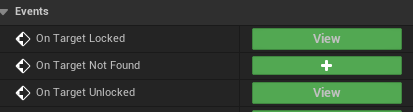
- Add OnTargetLocked/Unlocked events from LockOnTargetComponent and disable
bOrientRotationToMovementin CharacterMovementComponent if used.
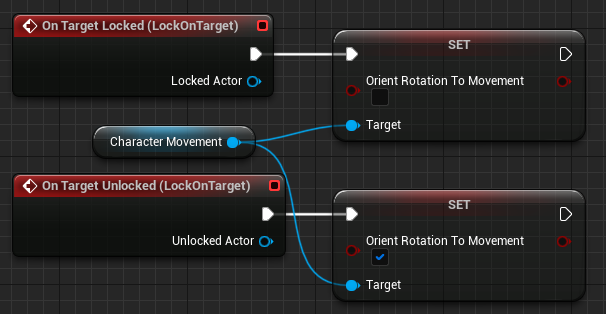
- Add TargetComponent to the desired AActor.

- Select the mesh in
TrackedMeshName, which is used for Socket lookup, Widget attachment, etc. If None then the root component will be used.

- Select the desired sockets in
Sockets.
At least one socket should be specified.

-
(Optional) If you want to preview a potential Target, you can add TargetPreview to
DefaultModules.
Be sure to read this before packaging your project.