Repository navigation
Releases
Pad8Lab 1.1.1

Pad8Lab 1.1.1 keeps the same firmware core and adds the tests and the profile-driven interface that were missing from 1.1.0.
- Added 45 unit tests for everything that needs no controller: flash-layout validation, the profile registry, HID mode matching, the tweak table and its stock hashes, and plan range checks. CI runs them on every push and pull request.
- The Setup and About screens now take the model name, tweak titles, firmware version, recovery steps and disclaimer from the registered profile, so the flow no longer hardcodes the Ultimate 2C Wireless.
- The firmware row shows the detected version, and the check message uses the real number of bytes from the plan instead of a fixed 819.
- Updated the CI actions to their current Node 24 releases.
The flashing core is unchanged: same 819 bytes, same read-back verification, still validated byte for byte with ParityCheck. Flashing requires the USB-C cable; after one flash the controller works over Bluetooth on any Windows PC.
Keep your backup. Restore puts back the newest backup that still holds the original firmware 1.09.
Pad8Lab 1.1.0
The app is now Pad8Lab. Same firmware core, same safeguards, new name and a structure ready for more controller models.
- Renamed the solution, projects, namespaces, executable and documentation to Pad8Lab. Existing settings and backups keep working.
- The tool is built around controller profiles. The Ultimate 2C Wireless is the only model registered today, and new models can be added without touching the flashing core.
- The data folder moved from
%LOCALAPPDATA%\u2c-customfwto%LOCALAPPDATA%\Pad8Lab. The first run moves your backups, the accepted disclaimer and the log automatically; if the move fails it keeps using the old folder. The log file is nowpad8lab.log. - Added
app/Pad8Lab.Core/Profiles/README.md, a guide for adding a controller model.
The flashing core is unchanged: same 819 bytes, same read-back verification, still validated byte for byte against the reference image.
Flashing requires the USB-C cable; after one flash the controller works over Bluetooth on any Windows PC.
Keep your backup. Restore puts back the newest backup that still holds the original firmware 1.09.
U2cRumble 1.0.3
Live controller state and a new look.
- The window watches the controller now: plug or unplug the USB-C cable and the state, the connection row and the buttons update on their own within two seconds. The manual refresh button is gone.
- While the controller is on the cable, the illustration shows a straight USB-C cable with a soft pulsing glow and dashes flowing into the port. The port is drawn on the top edge, so it is visible even when the cable is out.
- New app icon: a squircle plate with a purple-to-cyan gradient and the same controller mark in the exe, taskbar, title bar, header and About chip. The top highlight is gone at small sizes, so there is no white rim in the taskbar.
- Fixed a crash that happened when a flash started: the disclaimer state was read from a background thread.
- Install and restore now tell apart a no-op from a real run, and the previous result banner is cleared when a new run starts.
- Unhandled errors are saved to crash.log with the full stack trace.
- Updated screenshots.
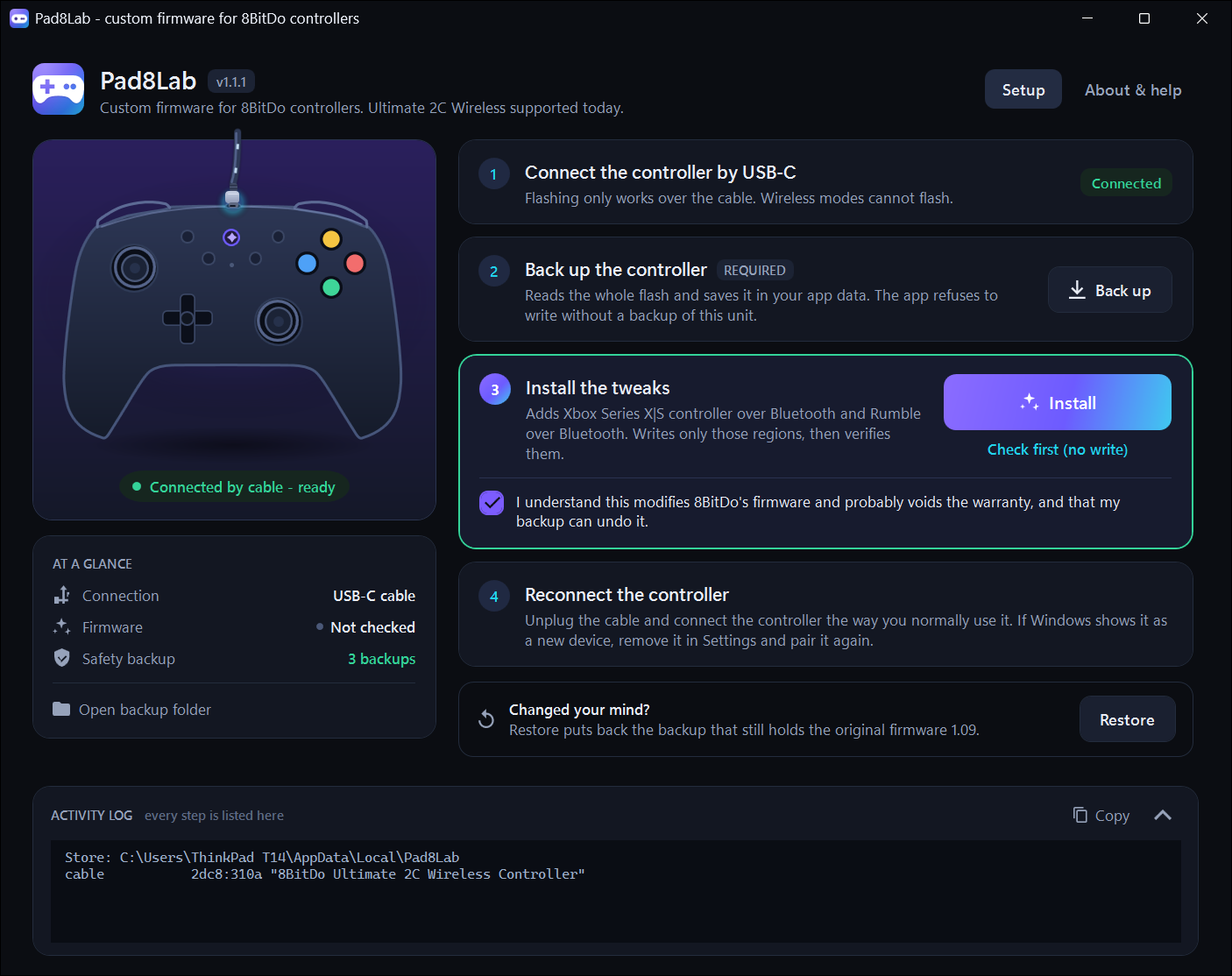
The flashing core is unchanged: same 819 bytes, same read-back verification, still validated byte for byte against the reference image.
Flashing requires the USB-C cable; after one flash the controller works over Bluetooth on any Windows PC.
Keep your backup. Restore puts back the newest backup that still holds the original firmware 1.09.
U2cRumble 1.0.2
A new window; the flashing core is unchanged.
- New dark interface with a guided four-step flow: connect the cable, back up, install, pair again.
- The window draws the controller and shows its live state (cable, update mode, Bluetooth, dongle), the firmware it found and how many backups are stored.
- A custom confirmation dialog replaces the system message box, and the security notice now sits inside the install card, right under the button, so it is obvious why Install starts disabled.
- The app has its own icon, a dark title bar on Windows 11 and a crash handler that writes the error to the log.
- The README explains what to do when Windows shows "Windows protected your PC" and how to check the SHA-256 of the file.
The flashing core is unchanged: same 819 bytes, same read-back verification, still validated byte for byte against the reference image.
Flashing requires the USB-C cable; after one flash the controller works over Bluetooth on any Windows PC.
Keep your backup. Restore puts back the newest backup that still holds the original firmware 1.09.
U2cRumble 1.0.1
Fixes flashing. Use this release; 1.0.0 cannot flash.
- Fix the bootloader channel: Windows returns a 0x00 report ID in front of each 64-byte report from a device that declares none, while hidapi returns the report alone. The mismatch made the first bootloader read fail, so every write aborted before erasing.
- The C# core has now been validated on hardware in both directions: it restored the original firmware 1.09 and reinstalled the Bluetooth rumble and Xbox tweaks, verifying every byte it wrote.
- Everything else is unchanged: self-contained Windows x64 executable, no .NET runtime or Python needed.
Flashing requires the USB-C cable; after one flash the controller works over Bluetooth on any Windows PC.
Keep your backup. Restore puts back the newest backup that still holds the original firmware 1.09.
U2cRumble 1.0.0
This release cannot flash: the bootloader channel failed at the first read, so every write aborted before erasing. Use 1.0.1 instead.
First release of the .NET-only app. Historical record only.