Repository navigation
v0.1.13 — scrollbox and borders

A panel that behaves like a window
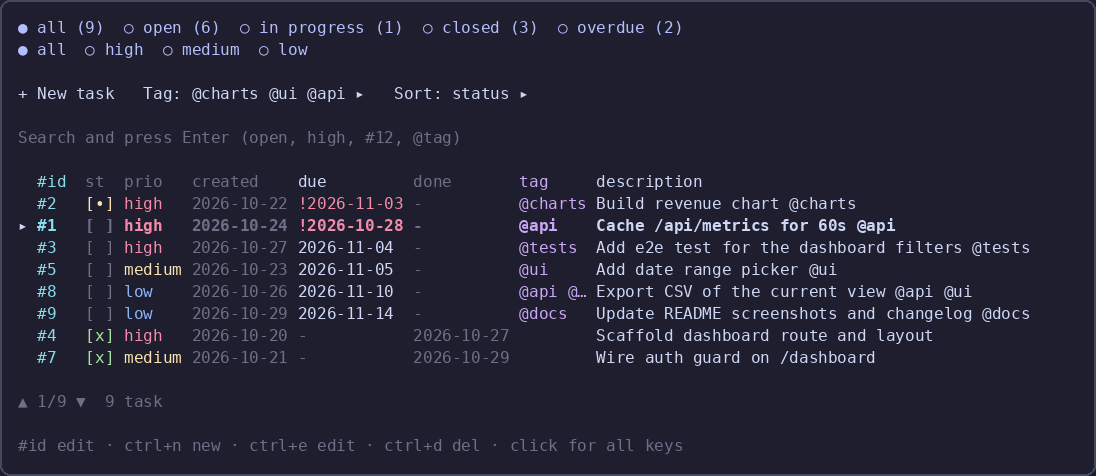
0.1.13 turns the todo panel into a scrollable, bordered window.
- Rounded border everywhere: the list, the editor, the settings and the help dialogs.
borderStylein the settings
switches it betweenrounded,singleandnone; the list border turns red while a delete is armed and cyan while
the search owns the keyboard. - Scrolling instead of paging: the cursor moves over every task and the view follows it.
PgUp/PgDn,
Home/Endand the arrows move the cursor; the footer showsposition/rows. - Settings clean-up: values are clipped to their column,
Save toshowsglobalorprojectinstead of a long
path, and the dialog re-centres itself after mounting. borderStylesetting, documented with the rest.
Install
{ "plugins": ["opencode-todo-md"] }The TUI half (sidebar strip and /todo) loads at TUI startup: restart opencode, or run /reload.
61 unit tests. MIT.
What's new in 0.1.13- Rounded borders on the list, the editor, the settings and the help; borderStyle picks rounded, single or none.
- The border turns red while a delete is armed, and cyan while the search box has the keyboard.
- The list scrolls instead of paging: the cursor walks every task and the view follows it.
- Settings values are clipped to their column,
Save toshowsglobalorproject, and the dialog centres itself at mount.