Repository navigation
Releases
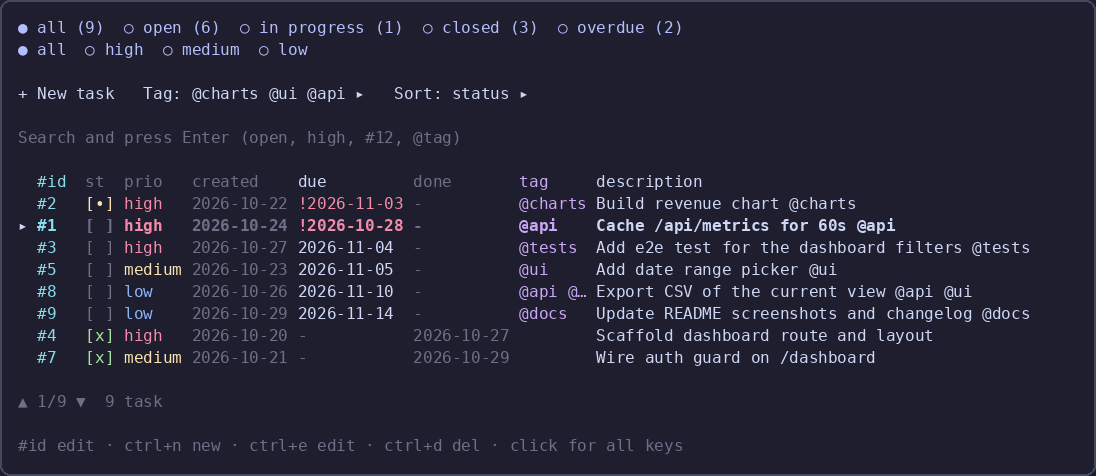
v0.1.20 — complete tasks with completed and done

What's new in 0.1.20
todo_writecloses a task withcompleted: true(or adonevalue) and reopens it withcompleted: false, as
aliases forstatus: "completed"/"pending"; thedonedate is written automatically.
Install
{ "plugins": ["opencode-todo-md"] }The TUI half (sidebar strip and /todo) loads at TUI startup: restart opencode, or run /reload.
80 unit tests. MIT.
v0.1.19 — explicit note add and id 0
What's new in 0.1.19
note_addappends a note;note_writepatches one byid, so the two operations no longer share a single tool.todo_writeacceptsid: 0as a new task, the same as omittingid.
Install
{ "plugins": ["opencode-todo-md"] }The TUI half (sidebar strip and /todo) loads at TUI startup: restart opencode, or run /reload.
79 unit tests. MIT.
v0.1.18 — project notes with reminders
What's new in 0.1.18
opencode-notes.mdkeeps project ideas and reminders with stable ids,@tagsand an optional time./notecaptures a note,/noteopens the list: filters by due date and tag,/search,ssnooze 5/30/60 minutes,
ctrl+n/ctrl+e/ctrl+dto add, edit and delete.note_read,note_writeandnote_deletegive the agent the same notes across sessions.- The sidebar lists the notes above the todo list, collapsible, with due reminders in red; reminders fire a toast every
30 seconds while the TUI is open.
Install
{ "plugins": ["opencode-todo-md"] }The TUI half (sidebar strip and /todo) loads at TUI startup: restart opencode, or run /reload.
78 unit tests. MIT.
v0.1.17 — renumber order and undo

What's new in 0.1.17
ctrl+zrestores the last deleted task at its original position, andctrl+grenumbers the ids without leaving the list./todo renumberorders ids by priority and then due date, with completed and cancelled tasks last.- The default list order follows the same rule, so the panel and the ids agree.
- Every column sort keeps open tasks on top and closed ones at the bottom;
priobreaks ties on the nearest due date.
Install
{ "plugins": ["opencode-todo-md"] }The TUI half (sidebar strip and /todo) loads at TUI startup: restart opencode, or run /reload.
66 unit tests. MIT.
v0.1.16 — click targets and stable order
Click where you mean
0.1.16 makes the list behave the way it looks.
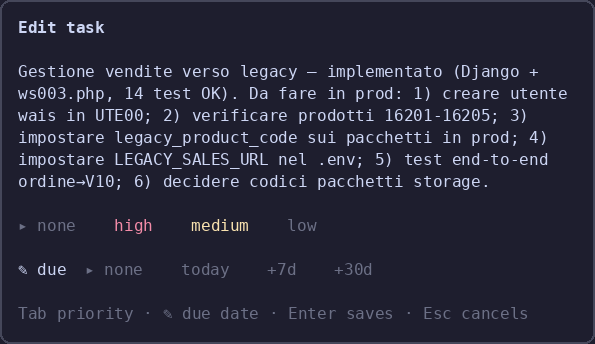
- The description opens the editor, exactly like
#id. Only thestcell cycles a task through pending →
in progress → completed. - Rows no longer jump while the dialog is open: a state or priority click updates the row in place. The list
re-sorts the next time you open it.
Install
{ "plugins": ["opencode-todo-md"] }The TUI half (sidebar strip and /todo) loads at TUI startup: restart opencode, or run /reload.
63 unit tests. MIT.
v0.1.15 — state cycling and editor wrap
Click the state, read the whole task
0.1.15 makes the list faster to drive and the editor usable for long descriptions.
- Click cycles the state: clicking the
stcell or the description walks pending → in progress → completed → pending (cancelled goes back to pending).spacedoes the same on the selected task. in progressfilter in the tab bar, so the work in flight is one key away.- Seven-line editor: the description is a focused box that wraps long text instead of scrolling it sideways. A pasted newline becomes a space, so a task stays one line in
TODO.md. - English due labels:
today,+7d,+30d, and the hint fits the dialog again.
Install
{ "plugins": ["opencode-todo-md"] }The TUI half (sidebar strip and /todo) loads at TUI startup: restart opencode, or run /reload.
63 unit tests. MIT.
v0.1.14 — due soon and safer writes
Due soon, safer writes
0.1.14 makes todo_write forgiving and the sidebar clearer.
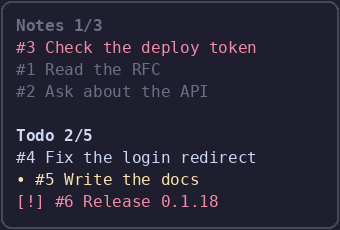
replacewithoutstatus:todo_writeinmode: "replace"defaults a missingstatustopending, the same as merge. The old build rejected the whole write.[·]due soon: the sidebar marks tasks due today or within two days;[!]stays for overdue.- No more
!for high priority: the row colour already carries it, and two red markers read as the same alarm. - Legend in the help dialog, and render errors in the sidebar and dialogs are appended to
~/.local/state/opencode/todo-md-errors.loginstead of vanishing.
Install
{ "plugins": ["opencode-todo-md"] }The TUI half (sidebar strip and /todo) loads at TUI startup: restart opencode, or run /reload.
63 unit tests. MIT.
v0.1.13 — scrollbox and borders
A panel that behaves like a window
0.1.13 turns the todo panel into a scrollable, bordered window.
- Rounded border everywhere: the list, the editor, the settings and the help dialogs.
borderStylein the settings
switches it betweenrounded,singleandnone; the list border turns red while a delete is armed and cyan while
the search owns the keyboard. - Scrolling instead of paging: the cursor moves over every task and the view follows it.
PgUp/PgDn,
Home/Endand the arrows move the cursor; the footer showsposition/rows. - Settings clean-up: values are clipped to their column,
Save toshowsglobalorprojectinstead of a long
path, and the dialog re-centres itself after mounting. borderStylesetting, documented with the rest.
Install
{ "plugins": ["opencode-todo-md"] }The TUI half (sidebar strip and /todo) loads at TUI startup: restart opencode, or run /reload.
61 unit tests. MIT.
What's new in 0.1.13- Rounded borders on the list, the editor, the settings and the help; borderStyle picks rounded, single or none.
- The border turns red while a delete is armed, and cyan while the search box has the keyboard.
- The list scrolls instead of paging: the cursor walks every task and the view follows it.
- Settings values are clipped to their column,
Save toshowsglobalorproject, and the dialog centres itself at mount.
v0.1.12 — settings and compact help
Settings, compact help, honest docs
/todo settings has 17 options, saved to ~/.config/opencode/todo-md.json or to the project's
.opencode/todo-md.json. The dialog works on a draft: Save writes, Cancel/Esc discards, Reset to
defaults restores, Export/Import JSON move the whole set through a file. Values are right-aligned and the dialog
uses the same colours as the screenshot. It also opens from the Settings ▸ row in the todo panel.
Shortcut bar is one compact line at the bottom; clicking it opens the full key list. The showHints setting turns
it off, and ctrl+d twice deletes is back in the hint.
Help cannot lie any more: the key list is generated from SHORTCUTS, and a test compares it against the bindings
actually registered in the panel, both directions. Titles are short enough that nothing overflows the dialog.
Install
{ "plugins": ["opencode-todo-md"] }The TUI half (sidebar strip and /todo) loads at TUI startup: restart opencode, or run /reload.
61 unit tests. MIT.
v0.1.11 — settings and column colours
Settings, colours, and a crash fix
/todo settings opens a dialog that works on a draft: Save writes it, Cancel/Esc drops it. Each row cycles its value on click, Reset to defaults restores everything (keeping the target), and Export JSON / Import JSON move the whole set through a file.
Settings live in ~/.config/opencode/todo-md.json (global) and <project>/.opencode/todo-md.json (project wins); Save to chooses which file Save writes.
New in 0.1.11
- 17 settings: padding, palette, hidden columns (created/done/tag), description width, strip width and collapse threshold, completed tasks in the strip, coloured strip header, rows per page, start filter and sort, delete mode, renumber after done, auto-create TODO.md, Save to
Settings ▸in the todo dialog opens the settings directly- Per-column colours, from the theme (
theme) or the Catppuccin palette used in the screenshots (fixed) - Configurable inner padding
- Fix a crash at render time:
visibleColumnusedsettingsfrom outside its scope, whichbun buildcannot catch
Install
{ "plugins": ["opencode-todo-md"] }The TUI half (sidebar strip and /todo) loads at TUI startup: restart opencode, or run /reload.
60 unit tests. MIT.