Repository navigation
Releases: Master0fFate/fateUI
Release list
V2.2.4

V2.2.4
Agent Teams fixes and fewer limits. Subagent results now always reach the parent, agent limits are lifted, and a model asking for a thinking level it cannot use no longer loses the whole batch. Context also shows tokens per second, and multi-question prompts can go back. Everything from 2.2.3 is included.
Subagent results always arrive
- A settled agent's final answer stays readable after it is released.
inspect_agentreturns it for any owned descendant, andwait_agentreturns the latest answer of every child that changed, up to 16,000 characters each. Before,inspect_agenton a released child only said it was released andwait_agentlisted paths. - In
agent_workflow, the graph-levelnotifyParentnow carries the result text of every node that has nonotifyParentof its own, up to 6,000 characters per node and 24,000 in total. Before, it only said the graph had settled, so a workflow set toimmediatewith default nodes silently dropped all eight answers. A node with its ownnotifyParentstill delivers separately, so nothing arrives twice. - The
notifyParent,wait_agentandinspect_agentdescriptions and the agent catalog now say where results come from.
Thinking levels no longer abort a batch
A thinkingLevel the selected model does not support is clamped to the nearest level it does support, and a non-reasoning model uses off. Before, admission rejected the launch with zero work done, even when the catalog listed the level. A level inherited from the caller is clamped the same way.
Fewer agent limits
- Agents nest up to depth 16 instead of 2.
agent_workflowruns every ready node in parallel by default.maxConcurrencydefaults to 256 instead of 4 and still works as an upper bound.- Teams saved with the old limits (16 nodes, 3 active turns, depth 2) pick up the new ones on restore.
- The agent catalog no longer tells models about a 3-turn or 16-node ceiling that was already gone. That stale text made models plan around limits that did not exist.
Still in place: one writer at a time per shared checkout (agents in separate worktrees write in parallel), 32 KiB per team message, 256 nodes per workflow graph and 5 minutes per wait_agent call.
Context shows tokens per second
System → Context has a fourth field next to Session tokens, Cache coverage and Session cost: Latest t/s, the output tokens per second of the latest response. The time runs from the start of the response to when it was saved, so it includes time to first token and reads a little lower than pure decode speed. It shows "—" until a response completes or when no usable timing exists.
Questions can go back
In a multi-question prompt, Previous and Next buttons let you return to an earlier question and change your answer. The earlier answer is shown selected, and a typed answer is kept in the field.
V2.2.3
V2.2.3
Hotfix for 2.2.2 "SpaceTime". It fixes the computer use overlay that appeared at startup and could not be brought back, the lock-out where every message failed with STORAGE_UNAVAILABLE, and GoalMax gates that were written as rules but never enforced. It also moves to Pi 1.4.0. Everything from 2.2.2 is included.
Warning
GoalMax in 2.2.2 is broken. A long goal fills the lifecycle index, after which Fate UI refuses every prompt, queue, stop and new session with STORAGE_UNAVAILABLE: Lifecycle checkpoint could not be saved, and the agent ignores the plan, sync and delegation contract because nothing enforced it. Both are fixed here; install this build before starting another goal.
Computer use overlay
- The frame and the Computer use pill no longer appear when Fate UI starts. They appear when the agent performs its first
computeraction and disappear when the turn ends or after 15 seconds without an action. - Stop on the pill, and Alt+Shift+Esc (⌥⇧Esc on macOS), now stop the running session exactly like the Stop button in the composer. Computer use itself stays on, so the agent can use the
computertool again in the next turn. In 2.2.2 the Stop button turned computer use off while the switch still showed it as on, and the agent reported "Computer use is off" until a restart. - The computer use switch in the permission menu and in Settings → Workspace reads the real state of the service, and it is locked while a session is running. Turn it off between turns.
- The Stop label is centred in its button.
Lock-out after STORAGE_UNAVAILABLE
The lifecycle index ~/.pi/fateGUI/lifecycle/v1/status-v1.jsonl was capped at 512 records and 2 MB, and every ordinary run added two. Once full, each write failed, the recovery coordinator marked storage unhealthy, and all new work was refused until the file was edited by hand.
- When the index reaches its limit, Fate UI compacts it: one record per execution identity is kept, and the oldest plain run records are dropped until the index is at half its limit. Team, task, goal, worktree and command records are never dropped. The file is rewritten atomically; prior records are retained if the rewrite fails.
- A copy that is already locked recovers by itself: restart Fate UI, and the first new run compacts the full index. No file needs to be edited.
GoalMax gates are enforced
The gateway contract is checked when a tool is called, not after the turn:
- Plan gate.
write,edit,pdf_fill,pdf_create,computer,bash(other than read-only inspection) and delegation tools are rejected until the task plan is captured withgoalmax_report. - Sync gate. The first workspace change or delegation of a turn is rejected until the turn has called
goalmax_statusorgoalmax_report. - Delegation gate. With the default agent strategy, the root agent plans, delegates, verifies and reports; its own
writeandeditcalls are rejected. Set the goal's agent strategy to off for root-only work.
A rejected call returns the gate and the exact next step to the model. The post-turn check that blocks a goal on a slipped violation is unchanged.
Pi 1.4.0
Pi SDK and Pi Durable move from 1.3.0 to 1.4.0. Fixes that reach Fate UI:
- Compaction and branch summaries use the model's output limit, so they no longer fail with "generation hit the token cap" when reasoning uses most of the old fixed limit.
- A session no longer breaks after recovering from a response cut off at the output limit. Previously every later request was rejected by the provider.
- Automatic retry now covers more gateway upstream failures,
stream disconnected before completionfrom Codex CLI proxies, and transient Google Vertex sign-in refresh errors. Digits inside request ids are no longer mistaken for HTTP status codes. - Whitespace-only tool output, such as a bare line break from
bash, no longer makes OpenAI and Google requests fail with a 400. - GitHub Copilot requests that are too large, for example with many images, are treated as context overflow and compacted instead of failing with HTTP 413.
- The
greptool ignoresRIPGREP_CONFIG_PATH, so a user ripgrep config can no longer turn regex searches into literal ones. - New models:
MiniMax-M3.1-Flash, and thexhighthinking level for Grok 4.3 and 4.5 on xAI.
Note
With native Durable storage on, the first start of this version migrates the storage database to a new schema. Earlier Fate UI versions cannot open it afterwards, so a native-Durable profile cannot go back to 2.2.2 or older. Profiles with the default storage are not affected.
Known limits
- The Node companion is not among these release files. Its builder supports Linux x64 only. Build it from this tag with the package guide. It needs Node 22.19 or later.
- No automated check drives a real mouse, a global hotkey or an elevated relaunch, so computer use is not covered by the test matrix on any platform.
- Computer use on Linux needs X11 or XWayland.
Installation
| Platform | Architecture | Formats |
|---|---|---|
| Windows | x64 | EXE |
| macOS | Apple Silicon and Intel | DMG, PKG |
| Linux | x64 | AppImage, DEB |
Installers remain unsigned, and macOS builds are not notarized. Verify your download with SHA256SUMS; a checksum does not replace code signing.
Setup guide · Security and limits · Troubleshooting · Report an issue
V2.2.2 - SpaceTime
V2.2.2 - SpaceTime
The first stable release since 1.1.1, and the one where the agent gets hands. SpaceTime lets the agent see your screen and use your mouse and keyboard. It also brings everything from the 2.0 and 2.2 betas to the stable channel, plus branch worktrees and long chats that open fast.
Agents become assistants you talk to. Fate can run on another machine and be used from a browser. Pi moves from 0.85 to 1.3. The agent can now see your screen and use your mouse and keyboard when you allow it.
Important
Back up ~/.pi before you install this over 1.1.x. Check for Updates offers this build to stable copies. Saved Agents become global, and the Agents library from 1.1 is replaced by one chat per Agent (see Upgrading).
Size of this release: more than 100 commits and about 835 changed files since 1.1.1. The 2.0.0-beta, 2.0.1-beta and 2.2.0-beta changes are all included; their pages stay up for the details.
Computer use: the agent can use your computer
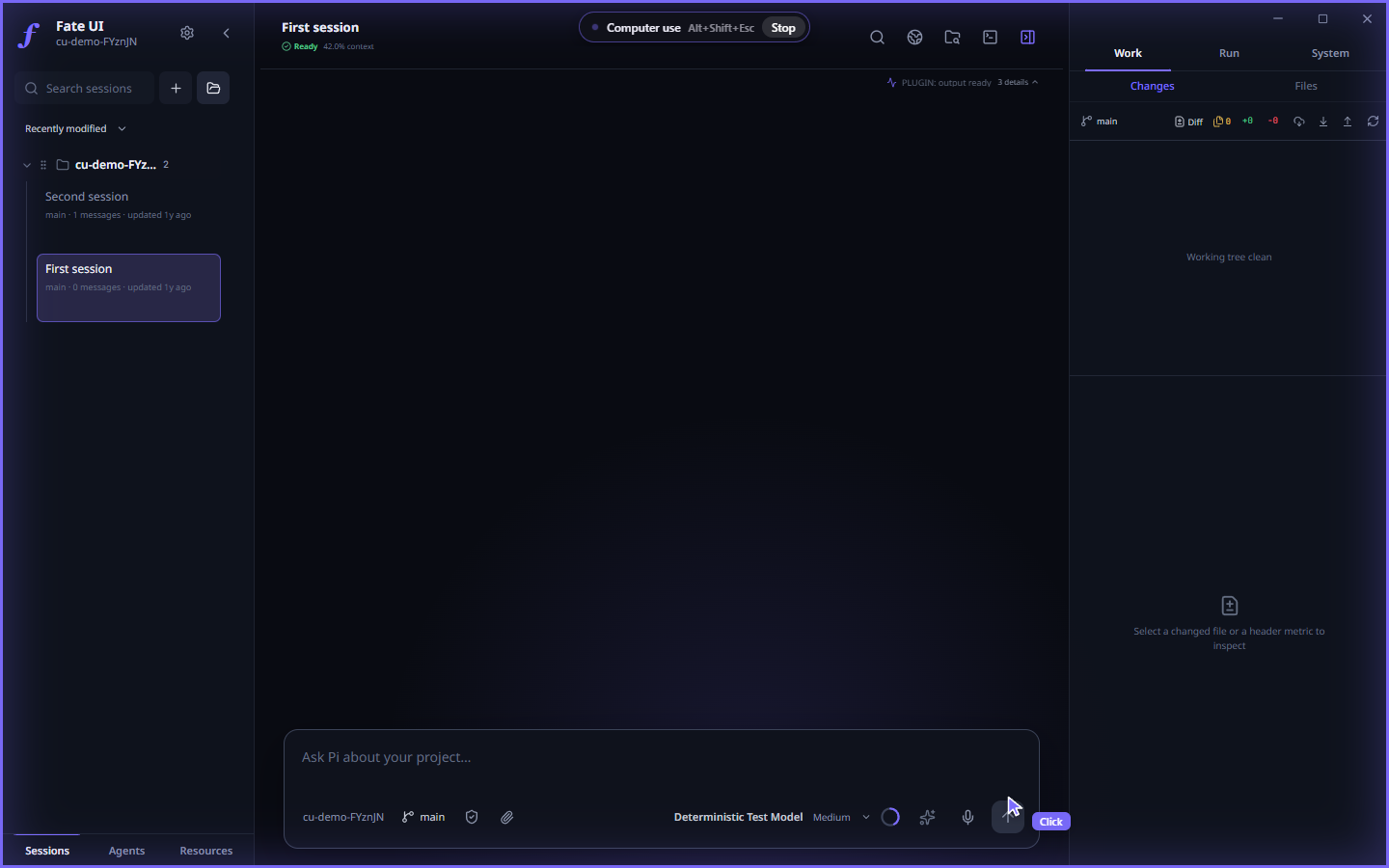
While the agent is acting, a frame lights up around every screen, a pill shows Computer use with its stop shortcut and a Stop button, and the agent's cursor is labelled with what it is doing. The frame, pill and cursor are the real overlay markup from the app, drawn over a Fate UI window.
The agent can take screenshots and drive the mouse and keyboard through a new computer tool: click, double and triple click, drag, scroll, type, key chords, hold a key, zoom into a region, and pick a display.
- Off until you turn it on. Use the switch in the permission menu of the composer or Settings → Workspace → Computer use. It only works in a Full access session; turning it on from the composer moves the session to Full access.
- Always stoppable. An overlay shows when the agent is acting, with a Stop button, and Alt+Shift+Esc (⌥⇧Esc on macOS) turns it off from anywhere. It also turns off when the last window closes.
- Fate UI relaunches elevated (a UAC prompt on Windows, an administrator prompt on macOS,
pkexecon Linux) so the agent can reach every window. The whole app, its shell tool and its child processes then run with administrator rights, and the choice is remembered for the next start. On Windows the UAC prompt on the secure desktop is also switched off while computer use is on, so the agent can see it, and it is put back when you turn computer use off. Only turn it on if you accept that. - macOS asks for Accessibility and Screen Recording permission first. Linux needs an X11 or XWayland display; pure Wayland is not supported yet.
- Agent runs started from an Agent chat do not get the tool.
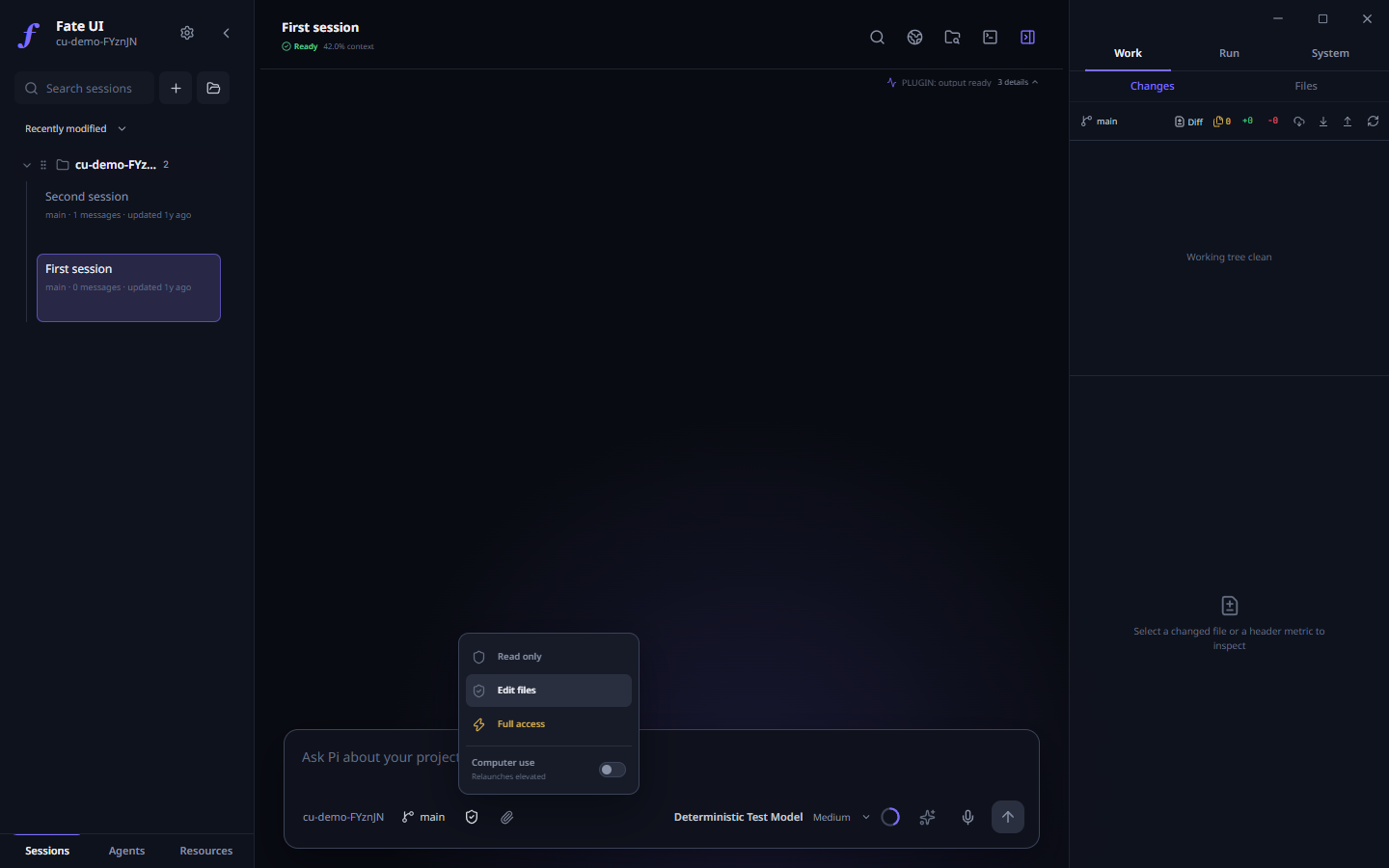
The switch sits in the permission menu of the composer, under the three levels. It is off by default.
Also new since 2.2.0-beta
Branches in their own worktree
- Picking a branch while you have uncommitted changes now opens it in a managed worktree and leaves your changes on the current branch, instead of failing.
- A branch that already has a worktree is listed with a worktree tag and opens that worktree.
- Each local branch has a delete button with a confirmation. Deleting a branch also removes its worktree. It refuses when a running session uses that worktree, or when the branch is checked out in the primary worktree.
- The picker no longer hides branches that are checked out in another worktree.
Long chats open fast
- A long session opens on its latest window of history. Scroll up and earlier messages load in pages, instead of being cut off for good.
- Images outside the recent budget stay as placeholders and load when you open them.
- Images you attach or receive are grouped into two-per-row tiles that open the full-size viewer. Tool-result images stay hidden while the tool card is collapsed.
Sessions and sidebar
- Delete a saved session of any project straight from the sidebar, not only of the open one. A project in the background keeps running.
- A background project whose selected session you delete closes cleanly first.
Fixed in this stretch
- Agent journal writes that Windows reported as busy are retried.
- The Agents tests and the Settings saved-toast checks no longer fail on slow runners.
- CI takes the pnpm version from
package.json. - A duplicate
deleteSessionbranch in the runtime router is gone; the one that ran before and the one meant to run now agree.
Agents, rebuilt
An Agent is a saved persona with exactly one conversation of its own, like a personal assistant chat. Agents are global and no longer saved per project.
- One chat per Agent. Select Agents in the sidebar and + to create one.
- Work in your projects. Ask for work in a trusted project. The Agent starts a background run with
run_in_project, answers right away, and continues when the run finishes. Up to four runs are active at once; each stops after 30 minutes. Open run shows it. - Inbox and notifications. Finished, failed and interrupted runs and Routine messages land in a per-Agent inbox behind the bell, with Unread and Read all. Desktop notifications fire while Fate UI is not focused; Mute notifications turns them off per Agent.
- Gmail and Google Calendar. With your own Google OAuth client (Settings → Agent → Google), an Agent can search and read mail and read your primary calendar. Sending mail and changing events waits for your answer in the chat. The client secret and sign-in are encrypted with the operating system's key store, and every decision is written to
google/receipts.jsonl. - Watches. Check a public page on an interval for any change, text appearing or disappearing, or a US dollar price crossing a threshold. Checks run without the model; only a hit posts into the chat.
- Routines post a message into the Agent's chat on an interval.
- Memory. The
remembertool saves what you state as a pending Memory Learning draft. Nothing is used until you approve it. - Tone and avatar, a live
fate_capabilitieslist so an Agent can walk you through what is not set up, and one permission setting shared by the chat and the card.
Web, PDFs and file search
Root sessions, Agent chats and Agent runs get these at every permission level:
web_search(Parallel's free Search MCP; turn it off in Settings → Agent → Web search) andweb_fetch, which refuses private, loopback and cloud metadata addresses, also after DNS and redirects.pdf_read; with Edit files or Full access alsopdf_fillandpdf_create.grep,findandlsat Read only and Edit files too, confined to the project.
Run Fate where the code lives
Fate 2 splits a host that runs Pi from clients that show it.
fate-serveris a plain Node process with no window. It owns Pi, your registered workspaces and the provider keys. A run on the host continues after you close the client. Commands:init,serve,web,provider login,auth-code,access-key create,doctor,migrate.- Browser workspace with chat, context, GoalMax and tasks, Agent Teams, Monitor, files, Git, saved history, permission requests and an optional terminal. Login is a one-use code, then an HttpOnly session cookie with CSRF protection. The host listens on
127.0.0.1only. - Desktop app as a remote client over SSH, with host key pinning (Settings → Hosts or
fate connect PROFILE). A failed connection never starts a local agent in its place. - Observers and one controller. A client claims a bounded control lease; control never raises the permission. After a lost connection the client shows the last known state as stale and reviews the original request instead of sending it again.
- One owner per profile, with recovery after a crash or power loss. Optional
native-durableSQLite storage andfate-server migratewith a verified backup and a rollback. Default storage is unchanged.
One orchestration engine
GoalMax, Agent Teams, Automations and Memory Learning now share one path. Agent Teams is the only executor for child sessions. A busy Team saves its state once per change instead of on every event (one child with 300 tool calls went from 706 saved snapshots, 78.8 MiB, to 5). Idle stays idle: Routines sleep until their next run, and GoalMax skips child bookkeeping while no goal is open.
Hooks, Code Intelligence, review and cost
- Hooks (Settings → Hooks) run your shell commands before a tool call, after a result, when the agent stops and at session start. Exit code 2 blocks, adds to the result, or sends the agent back to work.
- Code Intelligence connects language servers and gives the agent
lsp_diagnostics,lsp_definition,lsp_referencesandlsp_symbols. Everywriteandeditresult carries the file's fresh errors. - Checkpoints and Rewind on every Activity ledger row; hunk review with Keep and Reject in the Review Runway.
- Pull requests:
git_push(refusesmainandmaster),pr_createandpr_status; a branch chip withgit_branchfor the agent. - Usage and budget in Settings → Usage, a context inspector beside the composer, tool search, and optional Codemode.
- Reasoning slider in the model popover.
Pi SDK 1.3, MCP and more
- Pi 0.85 → 1.3. Resumed sessions keep their tools, model switches no longer leak old thinking, OpenRouter lists only your models, Kimi Co...
V2.2.0-beta - Radian
V2.2.0-beta - Radian
Agents become assistants you talk to. Each Agent now has one ongoing chat that starts work in your projects, reads your mail and calendar, searches the web, watches pages and reports back through an inbox and notifications. Underneath, every kind of background work runs on one engine, Pi moves to 1.3, and Fate gains hooks, language servers, rewind, hunk review and usage tracking.
Important
This is a pre-release for beta testers, like 2.0.1-beta. Back up ~/.pi before you install it over an existing installation. Installed stable copies are not offered this build, and 2.0.x beta copies are not offered it automatically either; download it below. From this build on, Settings → System → Beta branch lets Check for Updates offer later pre-releases. To leave the beta, uninstall it and install the stable release again.
Everything in 2.0.1-beta is included. This page lists what changed after it.
Agents, rebuilt
An Agent is now a saved persona with exactly one conversation of its own, like a personal assistant chat. Agents are global: they are no longer saved per project.
- One chat per Agent. Select Agents in the sidebar and + to create one. Its conversation runs in a folder Fate UI owns and is not listed under any project.
- Work in your projects. Ask for work in a trusted project, for example "check why the build fails in fateUI". The Agent starts a background run with
run_in_projectand answers right away. When the run finishes, its result comes back into the chat and the Agent continues from there. A run is a normal conversation in that project, so it can use Agent Teams, GoalMax and Memory Learning, and Open run shows it. Up to four runs are active at once, and each stops after 30 minutes. - Inbox and notifications. Finished, failed and interrupted runs and Routine messages land in a per-Agent inbox behind the bell in the Agents toolbar, with Unread and Read all. While Fate UI is not focused, every finished or failed run raises a desktop notification. Mute notifications turns them off for one Agent.
- Status under the name. In the regular sidebar each Agent shows what it is doing: the project and request of a running job, its latest unread item, Watch paused, its last run, or Ready with its permission.
- Gmail and Google Calendar. With your own Google OAuth client (Settings → Agent → Google), an Agent with Google turned on searches and reads your mail and reads your primary calendar. Sending mail and changing events shows the exact content in the chat and waits for your answer. The client secret and sign-in are encrypted with the operating system's key store, every decision is written to
google/receipts.jsonl, and a send Google does not confirm is reported as unknown instead of retried. Full access Agents can use Google too; mail is text from other people, so give a Google Agent the shell only if you accept that risk. - Watches. + Watch on an Agent's card checks a public page on an interval for any change, text appearing or disappearing, or a US dollar price crossing a threshold. Checks run without the model; only a hit posts into the chat and notifies. Failed checks back off from 2 to 16 minutes, and five failures in a row pause the watch.
- Routines now post a message into the Agent's chat on an interval, for example "every morning, summarize my unread mail".
- Memory. The
remembertool saves something you state as a pending Memory Learning draft: preferences go to your GLOBAL profile, everything else to the Agent's own PROJECT store. Nothing is used until you approve it, and a Memory drafts rail above the composer opens Learning. Normal chats getremembertoo. - Tone and avatar. A tone of up to 500 characters is added to the Agent's system prompt, and an emoji avatar is shown in the sidebar, the chat header and on its replies.
- Knows what it can do. Ask an Agent what it can do, or for something it lacks. It calls
fate_capabilities, which lists what is on right now (projects, files, shell, web, browser, Gmail and Calendar, memory, MCP servers, PDFs, images, schedules) with the exact setup steps for the rest, and walks you through them instead of saying it cannot. - One permission setting. The permission menu in an Agent's chat and the one on its card are the same setting. Picking a level in the chat saves it to the Agent and restarts the idle chat at that level.
Web, PDFs and file search for every session
Root sessions, Agent chats and Agent runs get these tools at every permission level:
web_searchasks Parallel's free Search MCP and returns up to 10 results with title, address and excerpt. Settings → Agent → Web search turns it off.web_fetchreads one public page. It refuses private, loopback and cloud metadata addresses, also after DNS resolution and redirects, and limits redirects, size and time.pdf_readreturns the page count, metadata, form fields and page text. With Edit files or Full access,pdf_fillfills a form into a new copy andpdf_createrenders Markdown to a PDF; each write gets a ledger row in Activity.grep,findandlsnow work at Read only and Edit files too, confined to the project likeread. An Agent run at Edit files could not list a folder before.
One orchestration engine
GoalMax, Agent Teams, Automations and Memory Learning used to run four separate kinds of background work. They now share one path.
- Agent Teams is the only executor for child sessions. The old subagent engine is removed; its history still restores and renames.
- Far less disk work. A Team saves its state once per change instead of on every event: updates go out within 50 ms and are saved at most once a second. One busy child with 300 tool calls went from 706 saved snapshots (78.8 MiB) to 5.
- Idle stays idle. GoalMax skips child bookkeeping while no goal is open, Routines sleep until their next run instead of scanning the disk every 5 seconds, and Memory Learning writes nothing for turns that attach nothing.
- Team members load hooks, Code Intelligence, usage and the context inspector, like the root agent.
Hooks and Code Intelligence
- Hooks (Settings → Hooks) run your own shell commands before a tool call, after a tool result, when the agent stops and when a session starts. Exit code 2 blocks the call, adds to the result, or sends the agent back to work, for example to require a passing typecheck before it stops. Hooks apply to the root agent and every Agent Team member. A hook is not a security boundary. See Hooks.
- Code Intelligence (Settings → Code Intelligence) connects language servers and gives the agent
lsp_diagnostics,lsp_definition,lsp_referencesandlsp_symbols. Everywriteandeditresult also carries the fresh errors and warnings of that file. Defaults cover TypeScript and JavaScript, Python, Rust, Go and C/C++; Fate UI does not install the servers. See Code Intelligence.
Review, Git and cost
- Checkpoints and Rewind. Every
writeandeditstores the file's earlier content. Rewind on an Activity ledger row restores every file changed from that row onward and removes files the agent created. A file changed since by a shell command, formatter or editor is skipped and named. - Hunk review. In the Review Runway each hunk has Keep and Reject. Reject reverts only that hunk and drafts a feedback message with it for the agent.
- Branches. A branch chip in the composer switches to or creates a branch while the session is still empty. The agent uses the
git_branchtool for the same. - Pull requests. Full access sessions get
git_push(which refusesmainandmaster),pr_createandpr_status, which reports every check and the failed log of up to three failing runs. - Usage and budget. Settings → Usage shows today, a 7 to 365 day window, cost per day and the top models and sessions. Settings → Agent → Daily budget warns after a turn once a project passes it; it is an alarm, not a hard stop.
- Context inspector. A
contextwidget beside the composer estimates what fills the context window: system prompt, tool schemas, messages and the largest tool results. - Tool search keeps rarely used tools out of the prompt until the model looks them up. Settings → Agent → Codemode lets the model run several tools from one script; it is off by default.
- Reasoning slider. The model popover shows reasoning effort as a slider; the arrow on the Reasoning row switches back to the menu.
Pi SDK 1.3
Fate moves from Pi 1.1.0 to Pi 1.3.0. What that brings into Fate:
- Resumed sessions keep their tools. A session that loaded a tool keeps it after a restart, so Fate no longer adds every orchestration tool back by hand.
- Clean model switches. After you switch models, the new model no longer sees the old model's thinking as plain text in earlier replies.
- OpenRouter lists only the models your key may use, with that key's context size and prices.
- Kimi Code uses Chat Completions, and tools added during a conversation keep the prompt cache. If you override the
kimi-codingbase URL inmodels.json, it must now end in/v1. - OpenAI GPT-6 with an API key keeps the prompt cache when you change the thinking level.
- Fewer failed turns. "The upstream provider returned an error", "Unable to forward upstream stream" and "The service is temporarily unavailable" are retried. When Anthropic rejects the strict tool set, Pi retries once without it. Mistral streams are no longer cut off during long thinking.
- Provider fixes: tool calls with malformed arguments...
V2.0.1-beta - Radian
V2.0.1-beta - Radian
A hotfix for the 2.0 beta. Fate moves to Pi SDK 1.1, shows the real run time of each tool, and gets the fixes made since 2.0.0-beta.
Important
This is a pre-release for beta testers, like 2.0.0-beta. Back up ~/.pi before you install it over an existing installation. Installed stable copies are not offered this build; the stable release stays 1.1.1 until 2.0.0 is final. To leave the beta, uninstall it and install the stable release again.
Everything in 2.0.0-beta is included. This page lists only what changed after it.
Pi SDK 1.1
Fate moves from Pi 1.0.0 to Pi 1.1.0 (Pi SDK, Pi Durable, client, protocol and server packages). What that brings into Fate:
- Claude Haiku 5.5 is in the model list, with thinking up to
xhighandmax. - Azure is now one provider called
azure. Pi renamedazure-openai-responses, and it now also serves Foundry Chat Completions deployments such asazure/deepseek-v4-pro. If you used Azure, sign in again or rename the provider key inauth.json,models.jsonandsettings.json. A session that used the old name falls back to another model when you resume it. - Fewer failed turns. "Selected model is at capacity",
server_busy, Mistralfinish_reason: "error"and stalled Bedrock HTTP/2 streams are retried instead of ending the turn. Output limits are estimated at 3.5 characters per token, so fewer requests go over the context limit. - Anthropic sign-in on Windows falls back to a free local port when port 53692 is reserved, for example by Hyper-V or WSL.
- Prompt cache: Anthropic keeps the cache when tools change in the middle of a conversation, instead of sending the full tool list again.
- Provider fixes: Bedrock Claude after a changed system prompt, OpenAI models on Bedrock now follow the thinking level, Codex requests accept
headersfrommodels.json, sign-in with ChatGPT after a cancelled token refresh, and costs of long prompts on models with prompt-length pricing. - MCP sign-in registers as a native client, so OpenID Connect servers no longer refuse it with
invalid_redirect_uri.
The native durable store keeps its SQLite format. A store made by 2.0.0-beta opens unchanged, and you can go back to 2.0.0-beta with it.
Tool times you can trust
The time on a tool card is now the time the tool really ran, measured by Pi. Before, Fate counted from when the model started its answer. On a reopened session that included the whole model response, so a one-second read could show half a minute. Results saved by older versions have no recorded time and keep the old estimate.
A run you stop now counts as stopped also when you stop it after its last message, for example while an extension still runs at the end of the turn. Fate takes that state from Pi instead of guessing it from the last message. A stopped project in the background is then not marked as completed, and recovery records the run as interrupted.
Fixed since 2.0.0-beta
- Changes panel: opening a project could show "This project is not registered in the execution host configuration." and keep that error. A read during a project switch now waits until the switch is complete.
- Title bar: the execution host selector sat above the title bar and pushed the window controls to a second row. Hosts are now a Settings page (Settings → Hosts). The workspace header has one connection button, and only when a host is saved or connected.
- Monitor uses the same head, chips, rows and tags as the Activity panel, so every skin styles it. The per-source check times are in the tooltip of the footer.
- M3 skin: the music player is at most 360 px wide instead of the full inspector width, and its labels cannot be selected as text.
- Compact sessions: an empty folder shows one line instead of the large empty block.
Known limits
Unchanged from 2.0.0-beta. The Node companion is still not among the release files; build it from this tag with the package guide.
Installation
| Platform | Architecture | Formats |
|---|---|---|
| Windows | x64 | EXE |
| macOS | Apple Silicon and Intel | DMG, PKG |
| Linux | x64 | AppImage, DEB |
This build passed the package, install and smoke matrix on all four runners, and the exact seven-installer checksum set was verified before publishing. Installers remain unsigned, and macOS builds are not notarized. Verify your download with SHA256SUMS; a checksum does not replace code signing.
Setup guide · Security and limits · Troubleshooting · Report an issue
Fate UI is an independent community project and is not an official Pi distribution.
V2.0.0-beta - Radian
V2.0.0-beta - Radian
Fate UI 2.0 takes the workspace off the desktop. Radian splits Fate into a host that runs Pi and clients that show it. The host can still be the desktop app. It can now also be a small Node process on another machine, and you work on it from the desktop app, from a browser, or through SSH.
Under that change sit a move to Pi SDK 1.0, an MCP client, questions from the agent, a Monitor dashboard, a new ownership and recovery model, and an optional SQLite storage.
Important
This is a pre-release for beta testers. Back up ~/.pi before you install it over an existing installation. Installed stable copies are not offered this build; the stable release stays 1.1.1 until 2.0.0 is final. To leave the beta, uninstall it and install the stable release again.
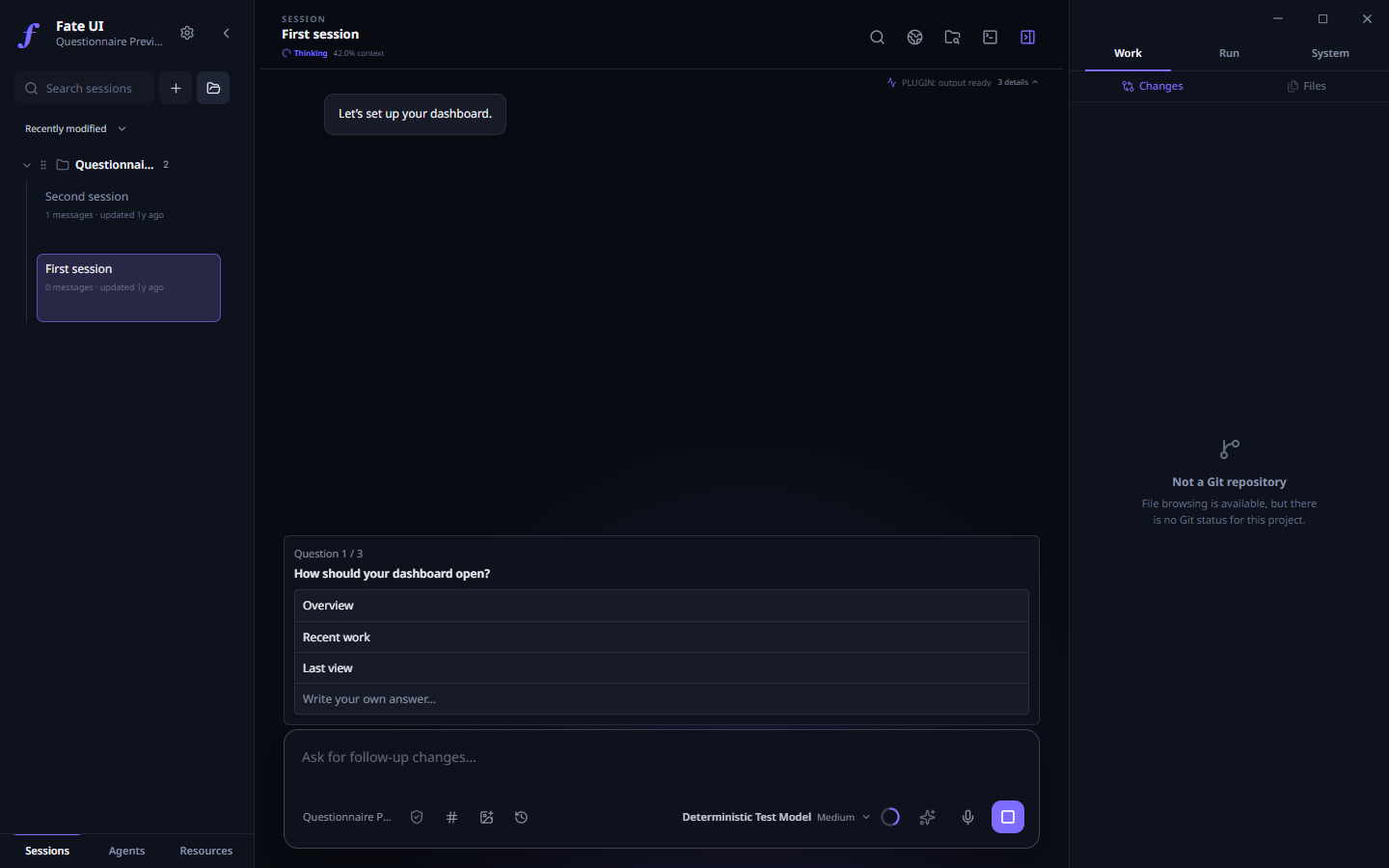
Actual Electron UI with a demonstration project and a test model: the agent asks, you choose.
Size of this release: 38 commits, 695 changed files and about 71,700 added lines since 1.1.0, checked by more than 3,900 automated tests. The 1.1.1 hotfix for large saved sessions is included.
Run Fate where the code lives
The Node companion: fate-server
A plain Node process that owns Pi, your registered workspaces and the provider credentials. It has no window and no Electron. Closing a client does not stop it, so a run on the host continues after you close the browser or the laptop.
| Command | What it does |
|---|---|
fate-server init |
Creates a private profile for one trusted workspace. |
fate-server serve |
Runs the host without a web page. |
fate-server web |
Runs the host and serves the browser workspace. |
fate-server provider login / status |
Sets up the model provider on the host. Keys never pass through a browser. |
fate-server auth-code |
Issues a one-use login code for a browser. |
fate-server access-key create |
Issues a workspace-scoped credential for a desktop client. |
fate-server doctor |
Reports the state of a profile and changes nothing. |
fate-server migrate |
Moves existing state to the new storage (see below). |
A profile made this way starts with a read-only permission maximum and the terminal off. Both are raised only by explicit flags at init. The host listens on 127.0.0.1 only; there is no public mode and no mode without login. A sample systemd user unit and a service guide are included.
The browser workspace
Open the login page, enter the one-use code, pick a registered workspace. The page is built from the same interface code as the desktop app.
- Conversation: chat, model and thinking level, new session, message queue, stop a run on the host, export a bounded text copy of the session.
- Context: attach a text file from your device, or a file of the project on the host.
- GoalMax and tasks: create, edit and clear a goal; create, reorder, change and clear tasks.
- Agent Teams: create a Team and use its lifecycle controls.
- Monitor: what is active and what needs attention, with a jump to the work behind a row.
- Files: the tree and a text preview of the registered project.
- Git: changed files, a diff for one file or for all, "reviewed" marks, history, and the content of one commit.
- Saved history: read an old conversation page by page from its start.
- Permissions: request a lower or a higher permission. Each change needs a one-use confirmation, and nothing above the host maximum is granted.
- Terminal: an optional manual shell in the browser, when the host was set up for it.
The desktop app as a remote client
The desktop app has a new Execution host selector. Add an SSH host, pin its server ID, choose the private client credential, and connect — or run fate connect PROFILE. The app opens the tunnel through your system OpenSSH and checks the host identity, the protocol and the workspace before any work starts. An unknown or changed host key blocks the connection. A failed connection never starts a local agent in its place.
Observers and one controller
- Every client starts as an observer. To change something, it claims control: a bounded lease that the host owns. You can renew it or release it.
- Control never raises the permission.
- When control moves to another client, requests from the earlier one are refused. A takeover is possible only when the host policy permits it.
- The selected session is shared in a workspace. When the controller selects another session, every client follows.
After a lost connection
- What you see is the last known state, marked as possibly stale. The host can still be working.
- After a reconnect or a host restart, the client needs a fresh snapshot before it can control again. Events arrive in order behind that snapshot.
- Each change request has an ID and a recorded outcome on the host. If the answer is lost, you review the original request. The client does not send it again.
- Interrupted work is shown as interrupted. It is not resumed without you.
New in the desktop app
Pi SDK 1.0
Fate moves from Pi 0.85.1 to Pi 1.0. A prompt is either admitted by Pi or refused; there is no half-queued item. The standard Pi 1.0 themes and their new color format are supported.
MCP servers
Settings → MCP adds a client for the Model Context Protocol, built on the official SDK. Add a local command or an HTTPS endpoint, press Test saved server, and turn it on. No server is on by default, and a project file cannot start one. The agent reaches MCP tools only in a Full access session. MCP guide
Switch from Pi Terminal
Settings → MCP → Switch from Pi Terminal imports the provider entries and the compatible global MCP servers that Fate does not have yet. It never replaces a Fate value. A new Fate profile also starts with the model and thinking level you chose in Pi.
Questions from the agent
Pi can stop and ask. A question card opens above the composer with two to four choices and a field for your own answer; several questions come one after the other. The agent waits for you. Skin packs can style the card.
Monitor
One panel lists the runs, Teams, tasks and activity that are active or need attention, and opens the work behind each row. The agent can read the same dashboard with a tool. It cannot approve, stop or resume work through it.
GoalMax and Agent Teams
- A failed verification can now be linked to a later passing run of the same check. The failure stays in the timeline as stale, with the reason.
- A sub-agent in an isolated worktree keeps its own sub-agents in that worktree, unless it asks for another workspace.
- After a restart, a saved Team is checked against its stored child sessions. Nothing is run again.
Sessions and permissions
- Session files are read as a stream with a bounded preview. Sessions and Agent home sessions larger than 128 MiB open, and the file is never shortened.
- A saved session is tied to its real project, also when two project paths map to the same Pi folder name.
- A saved permission is restored only inside the current host limit. Unreadable or damaged permission storage blocks the agent; it never grants more access.
Interface and launcher
- The heaviest side panels load when you first open them. If one fails to load, the other tabs stay usable.
- Push-to-talk runs its keyboard hook in a helper process. A hook that hangs cannot freeze the app; push-to-talk is then reported as unavailable.
- The
fatelauncher gainsfate connect PROFILEand passesinit,serve,web,provider,auth-code,access-keyanddoctorto an installed companion.
Ownership, storage and recovery
One owner for each profile
One process owns a profile and its checkouts. A second app or host on the same data is refused, so two processes cannot write the same state. After a crash, a forced quit or a power loss, the next start recovers the lock when the operating system confirms that the old process is gone. A lock is never taken because it looks old.
Native durable storage (opt-in)
The default storage is unchanged, and existing sessions, Team history and worktrees stay as they are. A new profile can select native-durable: one SQLite store, through Pi's durable runtime, for the queue, the tasks and the GoalMax documents. New workflow graphs are then admitted and ordered by Pi's native tasks. A damaged or incomplete native store blocks the start; Fate never falls back to the old storage silently.
Migration with a way back
fate-server migrate shows a dry run first. prepare writes a plan, apply makes a verified private backup and imports, and rollback returns to the original state. It does not copy provider credentials, trust or full-access grants, and it does not replay old work. Migration procedure
Review after an uncertain stop
If a workflow stopped in an unknown state, its history must be reviewed before new work is admitted. A storage close that could not be confirmed keeps the profile locked for an operator. An ordinary crash does not. Workflow review
Security defaults
- Browser login: a one-use code with a five-minute life, sent in a POST body; then an HttpOnly, SameSite=Strict session cookie and a CSRF token. Requests with a wrong Host or Origin are refused.
- Profile and credential files must be private. Windows ACLs and POSIX modes are checked, and a profile that is not private is refused.
- A workspace must be registered and trusted on th...
V1.1.1 - Axiom
V1.1.1 - Axiom hotfix
Saved sessions larger than 128 MiB can open again. Fate UI reads the selected JSONL session as a stream and keeps a bounded recent preview in memory. A large saved message is shortened in the preview; its full content remains in the session file. Sessions with long histories can still be resumed.
Agent home sessions no longer stop at the former 128 MiB reader limit.
Installers
The release contains Windows x64 EXE, macOS Apple Silicon and Intel DMG and PKG, Linux x64 AppImage and DEB, and SHA256SUMS. The native build, install, and smoke checks must pass on all four runners before the release is published. Installers are unsigned; verify the checksum of your download.
V1.1.0 - Axiom
V1.1.0 - Axiom
Fate UI 1.1 adds a local Agents library, a third built-in skin, and refinements to provider, session, and window controls.
Agents library
Save Agent identities, reusable TaskTemplates, and interval-based Routines. Open an Agent's home conversation, start a new session, or run a TaskTemplate and review its retained history. Routines run while the app is open; missed intervals are skipped rather than replayed. Background work stays within project-trusted, read-only/edit authority. Consequential file actions require exact, single-use approval and are not silently retried after uncertain interruption.
Upgrade from Automations
The old Automations tab and direct launch/edit flow are replaced by Agents → Copy Automations. Existing Automation files are not deleted or rewritten. Open and trust the original project, review each source, and copy it into a TaskTemplate. Then create or choose an Agent to run it; create a Routine only if you want a schedule. Old run counters are archived, not converted into new Run history. Copy rollback removes the copied TaskTemplate but leaves the original file intact. Back up your data before upgrading and read the migration steps.
Important
This changes the old Automations workflow and removes its window.piDesktop automation methods. Integrations that call those methods must switch to the Agents API; copying data does not keep the old commands running. The preload bridge is an application-internal interface, not a promised third-party plugin API.
Workspace and provider changes
- M3 Expressive skin and an independent matching palette join Default and Angelcore. Roboto Flex is bundled locally. Existing per-skin font, color, and density preferences remain independent.
- The window has a fullscreen control. The composer distinguishes Stop from Queue follow-up during a live run.
- A plain Expand details / Collapse details action on the left of the extension-status row opens or closes every reasoning and tool call, including offscreen history. Individual rows still open or close on their own; changing sessions resets the bulk view. Ctrl+O remains reserved for Open.
- OpenAI-compatible custom provider defaults are safer for aggregator endpoints. File changes to Fate-owned
models.jsonandauth.jsonrefresh live provider state; removing a stored API key clears its runtime override. Invalid partial auth writes do not wipe live keys. - Agent Team scheduling no longer imposes the earlier arbitrary team-size ceiling. Permission, workspace ownership, and bounded message/tool admission remain enforced.
Install and trust
The planned native artifact set is Windows x64 EXE; macOS Apple Silicon/Intel DMG and PKG; Linux x64 AppImage and DEB; plus SHA256SUMS. Installers remain unsigned, and macOS builds are not notarized. Verify the checksum for your downloaded asset; checksums do not replace code signing. Fate UI is local-first, not offline-only: prompts and selected context go to your configured provider. Full access is unsandboxed; worktrees are not security sandboxes.
Publishing is gated on the native four-runner package/install/smoke matrix and an exact seven-installer checksum set. A Windows-only local test pass is not cross-platform release approval.
V1.0.0 - Modulo
V1.0.0 - Modulo
Fate UI 1.0 brings the real Pi coding agent into a complete desktop workspace. Modulo is the first stable release: one place to plan a change, delegate work, supply useful context, inspect the result, and decide what to ship.
Fate UI embeds the Pi SDK directly. There is no terminal UI scraping and no separate Pi terminal installation to manage.
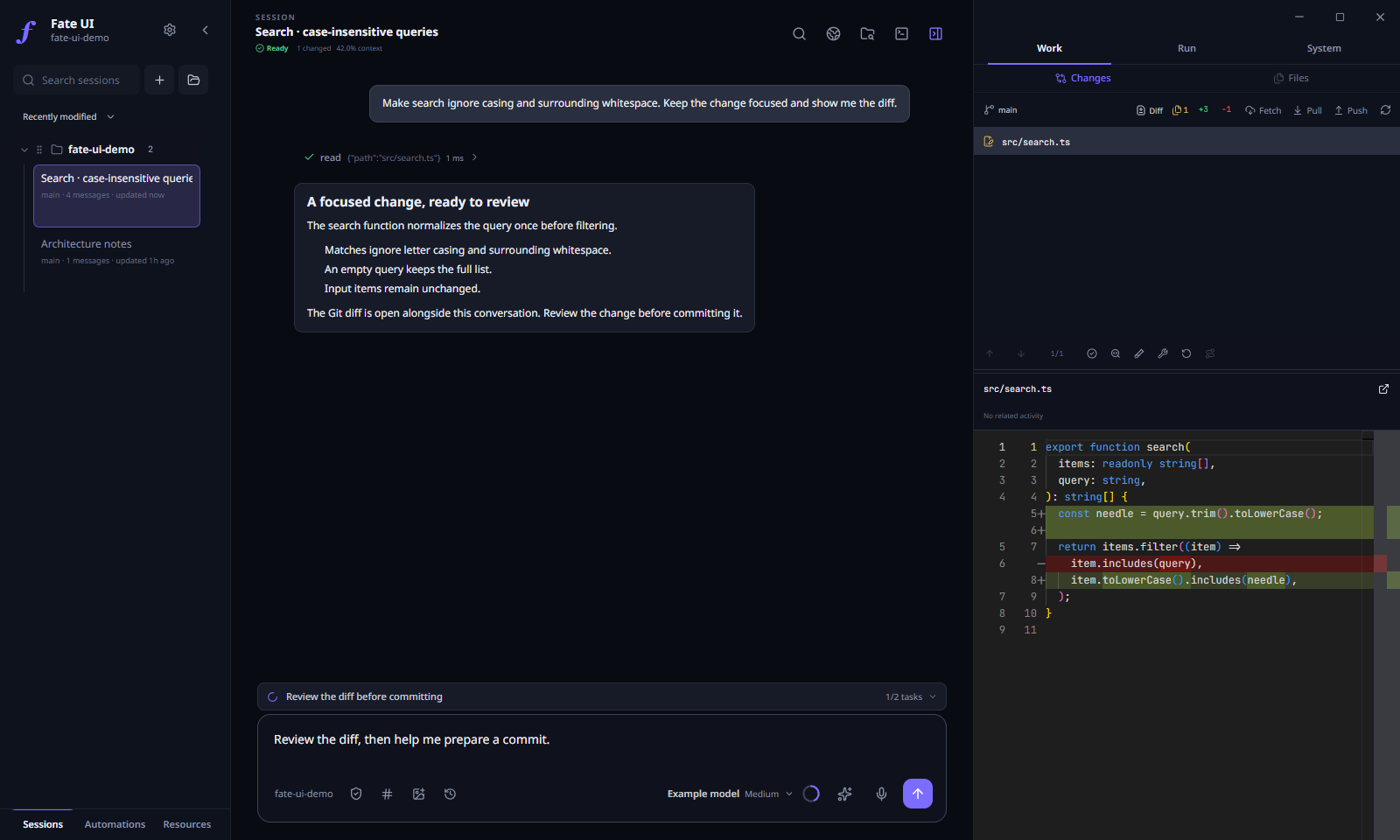
Actual Electron UI with a local demonstration project and illustrative agent messages.
One workspace for the coding session
Agents and workflows, together
Individual agents, recursive delegation, and dependency-based workflows now use one execution engine. There is no Legacy/Teams mode selector.
Choose each agent's model, reasoning effort, profile, tools, and skills. Use the shared checkout or a managed Git worktree according to the global workspace preference. Review changes before explicitly integrating them; completion alone does not merge code or remove a worktree.
The agent inspector keeps task state, messages, usage, and workspace ownership visible. Retained context supports follow-up work, while historical standalone records remain available without being silently revived as live agents.
Browser context that points to the right thing
The embedded browser keeps relevant pages beside the conversation. Select page elements and attach annotations so the agent can work from specific context instead of a vague description. Browser control has explicit origin and interaction policies; it is not arbitrary desktop control.
Git, files, and a separate terminal
Browse project files, inspect Monaco diffs, review Git history and working-tree changes, and use a manual terminal without leaving the workspace. Activity views connect runtime events and direct-write records to the investigation, while preserving the distinction between related activity and proof of authorship.
Longer goals without invisible state
GoalMax pairs objectives with criteria, tasks, evidence, and verification. The compact task/goal rails expose the next step; the Flight Deck provides the detail. Pending workflow admission and live parent/child joins prevent premature completion.
Queues preserve editable drafts and their delivery mode. Steering, follow-ups, saved instructions, and uncertain recovered messages remain visible; uncertain delivery is not blindly replayed after restart.
A workspace that fits the way you work
- Default and Angelcore skins, independent palettes and fonts, imported skin packs, and locally processed dithered backgrounds.
- Consistent compact controls across queue, tasks, steering, and GoalMax, plus proper confirmation dialogs and keyboard-operable menus.
- Opt-in Memory Learning for reviewed global coding preferences and project-specific notes/procedures.
- Local voice transcription, optional image generation, and a separate ambient-audio player.
- Multiple projects, durable sessions, branches, session references, and direct session messages.
Reliability work behind V1
Modulo separates execution from notification and cleanup. A successful task is not automatically rerun because its result could not be delivered. Follow-ups do not overwrite an unfinished parent/child join. Failed-to-stop work retains its writer lease until actual settlement, and cancellation attempts all requested targets before reporting failures.
Workflow runtime/idle/resource checkpoints remain advisory rather than hidden stop rules. Agent admission, workspace ownership, and history/transport bounds remain explicit.
The Pi SDK pin is 0.85.1, verified against the upstream GitHub release. V1 keeps the tested public SDK and Fate's stronger application-owned queue, trust, and orchestration boundaries instead of importing unreleased upstream experiments.
Versioning
The application displays V1.0.0 - Modulo. The machine version is 1.0.0.
Tags, installer filenames, checksums, and update ordering use the version number. The release name is display metadata: a future 1.0.1 is newer regardless of its name, and a name-only change does not create an update.
Installation and upgrade
Artifacts target:
| Platform | Architecture | Formats |
|---|---|---|
| Windows | x64 | EXE |
| macOS | Apple Silicon and Intel | DMG, PKG |
| Linux | x64 | AppImage, DEB |
Download the installer for your platform and the accompanying SHA256SUMS. Existing local sessions, settings, and provider data are retained. Earlier standalone agent records remain historical; newly created work uses the unified runtime. Recovered workflows and uncertain message delivery still require the appropriate explicit recovery action.
Important
These installers remain unsigned, and macOS builds are not notarized. Windows SmartScreen and macOS Gatekeeper may warn or block launch. Verify downloads against the published SHA256SUMS and review platform trust prompts. Checksums do not replace publisher code signing.
Trust and limits
Fate UI is local-first, not offline-only. Prompts and selected context go to your configured AI provider. Full access is intentionally unsandboxed, and a Git worktree is not a security sandbox. Keep important work backed up and review changes before merging or deploying them.
Automated checks and model-assisted verification do not guarantee that every generated change is correct. Native release artifacts are gated by the platform build/smoke matrix; runtime/provider failures remain visible rather than being called success.
Get started · Documentation · Agent orchestration · Report an issue
Fate UI is an independent community project and is not an official Pi distribution.
v0.9.9-beta4
Fate UI v0.9.9-beta4
This beta fills in the parts of Angelcore that still looked like the default interface. Music and playlists, tasks, GoalMax, agents, Context, Resources, model pickers, tooltips, and the browser controls now follow the same visual style.
The small things that were getting in the way
- The composer toolbar stays on one line with Memory Learning enabled. Labels shorten and secondary actions move into the tools menu instead of dropping onto another row.
- Narrow headers no longer let the activity text collide with the action buttons.
- Agent actions have their own row, so they no longer cover the button that opens a child preview.
- The browser's tabs, address field, navigation buttons, and device toolbar are styled. The web page itself keeps its own design.
- The address bar now handles HTTP links ending in
.htmlcorrectly and stops showing an old edit after navigation.
Font choices that match what you see
Angelcore starts with JetBrains Mono. The Interface font picker now shows the effective choice, and choosing Poppins actually changes the interface to Poppins. Code and terminal fonts remain separate.
Font, density, and motion overrides are saved per skin. You can return to a skin's defaults without losing the choices you made for another one.
More room for skin creators
Version 2 packs can bundle WOFF/WOFF2 fonts, embed a PNG as base64, and provide appearance defaults. They also have named style entries for the app's surfaces, with separate normal, compact, and compact-session variants.
Version 1 packs still work. Packs remain declarative: they cannot run JavaScript or CSS, load remote assets, or change providers, permissions, Memory Learning, or tool policy. Personal backgrounds can still replace a pack's image.
The creator guide documents the format. The coverage gallery shows populated panels and the checks behind this pass.
Compatibility and downloads
Keep a settings backup before downgrading: older builds do not understand version 2 packs or per-skin appearance overrides. A pre-existing local-file history limitation remains: Back can revisit an expired local-page capability. This release does not relax that security policy.
Native installers are verified and smoke-tested on Windows x64, macOS Apple Silicon, macOS Intel, and Linux x64 before publication. Public beta installers are unsigned; verify downloads against SHA256SUMS and back up important work before upgrading.