Repository navigation
Releases
FEED v1.8.2 — AI model catalogue refresh

Current OpenAI and Claude models, with the same setup workflow. Choose GPT-6 Luna, GPT-6.1 Terra or Sol, or Claude Haiku, Sonnet or Opus 5.5. Astra and Fable remain available, and Google choices are unchanged. Superseded models no longer appear as new selections; existing configurations remain identifiable and supported while their provider serves them.
Model settings and spending follow the selected model. Thinking uses the lowest supported setting by default. Preset pricing accounts for applicable prompt-length tiers and scheduled rate changes; manually entered rates remain yours.
Validated locally: 1,364 backend tests passed (2 skipped), 584 frontend tests passed, and both builds passed. Live OpenAI/Anthropic classification and translation, Spanish DOCX, 40-row bulk retry, Arabic/Chinese PDFs, and cache reuse passed. Google live testing was excluded because its model selections were unchanged.
Deployment verification is recorded separately in docs/deployment/v1.8.2-validation.md.
FEED 1.8.1
Fixed
The breadcrumb banner now renders its frosted glass correctly in Chrome as well as Safari. The production CSS optimizer had discarded Chrome's standard backdrop-filter declaration because the Safari-prefixed declaration came last. Correcting their order preserves both, including the shared shell panels, sidebar and print reset.
Validation
- Four production-optimizer regressions failed before the fix and pass after it; all 16 focused backdrop/theme tests pass.
- Both package builds pass. The frontend typecheck ratchet passes with 144 existing errors below its 148-error ceiling.
- Chrome localhost checks confirm visible blur in light and dark themes, including the packaged Docker frontend.
- Safari localhost checks confirm the packaged frontend retains its frosted banners in light and dark themes.
- ARM64 backend reports Node 24.21.0 and FEED 1.8.1; all 36 migrations apply to a disposable database. No new migrations or dependency changes.
Deployment
Deployed to production on September 14, 2026 through the Pi's screen-shared terminal after a verified SQLite and storage backup. Both services are healthy; all 36 migrations are current. Public health and the app report 1.8.1, the release notes open correctly, and Chrome's scrolled breadcrumb frost passes in both themes.
ARM64 images are published as et2geiger/feed-backend:1.8.1 and et2geiger/feed-frontend:1.8.1, with matching latest tags. The 1.8.0 images and backup are retained for rollback. The user confirmed Safari and Chrome on localhost and completed the final production visual inspection, closing the remaining manual check. Evidence is recorded in the deployment validation.
FEED 1.8.0
FEED 1.8.0 releases the revised AI model support and moves the server to Node 24.
- Refreshed, shared model catalogue with current provider SDKs, thinking controls, language coverage, model-expiry warnings, and save-time entitlement verification.
- Clearer provider errors and administrator alerts, including actionable handling of unavailable models and temporary provider limits.
- Working Fable document classification and more accurate spending records for billed failures and parallel classification batches.
- Finalized in-app release notes without the confusing “Unreleased” heading.
Validation: backend 1,299 tests passed (2 skipped); frontend 578 tests passed. Both ARM64 production images build successfully. Development feature checks covered Fable classification, Spanish DOCX translation, Arabic shopping-list PDF export, long-document classification, and a 40-item bulk retry.
Production AI tests were intentionally omitted at the operator's request. Fresh API keys and production model configuration are handled by the operator. Deployment checks cover running image identity, health, migrations, and matching version labels.
Docker images: et2geiger/feed-backend:1.8.0 and et2geiger/feed-frontend:1.8.0 (linux/arm64); both are also published as latest.
FEED 1.6.5
Everything since 1.6.0, plus a consistency pass over the controls staff touch most.
Filter and search fields are solid now. Every filter box, search field, and dropdown used to be transparent, so each one took the colour of whatever sat behind it — the page background on one screen, a card on another, a dialog on a third. The same control looked different on every page and had almost no edge against the background. They now carry their own fill and match the Columns button beside them. This covers Category, Food Item, Language, Translation and Reports Management, the Service Log, Shopping Lists, Document Translator, AI Configuration, Settings, Data Management, Help, and the Analytics detail tables.
LOTTO queue work from 1.6.0 continues. Service Analytics gained daily queue-volume and call-milestone charts, Queue Timing became Queue Statistics with initial-batch and per-day ticket figures, and portable backups now carry the staff roster and LOTTO synchronization provenance. Data Management summarizes current SIMC visits, Link2Feed visits, and LOTTO queue sessions beside procurement coverage.
Fixes. Call Milestones tooltips follow the chart's visible line order. A rolling deployment where the frontend is newer than the backend no longer crashes the Service lens. LOTTO closeouts backed by Postgres no longer fail the contract check on their clock format. Identical page-load failures now raise one toast instead of several.
Full detail in CHANGELOG.md.
FEED 1.5.0
FEED 1.5.0 is the first release worth another pantry's time.
Everything before this was plumbing for one organisation. 1.5.0 adds the
analytics and reporting that make FEED legible to any food pantry running the
same operational reality — and it speaks the data standards Oregon pantries
already use: Link2Feed and SIMC client visit records, and Oregon Food Bank
supply and spend.
What's new
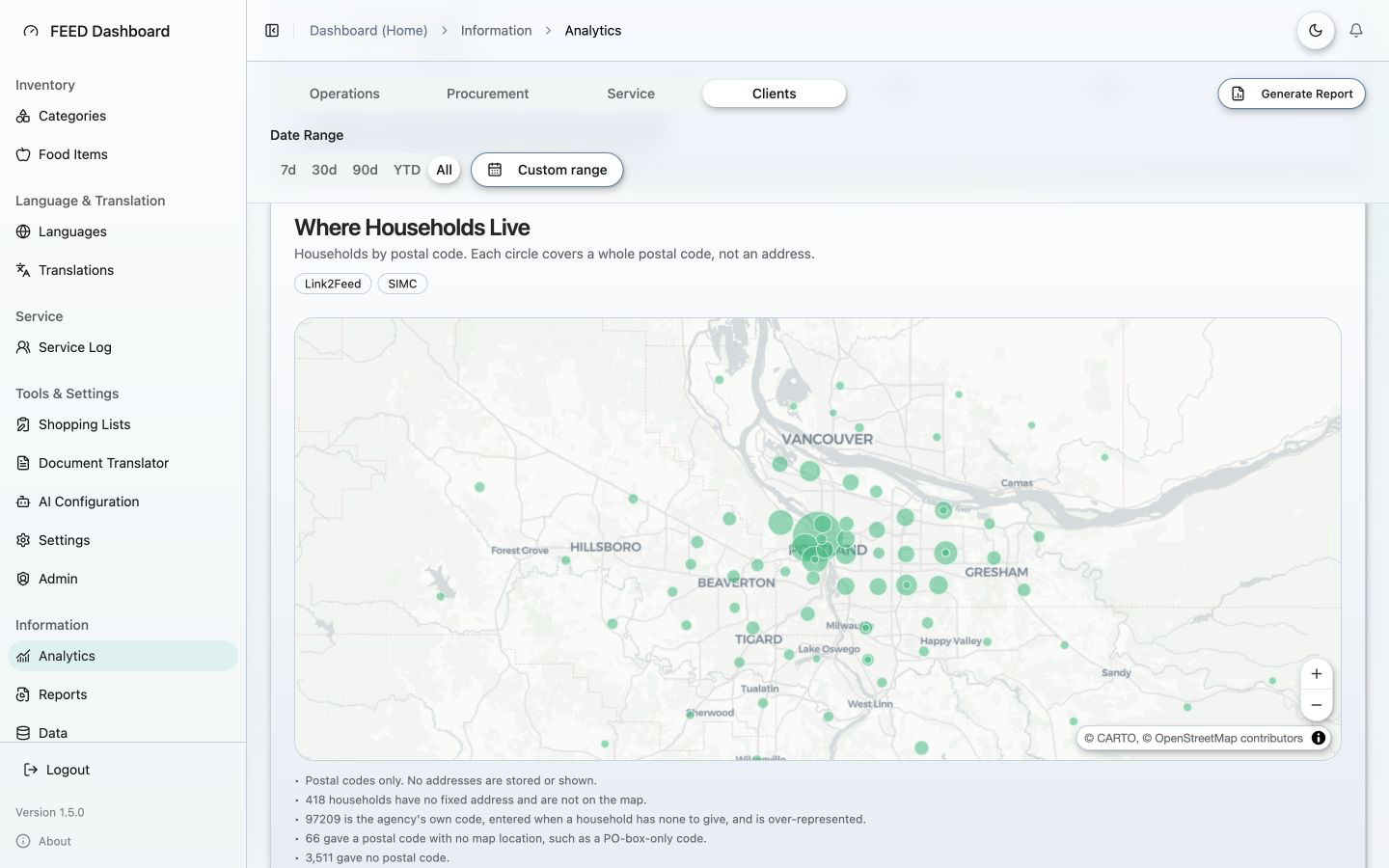
Analytics in four lenses. Operations (inventory history and availability),
Procurement (Oregon Food Bank supply and spend), Service (what happened on a
service day — households served, how service was delivered, household size,
turned away, languages), and Clients (who the people are — age ranges,
ethnicity, gender identity, housing, and a map of the postal codes households
gave).
Reports you can hand to someone. Select any cards from any lens and get a
PDF to read plus a CSV of the figures behind it. Save the selection as a
template and re-run it later against a new date range, so a monthly funder
report is set up once. Charts render server-side — including the postal-code
map — so a saved report reproduces without a browser.
Client visit imports. Link2Feed exports from 2020 onward and SIMC exports
since the June 2026 changeover. Large imports run as background jobs with live
progress. FEED reads only what it needs and never stores names, addresses,
phone numbers, or email addresses.
Backup, restore, and reset. A restore can bring back selected units only, so
recovering last month's inventory need not disturb anything else. Verified
before this release by restoring a real production backup onto a scratch
database.
Administration. See who has access, invite staff, revoke access with
immediate effect, and optionally restrict sign-in to an allowlist, with an audit
history of what administrators changed.
Counting honestly
Cards draw on records that begin years apart and are never summed. Each says
which record produced its figure, how far back that record reaches, and how many
households were actually asked a question — so a low answer rate reads as a
newer question rather than a refusal. This is deliberate, and it is the part
most worth inspecting if you are evaluating FEED for your own agency.
Before you deploy it
The interface still carries William Temple House branding — name, logo, colours,
and contact details. Configurable branding is planned for 2.0; until then,
replace it with your own before any public deployment. See
TRADEMARKS.md.
Running in production at https://feed.williamtemple.app ·
AGPL-3.0-or-later
Note on versioning: 1.3.x and 1.4.0 shipped to production without release
tags. This release covers everything since 1.2.3.
FEED 1.2.3
FEED 1.2.3 — Shopping List Builder limit handling. No database changes. Upgrades cleanly from 1.2.x.
A creation of Temple Consulting, LLC.
🐛 Fixed
- Food item limits now show automatically in the Shopping List Builder — Inventory Section tables read each item's limit straight from inventory, so a cap set in Food Item Management appears in the Limit column without re-entering it in the builder.
- A food item's request limit is now independent of its "Limited" stock status — editing the cap no longer flips the "Limited" low-stock badge, in either direction.
✨ Added
- The Global Limit now caps "No Limit" items by default — section-table rows with no per-item limit show the org-wide Global Limit value in the Limit column, with a per-table opt-out.
⚠️ Known issues
- Builder canvas can wrap long item names in Safari at non-100% browser zoom — a Safari-only sub-pixel rendering quirk under page zoom; the exported PDF and other browsers are unaffected. View the canvas at 100% zoom in Safari, or use Chrome.
Full notes: CHANGELOG.md.
FEED 1.1.2
FEED 1.1.2 — more UI motion polish plus a breadcrumb fix. Frontend-only; no backend or database changes. Upgrades cleanly from 1.1.0/1.1.1.
A creation of Temple Consulting, LLC.
🎨 Changed
- Alerts bell — the "no new alerts" bell rings on hover/tap (no page-load animation); the "new alerts" bell still shakes on appearance.
- Filter inputs on every data-table page (Categories, Food Items, Translations, Shopping Lists, Document Translator, AI Configuration) animate the funnel icon on page load + field hover/click.
- Language Management search field animates its magnifying glass (hop/nudge) on page load + field hover/click.
- Translate Document dialog — added vertical spacing around the "Select All" row so it isn't squeezed against the Basic/Advanced tabs.
🐛 Fixed
- Breadcrumb dead links — non-route group labels (Inventory, Tools, Language & Translation) presented as clickable but did nothing; they now render as non-interactive text. Routed crumbs still navigate.
Full notes: CHANGELOG.md.
FEED 1.1.1
FEED 1.1.1 — UI motion polish. Animated icons throughout the app. No backend or database changes (frontend-only); upgrades cleanly from 1.1.0.
A creation of Temple Consulting, LLC.
🎨 Changed
- Animated toolbar action icons across the management pages — Create/Add (Categories, Food Items, Translations, AI Configuration), Find Missing Translations, Document Translator's Upload Document & Run Storage Check, AI Configuration's Reset to Defaults, and Shopping Lists' Export Settings — animate on hover/tap.
- Animated page-title icons on every page (Categories, Food Items, Translations, Document Translator, Shopping Lists, Language Management) — animate on load + hover, matching the AI Configuration page (shared
createPageTitleIconhelper). - Sidebar toggle uses an animated
panel-left-closeicon (chevron nudges on hover). - Sidebar Log out icon animates (arrow slides out) on row hover.
- Global Limit Settings uses a custom animated
globe-lock(globe lines trace in, lock bobs). - Alerts bell shakes when unread alerts are present — on appearance / page load and on hover.
Icons with no upstream animate-ui version are hand-rolled as native animate-ui icons using Lucide v0.522.0 geometry verbatim. Full notes: CHANGELOG.md.
FEED 1.1.0
FEED 1.1.0 expands the Shopping List Builder with a batch of layout and printing controls plus an org-wide Export Settings panel. Every builder change applies identically in the on-screen canvas preview and the Chromium PDF export (verified by rendered-PDF parity smokes).
A creation of Temple Consulting, LLC.
✨ New features
Shopping List Builder
- Show/hide the Want column on section tables — tables can be Item+Limit+Want, Item+Limit, Item+Want, or Item-only.
- Show/hide column dividers and table/cell borders on section tables and form-field groups (independent toggles, both default on).
- Limited / Clearance status icons on section-table rows, shown inline with the item name.
- Legend component explaining the status icons, with horizontal/vertical layouts and editable labels. Right-to-left target languages flip the legend's alignment and reading order.
- Per-row checkbox in the Want column as an alternative to the blank fill-in space.
- Show Global Limit per section table — rows with no item-level limit display the current org-wide Global Limit instead of a blank cell (resolved live at render time).
Shopping Lists page
- Export Settings panel — org-wide shared configuration for exported-PDF filenames (base names for single vs. translated downloads, plus optional template-name / language / date-stamp tokens and date position), with a live filename preview.
- English in the Translate & Download PDF modal — English is now a selectable export target and takes the identity path (skips translation).
🎨 Changed
- All Shopping List text and icons render in pure black (#000000) for maximum print contrast.
- Default builder component width is now 267pt (was 270).
- Enhanced the animated Save icon motion.
🐛 Fixed
- Builder translation failures now show a specific, actionable message — a transient AI-provider overload (503 "high demand") names the language, explains it's temporary, and reassures that no work was lost, instead of a generic error.
- Keyboard arrow keys / Home / End now work in text fields (#37) — a global navigation listener was intercepting them while typing.
- Editing names mid-string no longer jumps the caret to the end (#38) — Title-Case is now applied once at submit rather than per keystroke.
- AI Configuration icon hover triggers (#35, #36) now animate anywhere over the card.
Production upgrades from 1.0.10 → 1.1.0. Includes an additive database migration (ExportSettings) that auto-applies on backend start. Full notes: CHANGELOG.md.