Packrat is an open source command-line packet analyzer that takes the pain out of reading raw .pcap files. Packrat gives you a clean, colorized summary of IP conversations, protocol breakdowns, and traffic detection.
After using tshark I just wanted something simpler. Something I could run and immediately understand what's happening in a capture without digging through documentation for flags.
If you are using this tool and have any suggestions, feel free to open an issue or reach out!
pip install packrat-cli# basic analysis
packrat capture.pcap
# filter by IP or protocol
packrat capture.pcap --filter 192.168.1.5
packrat capture.pcap --filter DNS
# export results
packrat capture.pcap --export json
packrat capture.pcap --export html
packrat capture.pcap --export txt
# skip DNS resolution (faster)
packrat capture.pcap --nd
# check version
packrat --version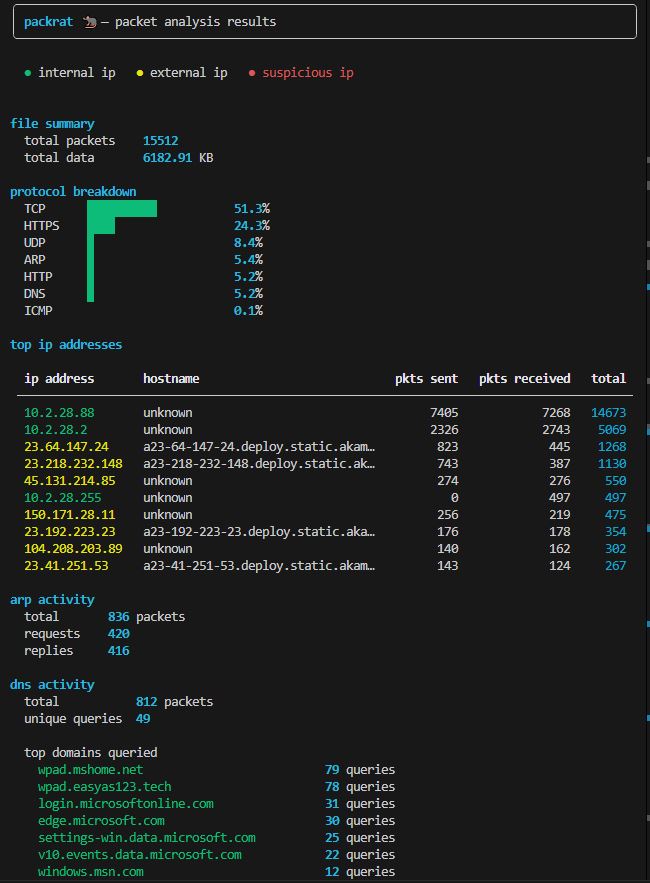
- Protocol breakdown — TCP, UDP, DNS, HTTP, HTTPS, SSH, FTP, SMTP, IMAP, ARP
- Top IP addresses with hostname resolution and color coding
- DNS query analysis with top domains
- TLS/HTTPS handshake detection
- Anomaly detection — port scans, ARP floods, DNS tunneling, FTP plaintext
- Export to JSON, HTML, or TXT
- Added threat detection engine with rules for SYN flood, ICMP flood, UDP flood, port scan, and ARP scan
- Refactored codebase into layered architecture (core API, CLI, detection)
- Initial release
Packrat reports HTTP at the packet level, not the transaction level. What this means is that since there is no TCP reassembly, A single HTTP request/response may span multiple packets. This can lead to a higher number of packets according to Wireshark or other Networking tools.

That being said, use Packrat for convenience not pin point accuracy.