Repository navigation
Home
A calibre plugin that keeps reading status, reading position, progress, favourites and collections in step between a PocketBook e-reader and a calibre library, and can repair the author information the reader sorts by.
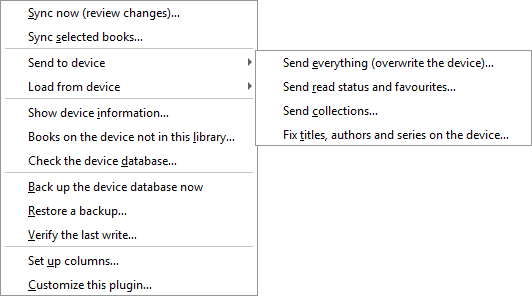
- Installation and first run — installing the plugin, getting a button on the toolbar, and the one-click column setup.
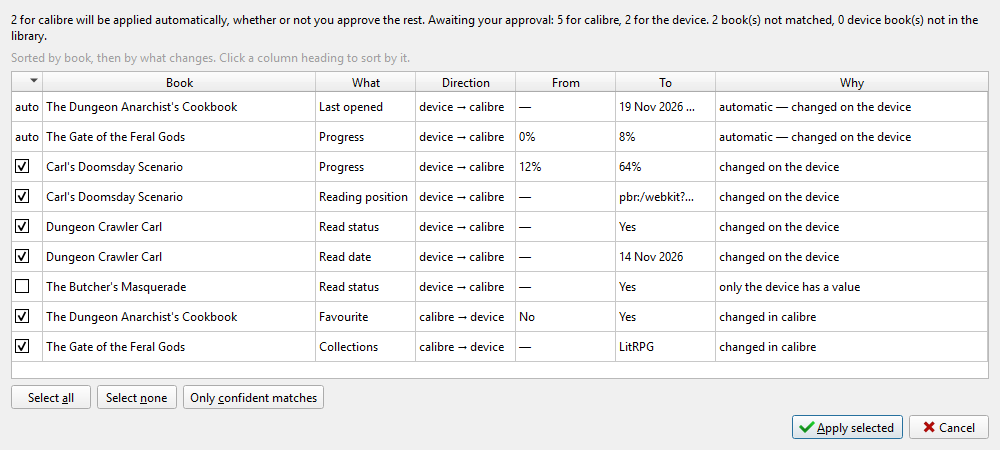
- How syncing works — what the plugin compares, how it decides which side wins, and what the review dialog is telling you.
- Settings reference — every option in the configuration dialog, what it defaults to and what it changes.
| Direction | |
|---|---|
| Read status | both ways |
| Read date | reader → calibre |
| Last opened | reader → calibre |
| Favourite | both ways |
| Progress (% read) | reader → calibre |
| Reading position | both ways |
| Collections | both ways |
Reader-only fields are ones the device maintains itself; writing them back would be meaningless or would be overwritten on the next page turn. The Columns page says which calibre column each one lands in.
The plugin writes directly to the reader's explorer-3.db database. It takes
a backup before every single write and that cannot be turned off, but read
Backups and safety once before the first write, and keep
your own backups of your calibre library as you would with any plugin.
No DELETE statement exists anywhere in the plugin. Removing a book from a
collection flags the membership as deleted, the way the firmware does.
- Reading positions stored by CoolReader (
.cr3hist) are detected but not synced. The native reader keeps its position in the database and works. - The Fix titles, authors and series action always covers the whole library; it has no "selected books only" mode yet.
- SD-card storage, multiple device profiles and
explorer-2firmware are implemented but have not been tested on real hardware. Reports welcome.
If you are reporting a problem, Troubleshooting says which three things to include.
They are published automatically from docs/wiki in the repository, so a change to the plugin and the change to its documentation go through the same review. Editing a page here is overwritten on the next publish; corrections are welcome as a pull request against that folder.