Repository navigation
Menu reference
Everything the plugin does is on the toolbar button's drop-down menu. Items that cannot be used right now are greyed out with the reason in their tooltip, rather than disappearing.
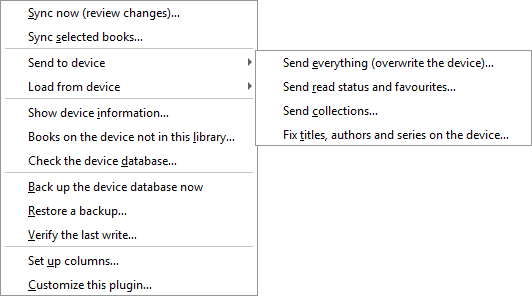
Two conditions decide most of it:
- No PocketBook is connected — anything that touches the device is off.
- Run "Set up columns" first — syncing is off until the plugin has somewhere to put what it reads.
| Item | What it does |
|---|---|
| Sync now (review changes)… | Compares both sides, shows you a list of proposed changes, writes only what is ticked. This is the one you will use. |
| Sync selected books… | The same, limited to the books selected in the library view. |
Forced, one-directional, and ignores what the plugin remembers from the last sync: calibre's value wins everywhere it differs. Use these to repair a device, not as a routine.
| Item | What it does |
|---|---|
| Send everything (overwrite the device)… | Every enabled field, calibre's value wins. |
| Send read status and favourites… | Read status and favourite. (The read date is never written to the device.) |
| Send collections… | Collection membership only. Greyed out if the device has no shelves table. |
| Fix titles, authors and series on the device… | Not a sync. See Fixing author sorting. |
The mirror image: the reader's value wins.
| Item | What it does |
|---|---|
| Load everything (overwrite calibre)… | Every enabled field. |
| Load read status and favourites… | Read status, read date and favourite. |
| Load reading positions and progress… | Position, progress and last opened. |
| Load collections… | Shelf membership into the collections column. |
Every forced action still shows the review dialog before writing anything.
| Item | What it does |
|---|---|
| Show device information… | Model, driver in use, storage id, database path, explorer and schema version, profile, and the capability list. This is what to paste into a bug report — it contains no titles and no file paths. |
| Books on the device not in this library… | A read-only list of books the reader has that calibre did not put there. The plugin never touches these. |
| Check the device database… | Runs an integrity check and reports orphaned rows. It reports; it never repairs or deletes. |
| Item | What it does |
|---|---|
| Back up the device database now | An immediate copy, taken with SQLite's backup API so the write-ahead log is included. |
| Restore a backup… | Puts a previous copy back on the device. |
| Verify the last write… | Re-reads the rows the last write touched and reports any the device has since changed back. See Backups and safety. |
| Item | What it does |
|---|---|
| Set up columns… | Creates the custom columns. Safe to run again; it reuses what it made before. |
| Customize this plugin… | Opens the settings dialog. Same as Preferences → Plugins → PocketBook Utilities → Customize. |