bash won't start after hang during intensive compilation & zombie processes remain after reboots #2364


Description

-
Your Windows build number: Microsoft Windows [Version 10.0.16232.1000]
-
What you're doing and what's happening:
Was attempting to compile haskell as suggested here. After several hours of compilation bash windows froze post gcc stage. Was unable to start a new process using an existing separate bash window. Attempted to run a sudo command but froze. -
What's wrong / what should be happening instead:
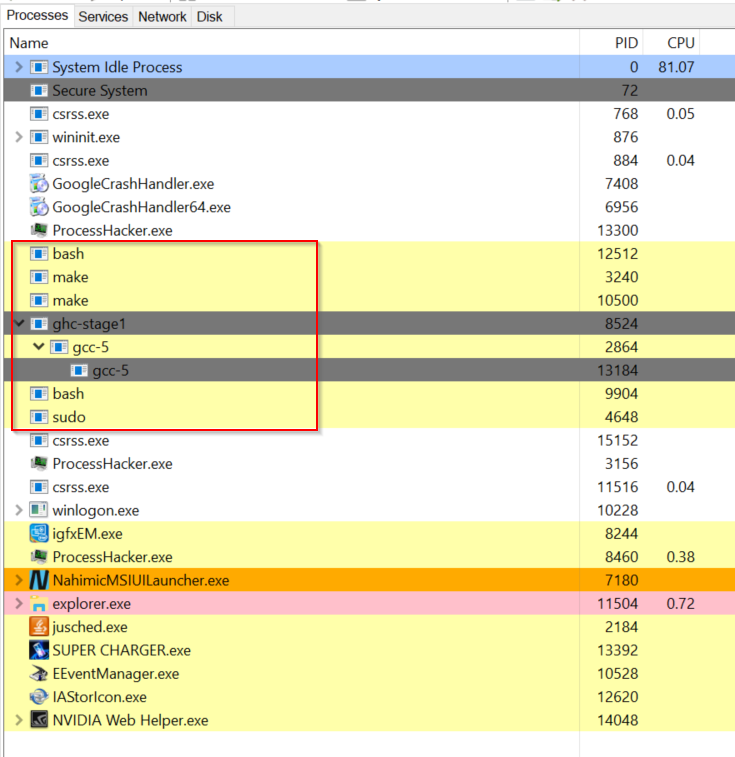
After rebooting several times, unable to start bash process. Console window opens but bash does not start. In Process Hacker/Task Manager I can see ghost processes that had initially stalled. These zombie processes do not die after rebooting (several times) or by terminating in process explorer/task manager. Here is a screenshot of my process explorer highlighting zombie processes after several reboots.
This is what I see if I try to start bash shell.

-
Strace of the failing command, if applicable:
Unfortunately, i can't get to that stage but I am able to PM you a log from process monitor while running bash.exe --login from cmd.exe if that helps.
Is there any way to reset the subsystem's memory/process cache manually?