@darrickyee commented on Tue Oct 23 2018
Docstrings do not appear in Intellisense info for modules living in a virtual environment's /lib/site-packages directory for Python 2.7.11 virtual environment.
They DO appear for identical modules in a virtual environment based on Python 3.7.
Environment data
- VS Code version: 1.28.2
- Extension version (available under the Extensions sidebar): 2018.9.1
- OS and version: Windows 7
- Python version (& distribution if applicable, e.g. Anaconda): 2.7.11
- Type of virtual environment used (N/A | venv | virtualenv | conda | ...): virtualenv
- Relevant/affected Python packages and their versions: Any in /lib/site-packages
User settings JSON:
{
"python.jediEnabled": false,
"python.linting.enabled": false
}
Workspace settings JSON:
{
"python.pythonPath": [Path to virtualenv python.exe]
}
Actual behavior
Docstring does not appear in Intellisense info.

Expected behavior
Docstring appears in Intellisense info.
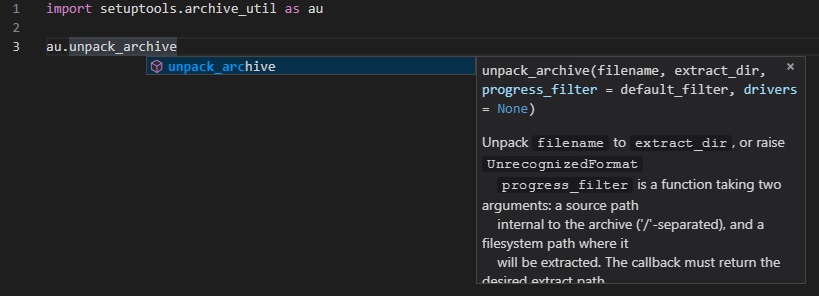
Steps to reproduce:
- Create a Python 2.7.11 virtual environment using virtualenv.
- Import some module from /lib/site-packages.
- Type or begin typing an object name from the imported package.
Result: Docstring does not appear in Intellisense info.
Modify step 1 by creating a Python 3.7 virtual environment instead and copying the module to that virtual environment's /lib/site-packages. Docstring should appear in Intellisense after steps 2 and 3.
[Edit] Should add that jedi does show the proper docstrings with Python 2.7, but it is very, very slow.
@DonJayamanne commented on Wed Oct 24 2018
Modify step 1 by creating a Python 3.7 virtual environment instead and copying the module to that virtual environment's /lib/site-packages. Docstring should appear in Intellisense after steps 2 and 3.
Why are you copying the files? Why don't you pip install them?
@DonJayamanne commented on Wed Oct 24 2018
Works for me, please could you try the following:
- Open your
settings.json
- Add the following setting:
"python.analysis.downloadChannel": "daily",
- You will get some red squigglys under the above, please ignore.
- Please reload VS Code and a new version of the language server will get downloaded, wait until it gets downloaded and started
- Let me know how it goes.
@darrickyee commented on Wed Oct 24 2018
Thanks for the response. Still not working for me, though. The log says Microsoft Python Language Server version 0.1.50.0, is that correct? If not, I might be having network issues at work and could have better luck on my home computer.
I'm trying this:
import setuptools.archive_util as au
au.unpack_archive
Hovering over "unpack_archive" doesn't show the docstring in the 2.7.11 environment, but it does in 3.7.0.
To answer your question,
Why are you copying the files? Why don't you pip install them?
In some cases, there isn't a pip install available (e.g., Maya's pymel stubs). In other cases, I have some of my own libraries that I would like to include in every project that uses the environment.
@darrickyee commented on Thu Nov 08 2018
Any updates on this? I realize Python 2.7 is getting a bit "long in the tooth," but unfortunately we're stuck with it in Maya/UE4/any other VFX software until the VFX Reference Platform moves to 3.x in 2020...
@DonJayamanne commented on Mon Nov 19 2018
Please update your extension to the latest version and remove the following setting "python.analysis.downloadChannel": "daily",
The latest version should be >= 0.1.60
Please let me know if the problem persists.
@darrickyee commented on Thu Nov 29 2018
I just ensured my version is 0.1.60, but the behavior is the same as before. Tested with setuptools.archive_util.unpack_archive as above, plus a couple of different functions. The docstring appears when 3.7 is my interpreter, but not 2.7.


@darrickyee commented on Tue Oct 23 2018
Docstrings do not appear in Intellisense info for modules living in a virtual environment's /lib/site-packages directory for Python 2.7.11 virtual environment.
They DO appear for identical modules in a virtual environment based on Python 3.7.
Environment data
User settings JSON:
{
"python.jediEnabled": false,
"python.linting.enabled": false
}
Workspace settings JSON:
{
"python.pythonPath": [Path to virtualenv python.exe]
}
Actual behavior
Docstring does not appear in Intellisense info.
Expected behavior
Docstring appears in Intellisense info.
Steps to reproduce:
Result: Docstring does not appear in Intellisense info.
Modify step 1 by creating a Python 3.7 virtual environment instead and copying the module to that virtual environment's /lib/site-packages. Docstring should appear in Intellisense after steps 2 and 3.
[Edit] Should add that jedi does show the proper docstrings with Python 2.7, but it is very, very slow.
@DonJayamanne commented on Wed Oct 24 2018
Why are you copying the files? Why don't you pip install them?
@DonJayamanne commented on Wed Oct 24 2018
Works for me, please could you try the following:
settings.json@darrickyee commented on Wed Oct 24 2018
Thanks for the response. Still not working for me, though. The log says Microsoft Python Language Server version 0.1.50.0, is that correct? If not, I might be having network issues at work and could have better luck on my home computer.
I'm trying this:
Hovering over "unpack_archive" doesn't show the docstring in the 2.7.11 environment, but it does in 3.7.0.
To answer your question,
In some cases, there isn't a pip install available (e.g., Maya's pymel stubs). In other cases, I have some of my own libraries that I would like to include in every project that uses the environment.
@darrickyee commented on Thu Nov 08 2018
Any updates on this? I realize Python 2.7 is getting a bit "long in the tooth," but unfortunately we're stuck with it in Maya/UE4/any other VFX software until the VFX Reference Platform moves to 3.x in 2020...
@DonJayamanne commented on Mon Nov 19 2018
Please update your extension to the latest version and remove the following setting
"python.analysis.downloadChannel": "daily",The latest version should be >=
0.1.60Please let me know if the problem persists.
@darrickyee commented on Thu Nov 29 2018
I just ensured my version is 0.1.60, but the behavior is the same as before. Tested with setuptools.archive_util.unpack_archive as above, plus a couple of different functions. The docstring appears when 3.7 is my interpreter, but not 2.7.