- VSCode Version: Code 1.15.1 (41abd21, 2017-08-16T18:07:25.676Z)
- OS Version: Windows_NT x64 6.1.7601
- Extensions: none
When i am trying to duplicate an html block, I used to just select the rows, press ctrl+c and then ctrl+v and the block is successfully duplicated
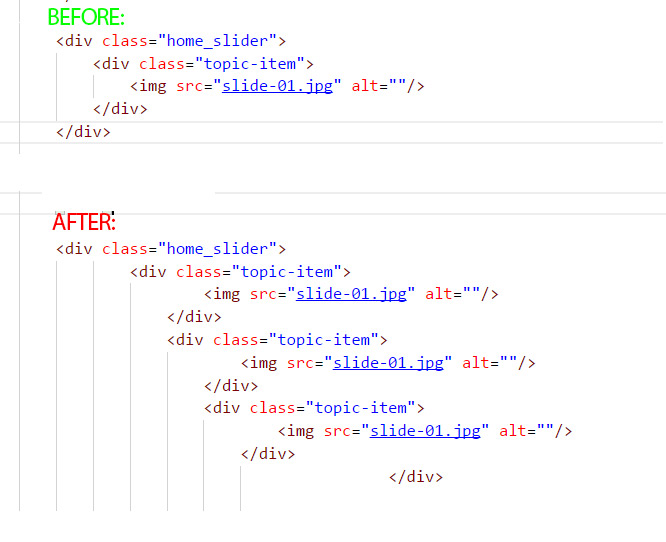
But after the recent update things go horribly wrong when all the indentation gets screwed up as you can see in the attached image: the duplication is indented in relations to it's sibling, not to it's parents, which is totally incorrect in any known language or markup.
Indentation is to the sibling element instead of the parent element not just in duplictions but also in normal writing of code.
Please fix this bug as soon as possible.
By the way, editing css recently also becames challanging as auto complete suggests css properties no one ever really uses, this also started from one of the recent updates.
Steps to Reproduce:


When i am trying to duplicate an html block, I used to just select the rows, press ctrl+c and then ctrl+v and the block is successfully duplicated
But after the recent update things go horribly wrong when all the indentation gets screwed up as you can see in the attached image: the duplication is indented in relations to it's sibling, not to it's parents, which is totally incorrect in any known language or markup.
Indentation is to the sibling element instead of the parent element not just in duplictions but also in normal writing of code.
Please fix this bug as soon as possible.
By the way, editing css recently also becames challanging as auto complete suggests css properties no one ever really uses, this also started from one of the recent updates.
Steps to Reproduce: