- VSCode Version: 1.16.1
- OS Version: Ubuntu Linux 16.04 Gnome
Steps to Reproduce:
- Start a blank file
/tmp/foo.css/
- Paste this code in there:
/* I've intentionally indented with 2 spaces */
.foo {
  padding: 10px;
  color: #123;
}
- Go to the bottom right and click the tab size box and select "Convert indentation to Tabs".
- The
color line has slightly different indentation.
Reproduces without extensions: Yes
Here's a screenshot with code --disable-extensions:
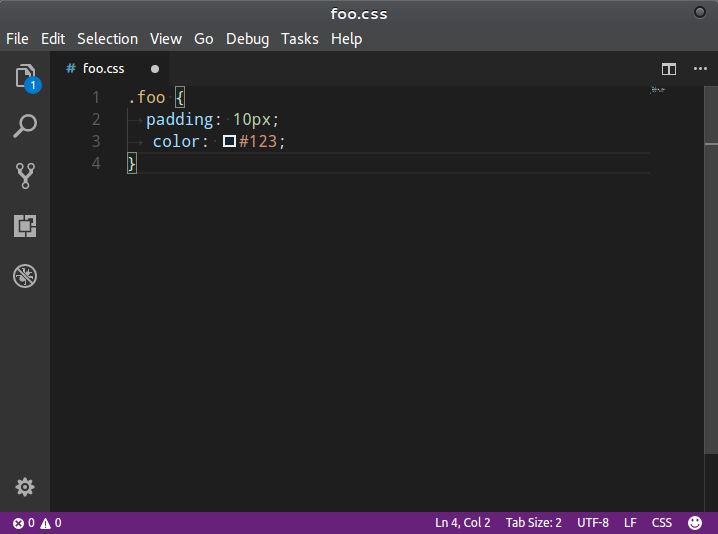
Believe me, I prefer spaces for indentation, but I'm on a couple code bases where the team has chosen tabs. And this is a weird annoyance.
This goes away if I set: "editor.colorDecorators": false in the settings.


Steps to Reproduce:
/tmp/foo.css/colorline has slightly different indentation.Reproduces without extensions: Yes
Here's a screenshot with
code --disable-extensions:Believe me, I prefer spaces for indentation, but I'm on a couple code bases where the team has chosen tabs. And this is a weird annoyance.
This goes away if I set:
"editor.colorDecorators": falsein the settings.