- VSCode Version: 1.22.2
- OS Version: Windows 10 1709 (16299.371)
Steps to Reproduce:
- Update from Visual Studio Code 1.22.1 to 1.22.2.
- Observe 'Updating VS Code...' dialog box.
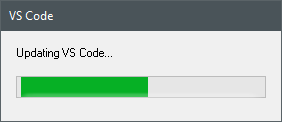
Does this issue occur when all extensions are disabled?: Yes
Somewhat related to #24957, but this dialog doesn't look to be part of the main UI (I can't actually find where it's defined in the code).
Additionally, is 'VS Code' correct here? My feeling is that the dialog should use the unabbreviated 'Visual Studio Code'.


Steps to Reproduce:
Does this issue occur when all extensions are disabled?: Yes
Somewhat related to #24957, but this dialog doesn't look to be part of the main UI (I can't actually find where it's defined in the code).
Additionally, is 'VS Code' correct here? My feeling is that the dialog should use the unabbreviated 'Visual Studio Code'.