Adds sort lines (ascending and descending) command#2796
Adds sort lines (ascending and descending) command#2796alexdima merged 2 commits intomicrosoft:masterfrom martellaj:joem/sort-lines
Conversation


|
Hi @martellaj, I'm your friendly neighborhood Microsoft Pull Request Bot (You can call me MSBOT). Thanks for your contribution! TTYL, MSBOT; |


|
@martellaj, Thanks for signing the contribution license agreement so quickly! Actual humans will now validate the agreement and then evaluate the PR. |

|
Nice job. Question is; should this be merged or handled by an extension? E.g. Sort lines |

|
I know Sublime Text has this functionality built in and that it's often a requested feature for IDEs. I don't see a downside of including it without having to download a third party extension, given that it's an operation on code lines with essentially no logic (I'm on the OneDrive team and would love to alphabetize our dependencies. 😋). Really I was just trying to contribute where I could to a product I love using. Would love to see it merged! |


|
Commenting so I get a participating notification. I want to deprecate my extension if it gets in :) |
Adds sort lines (ascending and descending) command

|
Thank you! 👍 I took the liberty to tweak the keybindings and add some tests while merging. |

|
Sweet! Happy to contribute. |


|
It took me a few minutes to me to understand how this works. To me at least, do not seems particularly obvious that I must select the lines before sorting out, what if it acts like Copy/Paste with no selection (defaults to whole line) the command should either alert if there isn't any selection to act upon, or act over the whole file instead. |

|
Can someone please provide a link to the documentation for this feature? I can't find this feature in any of the menus. |
|
Interesting. Seems it's no longer showing up in the command palette, but does show up as keyboard shortcuts. |
|
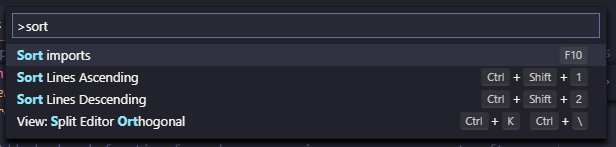
@martellaj Ahh, thank you. I do see it in the command palette if I type "sort". I was expecting to access the feature from one of the Edit/Selection/context menus. |
|
Yep, I'm seeing it in the command palette now, too. Pretty sure it was absent on the Insider build I was on 2 days ago though. Regardless, all good now. 👍 |

|
How does one access this feature? Typing |
|
@OlafvdSpek You're sure you're in the command palette, right? I still see it FWIW.
|
|
No, I was trying the Ctrl-P one.. sorry. |

8 participants


help wantedlabel