Releases: Mighty-Text/MightyText
MightyText

MightyText – Your Android Communication Hub on Desktop


What is MightyText and How Does It Transform Your Desktop Experience?
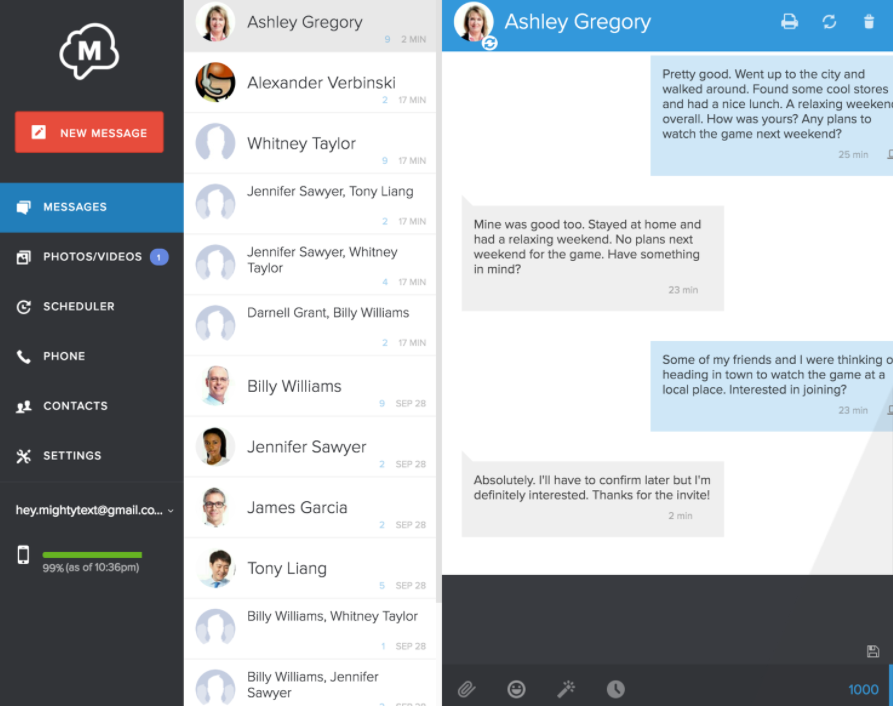
MightyText represents a fundamental shift in how we interact with our mobile communications while using a desktop or laptop computer. This sophisticated application creates a seamless, integrated bridge between your Android smartphone and your computer's ecosystem. The core philosophy of MightyText is to eliminate device-based distractions by centralizing your phone's essential communication functions—SMS, MMS, call alerts, and application notifications—into a clean, manageable, and persistent borderless window on your desktop monitor.
Imagine working on a critical project, engaging in a PC gaming session, or streaming content, and an important text message arrives. Instead of breaking your immersion to locate your phone, MightyText presents that notification elegantly at the corner of your screen. You can read it, and with the power of a full keyboard, craft a thoughtful reply instantly. This is the productivity enhancement that MightyText delivers. It supports a vast array of popular messaging and social applications, ensuring alerts from WhatsApp, Telegram, Signal, Slack, Discord, Instagram, and many others are mirrored reliably. For professionals, the ability to schedule SMS messages, access a full conversation history, and share large files directly from desktop folders is transformative. MightyText is more than just an SMS-forwarding tool; it's a comprehensive desktop communication command center designed for the modern, multi-device user who values efficiency and a streamlined workflow.
🎛 Key Features
| Feature | Description |
|---|---|
| ✉️ SMS/MMS from PC | Send and receive text messages directly from your computer. |
| 🔔 Mirror Phone Notifications | See all Android app alerts (WhatsApp, etc.) in a borderless window on PC. |
| 📞 Call Management | View missed calls, call history, and get incoming call alerts on desktop. |
| 📁 File & Photo Sharing | Easily share photos, videos, and files from your computer to phone contacts. |
| ⌨️ Full Keyboard Convenience | Type messages quickly and efficiently with your physical keyboard. |
| ☁️ Cloud Sync & Backup | Your messages are synced and accessible across multiple devices. |
| 🛡️ Secure & Private | Your data is encrypted and never stored on our servers. |
| 🖥️ Windows & Mac Support | Compatible with Windows 10, 11, and macOS. |
🔄 What’s New in Recent Versions
- Enhanced notification stability and speed.
- Improved Windows 11 and macOS Sonoma compatibility.
- New customizable notification filters.
- Reduced battery impact on your Android device.
- Updated, more modern user interface.
🏆 Ideal Use Cases
- Professionals & Remote Workers – Stay connected to personal messages without switching devices.
- Gamers & Streamers – See important notifications in a borderless window without minimizing games.
- Multitaskers – Boost productivity by managing communications from one screen.
- Anyone with a Desk Job – Keep your phone in your bag while texting from your PC.
📚 Quick Start Guide
- Download the MightyText app on your Android phone from Google Play.
- Install the MightyText browser extension (Chrome, Edge, Firefox) or desktop app on your PC/Mac.
- Log in with the same Google account on both devices.
- Grant the necessary permissions on your phone.
- Enjoy MightyText notifications and messaging in a seamless, borderless window on your computer.
⚙️ Minimum System Requirements
| Parameter | Requirement |
|---|---|
| Mobile OS | Android 8.0 (Oreo) or higher |
| Desktop OS | Windows 10/11, macOS 10.14+, or modern browser |
| Processor | Any modern CPU |
| RAM | 2 GB (4 GB recommended) |
| Storage | 100 MB free space |
| Connection | Active internet connection on both devices |
| Account | Google account for synchronization |
🏷 Tags
mighty text • mightytext • mighty text app • mightytext app • android sms on pc • text from computer • send sms from pc • phone notifications on pc • mirror phone to pc • desktop sms • borderless notification window • borderless window for messaging • manage android from pc • productivity app • remote messaging • sync messages • cross platform texting • mighty text pro • mightytext premium