Home
This wiki serves as the home for resources & documentation for NANOG 67's Hackathon (http://nanog.org/meetings/nanog67/hackathon).
The hackathon's theme is focused on "building a source of truth". In the world of automation, we have many possiblities and one road block that will hinder your level of automation is where the source of truth lies for device configurations. Is it on the device themselves? Is it stored in a text file elswhere and pushed? Is it modeled in a database and rendered during build?
Each group will have a Virtual Private Server (VPS) assigned to collaborate on for the duration of the hackathon. Login credentials will be provided at the Hack's opening. Use of the VPS is not required and simply provided as a convenience.
The VPS will be running Ubuntu 14.04 LTS Server with current versions of Python, GoLang, and Perl installed. MySQL server is also installed with appropriate Python modules for database access.
To access the VPS, connect using SSH and the credentials provided. Each VPS runs a local "mosh-server" as well which provides a more reliable SSH-connection for use across un-predicatble network connections. See mosh.mit.edu for more detail and to grab a free client. If you have trouble connecting to the VPS via Mosh, note that Mosh uses UDP over non-standard ports -- so it may be blocked by your corporate VPN. What is the Lab Environment?
On the VPS, we have built a mini clone to a system known as "FBNet", a network topology database used by Facebook's networking team. The version built in the VPS was created from scratch for the hack, so it should be easily approachable by both new and seasoned coders alike.
The example provided uses a traditional MySQL database (named "hackathon"). We have a simple table structure of "devices", "locations", "interfaces", and "circuits". While the first few sound obvious, the secret sauce to FB's automation abilities lie in the level of detail modeled on the "circuit" level. When you are able to model fully L2 and L3, many more doors of possibility open! Back to this though, the "circuits" table represents only physical L2 connections. We will describe L3 separately.
You will find the example in ~/hackathon/, along with data pre-loaded to the current instance of MySQL server. To see the pre-loaded data, type "mysql" on your shell. This is an alias to "mysql -u -p", dropping you into a MySQL shell. Once in that, type "use hackathon;" use standard SQL commands such as "select * from devices" to see the pre-loaded data. Should you need to reset the database and pre-loaded data, simply run "dbsetup.sh" from the "hackathon" directory. The full SQL schema can be found in that shell script too!
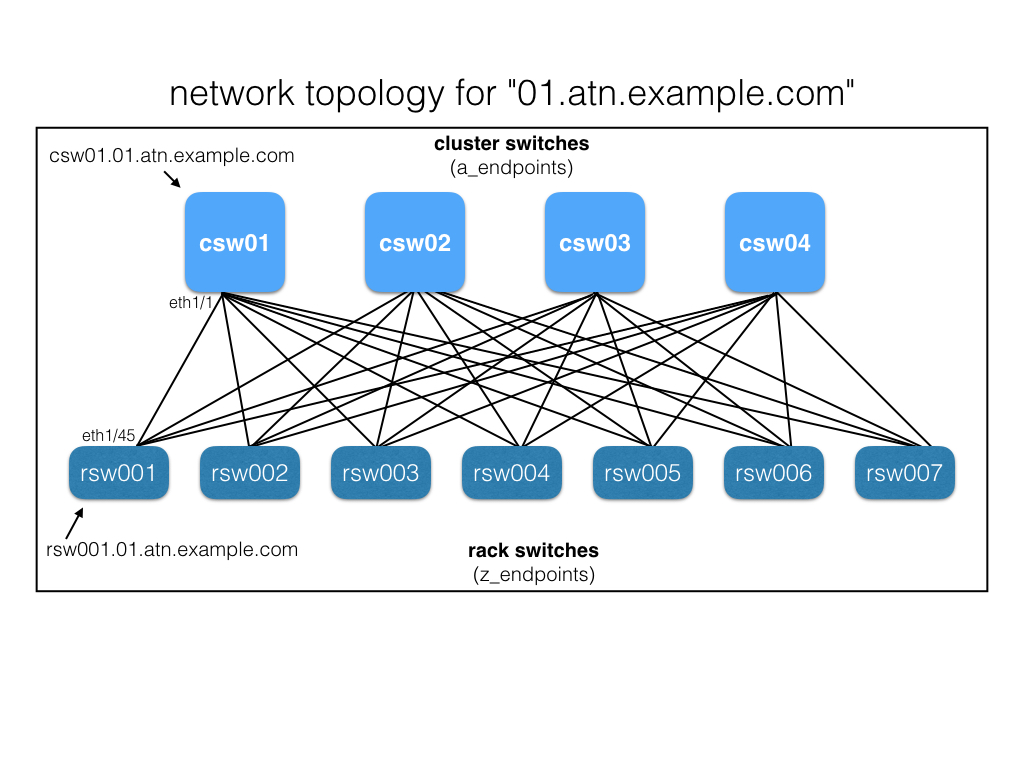
The database has been pre-staged using the script "dbsetup.sh", which builds a network topology of two datacenters with one cluster each. Each "cluster" contains 128 rack switches and 4 cluster switches. Drawling below illustrates one cluster --