Cheatsheet | Collaboration Workflow
This describes all the basic steps required to collaborate on a feature for this project. This assumes that the user already has access to a cloned repository and the virtual environment.
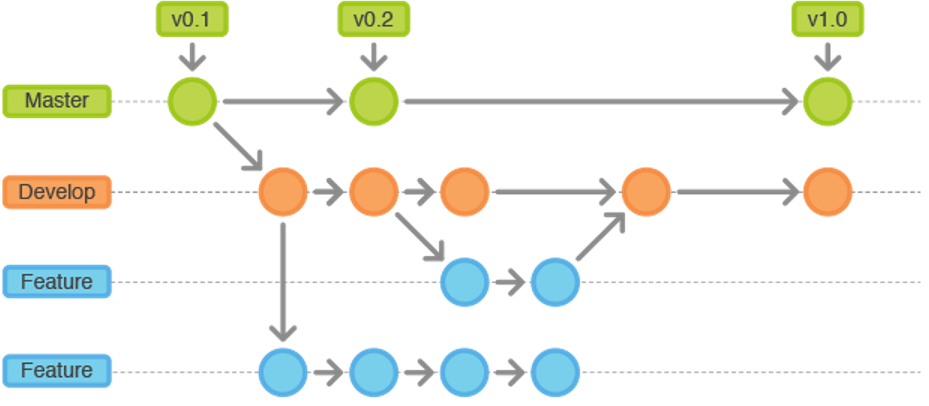
The process of collaborating on a feature is broken down into the following high-level steps:
- Organize a group of collaborators and identify a lead
- The lead creates a base reference branch for the feature
- If the feature is being created from scratch the lead initializes a new application for the feature
- If a pre-existing feature is being enhanced, no new application is created
- The lead pushes the feature branch up to the remote repository
- All other collaborators checkout the remote branch from remote repository
- All collaborators now work on the feature in parallel, committing file changes together on the same branch and pulling each others changes from the remote repository and pushing their own changes to the remote repository
- Collaborators test the feature
- The lead finishes the feature branch and merges their new feature back into the develop branch
All of the above steps are described in the following sections. We will be using a subset of the git-flow commands and some Django commands to support this workflow.
Week-to-week we will form feature/collaboration clusters. These are teams of several individuals working together to complete a feature. The list of collaborators must be posted by one of the team members within the slack chat each week. They will define requirements, goals and expected completion timelines. Furthermore, these teams will select a point-person who will own the issue associated with the feature. Issues are displayed on the issues page:
Each cluster team will deliver the following:
- Slack | A list of the collaborators' GitHub IDs indicating the lead's ID first
- Slack | Feature branch name and associated issue
- GitHub | Created feature branch available on remote until feature finished
The team lead creates the feature, <feature_name>, by executing the following:
git checkout develop
git flow feature start <feature_name>
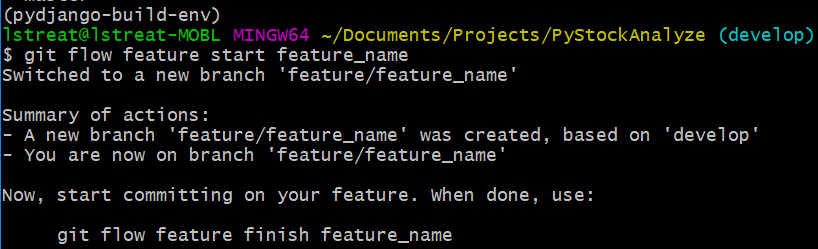
These commands creates a new branch, <feature_name>, that is based on the develop branch and begins working on it (checks it out). Never work directly on the develop branch or master branch--always branch features off of the develop branch and then merge them back into the develop branch when they are completed. To view the current branch you are working on:
git branch

Once the feature lead creates the branch, they must share it with the team. This is done by publishing the branch to the remote repository:
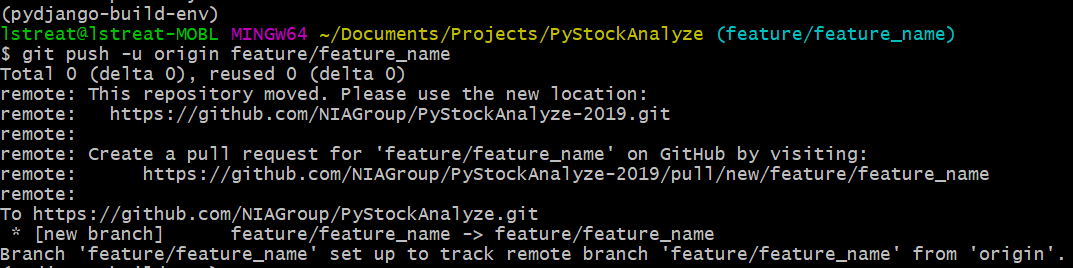
git push -u origin feature/<feature_name>