Sprint 1 | Django Overview & GUI Design
The following wiki is to better prepare everyone for the upcoming session. The base of this page has 3 links, of those the first two serve as resources to familiarize yourselves with the content that we'll be practicing Friday. The final link is an instruction set to practice your new knowledge from the first 2 links, in your new Sandbox. Please follow the instructions included in the link.
Once you're comfortable, feel free to practice as much as you like. The Sandbox can be found here:
ENJOY!
- Learn about the work environment
- To become familiar with the fundamentals of the Django framework
- Obtain a working knowledge of the collaboration flow (git flow) that will be used for the project
- Complete the first django exercise
The PyStockAnalyze repository is structured as follows:
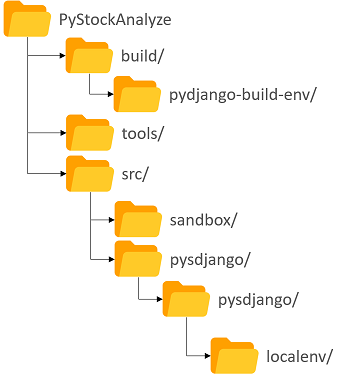
- build/ Contains the build virtual python environment in which all of the necessary packages required for the project have been installed
- The following link shows you how to assign yourself to tasks
https://help.github.com/en/articles/assigning-issues-and-pull-requests-to-other-github-users
- Navigate to the following issue, assign it to yourself, and complete the videos/exercises https://github.com/NIAGroup/PyStockAnalyze-2019/issues/33
- Navigate to the following link and complete the instructions in the video series
https://github.com/NIAGroup/PyStockAnalyze-2019/issues/20
The goal of the sandbox exercise is to start working on online Django learning modules without corrupting the project being worked on in the PyStockAnalyze sessions.
- The project being worked on is stored in the src/pysdjango/pysdjango folder
- The sandbox area is stored in the src/sandbox folder--all exercises should be done in this folder
To setup your environment to support the new sandbox area:
- Navigate to your repository while in Git Bash
- Copy the following code into a script called resynchronize_repository.sh
#!/bin/bash -e
PROJ_ROOT_DIR=$(git rev-parse --show-toplevel)
PROJ_LOCALENV_TMPDIR=$PROJ_ROOT_DIR/build/localenv_temp
PROJ_LOCALENV_DIR=$PROJ_ROOT_DIR/src/pysdjango/pysdjango/localenv

# Move unsaved versions of files in localenv folder to build folder temporarily
mkdir $PROJ_LOCALENV_TMPDIR
mv $PROJ_LOCALENV_DIR/*.py $PROJ_LOCALENV_TMPDIR

# Pull from remote origin
git pull

# Move files back into localenv folder
mv $PROJ_LOCALENV_TMPDIR/*.py $PROJ_LOCALENV_DIR
rm $PROJ_LOCALENV_TMPDIR -rf
- Run script while in the repository
./resynchronize_repository.sh
- The terminal should print something like the following:
$ ./resynchronize_repository.sh
Updating 3e0202f..a53e933
Fast-forward
 .gitignore                                         |  2 +-
 src/pysdjango/pysdjango/localenv/.gitignore        |  2 ++
 src/pysdjango/pysdjango/localenv/README.md         |  8 +++++
 src/pysdjango/pysdjango/localenv/localapikeys.py   | 36 ----------------------
 src/pysdjango/pysdjango/localenv/localuser.py      | 35 ---------------------
 src/pysdjango/pysdjango/localenv/localwebproxy.py  | 34 --------------------
 .../localenv/__init__.py => sandbox/README.md}     |  0
 tools/build_env.sh                                 | 23 +-------------
 8 files changed, 12 insertions(+), 128 deletions(-)
 create mode 100644 src/pysdjango/pysdjango/localenv/.gitignore
 create mode 100644 src/pysdjango/pysdjango/localenv/README.md
 delete mode 100644 src/pysdjango/pysdjango/localenv/localapikeys.py
 delete mode 100644 src/pysdjango/pysdjango/localenv/localuser.py
 delete mode 100644 src/pysdjango/pysdjango/localenv/localwebproxy.py
 rename src/{pysdjango/pysdjango/localenv/__init__.py => sandbox/README.md} (100%)
- After this, cd into src/sandbox to start working on the two exercises provided by the following URL
- Assign yourself to the issue https://github.com/NIAGroup/PyStockAnalyze-2019/issues/11