Repository navigation
Routes of an OD pair
The model can be run for one origin-destination (OD) pair (HB-paar, #129). It then keeps the route of every option on the Pareto front, so that the options can be shown on a map, read as a table and plotted as price against travel time. It does this per component (walking WW, cycling CC, Car, the public transport components such as W_PT_W) and for the merged front (Combined).
- What it shows
- Settings
- Running it
- The whole pair in one call: gpkg and pictures
- Viewing the results in GeoDmsGui
- Example: BU04020501 to the Vrije Universiteit, 07:30
- Comparing with the whole model
- How it works
- Limitations
For each departure moment and each option of the front:
-
Optionshas one row per option, with component, departure moment, travel time, price and the modes used (ModeUsed). These are the rows of the ordinary output of the pair, numbered per departure moment (Optie). -
Partsis the journey description of each option, in the order of travel: the pre-transport leg, every ride with its line and operator, the transfers between them and the post-transport leg. For a direct trip it is the trip on foot, by bike or by car. Each part has its stops or places, departure and arrival time, duration, distance and price. -
Linksholds every part as the links of its route, each with its geometry:- walking and cycling legs, and the direct trip on foot or by bike: the links of the route over the (simplified) walking or cycling network;
- a ride: the stop-to-stop links between boarding and alighting, each along the shape of its trip;
- a transfer: the straight walking line between the two stops;
- the direct car trip: the TomTom road links of each route of the car front, with the shape of the road.
-
Chartplots the price of each option against its travel time. The options are grouped by what they need: a car, an own bike, both or neither (NeedsCar,NeedsBike). Each group is a series of its own, in its own colour.
All settings are in cfg/main/ModelParameters.dms.
Group 1, as for any run:
-
AnalysisMomentandPartOfDay: the analysis moment, which sets the analysis date, and the part of the day (for example'Y2026','Morning'). -
OrgsetandDestset: the origin set and the destination set that the origin and the destination come from, usually'Buurt2025'(or'Buurt2023'). The CBS neighbourhood boundaries and the BAG are those of these sets.
Group 6, ONE OD PAIR:
| Parameter | Meaning |
|---|---|
OD_Origin |
The origin: a name in Orgset, as OrgName in the output. For the neighbourhood sets this is the CBS neighbourhood code, for example 'BU04020501'. Empty means the whole model. |
OD_Destination |
The destination: a name in Destset, as DestName, for example 'BU0363KP03'. Set both or neither. |
OD_DepartureTime |
Optional: one departure moment of PartOfDay as hh:mm, for example '07:30'; empty means the four moments of the part of the day. It applies to every component, also those that otherwise compute one moment. |
OD_MergeCriteria |
The criteria of the merged front of the pair, 'Price,Time,Car,Bike' by default. -MergeCriteria of the scripts, or UpdateAll.cmd -set MergeCriteria, sets other criteria for one call. |
OD_Option |
The option the map shows on its own (MapView/OptionLinks); 0 shows all. |
OD_CompareLabel |
The OutputLabel of the run of the whole model that /Output/OD_PairRoutes/Compare compares the pair with, default 'b2025'; see Comparing with the whole model. |
To find the neighbourhood of an address, look it up in the PDOK location server (https://api.pdok.nl/bzk/locatieserver/search/v3_1/free?q=<address>&fq=type:adres, field buurtcode). Then check that the code exists in the neighbourhood map of the set: cbsgebiedsindelingen2025.gpkg, layer buurt_niet_gegeneraliseerd, which the model reads (SourceData/RegioIndelingen/Divisions). The model uses one point per neighbourhood, not the address itself: the mean of its residential addresses in the BAG, or a point inside the neighbourhood when that mean lies outside it (CalcAddressCentroids).
The components are those of the variant (ModelParameters, group 2): every pre-transport type that is on with every post-transport type that is on, and the direct trips that are on. In the repository the pre-transport types W, C, Cr and Crm, the post-transport types W, C and ovfC and the three direct trips are on, 15 components in all. -Components chooses exactly the components to compute and merge (see Running it). The merged front of a pair uses OD_MergeCriteria, Price,Time,Car,Bike, unless the call gives MergeCriteria (see How to run the model). With Car and Bike an option that needs no car or own bike stays on the front next to a faster or cheaper one that does, such as the train next to the car.
The routes of the car front need pareto with LinkSet in impedance_matrix (GeoDMS#1325), which GeoDMS has from version 20.26.0. The chart opens with travel time on the horizontal axis (DialogType = "XAxis").
With OD_Origin and OD_Destination set, the caches go to %LocalDataProjDir%\IntermediateResults_<O>_<D> and the output to %LocalDataProjDir%\Output_<O>_<D>, for example IntermediateResults_BU04020501_BU0363KP03 (Impl/OD_Tag). The folders of the whole model stay as they are. The names and signatures of the caches also hold the pair (-bu04020501).
Two scripts in the folder batch run a pair:
| Script | What it does |
|---|---|
ODPairReport.ps1 |
Everything in one call: it runs the model for the pair, writes the whole pair to one gpkg and makes the pictures of the routes and the fronts. |
WriteODResults.ps1 |
Only the model run: the output of each component and of the merge, without the gpkg and the pictures. |
The first step of ODPairReport.ps1 calls WriteODResults.ps1. So you do not need to run the two scripts one after the other. Use WriteODResults.ps1 on its own only when you need the model output and not the gpkg or the pictures.
The origin and the destination are names in Orgset and Destset. For the neighbourhood sets these are CBS neighbourhood codes, such as BU04020501 and BU0363KP03. Settings explains how to find the code of an address.
List the components that you need with -Components, for example -Components "WW,CC,Car,W_PT_W,C_PT_W,C_PT_ovfC". The run then computes and merges exactly these components. Every extra component makes the run longer.
Instead of a list, you can give a merge variant of ModelParameters/MergeVariants with -Variant, for example OV_lopen. See Merge variants and settings per call. Give -Components or -Variant, not both.
The two scripts differ when you give neither:
-
ODPairReport.ps1does not start, and asks for-Componentsor-Variant. -
WriteODResults.ps1computes every component of the variant incfg\main\ModelParameters.dmsof the working copy (see Settings). In the repository these are 15 components: the direct tripsWW,CCandCar, and the 12 combinations of the pre-transport typesW,C,CrandCrmwith the post-transport typesW,CandovfC, such asW_PT_W,Cr_PT_ovfCandCrm_PT_C. Such a run takes much longer.
To see which components a run will compute, without computing them, run WriteODResults.ps1 with -Section checks. The list is then in batch\log\components.txt of the run copy (see step 4).
This example computes six components from neighbourhood BU04020501 in Hilversum to neighbourhood BU0363KP03 in Amsterdam, at 07:30:
powershell -ExecutionPolicy Bypass -File batch\ODPairReport.ps1 -Org BU04020501 -Dest BU0363KP03 -Moment 07:30 -Components "WW,CC,Car,W_PT_W,C_PT_W,C_PT_ovfC" -WaitForMemoryGB 50
Without -Moment, the run computes every departure moment of the part of the day. All parameters lists the other options, and the example gives the times of one run.
Start a long run as a one-shot scheduled task, so that it continues when the window or the session that started it closes. See Running UpdateAll as a scheduled task. The pictures need a GUI window, so they need an interactive session. In a scheduled task, give -Steps run,export, and make the pictures afterwards with -Steps images.
WriteODResults.ps1 first makes a run copy: a copy of the model files of the commit -Ref (by default HEAD) in <Root>\od_<O>_<D>\variant\NetworkModel_PBL. The run copy has the pair and the components in its ModelParameters.dms. It also gets the config.ini of the working copy, so it writes its caches and output to the same %LocalDataProjDir% as the working copy. VARIANT.txt in the run copy names the merge variant of the run.
The script then runs batch\UpdateAll.cmd all in the run copy. UpdateAll:
- checks the settings and makes the source caches if they are missing: the OSM network cache and the GTFS cache of the feed. The whole model uses the same source caches;
- makes the chain cache before the first public transport component; all public transport components of the pair use it;
- takes the components one by one: for each component it makes the caches that the component needs, and then it computes the output. A public transport component needs the pre- and post-transport caches (the step
legs), andCarneeds the car cache of the departure moment.WWandCCneed no cache; - merges the components.
The chain cache, the pre- and post-transport caches and the car cache hold this pair only: one origin and one destination. They are in IntermediateResults_<O>_<D> (see Folders). The pair does not use the caches of the whole model, except the source caches.
Every step skips a cache or an output that already exists for the same settings. So when you run the pair again after a change that only affects the output, the run computes only the output again.
The script writes its progress to <Root>\od_<O>_<D>\status.txt. UpdateAll writes every step, with its start, end and duration, to batch\log\UpdateAll_status.txt in the run copy.
The chain step computes all rides of the public transport network in the time window, not only the rides of the pair. This needs about 40 to 50 GB of memory. With -WaitForMemoryGB, the script waits before UpdateAll starts until that much memory is free. This prevents paging: when the machine runs out of memory, Windows moves memory to disk, and every run on the machine becomes slow.
The output is in %LocalDataProjDir%\Output_<O>_<D>, with one folder for each component and one for the merge. Each folder has the ordinary output PerBlock\tt_<moment>_1of1.parquet and the file PerBlock\od_<moment>.gpkg, with three layers:
-
od_opties: the options; -
od_onderdelen: the parts of each option, the journey description; -
od_links: the links of the route of each part.
For WW and CC the name of the gpkg has alle instead of the moment, because the file applies to every departure moment. QGIS can open these files.
ODPairReport.ps1 also writes od_paar.gpkg, fronten.csv and the pictures to its folder -Out; see The whole pair in one call. Viewing the results in GeoDmsGui shows how to open the results in the GUI.
Both scripts take these parameters:
| Parameter | Default | Meaning |
|---|---|---|
-Org, -Dest
|
none: required | the origin and the destination |
-Moment |
empty: every departure moment of the part of the day | one departure moment as hh:mm, such as 07:30
|
-Components |
empty: the variant of the working copy | the components to compute and merge |
-Variant |
empty | a merge variant instead of -Components
|
-AnalysisMoment |
Y2026 |
the analysis moment |
-PartOfDay |
Morning |
the part of the day |
-Orgset, -Destset
|
Buurt2025 |
the origin set and the destination set |
-Label |
od |
the OutputLabel
|
-MergeCriteria |
OD_MergeCriteria in ModelParameters.dms: Price,Time,Car,Bike
|
the criteria of the merged front |
-NS_TariffChoice |
the value in ModelParameters.dms
|
the NS fare: the full fare or a discount |
-Ref |
HEAD |
the commit of the run copy |
-Root |
C:\LocalData\NM_PBL_runs |
the folder of the run copies |
-Exe |
the environment variable GEODMS_EXE, or else the installed GeoDMS version that UpdateAll.cmd names |
the GeoDmsRun.exe to use |
-WaitForMemoryGB |
0: no waiting | wait until this much memory is free (see step 5) |
WriteODResults.ps1 also takes -Section checks (see step 2). The other parameters of ODPairReport.ps1 are in The whole pair in one call.
To compare the routes before and after a change, run the pair twice: once for each commit, with -Ref. Give each run its own -Root, so that one run copy does not replace the other. Both runs write their caches and output to the same folders. When a change does not affect a cache or an output, the second run finds the result of the first run and uses it. It computes its own output only for the components that the change affects.
Set the parameters of groups 1 and 6 in ModelParameters.dms, with the component in the variant, and run batch\UpdateAll.cmd all -component <name>. UpdateAll makes the caches that the component is missing, and then its output.
batch\ODPairReport.ps1 runs the pair, writes the whole pair to one gpkg and makes the pictures of the routes and the fronts (#166). Running it shows how to start it. It works in three steps, by default all three (-Steps run,export,images).
Besides the parameters of both scripts, it takes:
| Parameter | Default | Meaning |
|---|---|---|
-Steps |
run,export,images |
the steps to run |
-Out |
<Root>\od_<O>_<D>\rapport_<Label> |
the folder for the gpkg, fronten.csv and the pictures |
-ComponentMaps |
empty | the components that also get a map of their own, such as W_PT_W,Car
|
-GuiExe |
GeoDmsGuiQt.exe in the folder of -Exe
|
the GUI that makes the pictures |
-NetworkModelDir, -PrivDir
|
empty: the folders that the registry gives | the source data folders, for a machine whose registry holds other folders than a scheduled task sees |
-Variant takes only one merge variant here, because the export reads the merged output of one merge.
The step run calls WriteODResults.ps1 with the same settings. It makes the run copy of -Ref and runs UpdateAll.cmd all in it, with group 1, MergeCriteria and NS_TariffChoice as -set and the merge variant of -Components or -Variant as -variant. The steps export and images read that merge variant from VARIANT.txt in the run copy, so they also find it when they run on their own. The merged output then gets a folder of its own in Output_<O>_<D>, because the criteria are in its signature. Start a long run as a one-shot scheduled task with -Steps run,export, and make the pictures afterwards with -Steps images.
The step export asks GeoDmsRun for /Output/OD_PairRoutes/Export/Write in the run copy, with the settings of the call in the environment variables GEODMS_Overridable_<name>. It writes od_paar.gpkg and fronten.csv into the folder of the merged output and copies them to -Out. The gpkg holds all components and departure moments of the pair in three layers:
| Layer | One row per | Columns |
|---|---|---|
od_opties |
option of a component and departure moment |
Component, Moment, Optie, Vertrek, Reistijd (min), Prijs (euro), ModeUsed, NeedsCar, NeedsBike, Groep, and OpFront: is the option on the merged front on MergeCriteria
|
od_onderdelen |
part of an option, the journey description | the columns of Parts, OpFront, and the route of the part as one line |
od_links |
link of the route of a part |
Onderdeel (the Volgnr of the part), Volgnr, Modaliteit, OpFront and the line of the link |
Sleutel (component, departure moment and option) joins the three layers. A filter on OpFront gives the merged front, the same options as /Output/OD_PairRoutes/Combined. fronten.csv has one line per series of the chart of the merged front, with its number of points.
The step images opens the run copy in GeoDmsGuiQt with the same settings and makes, with the scripts of the skill od-paar-beelden:
-
kaart_samen.png: the map of the routes of the merged front,Combined/Links/Mode_rel; - per departure moment
fronten_<moment>.png: the chart of the merged front with a line per group that has points, in the orderZonderAutoFiets,MetFiets,MetAuto,MetAutoFiets(see Opening the chart);fronten.csvsays which groups have points; - with
-ComponentMaps W_PT_W,Carthe map of each of those components,kaart_<component>.png.
Each picture shows a GUI window for a minute or two and overwrites the clipboard. Typing in that window disturbs the script, so run this step in an interactive session and leave the window alone.
Open cfg\main.dms of the run copy, or of the working copy, with the settings of the run in groups 1, 2 and 6 of ModelParameters.dms. The run copy has the pair and the switches of the variant in its ModelParameters.dms, but not group 1: the script gives the analysis moment, the part of the day, the sets and the label to UpdateAll per call. So set AnalysisMoment, PartOfDay, Orgset, Destset and OutputLabel to the values of the call, at the end of their lines. Or start GeoDmsGui with these values in the environment variables GEODMS_Overridable_<name>, as UpdateAll does for its steps (ConfigSettings/Overridable); after -Variant or -Components, also GEODMS_Overridable_Variant with the name of the merge variant that VARIANT.txt in the run copy gives (OD_Components after -Components). Everything is under /Output/OD_PairRoutes. Type the path of an item in the address bar above the tree and press Enter. Ctrl+D then opens a Table View of it, and Ctrl+M a Map View.
| Item | View |
|---|---|
/Output/OD_PairRoutes/PerComponent/<component>/Options |
Table View: one row per option and departure moment. |
/Output/OD_PairRoutes/PerComponent/<component>/Parts |
Table View: the journey description, per departure moment and option in the order of travel (Volgnr). |
/Output/OD_PairRoutes/PerComponent/<component>/Links/geometry |
Map View: the routes, each link in the colour and width of its mode. |
/Output/OD_PairRoutes/PerComponent/<component>/Links/Mode_rel |
Map View: the same routes as a theme, with a legend per mode (length and number of links). |
/Output/OD_PairRoutes/PerComponent/<component>/MapView/OptionLinks |
Map View: only the option OD_Option. |
/Output/OD_PairRoutes/PerComponent/<component>/Chart/<moment>/Points/Prijs |
Scatter Chart: price (euro) against travel time (min) of the front of a departure moment, in the colour of the group of the component. |
/Output/OD_PairRoutes/Combined/Options, Combined/Links
|
The same for the merged front. |
/Output/OD_PairRoutes/Combined/Chart/<moment>_<group>/Points/Prijs |
Scatter Chart of the merged front: one series per departure moment and group, see Opening the chart. |
/Output/OD_PairRoutes/Modes gives every mode a pen colour and width: train gold, metro red, tram green, bus grey, ferry dark blue, walking orange, cycling purple, car blue. Train and metro are 4 pixels wide, walking and cycling 2, the others 3. The links carry them as PenColor and PenWidth, so a Map View draws Links/geometry in these colours without a classification. Links/Mode_rel uses the same colours as a theme with a legend.
Every link of PerComponent/<component>/Links has its departure moment (Moment_rel), its option (Optie), its part (Onderdeel, the Volgnr in Parts), its place in the part (Volgnr) and its mode. Open Links as a table to read them. Optie counts per departure moment, so the line, operator, stops and times of the part are in the row of Parts with the same departure moment and Optie, and with the Onderdeel of the link as its Volgnr.
The options fall into four groups by what they need, following the criteria Car and Bike of MergeCriteria (/Output/OD_PairRoutes/Usage):
| Group | Needs | Colour | Components (default variant) |
|---|---|---|---|
ZonderAutoFiets |
neither a car nor an own bike | orange |
WW, W_PT_W, W_PT_ovfC
|
MetFiets |
an own bike | purple |
CC, C_PT_W, C_PT_ovfC
|
MetAuto |
a car | blue | Car |
MetAutoFiets |
a car and an own bike | teal | none |
The OV-fiets is rented, so it does not count as an own bike (Classifications/TimeInvariantTypes/NeedsOwnBike): W_PT_ovfC needs neither a car nor an own bike.
A Scatter Chart colours a point by the class of its own value, not by another attribute. Each group is therefore a series of its own, whose Prijs has a classification of one class in the colour of the group (Classes). Reistijd is the horizontal axis (DialogType = "XAxis"). A series, Combined/Chart/<moment>_<group>/Points, holds the front of one departure moment and one group. It is sorted by travel time, so that its line runs from fast and expensive to slow and cheap. The series of one moment stand next to each other in the tree.
- Right-click
/Output/OD_PairRoutes/Combined/Chart/At_07h30m00s_ZonderAutoFiets/Points/Prijsin the tree and choose Scatter Chart. - Drag
PrijsofAt_07h30m00s_MetFiets/Pointsand ofAt_07h30m00s_MetAuto/Pointsfrom the tree onto the chart. Each becomes a series with its own colour and its own entry in the legend. - Click the first zoom button of the toolbar (Make the extents of all layers fit in the ViewPort), so that the chart shows the points of every series. Then turn the mouse wheel one step to zoom out, so that the points on the edge show in full.
- Right-click each series in the legend and choose Show chart as ... > Points + Line. The line connects the points of the front in the colour of the series.
The chart of one component, PerComponent/<component>/Chart, has one series per departure moment, <moment>/Points/Prijs, in the colour of the group of the component.
The origin is neighbourhood BU04020501 in Hilversum. The destination is the Vrije Universiteit (VU) in Amsterdam, in neighbourhood BU0363KP03 (VU-kwartier, district Zuidas). The example uses the analysis moment Y2026 (Tuesday 13 October 2026), the morning rush hour, the departure moment 07:30 and six components: the three direct trips, W_PT_W, C_PT_W and C_PT_ovfC:
powershell -ExecutionPolicy Bypass -File batch\WriteODResults.ps1 -Org BU04020501 -Dest BU0363KP03 -Moment 07:30 -Components "WW,CC,Car,W_PT_W,C_PT_W,C_PT_ovfC" -WaitForMemoryGB 40
The script computes and merges exactly these six components, as the merge variant OD_Components of the run copy.
For this pair the legs take about 5 minutes and the chains less than 30 seconds. The output of the six components takes about 7 minutes, of which 2 minutes each for WW and CC, 1 minute for the car cache of 07:30 and 3 seconds for the merge. The options at 07:30:
| Component | Options | Travel time (min) | Price (euro) |
|---|---|---|---|
WW, CC
|
none: on foot and by bike the trip is longer than the maximum travel time | ||
W_PT_W |
3 | 51.1 to 64.4 | 8.89 to 9.10 |
C_PT_W |
7 | 43.0 to 76.0 | 8.85 to 9.24 |
C_PT_ovfC |
3 | 40.6 to 61.9 | 11.83 to 12.19 |
Car |
6 | 47.9 to 58.1 | 7.73 to 10.43 |
| Combined | 15: 6 car, 3 W_PT_W, 5 C_PT_W, 1 C_PT_ovfC
|
40.6 to 76.0 | 7.73 to 12.19 |
ModeUsed names the legs and rides with one letter per mode: W walking, C cycling, B bus, T tram, M metro, R train, F ferry and A car. The stop class of a pre-transport type follows its mode letter, and that of a post-transport type precedes it, in lower case, as in ovfC for the OV-fiets (From chains to journeys).
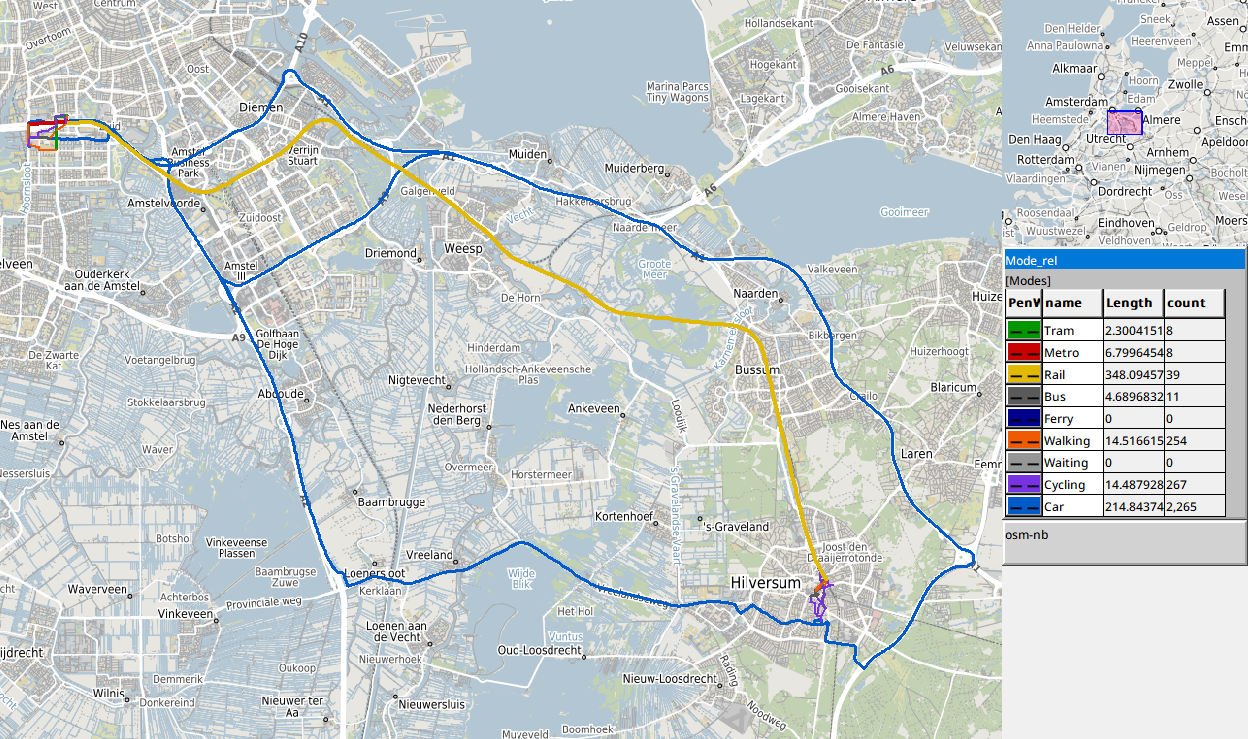
The image shows /Output/OD_PairRoutes/Combined/Links/Mode_rel in a Map View. The car has two corridors:
- options 1 to 4 take the N201 west and the A2 north, 32 km, 52 to 58 minutes, 7.73 to 7.80 euro: the shortest and cheapest;
- options 5 and 6 go east to the A1 and along the A1 to Amsterdam, 42 to 44 km, 48 to 49 minutes, 10.06 and 10.43 euro: the fastest.
All public transport options but one take the Intercity direct from Hilversum to Amsterdam Zuid, and reach the station on foot, by bus or by bike. One option cycles to Hilversum Media Park instead and takes the Sprinter, with a transfer at Weesp. A route via Utrecht Centraal is not on the front. It covers about twice the distance by rail (some 55 km against 29 km), so it takes longer than the direct train. Its two NS rides cost the through fare from Hilversum to Amsterdam Zuid, the same as the direct train (see The price of a chain). So the direct train dominates it: faster at the same price.
A public transport link follows the track or the road of its trip between two stops, from the shape in the feed (see The chains of the pair). So both trains are drawn on the same track, via Bussum, Weesp and Duivendrecht.
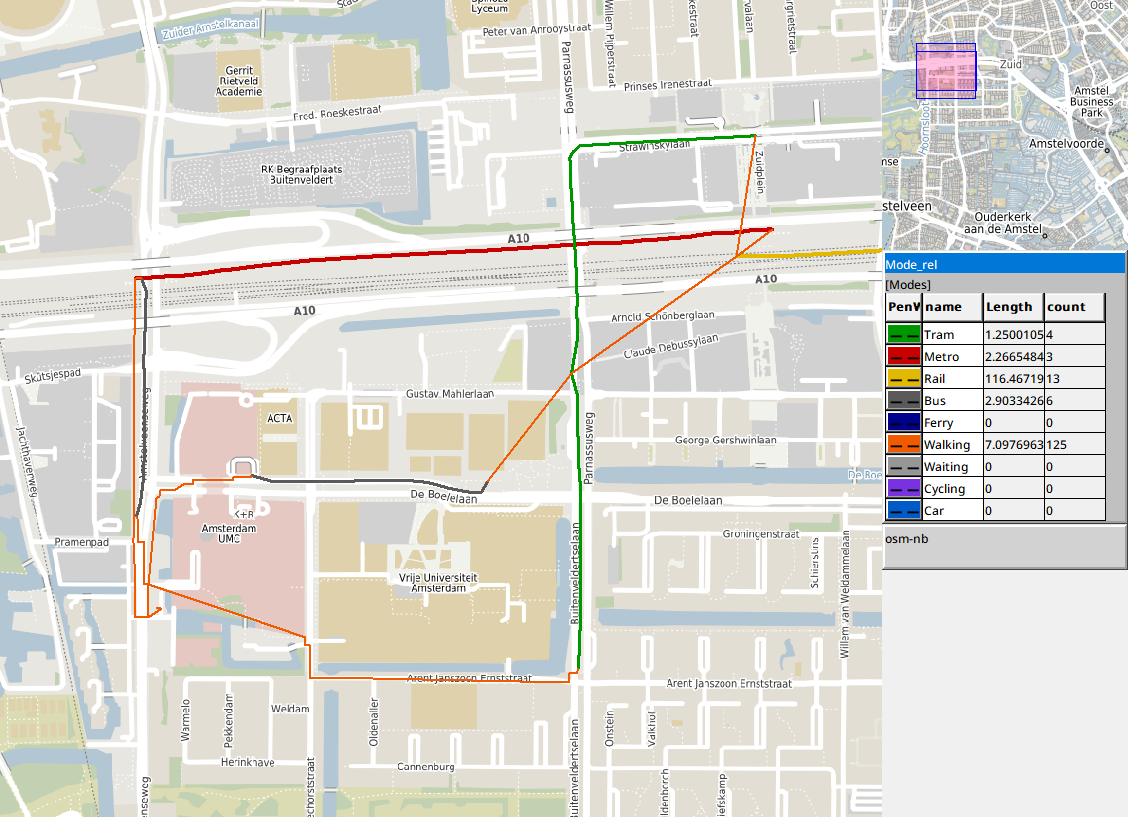
The image shows /Output/OD_PairRoutes/PerComponent/W_PT_W/Links/Mode_rel, zoomed in on the VU. From Amsterdam Zuid two options take metro 50 (red) to Amstelveenseweg: one walks from there, the other takes bus 357 (grey, partly under that walk) to VU Medisch Centrum. A third option walks to Parnassusweg and takes tram 6 (green) along Buitenveldertselaan to A.J. Ernststraat. The fourth takes tram 5 (green) from Station Zuid along Strawinskylaan and Parnassusweg, walks from the stop Parnassusweg to De Boelelaan/VU and takes bus 244 (grey) along De Boelelaan to VUmc Hoofdingang. A transfer on foot is the straight line between its two stops. The walks to the destination (orange) follow the walking network to the point of the neighbourhood (see Settings).
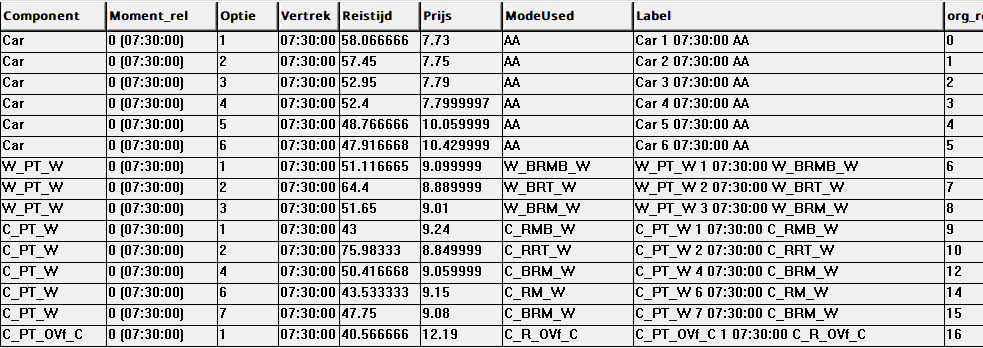
The image shows /Output/OD_PairRoutes/Combined/Options. Optie is the number of the option in the output of its component, so a row can be followed to PerComponent/<component>/Parts and Links. The car options are on the merged front next to the public transport options, because MergeCriteria also compares car and bike ownership: an option that needs a car does not dominate one that does not.
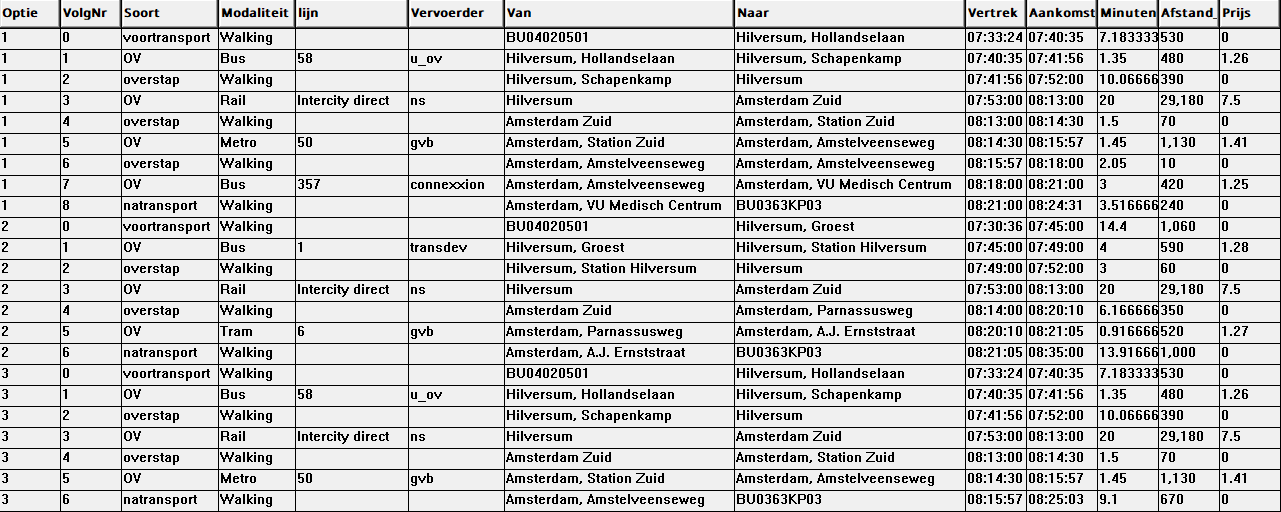
The image shows /Output/OD_PairRoutes/PerComponent/W_PT_W/Parts. Option 1 walks 7 minutes to the stop Hollandselaan, takes bus 58 to Schapenkamp and walks to Hilversum station. It then takes the 07:53 Intercity direct to Amsterdam Zuid (08:13), metro 50 to Amstelveenseweg and bus 357 to VU Medisch Centrum, and walks the last 240 m. The journey lasts 51.1 minutes from its start at 07:33. Option 3 walks from Amstelveenseweg instead of taking the bus (51.7 minutes, 9.01 euro). Option 2 walks 14 minutes to the stop Groest, takes bus 1 to the station and the same train, and tram 6 from Parnassusweg (64.4 minutes, but the cheapest, 8.89 euro).
The train is train 1820 of the Intercity direct series 1800, from Amersfoort Centraal via Hilversum, Duivendrecht, Amsterdam Zuid, Schiphol and Rotterdam to Breda, as the feed of 25 September 2026 names it (route_short_name Intercity direct). It costs no trip surcharge here: the trip surcharge of the Intercity direct applies only to a ride that passes both Schiphol and Rotterdam (MakeODs, IsTripSurchargeRide).
The departure and arrival of a ride are those of the timetable: the departure of the first and the arrival of the last scheduled link of the ride (OD_Output, Trip_Departure and Trip_Arrival). The ride itself can begin or end a minute earlier or later. A stop where a vehicle stands still has two nodes, its arrival and its departure. A dwell link within the ride joins them, and both nodes allow boarding and alighting where the stop time in the feed allows it. In Hilversum the train arrives at 07:52 and leaves at 07:53; in Amsterdam Zuid it arrives at 08:13 and leaves at 08:14:
- an option that cycles straight to the train boards at 07:53, the departure, because leaving home a minute later gives the shorter travel time;
- after a bus and a walk the transfer ends in time for either node, and the model keeps one of the two equal chains, here the one that boards at 07:52: the transfer before the train ends at 07:52, a minute before the train leaves;
- an option that changes to metro 50 at 08:14:30 alights at 08:13, the arrival, to make the transfer of 1.5 minutes. An option that waits for tram 6 at 08:20 can alight at either node and here alights at 08:14, so its transfer starts a minute after the train arrives.
The travel time and the price of the option do not depend on it.
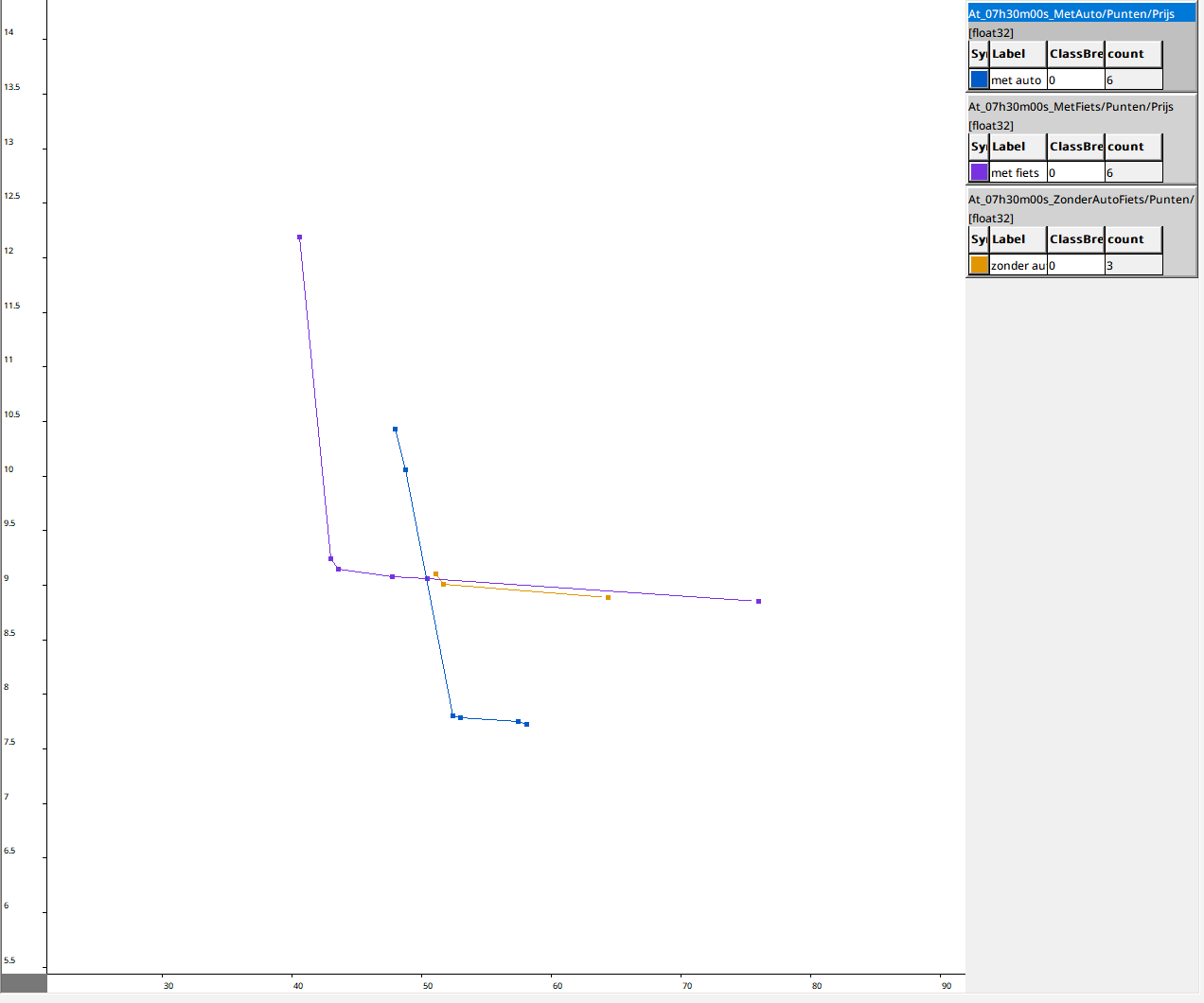
The image shows the Scatter Chart of the merged front with points and lines, made as in Opening the chart. Travel time is on the horizontal axis and price on the vertical axis, with a line per front. Blue is the car: at the bottom are the four short routes via the N201 and the A2 (about 7.75 euro), and at 48 to 49 minutes and 10 to 10.50 euro the two routes via the A1. Purple is the bike with public transport, from the fastest option at the top left (bike and train with an OV-fiets at the end, 40.6 minutes, 12.19 euro) to the cheapest option without a car at the right (76.0 minutes, 8.85 euro). Orange is walking with public transport, around 9 euro.
Within one colour no point is both slower and more expensive than another. Across colours a point can lie above and to the right of another and still be on the merged front. The reason is that a pair merges on Price,Time,Car,Bike by default (OD_MergeCriteria), which also compares what an option needs: an option drops out only when another one is as fast and as cheap and needs no car or bike that it does not need itself. Five of the 15 points lie above and to the right of another point:
-
W_PT_Woption 1 (51.1 minutes, 9.10 euro), behind two bike options ofC_PT_W: it needs no bike; -
W_PT_Woption 2 (64.4 minutes, 8.89 euro), behind the four short car routes: it needs no car; -
C_PT_Woption 2 (76.0 minutes, 8.85 euro), behind the four short car routes: it needs no car; - the two car routes via the A1, behind three bike options of
C_PT_W: they need no bike.
With MergeCriteria set to Price,Time these five would not be on the front.
/Output/OD_PairRoutes/Compare puts the rows of the pair next to the rows of the same pair in the output of a run of the whole model with the same settings (#135). It does this per component and departure moment, and for the merge. ModelParameters/OD_CompareLabel names that run by its OutputLabel, default 'b2025'; the folders of WW and CC carry the origin set instead of the label. Compare/Report gives a line per component, and Compare/Merged/Report one for the merge. Each line says whether the outputs are equal or differ, with the number of rows of the pair in both outputs per departure moment, or which output is missing. Compare/AllEqual is true when all are equal. The comparison needs the output of the pair (WriteODResults.ps1) and the output of the whole model.
The signature of the output of the whole model is that of the pair without the pieces that name the pair: its origin and destination in the origin and destination sets (Impl/OrgSet_SelectionTag, Impl/DestSet_SelectionTag) and the chains of the pair (PublicTransport_Prep/PT_Chains_ODTag). The folder is named as CompOutput_T/Dir names it, with the hash of that text at the end and OD_CompareLabel in the place of OutputLabel; for WW and CC that place holds the origin set without the origin of the pair (Compare/FullDir). The signature.txt in that folder must equal the text (PerComponent/<component>/Compare/FullSig). The signature of the merge holds the hashes of the components, so its folder follows from the hashes of the components of the whole model.
The pair is in the file of the block of its origin, tt_<moment>_<n>of<N>.parquet. The whole model chooses that block with a random permutation of all origins of Orgset and MaxOrgBlockSize origins per block (NetworkSetup/impl/OrgBlockSelections). OD_PairRoutes/FullRun does the same for the origin of the pair, with Advanced/NumberOfOrgBlocks_All blocks.
The readers of the merge read both files (NetworkSetup/ComponentMerge/Read<kind>_T). A row of the pair is the same as a row of the whole model when every column of their common schema is equal (CompareColumns; for the merge all its columns, MergedColumns). The two outputs are equal when every different row occurs equally often in both (CompareRows_T).
PublicTransport_Prep/impl/org and dest_src are the one element of Orgset and of Destset named OD_Origin and OD_Destination (OD_Org, OD_Dest). So everything after them has one origin and one destination: the places, the origin block, the legs, the direct trips and the car.
The pre- and post-transport caches ask the walking and cycling searches for their LinkSet as well. They write the links of every leg as <cache>_links.gpkg next to the parquet cache (PrePostTransport/<base set>/Write_Links). Templates/RouteLinks_T puts the links in the order of travel. It turns the LinkSet of an impedance_matrix, which runs from the end of the route to its start, into links with their start and end node, also on a two-way network.
The chain step computes one stop block: the stops the origin reaches with the pre-transport types of the public transport components of the variant (OD_Stops/IsVStop). The last ride of the longest chains only goes to a stop from which the destination can be reached (OD_L/Result_ToD and OD_R/Result_ToD, with OD_Stops/IsNStop). The chain step keeps only the chains to such stops. For these stops they are the same chains as in the cache of the whole model.
OD_Chains traces every chain back to its rides and the transfers between them, through the chain joiner (Right_rel, Valid1_rel->Transfers_rel, Left_rel). In the same request as the block cache it writes them to benen.mmd, in the folder of the chain cache next to the block cache 1of1.parquet (OD_Chains/Write_ChainParts). benen.mmd has one row per ride or transfer:
-
Keten: the row number of the chain in1of1.parquet; -
Volgnr: the position in the chain, from 0, with the rides at the even positions and the transfers between them;IsOverstapmarks a transfer; -
IsL: a ride on the NS network (L), otherwise on the regional network (R); for a transfer, that of the ride after it; -
From_Stop_rel,To_Stop_rel,From_Time_relandTo_Time_rel: where and when the ride or transfer starts and ends; -
Route_rel,Agency_relandMode_rel: the line, the operator and the mode; walking for a transfer; -
Duur: the travel time of a ride, or the walking and waiting time of a transfer, in seconds;Wachttijd: the waiting time of a transfer, 0 for a ride; -
Prijs: the price of the ride on its own, in cents (see Limitations); -
Afstand: the distance in decametres; the walking distance for a transfer; -
BeginKnoopandEindKnoop: the nodes at the start and end of a ride in the time-expanded network (Set_LorSet_R).
The output step reads benen.mmd (OD_Chains/Read_ChainParts) to give every public transport option its parts in od_onderdelen. For od_links, a search with LinkSet between the start and end node of a ride in the time-expanded network (Set_L or Set_R) gives the links within the ride (OD_Output/PTLinks_T). Between two nodes every path takes the same time. For a regional ride the search goes by length, because Advanced/ParetoLegs_R is on, so it gives the shortest of these paths, the one that the Pareto search of the regional rides keeps. For an NS ride ParetoLegs_L is off, because the NS fare does not depend on the distance travelled. The search then goes by duration and gives one of the equally fast paths, not always the shortest. Each scheduled link of the ride is drawn along the shape of its trip (the function Templates/ShapeSection): from the stop where it departs, along the points of shapes.txt whose shape_dist_traveled lies between that of its stop time and that of the next stop time, to the stop where it arrives. Only the map uses the shape; the travel time and the distance of a ride come from the timetable.
In the OD pair mode the time-dependent car search asks for the LinkSet of every route of the front (pareto with LinkSet, GeoDMS#1325). The car cache writes the links, with the shape of the TomTom road, next to the cache (Write_CarLinks).
Only in the OD pair mode does PerDepartureMoment_T keep where each row comes from (PT_InBlock_rel, VPT_rel, AllOptions_rel, First_rel); the whole model does not compute these relations. Add_N_to_VPT/Result has PT_rel and N_rel in every run, because it derives its columns through them. OD_Output follows these relations from each option back to its pre-transport leg, chain and post-transport leg, or to its direct trip, and writes the three layers.
- A public transport link of a trip without
shape_id, or without increasingshape_dist_traveledinstop_times.txt, is the straight line between its two stops. A link that follows its shape begins and ends at the stop points, so where the feed puts a stop beside the shape, its line can differ a few percent in length from the distance of the ride. - Walking and cycling links follow the simplified network, a straight line per link.
- The price of a ride in the parts is that of the ride on its own. In the chain a through fare or the maximum of the boarding fares can apply, so the prices of the parts need not add up to the price of the option.
-
/Output/OD_PairRoutes/Combinedcomputes the merged front from the options of the components withMergeCriteria, asComponentMergedoes. The merged output inOutput_<O>_<D>\<date>_<label>_Merged<n>_<hash>, withMergeRunNras<n>, can be used to check it.