Repository navigation
Releases
ZoneLock v1.0.8

A zone editor that works like you expect: draw straight away, split with a click, move shared edges together, and see which apps will not fit.
New
- Draw my own opens the editor at once on an empty screen. Press Enter when you are done and name your layout right there.
- "+" buttons. A big + in every empty spot fills it with a zone. Small + on each side of the zone under the mouse split it in two (left, right, top or bottom).
- Shared edges move together. Drag the line between zones and every zone along it follows, like a splitter. Hold Ctrl to move one zone only. Edges can be grabbed anywhere along their length.
- Grid. Press G (or the Grid button, bottom left) for a 4×4, 6×6, 8×8 or 12×12 grid; zone edges snap to it.
- Zones too small for your apps. ZoneLock asks the apps on your PC for their minimum size (Discord, Steam, Slack, Parsec…, even when they sit in the tray). In the editor, a zone that is too small gets an amber outline and the icon of each app that will not fit, crossed out; point at an icon to see why.
- Force small zones (Settings → General, off by default, marked Risky): squeezes apps below their own minimum size. ZoneLock asks before turning it on: apps can cut content, draw wrong or resize themselves back.
Changed
- Sharper editor. Rounded zones, dots and buttons are smooth (anti-aliased) and the text has no more colour fringes.
- Each zone shows its number once, with its size in pixels next to it.
- The editor takes the keyboard when it opens, so G, Enter and Esc work right away.
Download
| File | |
|---|---|
zonelock-1.0.8-setup.exe |
Installer (recommended): per-user, no admin, optional start with Windows |
zonelock-1.0.8-win-x64.zip |
Portable: unzip and run zonelock.exe |
zonelock-1.0.8-win-x64.exe |
The portable exe alone (used by portable copies to update themselves) |
SHA256SUMS.txt |
Checksums |
On v1.0.3 or later, ZoneLock offers this update by itself (Settings → System → Updates). From v1.0.0 to v1.0.2, run the setup once.
SmartScreen: the exe is not code-signed yet, so Windows may show "Windows protected your PC". Click More info → Run anyway. This release was built from source by GitHub Actions.
ZoneLock v1.0.7
Plans that follow your screens, a clearer Displays page, and screens that are recognised for real.
New
- Plans that follow your screens. For laptops: link a plan to each set of screens (Settings → Plans → Plans that follow your screens). Unplug the monitor and the open windows of your "laptop" plan go to their place; plug it back and your "desk" plan returns. Nothing is opened, minimized or brought to the front. Virtual screens (Parsec, Remote Desktop) do not count.
- Screens are recognised by model and serial number, not by the name Windows gives them. A monitor keeps its plans and spots whatever the port or dock, and two monitors of the same model stay apart.
- Replaced a screen? A new screen of the same model takes over the old one by itself. For a different model, the Displays page asks "Is this a new screen?": pick the one it replaces and its zones, plans and screen setups move over.
- Confirmation before Replace and Clear on a plan, saying exactly what will happen.
Changed
- Displays page redone. Your screens are drawn where Windows places them; click one to see its zones and pick a layout next to it. Your own layouts are edited or deleted right on their tile. Screens show their real name ("Built-in display", "HP E24 G4").
Download
| File | |
|---|---|
zonelock-1.0.7-setup.exe |
Installer (recommended): per-user, no admin, optional start with Windows |
zonelock-1.0.7-win-x64.zip |
Portable: unzip and run zonelock.exe |
zonelock-1.0.7-win-x64.exe |
The portable exe alone (used by portable copies to update themselves) |
SHA256SUMS.txt |
Checksums |
On v1.0.3 or later, ZoneLock offers this update by itself (Settings → System → Updates). From v1.0.0 to v1.0.2, run the setup once.
SmartScreen: the exe is not code-signed yet, so Windows may show "Windows protected your PC". Click More info → Run anyway. This release was built from source by GitHub Actions.
ZoneLock 1.0.6

What's new
- First-run welcome card: on first launch ZoneLock shows a native card with the current shortcuts and buttons to open Settings or dismiss. Re-open it any time from Settings > Maintenance.
- Remappable drag-snap key: the key held while dragging to show zones (default
Shift) is now configurable in Settings > Shortcuts. Modifiers-only combos likeCtrl+Altwork, and clearing it shows the zones on every drag. The cheatsheet and the General tile reflect your choice. - Shortcut status: the per-shortcut badge now only appears when the OS refused the key (already taken by another app) instead of always showing "Ready".
Downloads
zonelock-1.0.6-setup.exe- installer (recommended)zonelock-1.0.6-win-x64.exe- portable executablezonelock-1.0.6-win-x64.zip- portable packageSHA256SUMS.txt- checksums
ZoneLock v1.0.5
Two new shortcuts, and a confirmation when an update is done.
New
Win+Ctrl+Alt+↑: fullscreen in its zone, or on the whole screen. A fullscreen window has no buttons: when a snapped app goes fullscreen inside its zone (Parsec connecting, a game, a video), this shortcut sends it to the whole screen, and the same keys bring it back into its zone. Leaving fullscreen puts it back in its place as usual.Win+Alt+H: every shortcut at a glance. A card in the middle of the screen lists all ZoneLock shortcuts with your current keys. Esc, the same keys or a click close it. It never takes the focus from the app you are in.- Update confirmation. After an update, a card confirms that ZoneLock was updated and that your zones, plans and settings are kept.
Both shortcuts can be changed in Settings → Shortcuts.
Download
| File | |
|---|---|
zonelock-1.0.5-setup.exe |
Installer (recommended): per-user, no admin, optional start with Windows |
zonelock-1.0.5-win-x64.zip |
Portable: unzip and run zonelock.exe |
zonelock-1.0.5-win-x64.exe |
The portable exe alone (used by portable copies to update themselves) |
SHA256SUMS.txt |
Checksums |
On v1.0.3 or later, ZoneLock offers this update by itself (Settings → System → Updates). From v1.0.0 to v1.0.2, run the setup once.
SmartScreen: the exe is not code-signed yet, so Windows may show "Windows protected your PC". Click More info → Run anyway. This release was built from source by GitHub Actions.
ZoneLock v1.0.4
Maximize is yours again.
Changed
- The maximize button is a real maximize. ZoneLock no longer pulls a maximized window back into a zone: maximizing a snapped window fills the screen, and restoring it puts it back in its zone. Zones are for snapping (Shift + drag, shortcuts, plans), and F11 fullscreen of a snapped window still stays in its zone.
Download
| File | |
|---|---|
zonelock-1.0.4-setup.exe |
Installer (recommended): per-user, no admin, optional start with Windows |
zonelock-1.0.4-win-x64.zip |
Portable: unzip and run zonelock.exe |
zonelock-1.0.4-win-x64.exe |
The portable exe alone (used by portable copies to update themselves) |
SHA256SUMS.txt |
Checksums |
Already on v1.0.3? ZoneLock offers this update by itself (Settings → System → Updates). From v1.0.0 to v1.0.2, run the setup once.
SmartScreen: the exe is not code-signed yet, so Windows may show "Windows protected your PC". Click More info → Run anyway. This release was built from source by GitHub Actions.
ZoneLock v1.0.3
Updates in one click, and fullscreen that respects windows you moved out of their zone.
New
- Updates: ZoneLock checks GitHub once a day and shows a notification when a new version is out. Settings → System → Updates shows your version, a Check now button and Install when an update is available. The download is verified against the release's SHA-256 checksums, installed silently, and ZoneLock restarts by itself. The daily check can be turned off; it is ZoneLock's only network use and sends nothing about you.
Fixed
- Fullscreen of a window outside a zone gets the whole screen. Only a window sitting in a zone keeps its fullscreen inside that zone. A free window going fullscreen (Parsec or Remote Desktop connecting, a game, a player you moved out of its zone) now covers the whole display, as it should.
Upgrading from v1.0.0 to v1.0.2
Those versions cannot update themselves: download zonelock-1.0.3-setup.exe below and run it once. It installs over the old version and keeps your settings. From v1.0.3 on, updates come to you.
Download
| File | |
|---|---|
zonelock-1.0.3-setup.exe |
Installer (recommended): per-user, no admin, optional start with Windows |
zonelock-1.0.3-win-x64.zip |
Portable: unzip and run zonelock.exe |
zonelock-1.0.3-win-x64.exe |
The portable exe alone (used by portable copies to update themselves) |
SHA256SUMS.txt |
Checksums |
Windows 10 / 11, 64-bit.
SmartScreen: the exe is not code-signed yet, so Windows may show "Windows protected your PC". Click More info → Run anyway. This release was built from source by GitHub Actions.
ZoneLock v1.0.2
A bug fix for snapped windows.
Fixed
- Resizing a snapped window now resizes it. Grabbing a border or a corner of a window that sits in a zone used to give the window back its pre-snap size and switch to moving it. ZoneLock now asks the window what is under the cursor: a border or corner is a resize (the window keeps the size you give it), the title bar is a move (the window gets its pre-snap size back, as before).
Download
| File | |
|---|---|
zonelock-1.0.2-setup.exe |
Installer (recommended): per-user, no admin, optional start with Windows. Installs over an earlier version, your settings are kept. |
zonelock-1.0.2-win-x64.zip |
Portable: unzip and run zonelock.exe |
SHA256SUMS.txt |
Checksums |
Windows 10 / 11, 64-bit.
SmartScreen: the exe is not code-signed yet, so Windows may show "Windows protected your PC". Click More info → Run anyway. This release was built from source by GitHub Actions.
ZoneLock v1.0.1
A small update right after launch.
Changes
- New logo: a "locked zone" (two zones, the big one carrying a keyhole), on the app icon, the tray icon and the settings window.
- Plans: an app launched by a plan now starts in its own folder, like a Start menu shortcut would. Some apps (Steam, for example) wrote files into ZoneLock's folder before.
Everything from v1.0.0 is included: maximize and F11 fullscreen kept inside zones, a layout per display, Shift + drag snap, plans 1-9, apps reopening where you left them.
Download
| File | |
|---|---|
zonelock-1.0.1-setup.exe |
Installer (recommended): per-user, no admin, optional start with Windows. Installs over v1.0.0, your settings are kept. |
zonelock-1.0.1-win-x64.zip |
Portable: unzip and run zonelock.exe |
SHA256SUMS.txt |
Checksums |
Windows 10 / 11, 64-bit.
SmartScreen: the exe is not code-signed yet, so Windows may show "Windows protected your PC". Click More info → Run anyway. This release was built from source by GitHub Actions.
ZoneLock v1.0.0
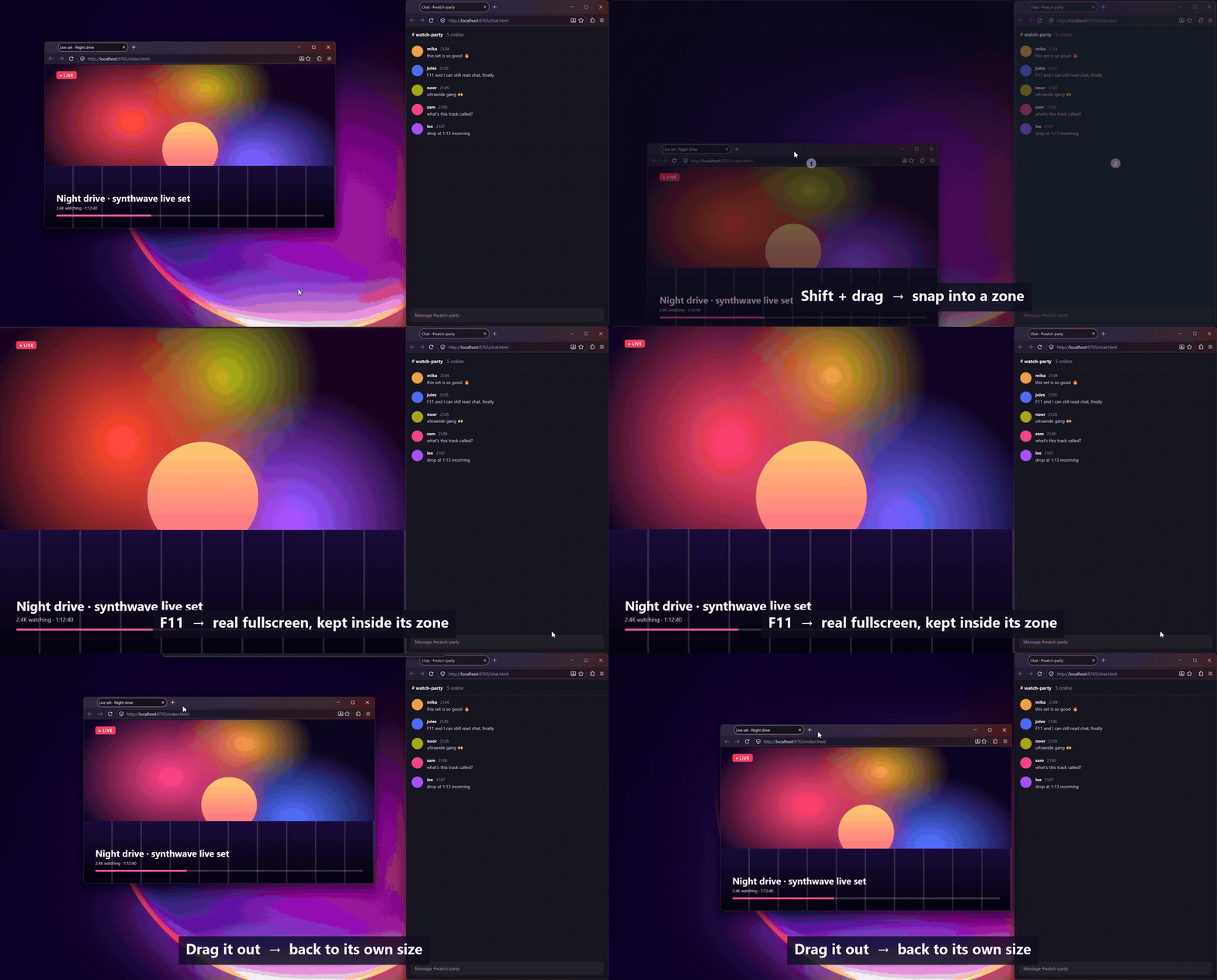
The first public release of ZoneLock: maximize and F11 fullscreen, kept inside your zones.
Highlights
- Maximize stays in its zone: the maximize button fills the zone, not the whole screen.
- Real F11 fullscreen inside a zone: browsers and video players hide their bars and stay in their zone, the rest of the screen keeps working. Per-app Stable mode for Chromium apps that flicker.
- A layout per display: built-in presets, your own presets (drawn in the zone editor), one click to switch.
- Shift + drag to snap, and drag out to get the window's size back.
- Zone shortcuts:
Win+Ctrl+Alt+→ / ←move the active window between zones. - Plans 1–9: save your open apps and where they sit, switch with
Alt+Shift+1…9; missing apps are launched and placed, even after a reboot.Ctrl+Alt+Shift+1…9saves (asks before overwriting). - Apps reopen where you left them, on the same display (or the main one if that display is gone).
- Resolution, scaling, taskbar and monitor changes: windows go back into their zones.
- Settings panel from the tray icon: instant apply, shortcuts recorded by pressing them on any keyboard layout.
Download
| File | |
|---|---|
zonelock-1.0.0-setup.exe |
Installer (recommended): per-user, no admin, optional start with Windows |
zonelock-1.0.0-win-x64.zip |
Portable: unzip and run zonelock.exe |
SHA256SUMS.txt |
Checksums |
Windows 10 / 11, 64-bit. ~1 MB, no network, no telemetry, no code injection.
SmartScreen: the exe is not code-signed yet, so Windows may show "Windows protected your PC". Click More info → Run anyway. This release was built from source by GitHub Actions.