Developer Overview
Another way to make thebestbookon.com easier to develop is by splitting up the code for the front-end and the back-end into 2 projects like I've done for a similar project: Skillsera.
In the past, I developed a minimal application called Skillsera (which is very, very, very similar to thebestbookon.com -- we could even fork this code and start from there). It only has 2 files of consequence:
- models: https://github.com/Skillsera/api.skillsera.org/blob/master/skillsera/api/graph.py
- routes: https://github.com/Skillsera/api.skillsera.org/blob/master/skillsera/views/v1/__init__.py
Skillsera, and thebestbookon.com both use the very minimal Flask web framework which use Python.
Flask is a python library that one may import. It allows one to define 2 things which constitute a running web application... [1] A controller: Generally controller includes a router which specifies url patterns which a user might type in to their url bar... e.g. /ask for thebestbookon.com/ask ... And each route pattern will be mapped to a block of controller code which is ultimately responsible for using some data Model [2] to generate a View.
This is where the idea of "MVC" generally comes from.
Programmer writes a set of route patterns (mapping urls to functions/classes which use models to generate views). Programmer runs the website by invoking the main file (typically for flask/python called app.py). By default, flask runs its own little "web server" (something which listens for requests on a port... like 80 or 443 which is what web browsers send on behalf of users) User goes to a url, this results in a url being sent on port 80 or 443 to our web application's "web server". This url is passed to app.py and is looked up in the router table. The answer of this router lookup is the corresponding function/class which is designated w/ logic to answer our query. Let's call this the AskController The AskController then calls whatever models it needs (maybe a database lookup, or any other math stuff) and then returns stuff to the client.
This is the minimum amount of code required to create a full working / forever-runnable web application:
from flask import Flask         # Imports the Flask module
app = Flask(__name__)           # magic: initializes the app and uses a special variable __name__ to get the name of the file we're in, e.g. app.py
@app.route('/')                 # Flask lets you attach routing logic to controllers
def hello_world():              # When `/` route is hit (i.e. the homepage), we call this function
    # call models as needed...
    return 'Hello, World!'      # 'Hello, World!' because the view returns to the user

if __name__ == "__main__":
    app.run()
Above, I just stuck a bunch of "controllers" in their own file for organization: https://github.com/Skillsera/api.skillsera.org/blob/master/skillsera/views/v1/__init__.py The controllers call out to a bunch of models defined in https://github.com/Skillsera/api.skillsera.org/blob/master/skillsera/api/graph.py Models are just functions that do work. They don't need to be anything related to "web applications". If we needed to get the square root of something, we'd call out to / use a model.
Instead of 'Hello, World!' Flask gives Controllers a nice function to take html templates you've defined and plugin/replace variables in the templates with code. Hence "templates"
The nice thing about this setup is Models can be made and tested independently of the web application
If you're a RTM (read the manual) type, here's Flask's documentation: https://flask.palletsprojects.com/en/1.1.x/quickstart/
There's really only 3 types of tech needed for this project
- Flask (the web framework) + our python controllers
- SqlAlchemy (lets us connect to a database, define tables, and gives us very convenient ways to access data which are easier than sql) for our models
- Some minimal javascript to do things like "type in an isbn and in realtime display info about this book on the page"
For #2, this is what you want 😎 https://leportella.com/sqlalchemy-tutorial.html
Data that powers The Best Book On is currently stored in eight tables.
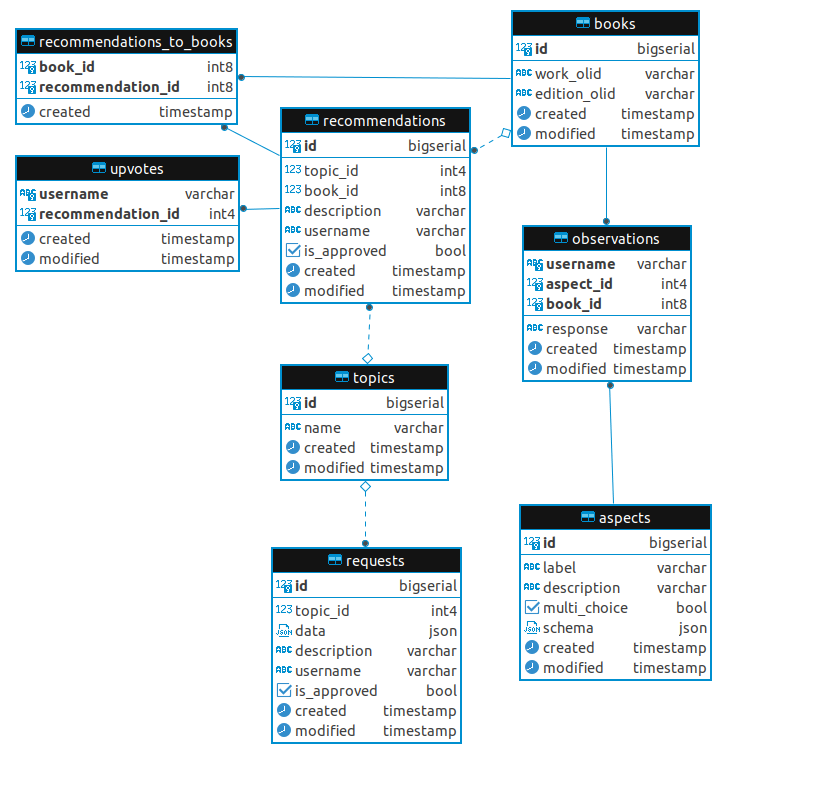
recommendations: Holds recommended books for a specific topic. Users' detailed reviews are stored in the description field. Contains an is_approved flag, which signifies whether or not a recommendation has been approved by a site moderator.
requests: Represents a request for the best book on a specific subject. Requests are also subject to moderator approval.
books: A collection of recommended or candidate books. A book is identified with an Open Library work ID and edition ID.
topics: Stores the topics of a recommendation or request (i.e. Physics, Cooking, etc.).
observations: Stores a user's observations about a book.
aspects: Predefined criteria (genre, intended audience, etc.) from which a user can make observations about a book. Aspects are designed to be displayed in a form. The multi-choice flag designates whether an aspect's values should be displayed as checkboxes (true) or radio buttons (false). Possible responses are stored in the schema field.
upvotes: Tracks users that agree with a recommendation.
recommendations_to_books: Links candidate books to recommendations.