


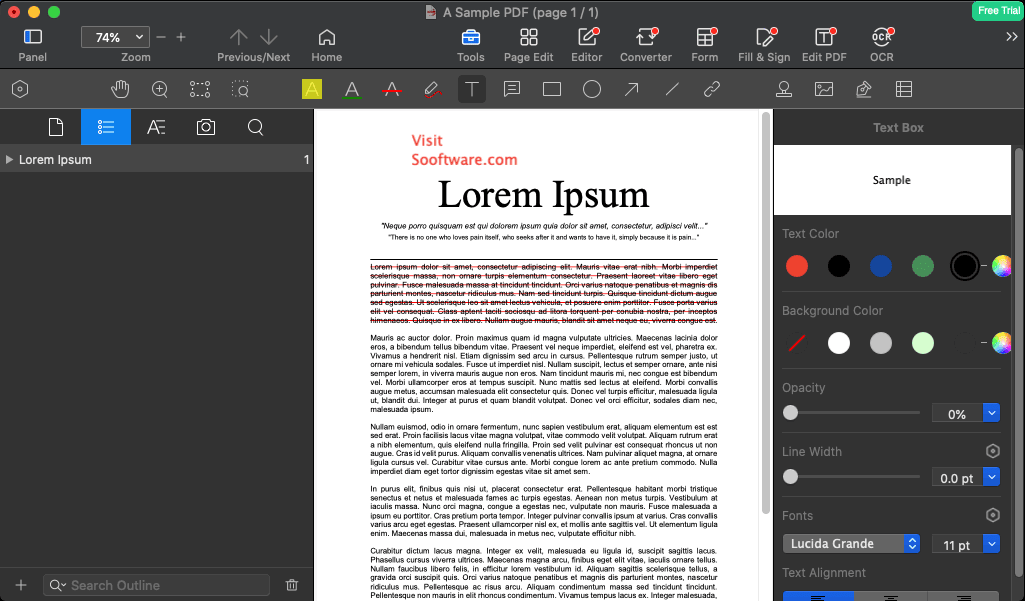
PDF Reader Pro provides complete PDF functionality that covers every document handling need Mac users encounter. The application reads PDFs instantly with smooth scrolling through documents of any length. Text renders crisply at any zoom level. Embedded fonts display correctly. The reading experience matches what you'd expect from a premium document application.
The OCR engine transforms scanned documents into searchable, editable text. Point the OCR at image-based PDFs and extract the text content within. The recognition handles multiple languages with impressive accuracy. Once processed, previously unsearchable scans become documents you can copy from, search within, and edit directly.
Annotation capabilities support thorough document markup. Highlight passages in multiple colors. Underline or strikethrough text precisely. Add sticky notes containing detailed comments. Draw freehand to circle or connect elements. Stamp documents with predefined or custom stamps. These annotations save directly into the PDF for sharing with others.
The editing tools modify PDF content directly without needing source files. Click on text to correct typos or update information. Add new text blocks anywhere in the document. Insert, delete, or rearrange pages. Crop page content to remove unwanted margins. These editing capabilities eliminate round-trips to original authoring applications.
Form handling makes PDF Reader Pro valuable for business users. Fill interactive forms by tabbing between fields naturally. Add signatures through trackpad, camera, or image import. For PDFs without proper form fields, create fillable fields yourself - add text boxes, checkboxes, radio buttons, and dropdown menus to any document.
The conversion engine exports PDFs to editable formats. Convert to Word documents preserving layout and formatting. Extract content to Excel for working with tabular data. Export pages as images in various formats and resolutions. These conversions enable working with PDF content in applications better suited for specific editing tasks.
Security features protect sensitive documents appropriately. Set passwords required for opening files. Apply separate passwords controlling editing and printing permissions. Redact sensitive information permanently - not just covering it but removing the underlying data. These protections ensure documents remain secure through distribution.
- OCR recognition for scanned documents
- Annotation tools comprehensive
- Text editing directly in PDFs
- Form filling and creation
- Digital signatures support
- Document conversion Word, Excel
- Batch processing multiple files
- Page management reorder, delete
- Cloud integration iCloud, Dropbox
PDF Reader Pro represents focused development creating software that excels at specific tasks. The application addresses real user needs with practical solutions refined through actual usage feedback. This targeted approach produces tools that feel purposeful rather than bloated with rarely-used features.
Updates maintain compatibility with macOS releases while introducing improvements based on user requests. The development cycle balances stability with progress, ensuring the application remains both reliable and current.