Repository navigation
Farm Settings EN
The Settings (Настройки) section holds the settings of the whole farm. The settings of individual sites are in the Sites (Площадки) section, on each site's page.
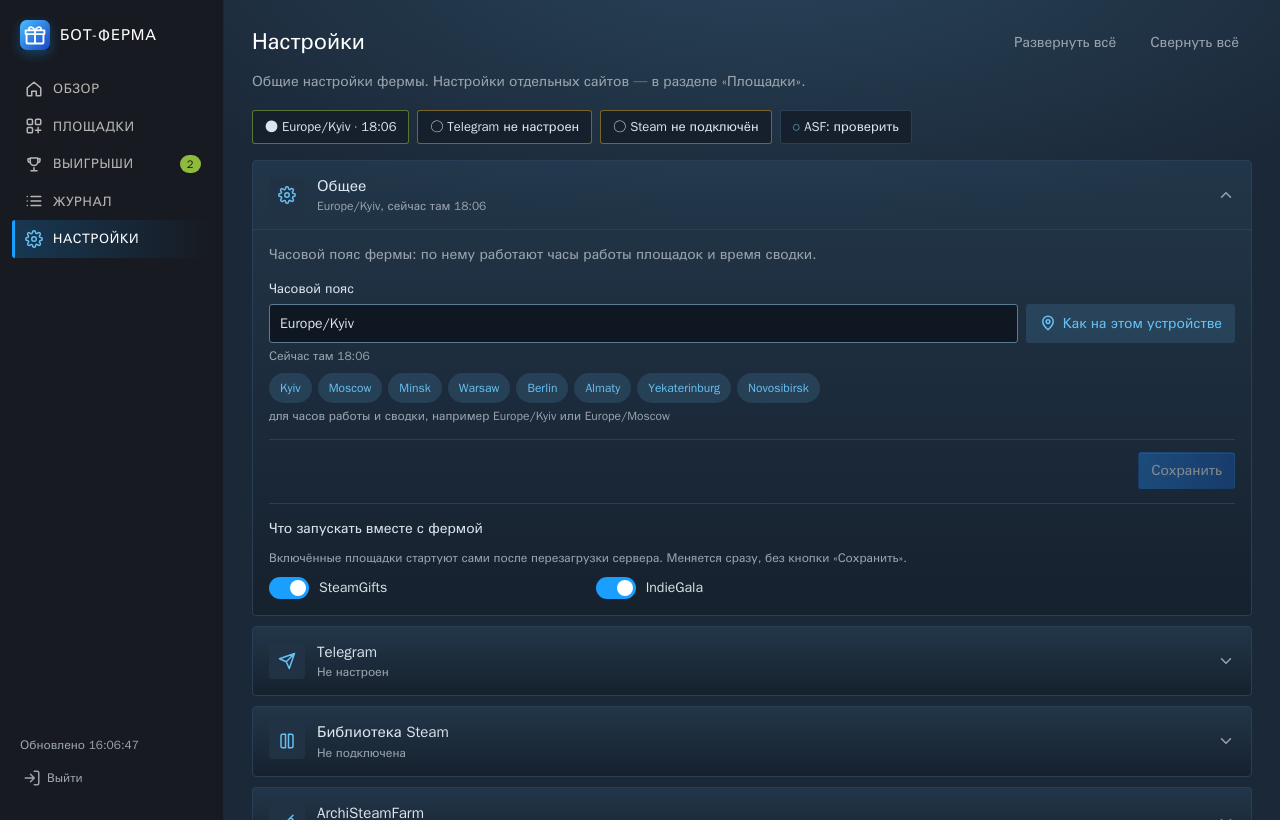
- The status bar at the top shows the time zone and the time in it, whether Telegram is set up and whether Steam is connected, and lets you check ASF. Clicking it opens the relevant section.
- Sections collapse. The panel remembers which ones you left open. At the top there are "Expand all" («Развернуть всё») and "Collapse all" («Свернуть всё»).
- Each section has its own "Save" («Сохранить») button. It lights up only when something has changed. Changes take effect at once, without restarting the farm.
- Saved secrets (tokens, keys, passwords) are shown as "✓ Saved" («✓ Сохранено») with a "Replace" («Заменить») button. They are never sent back to the browser.
Applies at once, without a Save button, and is remembered for all your devices.
- Panel language: Russian, English or Ukrainian. Labels, buttons and the farm's own log messages are translated; game names and the sites' replies stay as they are.
- Theme: "Classic", "Graphite", "Midnight" (near-black, for OLED) and "Light".
- Accent colour: the colour of buttons, links and highlights: seven presets or any colour of your own.
- Scale (90–125 %), corners (square or rounded), background glow and animations.
- Show the tour again: a short walk through the sections. It opens by itself on the first sign-in; "Skip" or Esc closes it.
- Reset: the default theme and colours (the language stays).
- Time zone (Часовой пояс). You can pick one from the full list (start typing a city in English: Kyiv, Moscow, Almaty), press "Same as this device" («Как на этом устройстве») or one of the buttons with common zones. Under the field you can see the current time in the chosen zone.
- Start with the farm (Что запускать вместе с фермой). A toggle for each connected site. Sites that are switched on start by themselves after the farm or the server restarts. The change takes effect at once; no "Save" button is needed.
General (Общее)
| Setting | Default | What it does |
|---|---|---|
| Time zone | Europe/Kyiv |
for working hours and the summary, for example Europe/Kyiv or Europe/Moscow |
Steam library (Библиотека Steam)
| Setting | Default | What it does |
|---|---|---|
| Steam Web API key | — | steamcommunity.com/dev/apikey; needed to skip games you already own |
| Steam profile (Профиль Steam) | empty | a SteamID64 or a profile link; "Game details" must be public |
| Wishlist games first (Сначала игры из списка желаемого) | off | IndieGala takes them first (and may spend the reserve), SteamGifts starts every run with the "Wishlist" section; the wishlist must be public |
ArchiSteamFarm
| Setting | Default | What it does |
|---|---|---|
| IPC address (Адрес IPC) | http://127.0.0.1:1242 |
if ASF is on the same server, leave it as is |
| IPC password (Пароль IPC) | — | IPCPassword from config/ASF.json; empty means the farm reads it from ~/asf/config/ASF.json by itself |
| Bot for keys (Бот для ключей) | empty | an ASF bot name; empty means the first bot online |
| Activate won keys immediately (Активировать выигранные ключи сразу) | off | as soon as a win has a key, ASF activates it and the result arrives on Telegram |
Telegram
| Setting | Default | What it does |
|---|---|---|
| Bot token (Токен бота) | — | create a bot with @BotFather using /newbot and paste the token it sends |
| Chat ID (ID чата) | empty | send the bot any message and press "Find my chat" («Найти мой чат») |
| Send notifications (Присылать уведомления) | on | wins, errors, expired cookies |
| Control the farm with commands (Управлять фермой командами) | off | /status, /pause, /start, /run, /preview, /wins, /report; replies only in this chat |
| Send daily summary (Присылать сводку за сутки) | off | entries, spending, wins and balance for each site |
| Summary hour (Час отправки сводки) | 21 |
0–23, in the farm's time zone |
The Telegram settings (token, chat, "Send notifications") are stored in
config.ini, because the command-line bot uses them too. Everything else is
in farm.json.
| Button | What it does |
|---|---|
| Telegram → "Find my chat" | shows the chats where someone wrote to the bot; the one you pick is filled into the field |
| Telegram → "Send test" («Отправить тест») | sends a test message |
| Telegram → "Send summary now" («Прислать сводку сейчас») | sends the daily summary without waiting for the summary hour |
| Steam library → "Check" («Проверить») | shows how many games are in the library and the wishlist, or why they could not be read |
| ArchiSteamFarm → "Check ASF" («Проверить ASF») | shows the ASF bots and which of them are online |
- Change password (Сменить пароль): enter the current and the new one (at least 6 characters). After the change, every other device is signed out of the panel.
- Sign out on all other devices (Выйти на всех других устройствах): the same, but the password stays as it was. Handy if you lose your phone.
Step-by-step instructions are on the Panel on your phone page. The "About the farm" («О ферме») section shows the start time, the panel addresses, how many sites are connected and the time in the farm's time zone.