Repository navigation
Web Panel EN
The panel is a single page with no build step and no external dependencies. The section menu is on the left; on a phone it is a bar at the bottom of the screen. The data refreshes every 3 seconds.
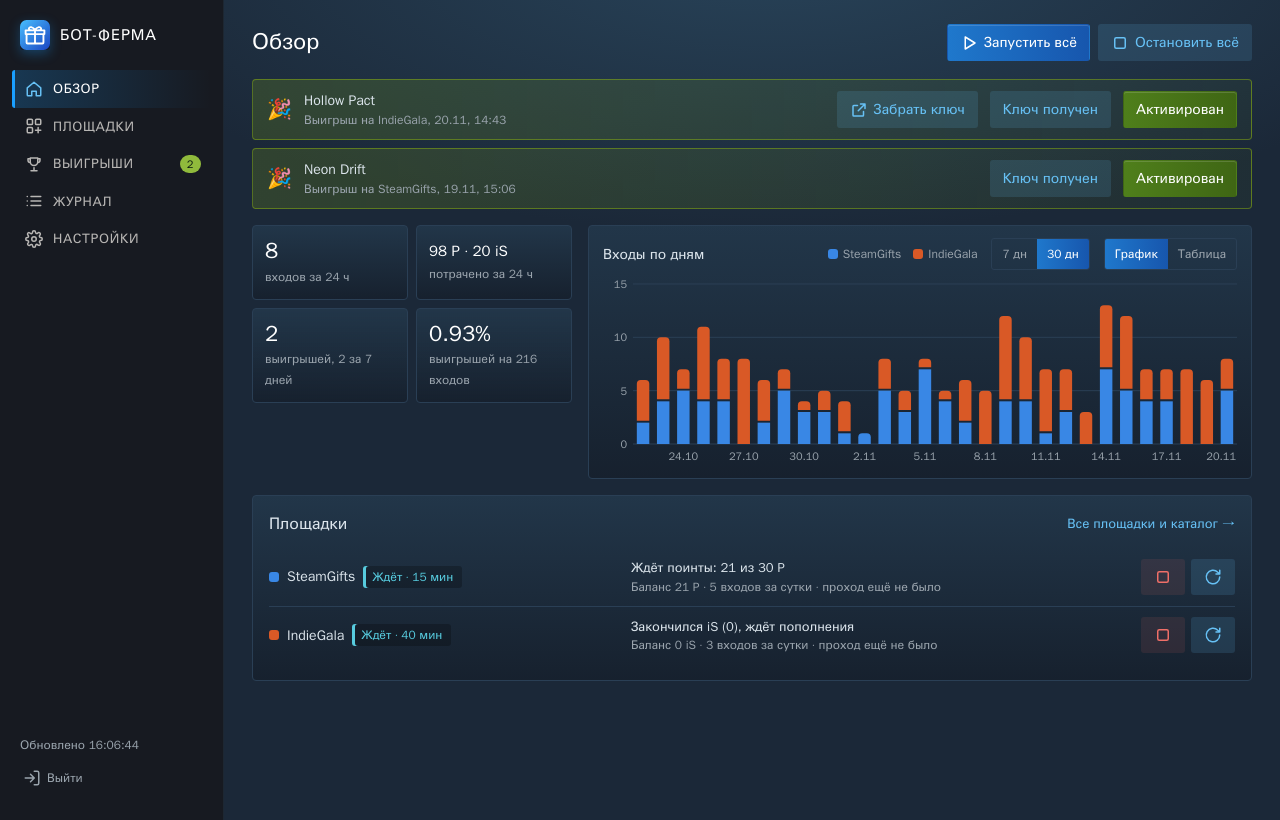
- New wins (Новые выигрыши): banners with the "Get key" («Забрать ключ»), "Key received" («Ключ получен») and "Activated" («Активирован») buttons. Up to three are shown; the rest are in the Wins (Выигрыши) section.
- Last 24 hours (Цифры за сутки): entries in 24 hours, spending (in each site's currency), wins in total and over 7 days, and the share of wins among entries.
- Luck against expectation (Удача против ожидания): under the figures, one line each for SteamGifts, IndieGala and OpiumPulses: how many wins came, how many the entries made could be expected to bring, how much of the site's currency went on one win and what an entry cost on average. It covers the entry history the farm keeps (up to the last 2000 per site). On SteamGifts only the wins of those kept entries count: a win has the same giveaway link as its entry. IndieGala and OpiumPulses give a win another link, so there the wins since the first kept entry count. That runs high the longer the farm works: a giveaway is drawn days after the entry, so wins of entries already gone from the history come in, and so do wins of giveaways entered by hand on the site; the panel says so under the lines. Expected wins are the sum of "copies / (entrants + 1)" over the entries: the farm notes the entrant count when it enters, and the copies on SteamGifts. This runs high: people keep joining after the farm, and giveaways that have not ended yet are already counted. For IndieGala the forecast of entrants by the end (smart order) is used when there is one. Entries with no entrant count (made before this version, and every OpiumPulses entry, since its listing does not show one) are left out of the expectation, and the panel says "known for N of M entries" («известно для N из M входов»).
- Entries per day (Входы по дням): a chart over 7 or 30 days, each site in its own colour. Hovering over a bar shows the day's entries, spending and wins. The "Table" («Таблица») toggle shows the same data as a list.
- Sites (Площадки): one row for each connected site: status, reason for waiting, balance, and the "Start/Stop" («Старт/Стоп») and "Run now" («Пройти сейчас») buttons. A site stops once its request to the site is over; "Start" pressed before that is not lost, the site starts as soon as it has stopped.
- Start all / Stop all (Запустить всё / Остановить всё): all connected sites at once.
| Label | What it means |
|---|---|
| Running (Работает) | a run is in progress |
| Waiting · 15 min (Ждёт · 15 мин) | a pause until the next run. The reason is shown next to it: "Waiting for points: 21 of 30 P" («Ждёт поинты: 21 из 30 P»), "Outside working hours, opens at 08:00" («Вне часов работы, откроется в 08:00»), "Daily limit reached, resets at 14:20" («Дневной лимит исчерпан, сброс в 14:20»), "Out of iS" («Закончился iS») |
| Stopped (Остановлена) | turned off by hand or never started |
| Error, retrying (Ошибка, повтор) | the site did not answer or answered unexpectedly. The farm retries by itself in 15 minutes, or after 1, 2, 5 minutes first if the site could not be reached at all |
| Sign-in required (Нужен вход заново) | the cookies no longer work. Press "Reconnect" («Подключить заново») |
| Not connected (Не подключена) | a site from the catalogue that has not been connected yet |
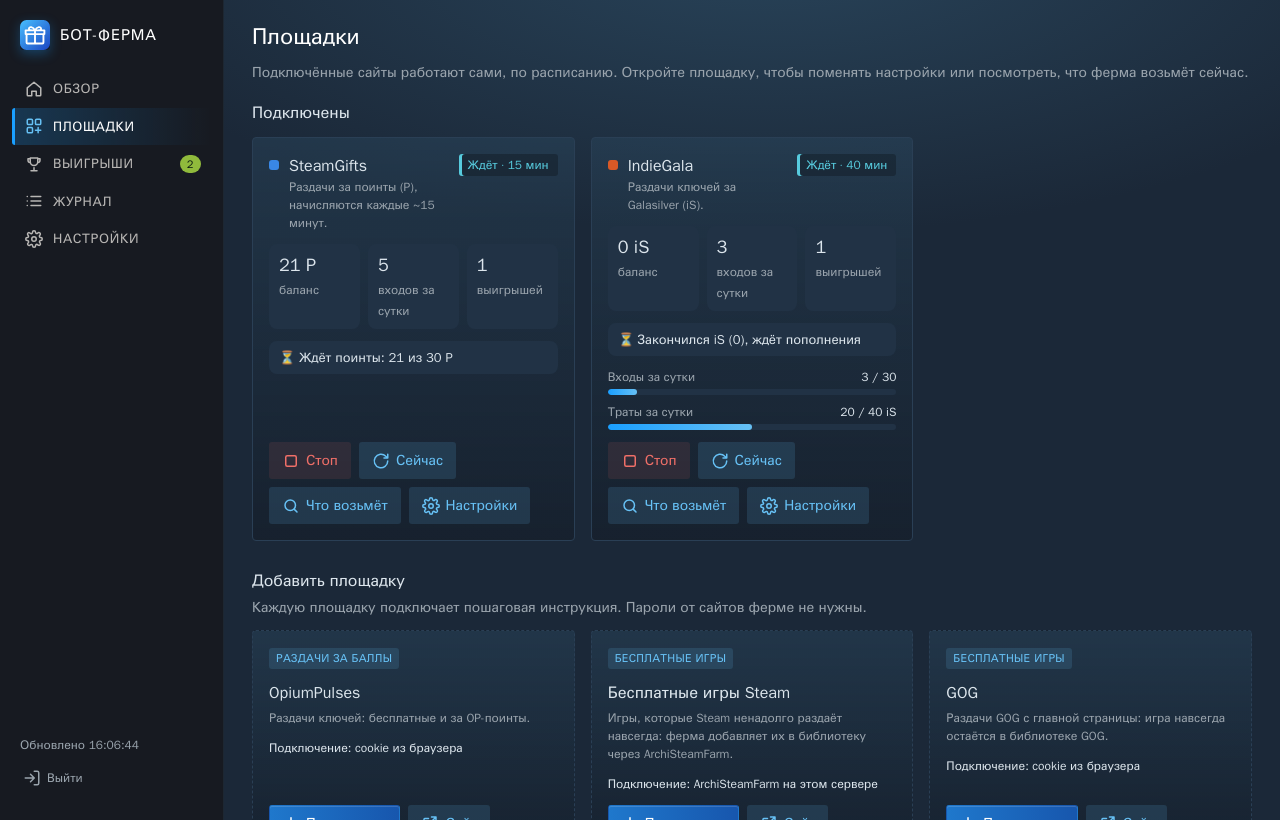
Connected sites are at the top, and the "Add site" («Добавить площадку») catalogue is below them. Every connected site has its own page with four tabs:
- Status (Состояние): balance, entries in 24 hours, wins, last run, working hours, daily limit bars and the last 10 entries.
- Settings (Настройки): presets and all of the site's settings, split into groups. Each one is described on that site's page in this wiki.
- Preview (Что возьмёт): a trial run (see below).
- Connection (Подключение): reconnect or disconnect.
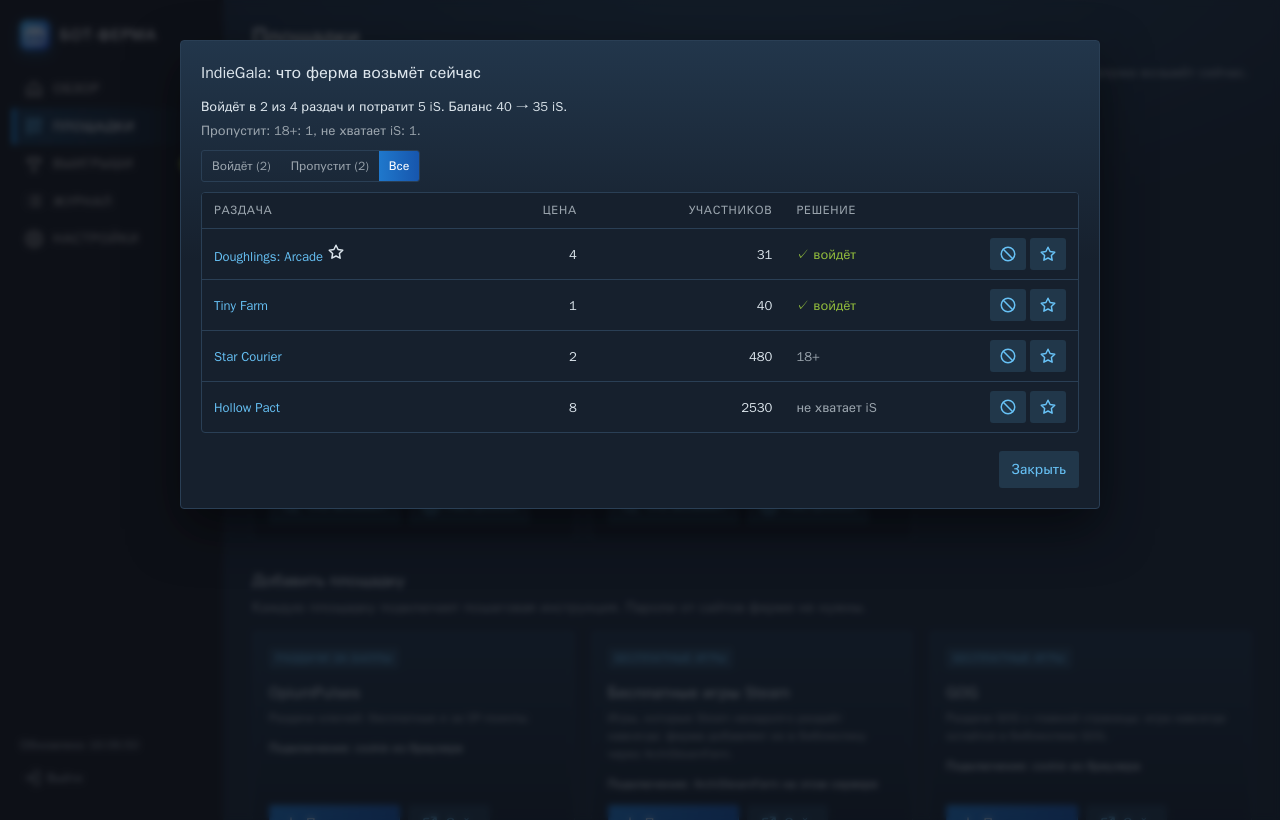
The trial run checks all current giveaways against the same rules as a real run: filters, balance, reserve, daily limits. It shows which giveaways the farm would enter and why it would skip the rest. It spends nothing and enters nothing; it can take up to a minute.
- At the top is the summary: "Will enter 2 of 4 giveaways and spend 5 iS. Balance 40 → 35 iS" («Войдёт в 2 из 4 раздач и потратит 5 iS. Баланс 40 → 35 iS»), and below it the reasons for skipping.
- The "Will enter / Will skip / All" («Войдёт / Пропустит / Все») filter.
- The 🚫 button next to a game adds it to the blacklist, ★ to the priority games.
- If it is outside working hours right now, a note says when the run will actually start.
See Wins and keys.
See Log and history.
See Farm settings. That is where the time zone, Telegram, the Steam library, ArchiSteamFarm, the panel password and the phone instructions are.
- Every element can be reached with
Tab; the focus outline is always visible. -
Esccloses a dialog, and focus does not escape it while it is open. - On a phone, buttons are at least 44 pixels.
- Icon buttons have labels for screen readers, and the chart has a table with the same data.
If the settings have unsaved edits, the section gets an "unsaved" («не сохранено») label. When you go to another page, the panel asks you to confirm.