
Replies: 2 comments 3 replies

-
|
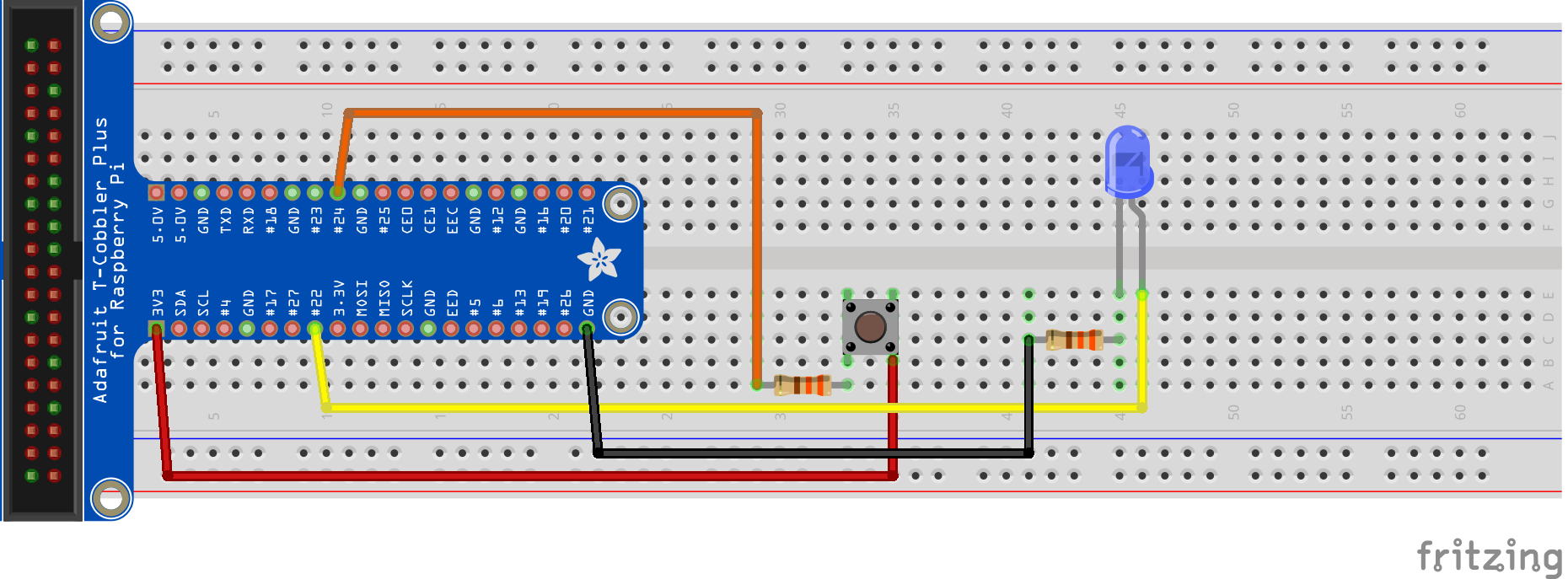
BCM/GPIO 21 is actually pin 40 ... And pin 29 is BCM/GPIO 5 yes, confusing, I know ;-) you can also check this example that you can run easily with JBang, and the wiring diagram shows you the BCM/GPIO numbering of the Raspberry Pi header |
Beta Was this translation helpful? Give feedback.

-
|
Do I need JBang or can I use the Pi4J library and create my own Project? And is out there any Pin diagram with all BCM infos for the pins? |
Beta Was this translation helpful? Give feedback.
-
|
That JBang is only an example! Ofcourse you can use your own project, or Maven, or Gradle, ... On https://pinout.xyz/pinout you can find all pin info. |
Beta Was this translation helpful? Give feedback.
-
|
One more question. |
Beta Was this translation helpful? Give feedback.

-
|
See https://pi4j.com/documentation/io-examples/serial/ .device("/dev/ttyS0") uses RX | UART TX, GPIO 15 |
Beta Was this translation helpful? Give feedback.


Uh oh!
There was an error while loading. Please reload this page.
-
Good evening everybody.
I have a problem, that my cable bridge (simulates a button) is not regognized by the code.
That is my current code, that is from the Pi4J example:
`import com.pi4j.Pi4J;
import com.pi4j.io.gpio.digital.DigitalInput;
import com.pi4j.io.gpio.digital.DigitalInputProvider;
import com.pi4j.io.gpio.digital.PullResistance;
import com.pi4j.util.Console;
public class TestMain {
/**
* Constant
DIGITAL_INPUT_PIN=0*/
public static final int DIGITAL_INPUT_PIN = 21;
}`
The Console prints only this:
`[main] INFO com.pi4j.util.Console - ************************************************************
[main] INFO com.pi4j.util.Console - ************************************************************
[main] INFO com.pi4j.util.Console -
[main] INFO com.pi4j.util.Console - <-- The Pi4J Project -->
[main] INFO com.pi4j.util.Console - Basic Digital Input Example
[main] INFO com.pi4j.util.Console -
[main] INFO com.pi4j.util.Console - ************************************************************
[main] INFO com.pi4j.util.Console - ************************************************************
[main] INFO com.pi4j.util.Console -
[main] INFO com.pi4j.util.Console - ------------------------------
[main] INFO com.pi4j.util.Console - | PRESS CTRL-C TO EXIT |
[main] INFO com.pi4j.util.Console - ------------------------------
[main] INFO com.pi4j.util.Console -
[main] INFO com.pi4j.Pi4J - New auto context
[main] INFO com.pi4j.Pi4J - New context builder
[main] INFO com.pi4j.platform.impl.DefaultRuntimePlatforms - adding platform to managed platform map [id=raspberrypi; name=RaspberryPi Platform; priority=5; class=com.pi4j.plugin.raspberrypi.platform.RaspberryPiPlatform]
[main] INFO com.pi4j.util.Console - THE STARTING DIGITAL INPUT STATE IS [
[main] INFO com.pi4j.util.Console - LOW]
[main] INFO com.pi4j.util.Console - CHANGE INPUT STATES VIA I/O HARDWARE AND CHANGE EVENTS WILL BE PRINTED BELOW:
`
Is the digital input pin the same as it is defined (21)? After a long search I found that is a "GPIO" Pin and not the real pin. GPIO-21 = PIN-29? But nothing happen if I short the cable to ground
Beta Was this translation helpful? Give feedback.
All reactions