Repository navigation
Codex Account Switcher 1.0.0

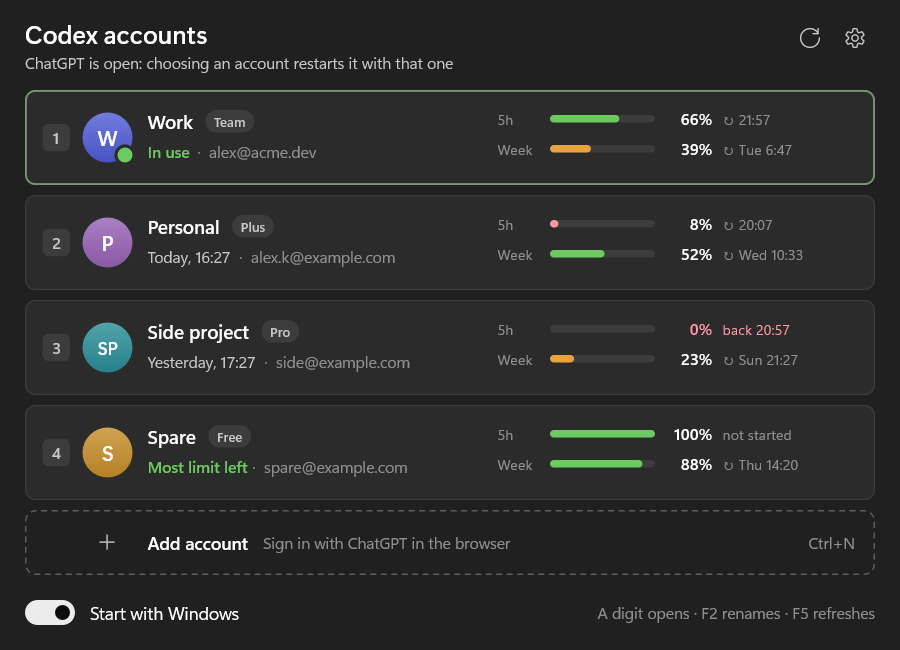
The first version: Codex Switcher rewritten as a native Windows program, in the design of Claude Profile Switcher. Everything Codex Switcher does is here, and its accounts and exports carry over.
New
- Pick an account, and ChatGPT opens with it. Codex switches in a second, the ChatGPT app (with Codex inside), the CLI and the editor extensions, through the
auth.jsonthey share. The app opens with the account, or restarts with it if it was open, and editors reconnect. A click on the account in use just opens the app. A question comes first when the app is open; Settings can turn the question, the restart or the opening off. - Renewed sign-ins are never lost. The copy Codex renewed is taken back before every switch and every few seconds, an older copy never replaces a newer one, and the sign-in Codex uses is never renewed behind its back.
- What is left, for every account: the 5-hour and weekly windows as Codex's
/statusshows them, the time they reset and when a used-up account comes back, from OpenAI, on open and in the background. The account with the most left is marked, and the tray menu switches to it. The tray can show the percentage left on the account in use instead of its icon. - Conversations the limit stopped carry on: after a switch, or from the tray menu, each conversation of the last 24 hours that stopped at the usage limit gets "Continue the previous task." with the new account, once.
- Account details and statistics: tokens today, this week, this month and in all, streaks, the longest task, a 30-day chart, the skills and plugins used most, limit resets with their expiry, and when the subscription renews or ends.
- 5-hour windows on demand: one tiny request from the account menu, for all accounts from the tray, automatically when a window is idle (for every account or chosen ones), every day at set times, or from the command line with
--warmup. - Adding accounts: the ChatGPT sign-in in the browser, which always asks for the account; an
auth.jsonfile; Codex's current sign-in; or every account from Codex Switcher, with their names. - Backups: every account in one file or line of text, encrypted with a password you choose (AES-256-GCM). Codex Switcher's
.cswfandcss1.exports import too. - The account list in a browser, for a phone or another computer: off by default, on this PC or your network, behind a secret link.
- Hide emails for screen sharing, for every account or one.
- The account list (Ctrl+Alt+X) with Codex's own state on top, whether the app is open and how many terminal sessions run, Ctrl+Shift+Alt+1…9 from any app, a tray list with limits, a jump list, desktop shortcuts per account, start with Windows, self-update with SHA-256 checks, English and Russian, system, dark and light themes.
- Settings show the app (ChatGPT, or Codex for an older copy), the Codex CLI and the sign-in file Codex uses.
- Sign-ins are kept encrypted for your Windows user (DPAPI).
- A command line:
--switch,--list,--import,--import-codex-switcher,--warmup,--add-account, and--diagnose, which prints what the switcher sees of Codex without changing anything.
Download
| Your PC | File |
|---|---|
| Intel or AMD (almost every PC) | CodexAccountSwitcher-x64.exe |
| ARM: Snapdragon, Surface Pro X | CodexAccountSwitcher-arm64.exe |
Run the exe: it installs itself, or updates your copy with accounts and settings kept. Installed copies offer the update by themselves. It isn't code-signed, so Windows may ask: More info → Run anyway. SHA256SUMS.txt lists the checksums; the zip holds both exes with the documentation.