Repository navigation
Releases
Codex Account Switcher 1.1.0

New
- Account manager (👥 in the picker, Ctrl+M), for accounts bought with a subscription. Paste an order reads the shop's message: the order, the month paid, the warranty and every
email|password|2FA keyline. Each account then has its steps: open the site in a browser profile of its own, change the password (a strong one is made and kept), change the 2FA key, confirm the phone by hand, and sign in to the switcher in your default browser, or by the link pasted into the account's own window. Ctrl+Alt+V types the email, the password and the 2FA code into the field under the cursor. Every account shows its current 2FA code, Code from a key… gives one for any key, and notifications come before a warranty or a paid month ends. The details are encrypted for your Windows user and included in backups. - A sign-in by its link alone. Copy the sign-in link behind the ⌄ on Add account starts a sign-in without opening the browser, for a private window or another browser.
- A waiting sign-in is shown where it belongs: in the account's row, or in a row for the new account, with Open again, copy the link and Cancel, instead of a banner above the list.
- One way in for everything. The ⌄ on Add account lists every way of adding: the browser, a shop's order or a line
email|password|2FA key, the sign-in Codex uses now, anauth.json, a backup. Ctrl+V takes whatever account the clipboard holds, and files can be dropped on the list or the manager. - Sign in to all in the account manager opens the sign-in windows of the cards not signed in yet one after another, the next when the one before has come back.
- Deleting asks nothing and can be undone. The account goes at once, and Undo (Ctrl+Z) brings it back whole for about ten seconds: its sign-in, place, colour, shortcuts and limits.
- Rows can be dragged to another place in the list.
- The ⋯ menu of an account opens its password, 2FA and order in the manager.
- Search in the account manager (Ctrl+F): by email, order number or note. The filters count what the search leaves, and Esc clears it. A chevron on each card shows that it opens.
- Screen readers. Narrator reads every window: rows, buttons, switches, tabs and the text between them have names and states, and can be pressed from it. The windows also follow Windows' high contrast colours and its Animation effects setting.
- Hints on hover. Resting the pointer on an icon button (👥, ⟳, ⚙, ⋯, ✕) says what it does and its key, and a day of the tokens chart shows its figure.
- A first start explains itself. With no accounts yet, the list says what it is for and offers one button.
Changed
- Settings are split into five pages, picked on the left as in Windows 11 Settings: General, Switching, Limits, Accounts and About. Related options share one card, each has one short line of explanation, and an option that depends on another (the question before restarting ChatGPT, who may open the browser list) shows up only when that one is on. A click anywhere on a switch's row flips it, and Ctrl+Tab goes to the next page.
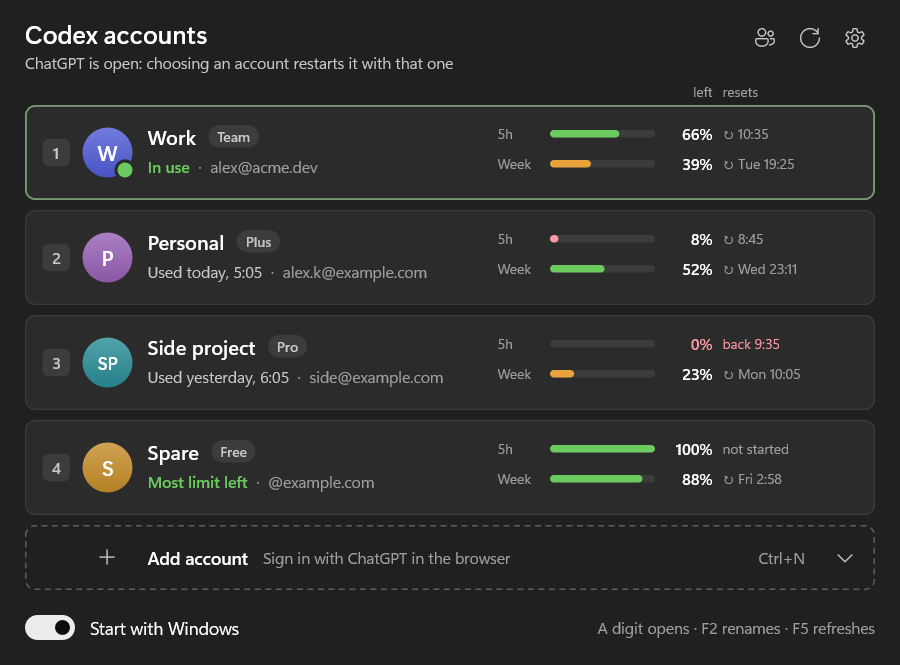
- Rows are easier to read. A date now says what it is ("Used today, 10:09"), a name made from the email is followed by
@example.comrather than the whole address again, and the two figures of a row are headed left and resets. - Grey text is darker in the light theme and lighter in the dark one, so emails, reset times and hints keep a contrast of 4.5:1. Text sizes come from one scale of six instead of fourteen.
- Copying says so. A copied code, password, email or link shows a line at the bottom of the window, with the reminder that a password or code leaves the clipboard in 45 seconds.
- Scrolling. PgUp, PgDn, Home and End scroll, the scroll bar can be dragged, the wheel moves as many lines as Windows is set to, and keyboard focus on a control out of view brings it into view.
- Settings, account details and the account manager open where you left them, at the size you gave them.
- The pointer stays an arrow over buttons, as in Windows' own windows, and hovering in the light theme tints a control slightly instead of turning it grey.
- Small things line up. Corners inside corners share one curve, the line under a text box follows its rounded corners, ⋯ darkens when pressed like every other icon button, and the cards in Settings have the same corners as everywhere else.
Fixed
- Signing in again with a different account than the one asked for added it without a word; now the switcher asks whether to try again or add it separately.
- With more than seven accounts, Tab couldn't reach the ones scrolled out of view.
- With more than seven accounts, turning the wheel while renaming left the text box over another row; scrolling now finishes the rename.
- Account details kept the old colours when the theme changed while they were open, and could be narrowed until the limits overlapped.
Download
| Your PC | File |
|---|---|
| Intel or AMD (almost every PC) | CodexAccountSwitcher-x64.exe |
| ARM: Snapdragon, Surface Pro X | CodexAccountSwitcher-arm64.exe |
Run the exe: it installs itself, or updates your copy with accounts and settings kept. Installed copies offer the update by themselves. It isn't code-signed, so Windows may ask: More info → Run anyway. SHA256SUMS.txt lists the checksums; the zip holds both exes with the documentation.
Codex Account Switcher 1.0.0
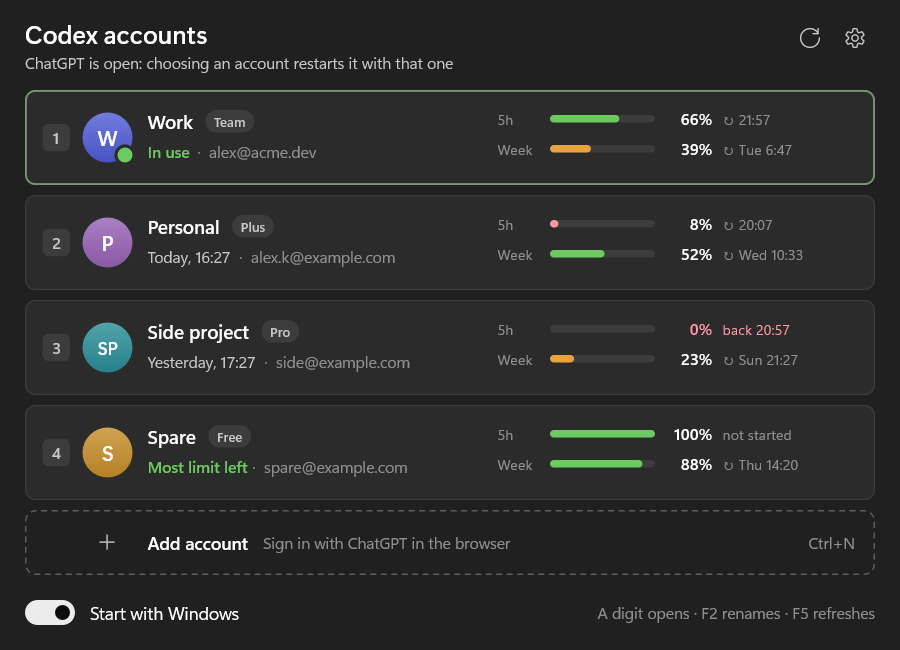
The first version: Codex Switcher rewritten as a native Windows program, in the design of Claude Profile Switcher. Everything Codex Switcher does is here, and its accounts and exports carry over.
New
- Pick an account, and ChatGPT opens with it. Codex switches in a second, the ChatGPT app (with Codex inside), the CLI and the editor extensions, through the
auth.jsonthey share. The app opens with the account, or restarts with it if it was open, and editors reconnect. A click on the account in use just opens the app. A question comes first when the app is open; Settings can turn the question, the restart or the opening off. - Renewed sign-ins are never lost. The copy Codex renewed is taken back before every switch and every few seconds, an older copy never replaces a newer one, and the sign-in Codex uses is never renewed behind its back.
- What is left, for every account: the 5-hour and weekly windows as Codex's
/statusshows them, the time they reset and when a used-up account comes back, from OpenAI, on open and in the background. The account with the most left is marked, and the tray menu switches to it. The tray can show the percentage left on the account in use instead of its icon. - Conversations the limit stopped carry on: after a switch, or from the tray menu, each conversation of the last 24 hours that stopped at the usage limit gets "Continue the previous task." with the new account, once.
- Account details and statistics: tokens today, this week, this month and in all, streaks, the longest task, a 30-day chart, the skills and plugins used most, limit resets with their expiry, and when the subscription renews or ends.
- 5-hour windows on demand: one tiny request from the account menu, for all accounts from the tray, automatically when a window is idle (for every account or chosen ones), every day at set times, or from the command line with
--warmup. - Adding accounts: the ChatGPT sign-in in the browser, which always asks for the account; an
auth.jsonfile; Codex's current sign-in; or every account from Codex Switcher, with their names. - Backups: every account in one file or line of text, encrypted with a password you choose (AES-256-GCM). Codex Switcher's
.cswfandcss1.exports import too. - The account list in a browser, for a phone or another computer: off by default, on this PC or your network, behind a secret link.
- Hide emails for screen sharing, for every account or one.
- The account list (Ctrl+Alt+X) with Codex's own state on top, whether the app is open and how many terminal sessions run, Ctrl+Shift+Alt+1…9 from any app, a tray list with limits, a jump list, desktop shortcuts per account, start with Windows, self-update with SHA-256 checks, English and Russian, system, dark and light themes.
- Settings show the app (ChatGPT, or Codex for an older copy), the Codex CLI and the sign-in file Codex uses.
- Sign-ins are kept encrypted for your Windows user (DPAPI).
- A command line:
--switch,--list,--import,--import-codex-switcher,--warmup,--add-account, and--diagnose, which prints what the switcher sees of Codex without changing anything.
Download
| Your PC | File |
|---|---|
| Intel or AMD (almost every PC) | CodexAccountSwitcher-x64.exe |
| ARM: Snapdragon, Surface Pro X | CodexAccountSwitcher-arm64.exe |
Run the exe: it installs itself, or updates your copy with accounts and settings kept. Installed copies offer the update by themselves. It isn't code-signed, so Windows may ask: More info → Run anyway. SHA256SUMS.txt lists the checksums; the zip holds both exes with the documentation.