Repository navigation
Releases
SB2H Android 1.2.1 Hotfix

A hotfix for 1.2: smoother menus, cutscenes and ultimates, a Read mode that plays your ISO or RVZ without extracting it, saves that survive an uninstall, and crash fixes from your reports. Install it over 1.2: your saves and settings stay.
Important
This app contains no game data. You need a dump of your own disc (.iso or .rvz, Wii NTSC-J RBSJ08). Download the app only from this Releases page.
Tip
Little free space? When you choose the game file, pick Read: the game plays from your ISO or RVZ where it is, without the 4 GB extracted copy. Keep the file where it is, or choose it again after moving it.
Download
| File | For | SHA-256 |
|---|---|---|
| basara2heroes-1.2.1-hotfix-android-arm64.apk | Android 10 or newer, arm64 | e82c1fb33c0eee82adc2f42e19b4204f3cba5b4c3224ffead205d547091f3b7b |
What's new
- Extract or Read: choose how the game file is used. Extract works as before (about 4 GB). Read plays the ISO or RVZ where it is, without extracting, for phones with little free space.
- GPU stopped responding? If the GPU stops responding and the game closes (Vulkan, WebGPU 1.2 or OpenGL ES), Render Resolution is lowered one step for the next start, and the app tells you.
- OpenGL ES on PowerVR now sends the 3D models the way their driver is made for.
- Saves survive an uninstall: your save is copied to
Basara2Heroes/Saves/Autowhenever it changes, and comes back by itself after the app is uninstalled and installed again (needs "All files access"). Updating never touches it. - Clearer Restart marks in the menu: settings that apply only after a restart carry a yellow ⟳ Restart tag instead of
*. Change one and its row turns yellow, the footer says how many changes wait for Restart, and the Restart button lights up. Restart lists what will change before it goes. - Texture mods start unticked: a mod added to the Textures folder is off until you tick it in Settings > Textures.
Fixes
- Menus, character select, cutscenes and ultimates could drop to about 5 fps on Vulkan: frames piled up behind the GPU and were thrown away. The renderer now keeps at most two frames waiting.
- Dynamic Resolution did nothing at 1x: it can go down to 240 lines again, as in 1.1, and now notices a GPU that falls behind even on phones that don't report GPU times.
- Fewer full-screen GPU passes in effects that copy the picture (ultimates, cutscenes, smoke).
- Thermal Control could hold the game at 30 fps until the app was closed. The battery temperature no longer turns on the 30 fps drawing.
- The game could close in battle with "unknown texture format" on some Mali phones: the graphics data is now read with the right size.
- The game could close with "invalid tex offset" on some Mali phones.
- The game could close right after an update with "No DVD root is configured".
- Crackling sound on phones whose audio takes large chunks at once (for example Helio G85 with Recording-Friendly Audio).
- PowerVR B-Series (BXM) with Graphics Compatibility Off drew a black game picture behind the on-screen buttons.
- Settings and texture mods had no effect when the game's Config.toml had been copied in from a PC or a file manager.
- PowerVR B-Series phones with an older Vulkan driver (for example ADVAN S50) drew a black game picture even with Graphics Compatibility On.
- Custom textures showed only after leaving and entering a screen again (Conquest character select). They now appear as soon as the file is loaded.
- Generic gamepads: the right stick and the D-pad work (D-pad from the hat, right stick from the Z/RZ axes).
- Some generic USB gamepads (for example "810 Twin USB Gamepad") were seen as a keyboard, so their Gamepad Buttons map did nothing. They now work as a gamepad.
- What's New in the app shows only the changes of the version you just installed.
- The log records the fps every 10 seconds again, so reports show where the game slowed down.
Known issues
- In the Maeda Toshiie & Matsu mission, part of the floor can be see-through or missing.
- Weak GPUs (Mali-G52 MC2, PowerVR) still slow down in Basara arts and ultimates: use Ultra Low, and try Reduce Effects.
- Snapdragon 680 / Helio G85 class CPUs hold about 40 fps in busy battles whatever the driver: use the 30 FPS Lock for a steady picture.
- Render Resolution 1.5x on a 480-line screen (720 lines of work) is too heavy for many mid-range GPUs: use 1x, or turn on Dynamic Resolution.
- Some phones (OPPO, Xiaomi) close the game while it sits in the background to save memory. That is the phone, not a crash.
Reporting a problem
Settings > System > Share Log: it puts the logs of the runs you pick (the crashed one first) and your device info in one zip. Send it with what you were doing to either:
- a new GitHub issue, or
- the Telegram channel: t.me/indonesiarecompcomunity, or
- the Discord server: discord.gg/qcXXP7A2
Credits
Port made by xu@shiinobu, continuing the work of WitherBlitz with the help of WiiCompiled's code. Touch button design and the Unlock All idea by datfooldive. Based on NSMB-Wii-Multiplayer-Recompilation and WiiCompiled (GPLv3). Renderer techniques studied from Dolphin (GPLv2+). Widescreen research helped by the PCSX2 widescreen patch for the PS2 version (SLPM-66848). Touch control icons from game-icons.net by Lorc, Delapouite and contributors (CC BY 3.0). Overlay font Roboto by Google (Apache 2.0).
Unofficial fan project, not affiliated with or endorsed by Capcom. Sengoku Basara, its characters and its logo belong to Capcom.
SB2H Android 1.2
Straight into the game, every setting while playing, and a faster Vulkan renderer. Install it over 1.1: your saves and settings stay.
Important
This app contains no game data. You need a dump of your own disc (.iso or .rvz, Wii NTSC-J RBSJ08). Download the app only from this Releases page.
Important
Was 1.0 smoother on your phone? Open Settings > Graphics > Renderer and pick WebGPU 1.0, then let the game restart. It is the original renderer of v1.0, with only the crash fixes since then. Everything else in 1.2 stays: the menus, frame pacing, Thermal Control, Ultra Low and the rest.
If it is not better on your phone, set Renderer back to Auto. PowerVR, Adreno 5xx and Android 10 phones stay on Auto, because 1.0 did not run on them yet.
Warning
PowerVR GPUs (many MediaTek and Unisoc phones) are not stable yet. The game starts and plays, but it can still slow down hard in big effects, show wrong colours for a moment, or close in a busy battle. Use Ultra Low, and send Share Log when something goes wrong: these reports are what fixes it.
Android 10 is supported, but has had much less testing than Android 11 and newer, and it cannot use WebGPU 1.0. If the game misbehaves there, try Renderer OpenGL ES or Vulkan and tell us which one works.
Download
| File | For | SHA-256 |
|---|---|---|
| basara2heroes-1.2-android-arm64.apk | Android 10 or newer, arm64 | 7b8e91a2e70a5579b7b24be548ded29c803f40d6869ce48e34d64eafedcce73b |
What's new
- No launcher: the app opens straight into the game. Your ISO or RVZ is chosen once, the first time; after that the icon goes right to the battlefield.
- Every setting in the game's menu (Back, or the gear): Display, Graphics, Performance, Controls, Save Data, Cheats, Textures and System. Restart beside Quit applies settings marked Restart needed.
- Texture mods: put each mod in its own folder in the Textures folder, then use the Textures tab: tick the mods, set their order (the higher one wins when two mods replace the same texture), and see each mod's status. A mod whose file names match nothing in the game shows ⚠ no valid names. Rescan picks up new folders without leaving the game, and
Textures/Loaded.txtlists what really got replaced. - New Vulkan renderer: the game now talks to the phone's Vulkan driver directly on every Vulkan phone. Older drivers without the newest Vulkan features get a mode made for them.
- Renderer choice: Graphics > Renderer has Auto, Vulkan, WebGPU 1.2, WebGPU 1.0 and OpenGL ES (Experimental). WebGPU 1.0 is the renderer of version 1.0, for phones that ran 1.0 smoother (not on PowerVR, Adreno 5xx or Android 10, where it is not offered). A renderer that closes the game while it starts goes back to Auto by itself, so you can always get back into the menu.
- Custom GPU drivers: Settings > Graphics > Install GPU Driver takes a Turnip driver zip for Adreno phones. On Adreno 6xx it usually takes much of the GPU's load off. With a driver installed, Graphics > Renderer lists only the renderers that run on it.
- Low-End Preset now has two levels: Low-End (480p) and the new Ultra Low (Display Resolution 360p, Render Resolution 0.75x, the 30 FPS Lock and GX Thread) for phones that drop in the heaviest effects. Off puts back your settings from before.
- Display Resolution 360p: a new step below 480p for the slowest GPUs.
- Disable Fog (Performance): removes the distance haze, so far scenery stays clear. A small saving on slow GPUs.
- Reduce Effects (Experimental) (Performance): skips glow and spark effects, such as the flashes of special attacks, so slow GPUs keep up in busy battles. Some effects disappear while it is on; it is off by default.
- Dynamic Resolution handles big effects: when a Basara art or ultimate pushes the GPU far past its limit, the picture drops for a moment (336 lines from 480, 252 from Ultra Low's 360) and climbs back once the effect is over. Outside those spikes it never goes below 480 lines or your own lower choice.
- Thermal Control on every phone: reads the phone's heat forecast (or the battery temperature where there is none) and eases the load before the phone throttles.
- Busy battles keep full speed on mid and low-end phones: a frame that ran a little late no longer waits a whole extra screen refresh.
- Performance Overlay:
- Overlay Style (Display): Bar, the bar at the top centre as before, or Minimal, with no bar, the FPS large in the top left and the other items under it.
- The FPS counts the new pictures that really reached the screen each second, and changes once a second instead of flickering.
- Sharper, bolder text.
- Generic USB gamepads can be mapped in Controls > Gamepad Buttons.
- Smaller download: the APK is about 86 MB instead of 109 MB, with both renderers inside.
- One look for the touch buttons: clean round outlines with white icons.
- 16:9 and Fill Screen stretch the picture again, as in 1.0. The wider view of 1.1 is now Settings > Display > Real Widescreen.
Fixes
- Battles could freeze, show wrong colours, then close ("comp_type_size: Unsupported component type") on several phones. The game no longer closes there.
- After a long session the screen could go blank or the HUD showed wrong colours (seen in long multiplayer sessions on Mali-G52). The game now keeps reading its graphics data correctly.
- PowerVR Rogue phones (for example OPPO with Helio P-series, PowerVR GM9446) showed a black screen on Vulkan. They now draw normally without any extra setup.
- PowerVR phones closed in battle with "invalid wrap mode 3".
- Mali phones on OpenGL ES drew broken or missing 3D models.
- Phones whose screen kept stalling with V-Sync on (for example Mali-G57 MP1) now turn V-Sync off for that session by themselves.
- Texture packs whose
.ddsfiles are really PNG images now load. - Adreno 610 phones with a custom Turnip driver showed black frames and missing layers.
- Changing Render Resolution with the slider while playing closed the app.
- The Restart button in the menu could close the app.
- Turnip drivers ran in the slower mode meant for old stock Qualcomm drivers; they now get the full renderer.
Known issues
- In the Maeda Toshiie & Matsu mission, part of the floor can be see-through or missing.
- In heavy battles a frame can still briefly show wrong colours or missing textures on some phones: please send Share Log if you see it.
- Weak GPUs (Mali-G52 MC2, PowerVR) still slow down in Basara arts and ultimates: use Ultra Low, and try Reduce Effects.
- Snapdragon 680 / Helio G85 class CPUs hold about 40 fps in busy battles whatever the driver: use the 30 FPS Lock for a steady picture.
- Some phones (OPPO, Xiaomi) close the game while it sits in the background to save memory. That is the phone, not a crash.
- In 16:9 and Fill Screen with Real Widescreen, the HUD, text and menus are still stretched; only the 3D picture is widened.
Reporting a problem
Settings > System > Share Log: it puts the logs of the runs you pick (the crashed one first) and your device info in one zip. Send it with what you were doing to either:
- a new GitHub issue, or
- the Telegram channel: t.me/indonesiarecompcomunity, or
- the Discord server: discord.gg/qcXXP7A2
Credits
Port made by xu@shiinobu, continuing the work of WitherBlitz with the help of WiiCompiled's code. Touch button design and the Unlock All idea by datfooldive. Based on NSMB-Wii-Multiplayer-Recompilation and WiiCompiled (GPLv3). Renderer techniques studied from Dolphin (GPLv2+). Widescreen research helped by the PCSX2 widescreen patch for the PS2 version (SLPM-66848). Touch control icons from game-icons.net by Lorc, Delapouite and contributors (CC BY 3.0). Overlay font Roboto by Google (Apache 2.0).
Unofficial fan project, not affiliated with or endorsed by Capcom. Sengoku Basara, its characters and its logo belong to Capcom.
SB2H Android 1.1
Real widescreen, a farther battle camera, and Android 10 and PowerVR phones. Install it over 1.0: your saves and settings stay.
Important
This app contains no game data. You need a dump of your own disc (.iso or .rvz, Wii NTSC-J RBSJ08). Download the app only from this Releases page.
Warning
Android 10 support is new and still being tested. It has run on only a few phones so far, so expect bugs there. If anything goes wrong on Android 10 (a black screen, the game closing, missing graphics, very low fps), report it right away: join the Discord server, open the #issue channel and make a post with your phone model, what happened, and the zip from Settings > System > Share Log. Reports without the log are very hard to fix.
Download
| File | For | SHA-256 |
|---|---|---|
| basara2heroes-1.1-android-arm64.apk | Android 10 or newer, arm64 | c2de1fec970c3776ab309827f077145d7afe78b2f2e085a28999e0e2e440977f |
What's new
- Real widescreen: 16:9 and Fill Screen used to stretch the game's 4:3 picture sideways, so characters and the field looked squashed. The game now draws a wider view instead: more of the battlefield to the sides, characters keep their shape. Health bars and names above characters stay on them, and screen effects line up. (Settings > Display > Aspect Ratio)
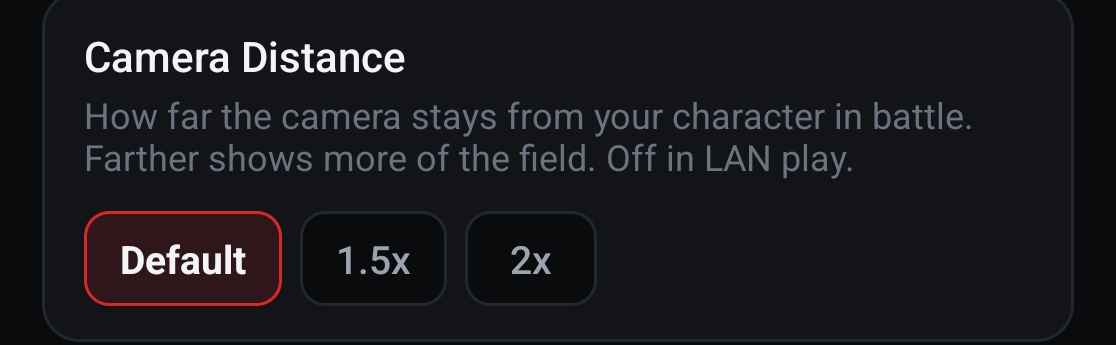
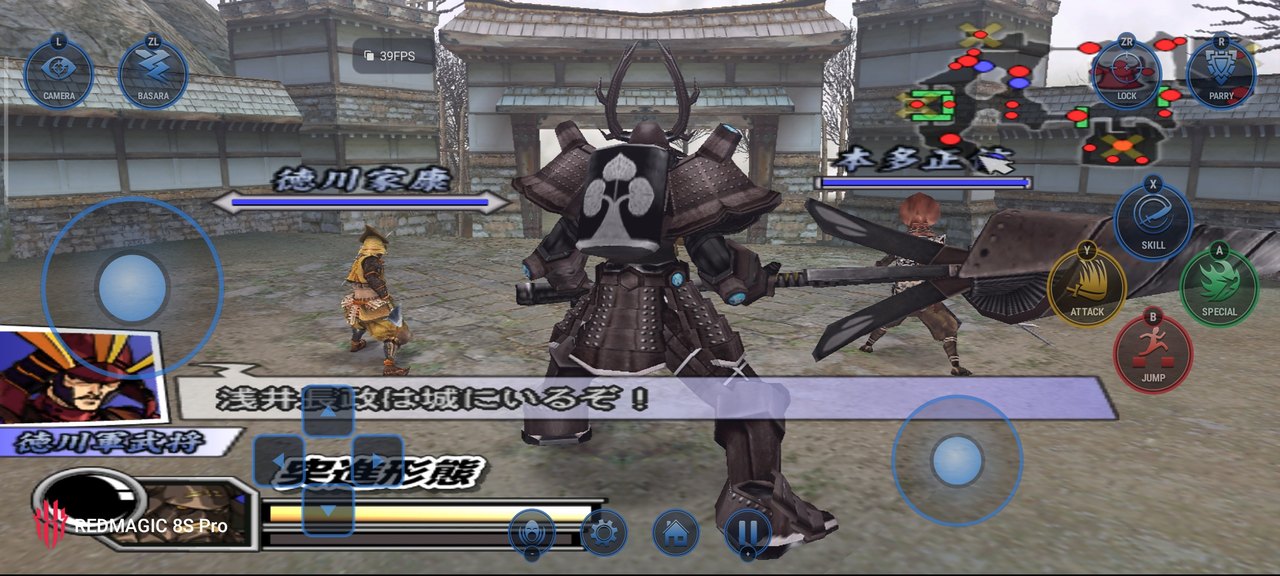
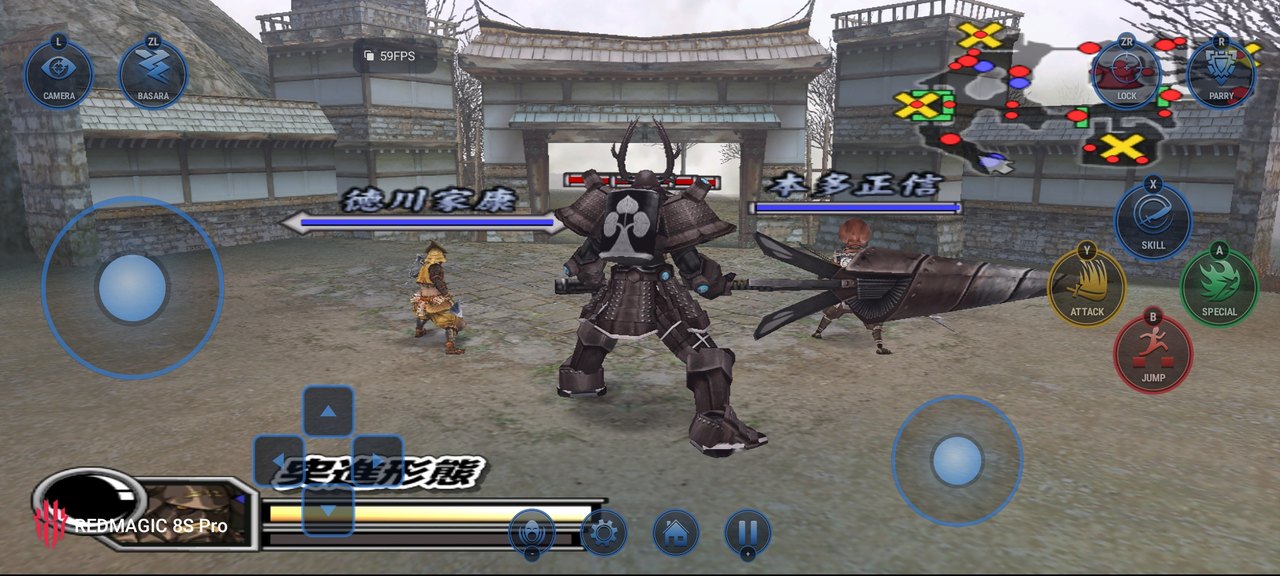
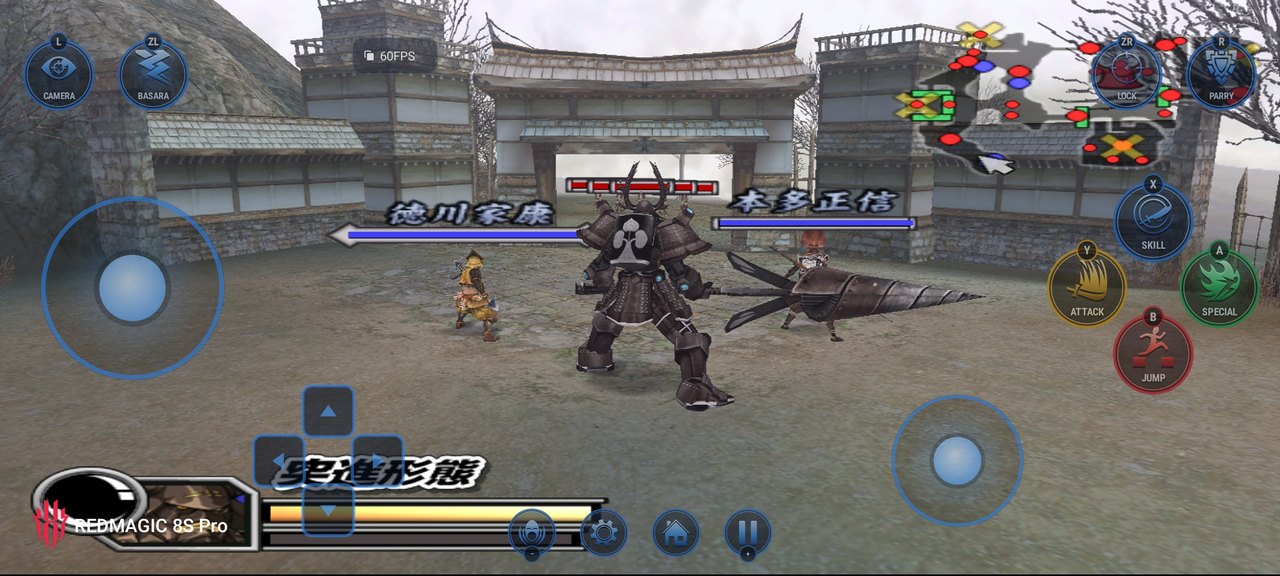
- Camera Distance: pull the battle camera back to 1.5× or 2× to see more of the field (Settings > Display). Cutscenes and stage intros keep the normal camera; it is off in LAN play. See below.
- Unlock All cheat: Settings > Cheats > Unlock All opens every character, stage, skill, weapon and item. It only fills what is still locked; what the game saves stays open after you turn it off. Off in LAN play.
- New touch buttons (Modern): lighter round buttons with the controller letter on the rim and a D-pad of four round keys, in the same colours (Button Color still applies). L is now labelled SWITCH and R GUARD.
- Gamepad Buttons: Settings > Controls > Gamepad Buttons sets which gamepad button presses each Classic Controller button (tap one, press the gamepad button). Reset to Default puts back the usual layout.
- Android 10: the game and the launcher now run on Android 10. File access there is the usual storage permission dialog.
- Graphics > Renderer > OpenGL ES: a third choice for phones whose Vulkan driver shows a black screen or closes the game. Adreno 5xx phones on Android 10 (for example Redmi Note 7) use it by themselves.
- Vulkan on older drivers: Graphics > Renderer > Vulkan now also works on Android 10 phones with an older Vulkan driver (for example realme 5, Adreno 610).
- Android 10 phones with four fast CPU cores: the graphics work now runs on the fast cores beside the game.
- Disc check: the launcher checks the game file against the original disc. A changed one (patched or badly converted) gets a warning; Play Anyway still works.
Camera Distance
Settings > Display > Camera Distance: Default, 1.5x or 2x. The view stays the same shape and the game still knows what is on screen, so enemies don't pop in and out at the edges.
| Default | 1.5x | 2x |
|---|---|---|
 |
 |
 |
Tested on Android 10
Phones that have run 1.1 test builds so far. This list is still growing: if your Android 10 phone isn't here, your report on Discord #issue helps (working or not).
| Phone | Chip / GPU | Renderer | Result |
|---|---|---|---|
| Redmi Note 7 | Snapdragon 660 / Adreno 512 | OpenGL ES (chosen automatically) | Plays, stable through pause and resume. Battles run at about 22 fps (30 FPS lock, 0.5x). Renderer Vulkan closes the game on this phone. |
| realme 5 | Snapdragon 665 / Adreno 610 | Vulkan | Plays. About 30 fps in battle; a 7-minute session with 7 pauses ran without a problem. |
| Infinix X680B | MediaTek / PowerVR GE8320 | Vulkan | Still being tested: an earlier test build showed a black screen. |
Fixes
- Phones with a PowerVR GPU (for example OPPO phones with Helio G35 or P90) no longer crash on Play with "Graphics adapter unavailable".
- Some Adreno 610 phones with an older Vulkan driver (for example Redmi Note 13 4G) closed on Play ("No supported adapters"). They now start the game the same way as the PowerVR phones.
- Adreno 5xx phones (for example Redmi Note 7) closed on the first screens or as the first battle loaded, inside their Vulkan driver. The game now feeds their driver in a way it handles.
- Closing the Wii HOME Menu could crash the game on slow phones (seen on realme 5).
- Save import refused a real save when an earlier import had put a wrong file in its place. Only a real save (173,568 bytes) is accepted now, and it always replaces whatever is there.
- Renderer Vulkan: if the phone isn't ready to show the picture when you come back to the game (from the home screen or after the screen turns off), the game now waits and tries again instead of closing.
- Renderer Vulkan on Android 10: the game takes memory in smaller pieces, and when memory runs short while loading a texture it tries again before giving up, so phones with 2-4 GB of RAM close less often.
- The log records more when the game stops on a black screen, so such reports can be traced faster.
Known issues
- In 16:9 and Fill Screen the HUD, text and menus are still stretched to the screen's width; only the 3D picture is widened.
- A modified or damaged disc image (for example a patched ISO) stops on a black screen after the first frame. Use your own unmodified
RBSJ08dump. - PowerVR GPUs are slow for this game: use the Low-End Preset.
- Adreno 618: very heavy effects drop to about 40 fps, the limit of the GPU.
Reporting a problem
Settings > System > Share Log: it puts the logs of the runs you pick (the crashed one first) and your device info in one zip. Send it with what you were doing to either:
- a new GitHub issue, or
- the Telegram channel: t.me/indonesiarecompcomunity, or
- the Discord server: discord.gg/qcXXP7A2
Credits
Port made by Xu, continuing the work of WitherBlitz with the help of WiiCompiled's code. New touch button design and the Unlock All idea by datfooldive. Based on NSMB-Wii-Multiplayer-Recompilation and WiiCompiled (GPLv3). Widescreen research helped by the PCSX2 widescreen patch for the PS2 version (SLPM-66848). Touch control icons from game-icons.net by Lorc, Delapouite and contributors (CC BY 3.0).
Unofficial fan project, not affiliated with or endorsed by Capcom. Sengoku Basara, its characters and its logo belong to Capcom.
SB2H Android 1.0
The first release of the unofficial Android port of Sengoku Basara 2 Heroes (Wii, NTSC-J, RBSJ08). The whole game is playable, from boot through Story battles, with sound, saving and loading. The game's PowerPC code is recompiled to native code ahead of time: nothing is emulated on the phone.
Important
This app contains no game data. You need a dump of your own disc (.iso or .rvz, Wii NTSC-J RBSJ08). Download the app only from this Releases page.
Download
| File | For | SHA-256 |
|---|---|---|
| basara2heroes-1.0-android-arm64.apk | Android 11 or newer, arm64, Vulkan 1.1 | 92a1f98b39b4ff0ed00fd47bdaedd676226ec9050c3735111aea17d8cd03d1d7 |
Coming from the Beta
The Beta has ended and no longer opens. The release is its own app (Basara 2 Heroes):
- Install it and load your disc again.
- Made a Back Up in the Beta before? In Basara 2 Heroes: Settings > Save Data > Import, and pick it from
Basara2Heroes-Beta/Saves. - Then uninstall Basara Beta. Without a backup, the Beta's saves can't be moved: Android keeps each app's data to itself.
Highlights
- Everything from the Beta, finished: every feature tested during the six Betas, with the fixes from the testers' reports, in one stable app.
- Runs on most phones: a Low-End Preset in one tap, Display Resolution (960p, 720p, 480p), Dynamic Resolution, Frameskip, 30 FPS Lock, GX Thread, Thermal Control and Sustained Performance.
- Sharp picture: render resolution 0.5× to 4×, FSR1 and SGSR upscaling, HD Textures Live, custom texture packs (.png or .dds).
- Sound: straight to Android's audio output with time stretching, so slow moments do not crackle; Recording-Friendly Audio for screen recordings.
- Controls: new touch controls in two styles, Modern (a picture for each button) and Classic (the controller's letters), with A, B, X and Y in their own colours and the rest in gold, red, blue or white (Settings > Controls > Button Color). A layout editor that pauses the game: move every button on its own and size it from 50% to 200%. Touch camera (the right stick hides while it is on) and gamepads in the Classic Controller layout.
- Cheats: Settings > Cheats (money, infinite HP, infinite BASARA gauge).
- GPU drivers: the Vulkan renderer, and custom drivers (Turnip for Adreno, malisx2 for Mali).
- Launcher: settings in tabs and in game, save backup and import, Share Log for bug reports, English and Indonesian.
Tested phones
| Class | Phone | Chip / GPU | Battles |
|---|---|---|---|
| Flagship | RedMagic 8S Pro | Snapdragon 8 Gen 2 / Adreno 740 | 60 fps |
| Upper mid | Poco X7 Pro | Dimensity 8400 / Mali-G720 MC7 | 48–60 fps (at 1x; 4x is too much) |
| Mid | Infinix GT30 | Dimensity 7300 / Mali-G615 | 48–60 fps |
| Mid-low | phone with Helio G99 | Helio G99 / Mali-G57 MC2 | about 30 fps in busy battles, with the Low-End Preset |
| Low | Redmi Note 12 Pro | Snapdragon 732G / Adreno 618 | 35–57 fps; very heavy effects about 40 fps |
| Low | TECNO KN4n | Helio G81 / Mali-G52 MC2 | 37–60 fps |
| Low | realme RMX3710 | Helio G85-class / Mali-G52 MC2 | steady 30 fps with the 30 FPS Lock |
| Low | itel (Unisoc) | Unisoc / Mali | 25–47 fps |
| Entry | itel A666LN | Unisoc T606 / Mali-G57 MP1 | 23–38 fps, with the Low-End Preset |
| Tablet | Redmi Pad SE | Snapdragon 680 / Adreno 610 | needs Turnip (Settings > Graphics > GPU Driver) |
Known issues
- Adreno 618: very heavy effects drop to about 40 fps, the limit of the GPU.
- Adreno 610 with the phone's own driver (Redmi Pad SE): use Turnip from Settings > Graphics > GPU Driver.
- GX Thread (Performance) can still show broken graphics in rare scenes; turn it off if that happens.
Reporting a problem
Settings > System > Share Log: it puts the logs of the runs you pick (the crashed one first) and your device info in one zip. Send it with what you were doing to either:
- a new GitHub issue, or
- the Telegram channel: t.me/indonesiarecompcomunity, or
- the Discord server: discord.gg/qcXXP7A2
Thank you, Beta testers
This release would not exist without you. To everyone who joined the Beta Test and stayed until the very end: thank you, from the bottom of my heart. Six Betas, many builds that crashed, stuttered or went black, and every time you installed the next one, played again and sent your logs. Every bug report, every fps number from your phone and every "it works now" made this port better. You tested it on phones I could never have tested on myself, and the list of tested phones above is your work. 1.0 belongs to you as much as it does to me.
Credits
Port made by Xu, continuing the work of WitherBlitz with the help of WiiCompiled's code. Based on NSMB-Wii-Multiplayer-Recompilation and WiiCompiled (GPLv3). Touch control icons from game-icons.net by Lorc, Delapouite and contributors (CC BY 3.0).
Unofficial fan project, not affiliated with or endorsed by Capcom. Sengoku Basara, its characters and its logo belong to Capcom.