Repository navigation
SB2H Android 1.1

Real widescreen, a farther battle camera, and Android 10 and PowerVR phones. Install it over 1.0: your saves and settings stay.
Important
This app contains no game data. You need a dump of your own disc (.iso or .rvz, Wii NTSC-J RBSJ08). Download the app only from this Releases page.
Warning
Android 10 support is new and still being tested. It has run on only a few phones so far, so expect bugs there. If anything goes wrong on Android 10 (a black screen, the game closing, missing graphics, very low fps), report it right away: join the Discord server, open the #issue channel and make a post with your phone model, what happened, and the zip from Settings > System > Share Log. Reports without the log are very hard to fix.
Download
| File | For | SHA-256 |
|---|---|---|
| basara2heroes-1.1-android-arm64.apk | Android 10 or newer, arm64 | c2de1fec970c3776ab309827f077145d7afe78b2f2e085a28999e0e2e440977f |
What's new
- Real widescreen: 16:9 and Fill Screen used to stretch the game's 4:3 picture sideways, so characters and the field looked squashed. The game now draws a wider view instead: more of the battlefield to the sides, characters keep their shape. Health bars and names above characters stay on them, and screen effects line up. (Settings > Display > Aspect Ratio)
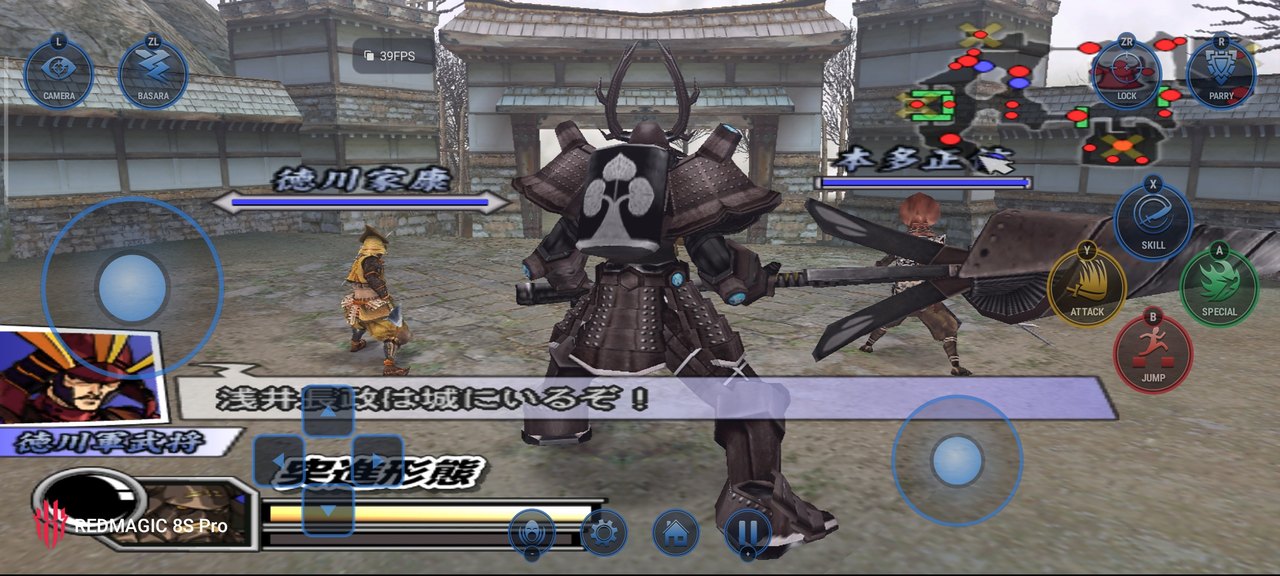
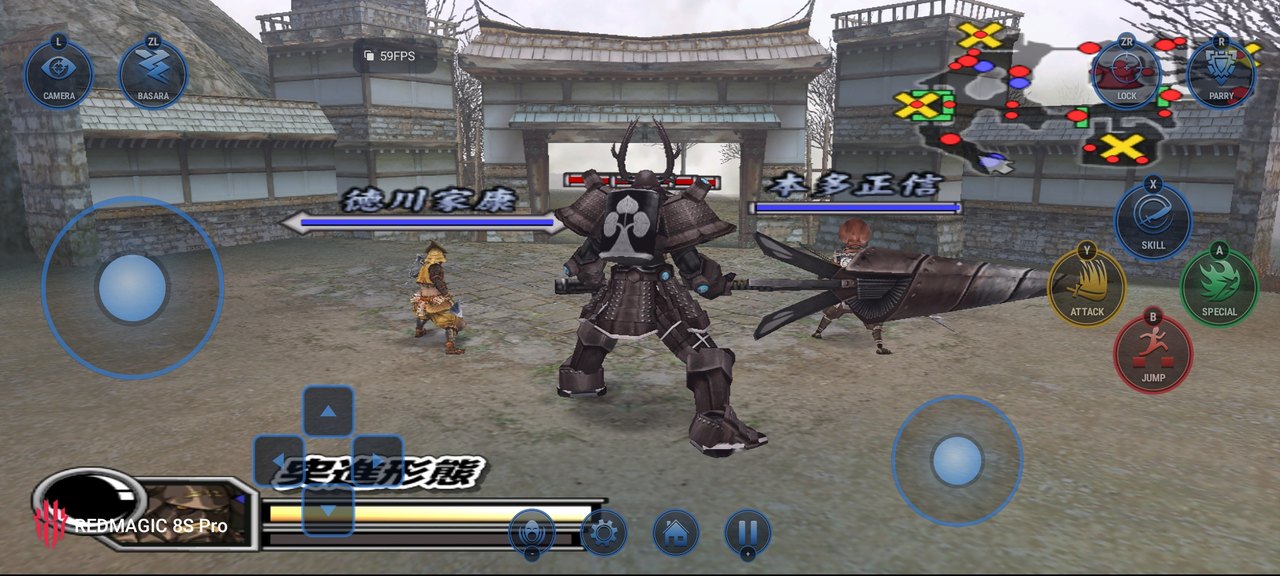
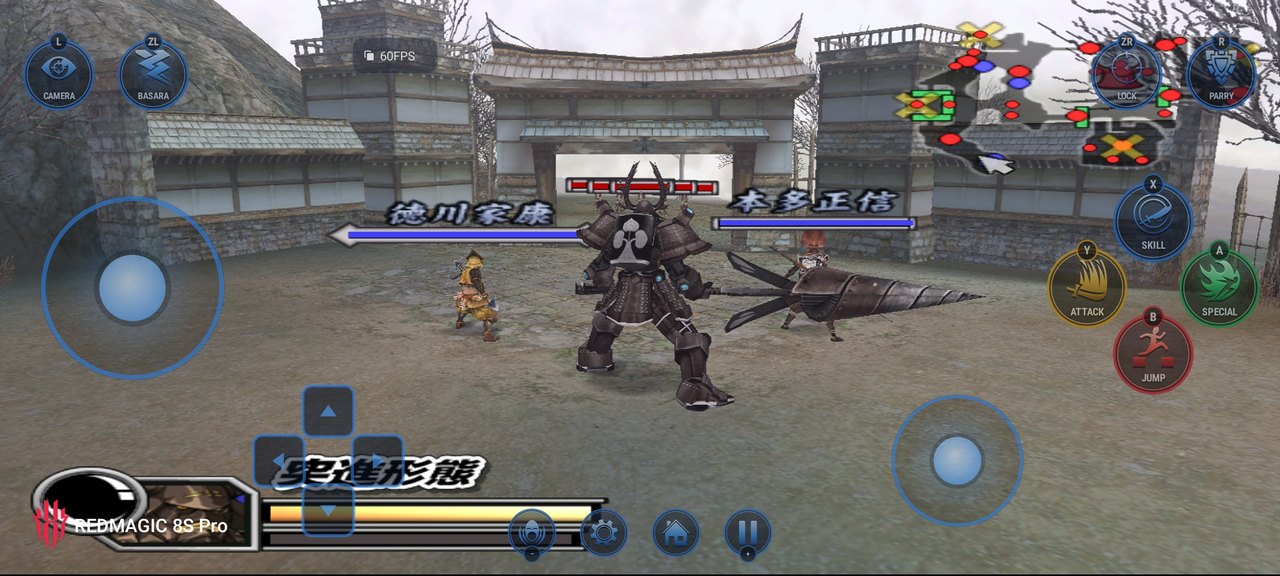
- Camera Distance: pull the battle camera back to 1.5× or 2× to see more of the field (Settings > Display). Cutscenes and stage intros keep the normal camera; it is off in LAN play. See below.
- Unlock All cheat: Settings > Cheats > Unlock All opens every character, stage, skill, weapon and item. It only fills what is still locked; what the game saves stays open after you turn it off. Off in LAN play.
- New touch buttons (Modern): lighter round buttons with the controller letter on the rim and a D-pad of four round keys, in the same colours (Button Color still applies). L is now labelled SWITCH and R GUARD.
- Gamepad Buttons: Settings > Controls > Gamepad Buttons sets which gamepad button presses each Classic Controller button (tap one, press the gamepad button). Reset to Default puts back the usual layout.
- Android 10: the game and the launcher now run on Android 10. File access there is the usual storage permission dialog.
- Graphics > Renderer > OpenGL ES: a third choice for phones whose Vulkan driver shows a black screen or closes the game. Adreno 5xx phones on Android 10 (for example Redmi Note 7) use it by themselves.
- Vulkan on older drivers: Graphics > Renderer > Vulkan now also works on Android 10 phones with an older Vulkan driver (for example realme 5, Adreno 610).
- Android 10 phones with four fast CPU cores: the graphics work now runs on the fast cores beside the game.
- Disc check: the launcher checks the game file against the original disc. A changed one (patched or badly converted) gets a warning; Play Anyway still works.
Camera Distance
Settings > Display > Camera Distance: Default, 1.5x or 2x. The view stays the same shape and the game still knows what is on screen, so enemies don't pop in and out at the edges.
| Default | 1.5x | 2x |
|---|---|---|
 |
 |
 |
Tested on Android 10
Phones that have run 1.1 test builds so far. This list is still growing: if your Android 10 phone isn't here, your report on Discord #issue helps (working or not).
| Phone | Chip / GPU | Renderer | Result |
|---|---|---|---|
| Redmi Note 7 | Snapdragon 660 / Adreno 512 | OpenGL ES (chosen automatically) | Plays, stable through pause and resume. Battles run at about 22 fps (30 FPS lock, 0.5x). Renderer Vulkan closes the game on this phone. |
| realme 5 | Snapdragon 665 / Adreno 610 | Vulkan | Plays. About 30 fps in battle; a 7-minute session with 7 pauses ran without a problem. |
| Infinix X680B | MediaTek / PowerVR GE8320 | Vulkan | Still being tested: an earlier test build showed a black screen. |
Fixes
- Phones with a PowerVR GPU (for example OPPO phones with Helio G35 or P90) no longer crash on Play with "Graphics adapter unavailable".
- Some Adreno 610 phones with an older Vulkan driver (for example Redmi Note 13 4G) closed on Play ("No supported adapters"). They now start the game the same way as the PowerVR phones.
- Adreno 5xx phones (for example Redmi Note 7) closed on the first screens or as the first battle loaded, inside their Vulkan driver. The game now feeds their driver in a way it handles.
- Closing the Wii HOME Menu could crash the game on slow phones (seen on realme 5).
- Save import refused a real save when an earlier import had put a wrong file in its place. Only a real save (173,568 bytes) is accepted now, and it always replaces whatever is there.
- Renderer Vulkan: if the phone isn't ready to show the picture when you come back to the game (from the home screen or after the screen turns off), the game now waits and tries again instead of closing.
- Renderer Vulkan on Android 10: the game takes memory in smaller pieces, and when memory runs short while loading a texture it tries again before giving up, so phones with 2-4 GB of RAM close less often.
- The log records more when the game stops on a black screen, so such reports can be traced faster.
Known issues
- In 16:9 and Fill Screen the HUD, text and menus are still stretched to the screen's width; only the 3D picture is widened.
- A modified or damaged disc image (for example a patched ISO) stops on a black screen after the first frame. Use your own unmodified
RBSJ08dump. - PowerVR GPUs are slow for this game: use the Low-End Preset.
- Adreno 618: very heavy effects drop to about 40 fps, the limit of the GPU.
Reporting a problem
Settings > System > Share Log: it puts the logs of the runs you pick (the crashed one first) and your device info in one zip. Send it with what you were doing to either:
- a new GitHub issue, or
- the Telegram channel: t.me/indonesiarecompcomunity, or
- the Discord server: discord.gg/qcXXP7A2
Credits
Port made by Xu, continuing the work of WitherBlitz with the help of WiiCompiled's code. New touch button design and the Unlock All idea by datfooldive. Based on NSMB-Wii-Multiplayer-Recompilation and WiiCompiled (GPLv3). Widescreen research helped by the PCSX2 widescreen patch for the PS2 version (SLPM-66848). Touch control icons from game-icons.net by Lorc, Delapouite and contributors (CC BY 3.0).
Unofficial fan project, not affiliated with or endorsed by Capcom. Sengoku Basara, its characters and its logo belong to Capcom.