Repository navigation
Releases: PriyanshuGeTRekT/Claude-Code-Desktop-Switcher
Release list
v2.2.0 - Per-account variables, flags and links

Per-account settings for people who run tools against their accounts: environment variables, launch flags, and claude:// links that open where you want them.
Thanks to @orty for the environment variables (#11) and to @Reel-Box for the launch flags and link proposal (#8).
New
- Environment variables per account (#11).
"ProfileEnv": { "Work": { "MY_VAR": "value" } }in%LOCALAPPDATA%\ClaudeProfiles\settings.jsonsets those variables only for the Claude the switcher starts for that account, so an MCP server or tool can tell your accounts apart. - Launch flags per account (#8).
"ProfileArgs": { "Work": "--flag --other=1" }(or a list) goes on every launch of that account, from the window, the tray,-Launch, links and the shortcuts you already have. - Open a
claude://link in a chosen account (#8).-OpenLink <url> -Account Workopens one link there, whether sign-in routing is on or not.-OpenLinksIn Workremembers an account for every link that is not a sign-in, such as a link to a Claude Code session; with sign-in routing on, the router sends them there instead of your original account.-OpenLinksIn Defaultundoes it, and-Statusshows where other links go.
For all three, keys are the profile's folder id (the name -List shows in brackets, or the plain name when there are none). Two limits apply: a copy that is already running keeps the environment and flags it started with, and Default on the Store build starts through the shell, which takes neither.
Fixed
- Under PowerShell 7, an environment variable set for one account's launch was left behind, empty, in the switcher's process, so a later launch of another account from the same process would have inherited it. The shortcuts run under Windows PowerShell 5.1, where this did not happen; it mattered only if you ran the switcher from
pwshyourself.
Downloads
| File | Use it if you want to |
|---|---|
Install-ClaudeProfileSwitcher.cmd |
Install or upgrade in one step. Double-click it; it downloads the latest script, installs it and opens the switcher. |
ClaudeProfileSwitcher-v2.2.0.zip |
Get everything offline. Unzip, then double-click Install.cmd, or Claude Profile Switcher.cmd to run it without installing. |
ClaudeSwitcher.ps1 |
Just the script, for PowerShell users or the one-line install below. |
SHA256SUMS.txt |
Check a download with Get-FileHash <file>. |
irm https://github.com/PriyanshuGeTRekT/Claude-Code-Desktop-Switcher/releases/latest/download/ClaudeSwitcher.ps1 -OutFile "$env:TEMP\ClaudeSwitcher.ps1"; powershell -ExecutionPolicy Bypass -File "$env:TEMP\ClaudeSwitcher.ps1" -InstallUpgrading from 2.1.0 changes nothing you did not ask for: your accounts, sign-ins, names, shortcuts and settings stay as they are.
Tested
- The five test suites pass in CI on Windows PowerShell 5.1 and PowerShell 7, including the new
ProfileLaunchsuite for these settings. - Launch flags, environment variables,
-OpenLinkand-OpenLinksInwere run end to end on Windows 11 against a stand-inClaude.exethat records what it receives: the folder, then the flags, then the link, with the account's variables set. - Not run against a real second account: opening a real Claude Code session link with
-OpenLink. If a session link opens in the right account but does not resolve there, please say so on #8.
Known gaps
- Huorong antivirus has been reported to delete the switcher's shortcuts as
Trojan/LNK.Runner.ad(#10). The shortcuts run a headless PowerShell, which is what that signature looks for. A bisect is under way on the issue to find which part of the launch chain trips it; a supported option will follow. - After Claude's idle auto-update force-closes every window, only your original account comes back (#9). A watchdog that reopens your other accounts is being worked on.
- The installer (non-Store) build is still untested end to end by the maintainer.
Full changes: v2.1.0...v2.2.0
Contributors


Assets 6
v2.1.0 - Right-account sign-ins, taskbar buttons, Cowork
Three things that make several accounts feel like separate apps: sign-ins that land in the right account, a taskbar button per account, and Cowork's local workspace working in every account.
Thanks to @orty for all three, built on @Sukarth's original router and taskbar work (#1).
New
- Sign-ins go to the account that asked (#4). Signing in through the browser used to bring the login back to your original account. With sign-in routing on, it reaches the account you were adding. It's off until you agree: you're asked the first time you add an account, and you can switch it from the tray (Send sign-ins to the right account), with
-RouteSignIns, or back off with-Revert.-Statusshows its state.- Store version of Claude: Windows needs one choice from you. In Settings > Default apps, set CLAUDE to Claude Profile Router. The switcher opens that page for you.
- Each account gets its own taskbar button (#5), with its coloured badge, instead of every account piling onto one Claude button. Pinning an account's shortcut shares that button. Your original account keeps Claude's own button.
- Cowork's local workspace now starts in every account (#6). Before, extra accounts showed "Workspace unavailable. The isolated Linux environment on this device failed to start." Each one runs its own local VM, which takes about 4 GB of memory and over 10 GB of disk per account.
What changes when you upgrade
- Account folders move, once, automatically. Extra accounts move from
%LOCALAPPDATA%\ClaudeProfiles\<name>to%LOCALAPPDATA%\ClaudeProfile-<name>, the first time the new version runs. A link (junction) is left at the old place, so Code chats that remember the old path keep working. An account that's open at the time moves on a later start. Anything that can't move is noted in%LOCALAPPDATA%\ClaudeProfiles\switcher-error.log, and that account keeps working from where it is. - Launching an account adds its Start menu shortcut if it doesn't have one. Windows takes the taskbar button's icon from it.
- Your accounts, sign-ins, names and shortcuts are otherwise unchanged.
- Going back: an older switcher only looks in the old place. Thanks to the links it still finds moved accounts there, but don't run two versions side by side.
Downloads
| File | Use it if you want to |
|---|---|
Install-ClaudeProfileSwitcher.cmd |
Install or upgrade in one step. Double-click it; it downloads the latest script, installs it and opens the switcher. |
ClaudeProfileSwitcher-v2.1.0.zip |
Get everything offline. Unzip, then double-click Install.cmd, or Claude Profile Switcher.cmd to run it without installing. |
ClaudeSwitcher.ps1 |
Just the script, for PowerShell users or the one-line install below. |
SHA256SUMS.txt |
Check a download with Get-FileHash <file>. |
irm https://github.com/PriyanshuGeTRekT/Claude-Code-Desktop-Switcher/releases/latest/download/ClaudeSwitcher.ps1 -OutFile "$env:TEMP\ClaudeSwitcher.ps1"; powershell -ExecutionPolicy Bypass -File "$env:TEMP\ClaudeSwitcher.ps1" -InstallTested
- Sign-in routing, taskbar buttons and the folder move were tested by @orty end to end on Windows 11 with the Store version of Claude. That included a real sign-in being routed, and a Code chat resuming after the move.
- The test files pass on the installer build too (@Sukarth).
- This release passes all four test suites in CI on Windows PowerShell 5.1 and PowerShell 7. Installing it over a 2.0 setup was tested in a sandbox: the account moved with its data, a link was left behind, routing stayed off, and nothing was logged.
Known gaps
- Sign-in routing and taskbar buttons haven't been tried end to end on the installer (non-Store) build. Reports are welcome via the installer build template.
- If a sign-in still lands in the wrong account, run
ClaudeSwitcher.ps1 -Statusand include its output in an issue.
Full changes: v2.0.1...v2.1.0
Contributors

Assets 6
v2.0.1 - Chat transfer fix for Store installs
A small fix release on top of v2.0.0.
Fixed
- Transfer chats said an account "has not used Claude Code yet" when it had. On some Store (MSIX) installs, Windows keeps a second account's files inside Claude's package folder, not where the switcher looked. Chat transfer now checks there too, in both directions. Thanks to @KaiCaborn (#3).
Also
- The first automated tests, covering chat transfer. CI runs them on Windows PowerShell 5.1 and PowerShell 7.
Downloads
| File | Use it if you want to |
|---|---|
Install-ClaudeProfileSwitcher.cmd |
Install or upgrade in one step. Double-click it; it downloads the latest script, installs it and opens the switcher. |
ClaudeProfileSwitcher-v2.0.1.zip |
Get everything offline. Unzip, then double-click Install.cmd, or Claude Profile Switcher.cmd to run it without installing. |
ClaudeSwitcher.ps1 |
Just the script, for PowerShell users or the one-line install below. |
SHA256SUMS.txt |
Check a download with Get-FileHash <file>. |
irm https://github.com/PriyanshuGeTRekT/Claude-Code-Desktop-Switcher/releases/latest/download/ClaudeSwitcher.ps1 -OutFile "$env:TEMP\ClaudeSwitcher.ps1"; powershell -ExecutionPolicy Bypass -File "$env:TEMP\ClaudeSwitcher.ps1" -InstallUpgrading keeps your accounts and shortcuts as they are.
Known gaps
- Signing in through the browser may land in your original account. Two users have reported that when a second account signs in via the browser, the login goes to the original account's window instead. A fix is being worked on in #1. If you hit this, please add your Claude version and build (Store or installer) there.
- Open accounts share one taskbar button. Also being worked on in #1.
- The installer (non-Store) build is still untested by the maintainer. Reports are welcome via the installer build template.
- Chat transfer has not yet been confirmed between two real signed-in accounts.
Full changes: v2.0.0...v2.0.1
Contributors

Assets 6
v2.0.0 - One-click accounts
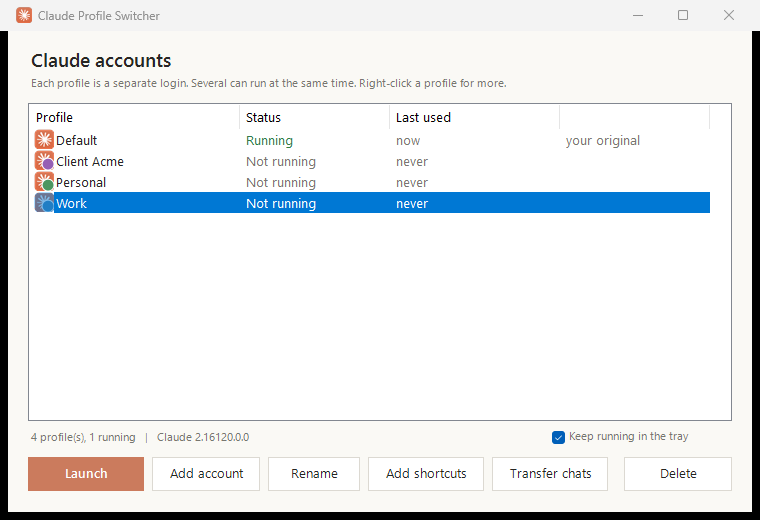
Run several Claude desktop accounts on one Windows PC, side by side. This release makes adding and switching accounts close to one click.
Downloads
| File | Use it if you want to |
|---|---|
Install-ClaudeProfileSwitcher.cmd |
Install in one step. Double-click it; it downloads the latest script, installs it and opens the switcher. |
ClaudeProfileSwitcher-v2.0.0.zip |
Get everything offline. Unzip, then double-click Install.cmd, or Claude Profile Switcher.cmd to run it without installing. |
ClaudeSwitcher.ps1 |
Just the script, for PowerShell users or the one-line install below. |
SHA256SUMS.txt |
Check a download with Get-FileHash <file>. |
Or from PowerShell:
irm https://github.com/PriyanshuGeTRekT/Claude-Code-Desktop-Switcher/releases/latest/download/ClaudeSwitcher.ps1 -OutFile "$env:TEMP\ClaudeSwitcher.ps1"; powershell -ExecutionPolicy Bypass -File "$env:TEMP\ClaudeSwitcher.ps1" -InstallWindows may show a SmartScreen or "unknown publisher" prompt for downloaded files. The script is plain text: you can open it and read it before running.
What's new
- Add account in one click. Opens a fresh Claude window at the sign-in screen and adds it to the list. Also from the tray, Ctrl+N,
-AddAccount, or a Claude - Add account Start menu entry. - Switch to open accounts. Launching an account that is already open brings its window forward instead of starting a second copy, from the window, shortcuts or tray.
- Tray icon. Jump between accounts, add one, or Start with Windows. Closing the window keeps it in the tray.
- Transfer Claude Code chats from one account to another.
- Rename accounts (the label only; sign-in is untouched), plus a right-click menu and keyboard shortcuts.
- Shortcuts you can tell apart: each account gets a coloured badge icon on the desktop and in the Start menu.
- Installs to a fixed place, so deleting the download breaks nothing, and shortcuts open without a console window flashing.
Fixes
- Claude Code sessions (which run their own
claude.exe) no longer make the original account look open, which used to block launching it. - Accounts under a Windows user folder with a space in its name now show as running, and can no longer be deleted while open.
- Shortcut icons no longer go blank after Claude updates itself.
- A mistyped
-Launchname is an error instead of creating an empty account. Invalid names and a wrong-ClaudePathare caught. - "Last used" is accurate.
Upgrading
Run any of the installers above. Existing accounts are kept as they are, and existing shortcuts keep working. Re-running -Install also moves them to the installed copy.
Known gaps
- Tested on the Store (MSIX) build of Claude. The installer build is still untested; please report back with the installer build template.
- Chat transfer is new and has not yet been tried between two real accounts. If a copied chat doesn't show up or resume, please open an issue.
Full changes: #2