Repository navigation
v2.0.0 - One-click accounts

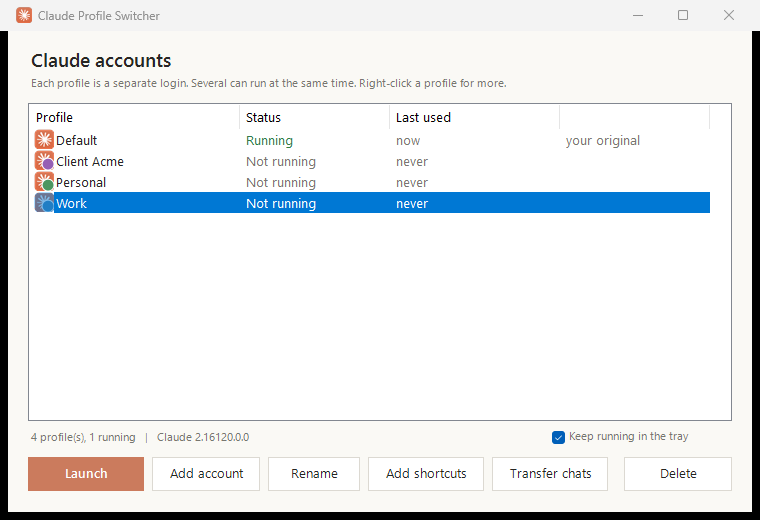
Run several Claude desktop accounts on one Windows PC, side by side. This release makes adding and switching accounts close to one click.
Downloads
| File | Use it if you want to |
|---|---|
Install-ClaudeProfileSwitcher.cmd |
Install in one step. Double-click it; it downloads the latest script, installs it and opens the switcher. |
ClaudeProfileSwitcher-v2.0.0.zip |
Get everything offline. Unzip, then double-click Install.cmd, or Claude Profile Switcher.cmd to run it without installing. |
ClaudeSwitcher.ps1 |
Just the script, for PowerShell users or the one-line install below. |
SHA256SUMS.txt |
Check a download with Get-FileHash <file>. |
Or from PowerShell:
irm https://github.com/PriyanshuGeTRekT/Claude-Code-Desktop-Switcher/releases/latest/download/ClaudeSwitcher.ps1 -OutFile "$env:TEMP\ClaudeSwitcher.ps1"; powershell -ExecutionPolicy Bypass -File "$env:TEMP\ClaudeSwitcher.ps1" -InstallWindows may show a SmartScreen or "unknown publisher" prompt for downloaded files. The script is plain text: you can open it and read it before running.
What's new
- Add account in one click. Opens a fresh Claude window at the sign-in screen and adds it to the list. Also from the tray, Ctrl+N,
-AddAccount, or a Claude - Add account Start menu entry. - Switch to open accounts. Launching an account that is already open brings its window forward instead of starting a second copy, from the window, shortcuts or tray.
- Tray icon. Jump between accounts, add one, or Start with Windows. Closing the window keeps it in the tray.
- Transfer Claude Code chats from one account to another.
- Rename accounts (the label only; sign-in is untouched), plus a right-click menu and keyboard shortcuts.
- Shortcuts you can tell apart: each account gets a coloured badge icon on the desktop and in the Start menu.
- Installs to a fixed place, so deleting the download breaks nothing, and shortcuts open without a console window flashing.
Fixes
- Claude Code sessions (which run their own
claude.exe) no longer make the original account look open, which used to block launching it. - Accounts under a Windows user folder with a space in its name now show as running, and can no longer be deleted while open.
- Shortcut icons no longer go blank after Claude updates itself.
- A mistyped
-Launchname is an error instead of creating an empty account. Invalid names and a wrong-ClaudePathare caught. - "Last used" is accurate.
Upgrading
Run any of the installers above. Existing accounts are kept as they are, and existing shortcuts keep working. Re-running -Install also moves them to the installed copy.
Known gaps
- Tested on the Store (MSIX) build of Claude. The installer build is still untested; please report back with the installer build template.
- Chat transfer is new and has not yet been tried between two real accounts. If a copied chat doesn't show up or resume, please open an issue.
Full changes: #2