Fix the display of the filter in the campaign page form#365
Fix the display of the filter in the campaign page form#365paramsiddharth merged 6 commits intomainfrom
Conversation


 paramsiddharth
left a comment
paramsiddharth
left a comment
paramsiddharth
left a comment
There was a problem hiding this comment.
@ahn-nath Excellent work, Nath! For someone just a few weeks into the fellowship and one who's new to Vue.js, you're performing great. I really appreciate the efforts and quality of description on the PRs. It makes reviewing them a tonne easier for the reviewers. Absolutely loved it!
I've requested one change. Please look at it and go ahead with it. Once that's done I think the PR will be ready for approval and merge. :)

 ahn-nath
left a comment
ahn-nath
left a comment
ahn-nath
left a comment
There was a problem hiding this comment.
I agree with the changes and understand the point of using one column for all buttons.
There was a problem hiding this comment.
Good @paramsiddharth. I think we can merge the changes now.
ahn-nath
left a comment
ahn-nath
left a comment
There was a problem hiding this comment.
Made changes to the file. Some characters of commit title/message were somehow changed. I apologize if it is hard to understand.
ahn-nath
left a comment
ahn-nath
left a comment
There was a problem hiding this comment.
I have also addressed the PascalCase issue.

|
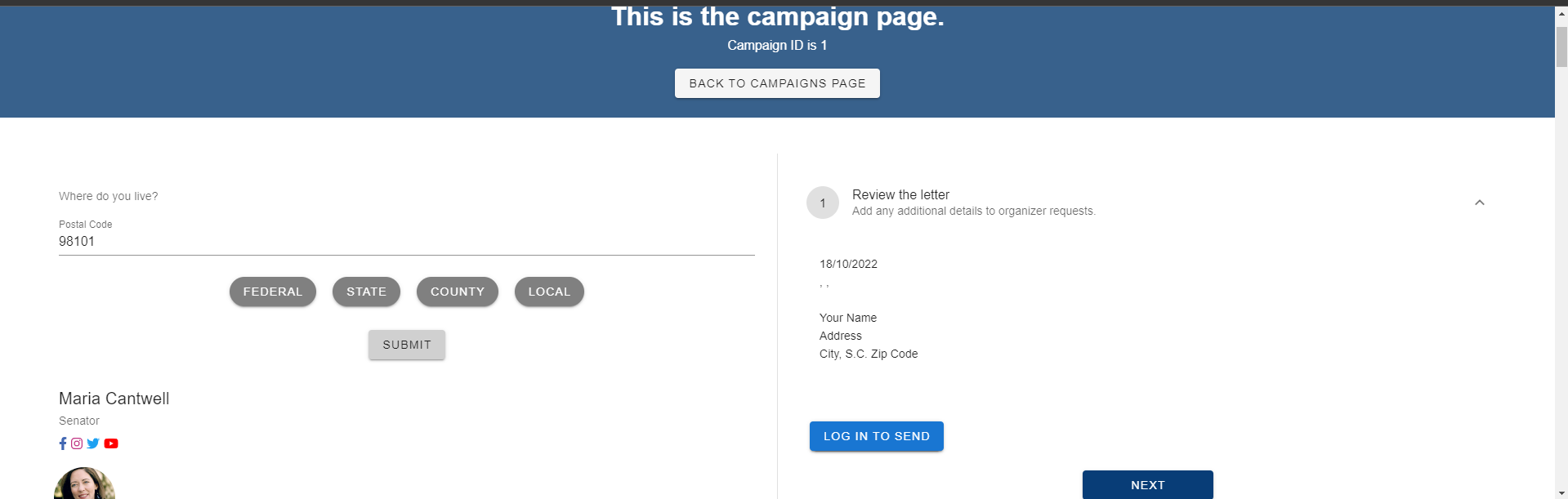
Some screenshots |


| library.add(faUserSecret, faInstagram, faFacebookF, faTwitter, faYoutube) | ||
|
|
||
| /* add font awesome icon component */ | ||
| Vue.component('font-awesome-icon', FontAwesomeIcon) |
There was a problem hiding this comment.
I wouldn't recommend making this change, because then it will break this. To remain consistent, we should make the component PascalCase in both places. You shared the screenshot after updating the PascalCase issue. Are the social icons still rendering correctly? Because that will be surprising.
paramsiddharth
left a comment
paramsiddharth
left a comment
There was a problem hiding this comment.
Hi, Nath. I would suggest you revert the PascalCase update because it's just a warning and we can ignore it for now. I want us to continue using the current convention for the Font Awesome icon component while still being able to ignore the error somehow. There are some known ways to ignore lint errors in certain instances. I'll try to find what we can do to avoid it here.
The rest seems good to me. The screenshots look amazing. Good job!

Signed-off-by: Param Siddharth <contact@paramsid.com>
| library.add(faUserSecret, faInstagram, faFacebookF, faTwitter, faYoutube) | ||
|
|
||
| /* add font awesome icon component */ | ||
| // eslint-disable-next-line vue/component-definition-name-casing |
There was a problem hiding this comment.
@ahn-nath I made some changes and I'd like you to look at this. This allows us to ignore the lint errors for the next line. For exceptional cases, this is what we use.
Pro tip: If you're not able to commit/push your changes due to link errors failing in the push/commit hook, you can always use git commit --no-verify or git push -n to temporarily skip the hooks.
paramsiddharth
left a comment
paramsiddharth
left a comment
There was a problem hiding this comment.
The PR looks good to me now. Feel free to merge it once the tests pass. Good work, Nath!
|
@paramsiddharth I am not authorized to do so. Thanks. |


3 participants


Issue: #332
Solution:
The button element is not the child of any wrapper component with proper margin and padding. The same is true for the buttons over it. The behavior, therefore, was hard to predict, and it was on top of items with similar characteristics. I was going to add a default margin to the button, however, after checking the code, I realized wrappers would be enough and proportionate more control over the element.
I have also added columns to the elements wrapped by a row without them. The logic for it was based on the grid system of Vuetify: (Grid system — Vuetify), where is stated that v-row is a wrapper component for v-col that utilizes flex properties to control the layout and flow of its inner columns. It is more consistent and logical to use the row with a column, as the class contains several properties that are specific to columns.
A demo that shows how the change looks in different window resolutions/sizes: https://www.loom.com/share/b90eb61e1df84ba8849347093a72fd57
Looking forward to your suggestions and comments.
References:
Vuetify | A Material Design Framework for Vue.js. (n.d.). Retrieved October 17, 2022, from https://vuetifyjs.com/en/components/grids/