Repository navigation
Releases
PyroCade 0.8.2 Hotfix

Added
- Settings → Quit application closes PyroCade, including from fullscreen.
Changed
- The README gallery and 20-second demo now feature games from GameCube, PlayStation and Game Boy Advance.
PyroCade 0.8.1
The instruction booklet now looks like that system's real manual.
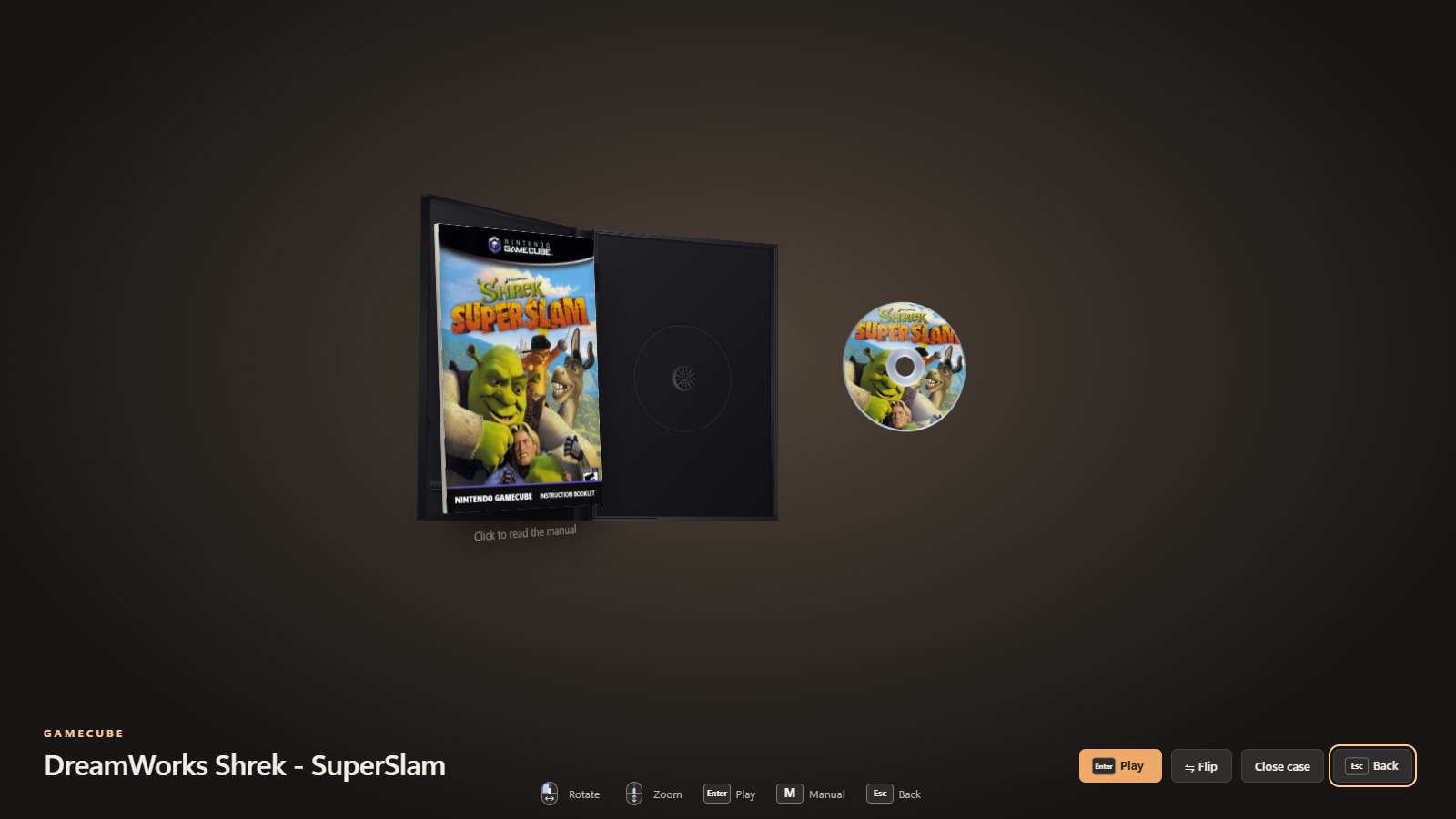
- The box art fills the booklet edge to edge (cropped, never squashed) instead of sitting in a plain off-white frame.
- Nintendo, Sega and other systems get a strip along the foot in their retail colours, with the system's wordmark and "INSTRUCTION BOOKLET". It uses the same colours as the case spine.
- PlayStation, PS2 and PSP booklets simply reprint the cover, as their manuals did.
Everything else is as in 0.8.0: the Page turn and Media carousel layouts, a library that opens straight away, and faster scanning and browsing. Full list: CHANGELOG.md.
Downloads
- Windows:
PyroCade-Setup-0.8.1.exe(not code-signed yet: SmartScreen → More info → Run anyway). Installed copies update themselves. - macOS:
PyroCade-0.8.1-arm64.dmg(Apple Silicon) orPyroCade-0.8.1-x64.dmg(Intel). Not notarized yet: System Settings → Privacy & Security → Open Anyway. - Linux: AppImage (SteamOS and any distro),
.deb,.rpmand Arch.pkg.tar.zst. - Android (experimental):
PyroCade-0.8.1-android-experimental.apk, a debug-signed proof of concept with this release's library. Artwork download, manuals and the updater are not available on Android yet, and launching an emulator has not been confirmed on a real phone. Details
🤖 Generated with Claude Code
PyroCade 0.8.0
Two new layouts, a library that opens straight away, and faster browsing on big collections.
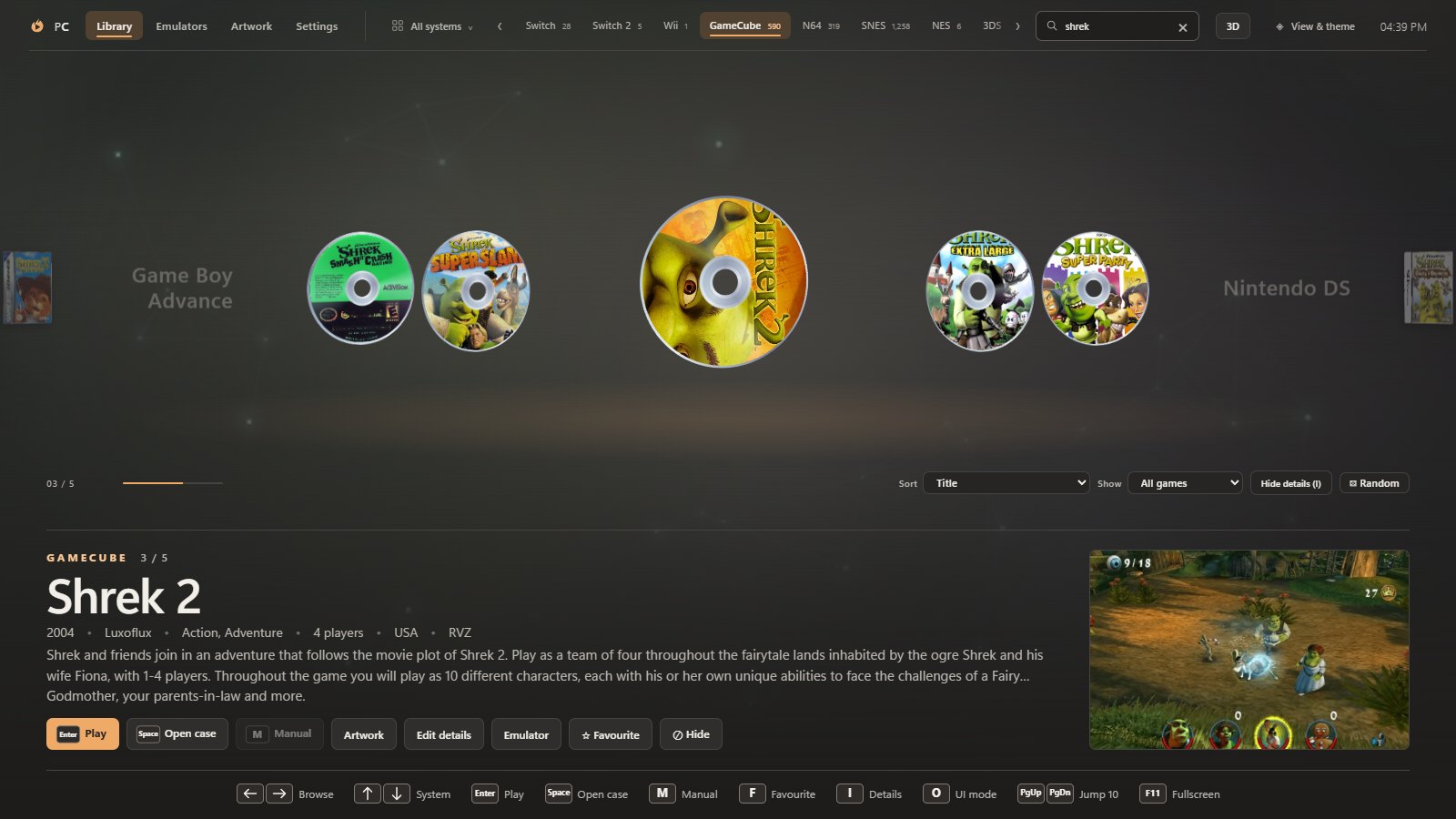
New
- Page turn layout. Cases swing across a spine like the pages of a book: the games you have passed lie open on the left, and the selected one stands open on the right.
- Media carousel layout. The games themselves instead of their cases: every disc, mini disc, UMD and cartridge on a carousel, with the selected disc spinning.
- Android: an updated experimental build is in the android-v0.8.0-experimental pre-release.
Faster
- The library opens straight away. PyroCade shows the library it found last time and rescans your folders in the background, redrawing only if something changed (0.8 s instead of 2.6 s on a 7,691-game library on a hard drive).
- Scans are about four times faster (about 0.6 s instead of 2.3 s): folders are read in parallel and listed once, and the file sizes used to choose between copies of a game are remembered. Save & rescan in Settings still reads them all again.
- Switching consoles is about twice as fast. Generated back covers for games without a scan are drawn in the background and filled in as they are ready.
Better
- A cartridge comes up out of its cardboard box in the case view and glides forward to rest in front of it, so the whole label shows.
- Super Famicom boxes keep their real proportions, the Bookshelf leaves room for the pulled-out case's disc, and hinged cases fold open around their spine.
- Spinner rack and Colour cards are replaced by Page turn and Media carousel. If one of them was your layout, PyroCade opens in its replacement.
Fixed
- Cartridge labels no longer go blank when a cartridge is seen at an angle.
- A turning case no longer shows its disc or cartridge on its back in Page turn.
- The cartridge no longer passes through the open flap of a Game Boy Advance box.
Full list: CHANGELOG.md
Downloads
- Windows:
PyroCade-Setup-0.8.0.exe(not code-signed yet: SmartScreen → More info → Run anyway). Installed copies update themselves. - macOS:
PyroCade-0.8.0-arm64.dmg(Apple Silicon) orPyroCade-0.8.0-x64.dmg(Intel). Not notarized yet: System Settings → Privacy & Security → Open Anyway. - Linux: AppImage (SteamOS and any distro),
.deb,.rpmand Arch.pkg.tar.zst.
🤖 Generated with Claude Code
PyroCade 0.7.0
What’s new
- Faster scans and smoother browsing for large libraries, especially in Bookshelf and Spinner rack.
- Charcoal surfaces, a transparent top bar and redesigned keyboard, mouse and controller prompts.
- More room for the shelf when game details are hidden, and higher cartridge previews.
- Shelf-edge previews, drag-to-reorder, editable game details and a Recomp shelf for standalone Windows games.
- Optional Leia SR stereo on Windows. The installer includes the native presenter. Stereo requires a compatible display and the installed Leia SR runtime.
- Feedback reporting from Settings, more sources for missing covers and a README gallery featuring the Shrek shelf.
Thanks to afterkaze for the Leia SR and library changes in PR #4.
PyroCade Android 0.8.0 (experimental)

Experimental proof of concept, not a finished release. Desktop users: use PyroCade 0.8.0.
This is the PyroCade library running on Android, built from the same renderer/ as desktop 0.8.0 inside a Capacitor WebView.
New since the 0.4.4 Android build: everything the desktop library gained up to 0.8.0. That includes the Page turn and Media carousel layouts, Bookshelf, faster console switching with generated back covers drawn in the background, cartridges that come up out of their cardboard boxes, and the newer cases, cartridges and themes.
What works: the 3D shelf, case view, layouts, themes and settings. You can choose a ROM folder through Android's folder picker, either one root with a sub-folder per system (ES-DE names) or one folder per system. Games are scanned with the desktop's systems and duplicate rules. Play hands the game to RetroArch (a core per system), PPSSPP, Dolphin, DuckStation or NetherSX2.
What doesn't work yet:
- Artwork download, LaunchBox and ScreenScraper
- Manuals
- The updater and the emulator installer
- Controller polish and the Back button
The layout is the desktop one scaled down, so touch targets are small.
Not verified: this build was compiled and its contents checked, but not run on a phone or emulator. Launching a game in an emulator has only been checked up to the Android intent in earlier builds. Reports welcome.
Install: this is a debug-signed APK (version 0.8.0, version code 2). Allow installs from your browser or file manager, then open the APK. In RetroArch, grant "All files access" so it can open ROMs by path. Then, in PyroCade, tap Choose ROM folder… on the banner (or go to Settings → Browse…).
Build notes and the full status: docs/android.md
🤖 Generated with Claude Code
PyroCade 0.6.0
Full Changelog: v0.5.0...v0.6.0
PyroCade 0.5.0
Your library, your way
- Favourites: press F (Select on a controller) or ☆ Favourite to star a game. Starred games get their own Favourites shelf.
- Play time: PyroCade counts how long you play each game and shows "12 h played" and "Last played yesterday". A Recently played shelf lists your last 30 games.
- Sort, filter and random: under the shelf, Sort by title, year, play time or developer, Show only multiplayer, unplayed or one genre, or press ⚄ Random (left stick button on a controller).
- PyroCade opens where you left it, and each system remembers the game you had selected.
- Hide systems you don't use: an empty system has a Hide button, and Settings → Show turns any system on or off.
Playing
- PyroCade no longer minimizes when a game starts. The game opens on top, and PyroCade comes back when it closes.
- Hold Select + Start for 1.5 seconds to close the running game.
- Multi-disc games: "(Disc 1)", "(Disc 2)"… files are now one game. Choose the disc to start with in the case view. PlayStation games get a playlist, so you can still swap discs in the emulator.
- Your screenshots: screenshots you took in the emulator show under the open case.
- One emulator per game: the Emulator button next to Play picks an emulator for just that game, such as a fork made for it.
Physical media
- Solid cartridge and case models, rebuilt in the proportions of the real thing.
- GameCube mini discs, PSP UMDs in their shell (downloaded UMD photos are shown as they are), black PlayStation discs, and small touches for Wii, Wii U and Dreamcast discs.
- Settings → Show cases at their real sizes, and Settings → Used copies for scuffed cases and faded labels.
Fixes
- SteamOS Game Mode (Steam Deck, Legion Go S): PyroCade could open in Desktop Mode but not from Steam in Game Mode. It now adjusts itself when Steam starts it, with no launch options needed. If it still doesn't open for you, please share
~/.config/PyroCade/data/logs/pyrocade.log. - After clicking something with the mouse, Enter, Space and the arrow keys work on the shelf again.
Full changelog: v0.4.4...v0.5.0
PyroCade 0.4.4
Cartridges in their real colours
Every cartridge can now have its own plastic colour. PyroCade picks it in this order:
- Your own colour: choose one per game in Artwork → Change an image → Cartridge colour. Automatic goes back.
- The real colour: read from a photo of the actual cartridge when one is downloaded.
- Famous coloured cartridges: a built-in list, including gold Ocarina of Time and Majora's Mask, the gold NES Zelda games, yellow Donkey Kong 64, and the coloured Pokémon cartridges on Game Boy Color and Game Boy Advance.
A proper N64 cartridge
The N64 cartridge was redrawn from measurements of a retail cartridge. It now has the curved top, the seams beside the label, the side grooves and a tall label with rounded corners.
Switch 2: .nup files
.nup files in Switch 2 folders are now picked up and passed to your emulator. Existing settings get the new file type automatically.
Windows, macOS (Apple Silicon and Intel) and Linux downloads are below.
Full list of changes: CHANGELOG.md · compare v0.4.3...v0.4.4
PyroCade 0.4.3
Your PC games in PyroCade
- PC Games system: go to Settings, point PC Games at a folder of shortcuts (
.lnk, Steam.url) or game programs (.exe), and click Save & rescan.- Your PC games show up in the library with real box art from LaunchBox.
- They start directly, with no emulator needed.
- PyroCade only looks at the folder itself, so installers and helper programs inside game folders don't show up as games.
- Add game…: adds a single game to any system, for example one
.exefrom wherever it's installed. A program inside its own folder (likeHollow Knight\hollow_knight.exe) is named after the folder. Added games are listed in Settings under Games you added, where you can remove them again.
Your own systems
- Add system…: create any system you like, with its own name, colour, case style (DVD, CD jewel case, Blu-ray, UMD or a cartridge box), file types, ROM folder and emulator. Your own systems can be removed again from the systems table.
- Run the file itself: this new emulator option works for any system, not just PC.
Windows, macOS (Apple Silicon and Intel) and Linux downloads are below.
Full list of changes: CHANGELOG.md · compare v0.4.2...v0.4.3
PyroCade 0.4.2
PyroCade on macOS
PyroCade now runs on Macs.
| Mac | Download |
|---|---|
| Apple Silicon (M1 and newer) | PyroCade-0.4.2-arm64.dmg |
| Intel | PyroCade-0.4.2-x64.dmg |
Open the .dmg and drag PyroCade to Applications. PyroCade isn't notarized by Apple yet, so the first time you open it macOS blocks it.
- Open System Settings → Privacy & Security.
- Click Open Anyway next to PyroCade.
If macOS says the app is damaged, run xattr -cr /Applications/PyroCade.app in Terminal once.
- Emulators: link the emulators you already have (Dolphin, PCSX2, DuckStation, RetroArch…) with Use existing .exe…, which accepts
.appbundles. The automatic emulator downloads are Windows and Linux only for now. - Your data is kept in
~/Library/Application Support/PyroCade/data.
Windows and Linux downloads are unchanged.
Full list of changes: CHANGELOG.md · compare v0.4.1...v0.4.2