RMD Preview fixes#699
Conversation


Implements changes as suggested by @manuel

| // global objects used in other files | ||
| export const extDir: string = path.join(os.homedir(), '.vscode-R'); | ||
| export const tmpDir: string = path.join(extDir, 'tmp'); | ||
| export const extensionDirectory: string = path.join(os.homedir(), '.vscode-R'); |

There was a problem hiding this comment.
I think both extDir or extensionDirectory are ambiguous because it could mean the installation directory, but I don't come up with a name that makes more sense. Any ideas?
There was a problem hiding this comment.
I agree. Hmm, what about... localDirectory? homeDirectory?
There was a problem hiding this comment.
Given it's created in the ~/ directory, I think something relating to 'home' is closer to the right name.
Just throwing ideas out there, because honestly I'm not sure either:
- homeDir
- homeExtDir
- extHomeDir
There was a problem hiding this comment.
I like homeExtDir, which is almost the same as its path.
| export const extDir: string = path.join(os.homedir(), '.vscode-R'); | ||
| export const tmpDir: string = path.join(extDir, 'tmp'); | ||
| export const extensionDirectory: string = path.join(os.homedir(), '.vscode-R'); | ||
| export const temporaryDirectory: string = path.join(extensionDirectory, 'tmp'); |
There was a problem hiding this comment.
It looks like tmp or temp are already a convention to indicate "temporary" (e.g. os.tmpdir()). Not sure if it really looks better to call it in full.
There was a problem hiding this comment.
This is a bit ambiguous too, i.e. temporaryDirectory just looks like an alias of os.tmpdir()?
There was a problem hiding this comment.
Would it be feasible to simply use os.tmpdir() then (if I recall correctly, there might be issues with user privacy on some platforms)?
And if not, why is this directory declared/created here? It doesn't seem to be used anywhere eles in the code, so wouldn't it be enough to put this in the markdown-preview code?
There was a problem hiding this comment.
Using os.tmpdir() will have some user privacy problem, unless we create something like /tmp/vscode-R/$USER and make the folder have mode 700.
Just notice that https://github.com/REditorSupport/vscode-R/blob/master/src/helpViewer/helpProvider.ts#L289 uses os.tmpdir() which is probably subject to multi-user clash problem.
There was a problem hiding this comment.
Perhaps we should set all references of os.tmpdir (and future references) to temporaryDirectory*?
- barring issues with the name
| export async function activate(context: vscode.ExtensionContext): Promise<apiImplementation.RExtensionImplementation> { | ||
| if (!fs.existsSync(extDir)) { | ||
| fs.mkdirSync(extDir); | ||
| if (!fs.existsSync(extensionDirectory)) { | ||
| fs.mkdirSync(extensionDirectory); | ||
| } | ||
|
|
||
| if (!fs.existsSync(tmpDir)) { | ||
| fs.mkdirSync(tmpDir); | ||
| if (!fs.existsSync(temporaryDirectory)) { | ||
| fs.mkdirSync(temporaryDirectory); | ||
| } |
There was a problem hiding this comment.
This creates these directories quite eagerly, i.e. as soon as the extension activates. Wouldn't it be better to create them only if they're actually used?
This could e.g. be implemented by adding a function that creates the directory (if necessary) and then returns its path
There was a problem hiding this comment.
Should now only be created when the variable is referred to:
export const extensionDirectory = (): string => util.getDir(path.join(os.homedir(), '.vscode-R'));
export const temporaryDirectory = (): string => util.getDir(path.join(extensionDirectory(), 'tmp'));
Names tbd :)

|
This is working quite nicely now, thanks for the nice work! :) |

|
There seems an inconsistency that the commands are |

|
Maybe we make it uniform: all under r.markdown? |
I agree. I think if we put a note of breaking changes in the news, and it is okay to rename existing settings of |

|
Thanks for the great work. |
I wouldn't say |
|
To me, I think of r.markdown in my head as |
- Create dir only when used
- useDarkTheme -> useCodeTheme
- Show warning when attempting to knit an untitled (unsaved) doc
- rename temp and extension directories
- Save untitled file, then retry preview
- refresh button now uses updatePreview rather than refreshPanel
- rename contexts to be more uniform
|
It looks like the progress only shows when executing the preview command. The refresh does not show up the progress, and thus there is no way to cancel the rendering. I wonder if it makes sense to also show the progress on each refresh? |
Whoops, yes that should happen. I'll fix that tonight |
- Show progress when refreshing a preview
- Save documents prior to knitting
|
Whenever I save the document, it looks like the document is rendered twice. It is because the file watcher might call multiple times. We might need to remember the file mtime and only call render when the file mtime changes, just like https://github.com/REditorSupport/vscode-R/blob/master/src/session.ts#L550. |

|
Seems to be an issue where the uri passed from the file explorer context menu is not equivalent to
|
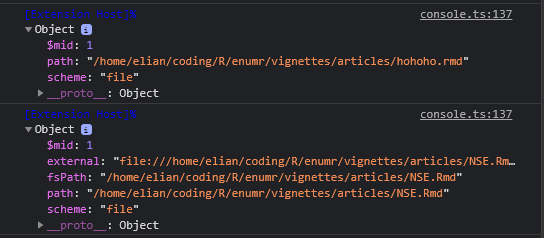
OK. Using |
|
// no fsPath
vscode.Uri.parse(fileUri.path);
vscode.Uri.file(fileUri.path);

// no fsPath
const fragment = /([^/\\]+$)/g.exec(fileUri.path)[0];
await vscode.workspace.findFiles(`**/${fragment}`, null, 10)[0]);

// no fsPath
vscode.Uri.from(
            {
                scheme: 'file',
                path: fileUri.path
            }
        );
Will have fix shortly |
The vscode.Uri object can lead to problems of equivalence, therefore we'll use a string (fsPath) as an identifier
| const fileUri = uri ?? vscode.window.activeTextEditor.document.uri; | ||
| const fileName = fileUri.fsPath.substring(fileUri.fsPath.lastIndexOf(path.sep) + 1); | ||
| const filePath = uri ? uri.fsPath : vscode.window.activeTextEditor.document.uri.fsPath; | ||
| const fileName = filePath.substring(filePath.lastIndexOf(path.sep) + 1); |
There was a problem hiding this comment.
Is there a reason not to use path.basename()?
|
|
||
| public add(uri: vscode.Uri, preview: RMarkdownPreview): Map<vscode.Uri, RMarkdownPreview> { | ||
| return this.store.set(uri, preview); | ||
| public add(fsPath: string, preview: RMarkdownPreview): Map<string, RMarkdownPreview> { |
There was a problem hiding this comment.
Do we have both filePath and fsPath?
-> Use r.rmarkdown, in line with previous contributions. (probably better left for a later discussion)
-> use consistent name for filePath
-> use path.basename
|
If the render process exits with an error (e.g. R syntax error in code chunks), the progress will never close. |
I can't replicate this, this is what should be happening when an error occurs:
It may be that we expand or change the error detection here: childProcess.stderr.on('data', (data: Buffer) => {
const dat = data.toString('utf8');
this.rMarkdownOutput.appendLine(dat);
if (dat.includes('Execution halted')) {
reject({ cp: childProcess, wasCancelled: false });
}
}); |
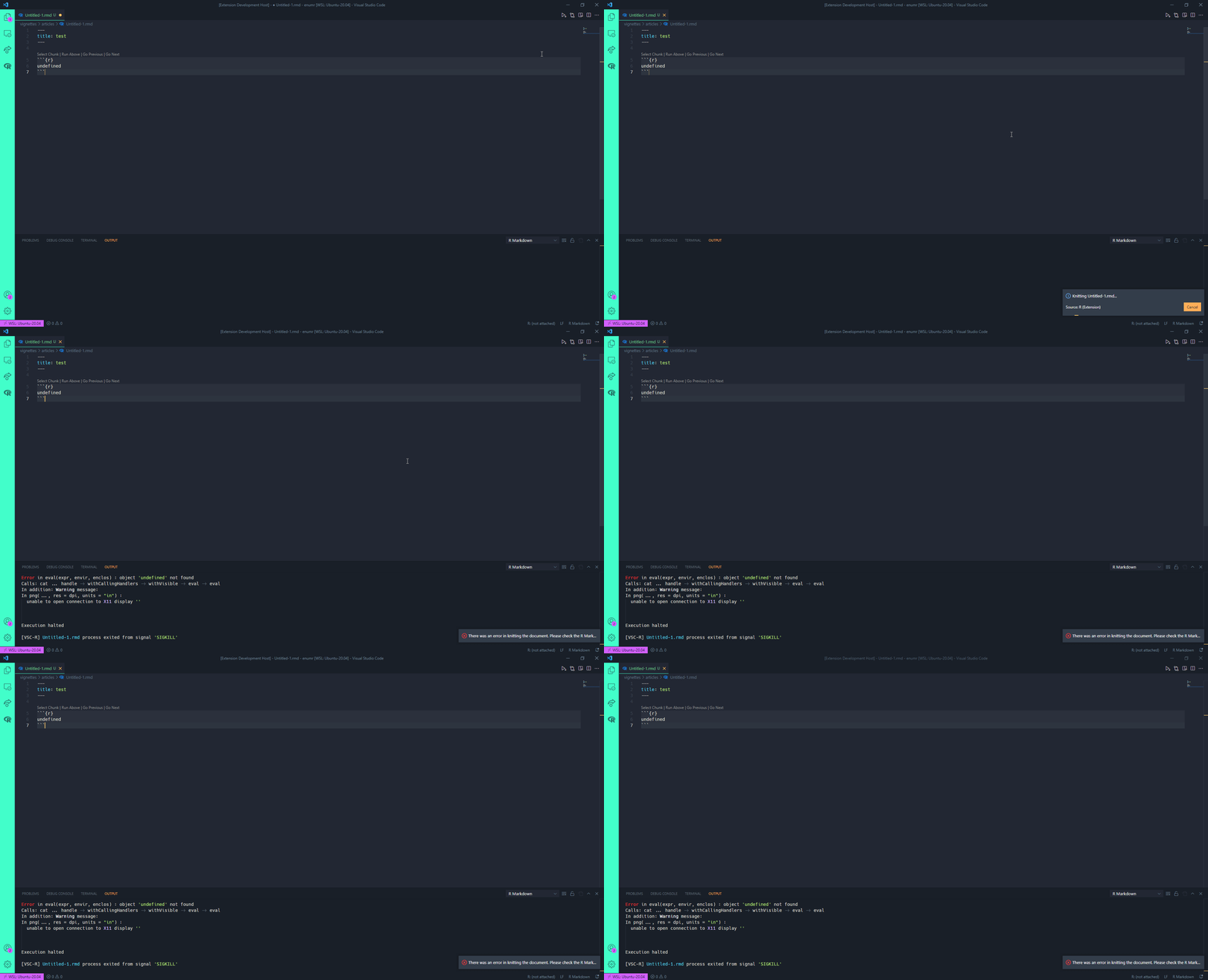
|
Let me take a look at this. |
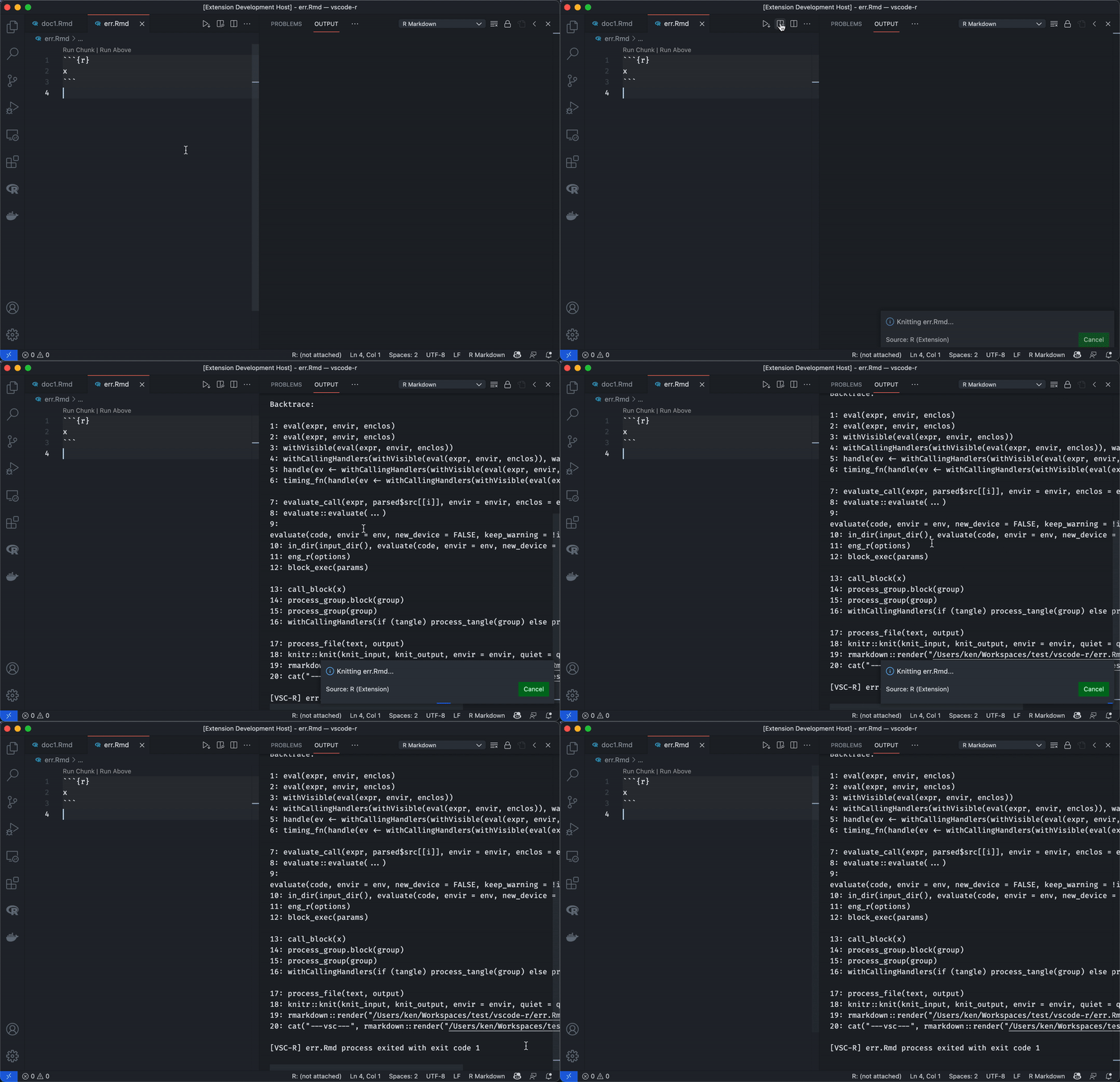
|
It turns out to be caused by my customized error handling specified in |
|
Looks like we should not rely on the error message "Execution halted" (e.g. R in other languages) but the exit code of the process. |


 ManuelHentschel
left a comment
ManuelHentschel
left a comment
ManuelHentschel
left a comment
There was a problem hiding this comment.
Works nicely, thanks!
5 participants


Implements changes suggested by @ManuelHentschel for R Markdown preview. Should not have any major change in functionality.
Changes:
'/' -> path.sepextensionDirectoryhomeExtDirtmpDir -> temporaryDirectoryTested on Linux, I don't currently have access to Windows.