Repository navigation
Weather monitor
The WeatherMonitor is a very simple RIAPS application with one publisher and one subscriber node. The project is uploaded to our app repository, it can be downloaded from here. First, let's see the model file:
app WeatherMonitor {
    message TempData;

    component TempSensor in C++ {
      timer clock 5000;
      pub ready : TempData;
    }

    component TempMonitor in C++ {
      sub tempupdate : TempData;
    }

    actor WeatherIndicator {
       {
          sensor : TempSensor;
       }
    }

    actor WeatherReceiver {
       {
          monitor : TempMonitor;
       }
    }
}
If this model file is new to you, please read the docs before you read further.
You can see, there are two components in the model file: TempSensor, TempMonitor and one message type: TempData. Before we dig into the C++ implementation it worths to check the project structure:
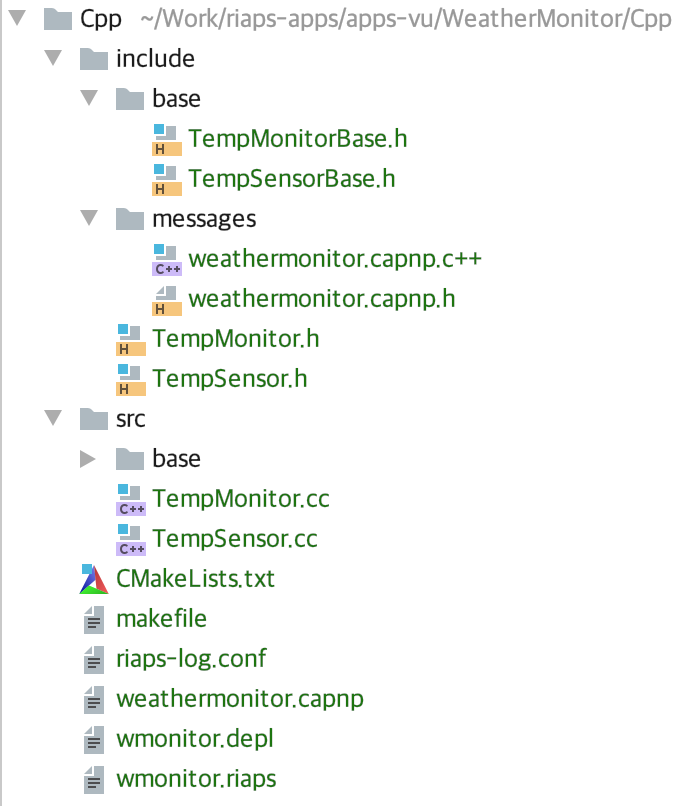
If you are familiar with C++, then there is no surprise for you: there are the usual src and include directories and the CMakeLists.txt in the root folder. However inside the src and include directories, you will find the base directory. The content of the base is always generated by the riaps_gen (in short: it processes the model file and generates a skaleton project, you can read more about that tool here). The base directory contains classes (named from the component name + "Base") for each components from the model file. These classes implement the Dispatch() function, which calls the appropriate handler for the arrived message and provides the Recv() and Send() functions for each port. Friendly reminder: please do NOT edit these files under the base directories, since their content is generated. Whatever goals you are trying to achieve by modifying the base content, the next round of riaps_gen will overwrite your changes anyway.
The messages directory contains the message structures in C++ (generated from the weathermonitor.capnp). The most important rule is the same: do NOT modify these files, they are generated by the capnp compiler, you have to edit the .capnp file.