Repository navigation
0.13.0


Download
| System | File |
|---|---|
| Windows 10 or 11 x64 | DisruptorRecomp-win-Setup.exe installs the launcher that updates itself |
| Windows, without installing | DisruptorRecomp-win-Portable.zip the launcher that updates itself, no install |
| Linux x64, glibc 2.35 or newer | DisruptorRecomp.AppImage the launcher that updates itself |
In this release
| Change | |
|---|---|
| Mouse look | Mouse turning and Vertical mouse look in one group, the crosshair on by default |
| Sky | The sky moves with the view when you look up and down, the first mission's city no longer runs ahead of the roof |
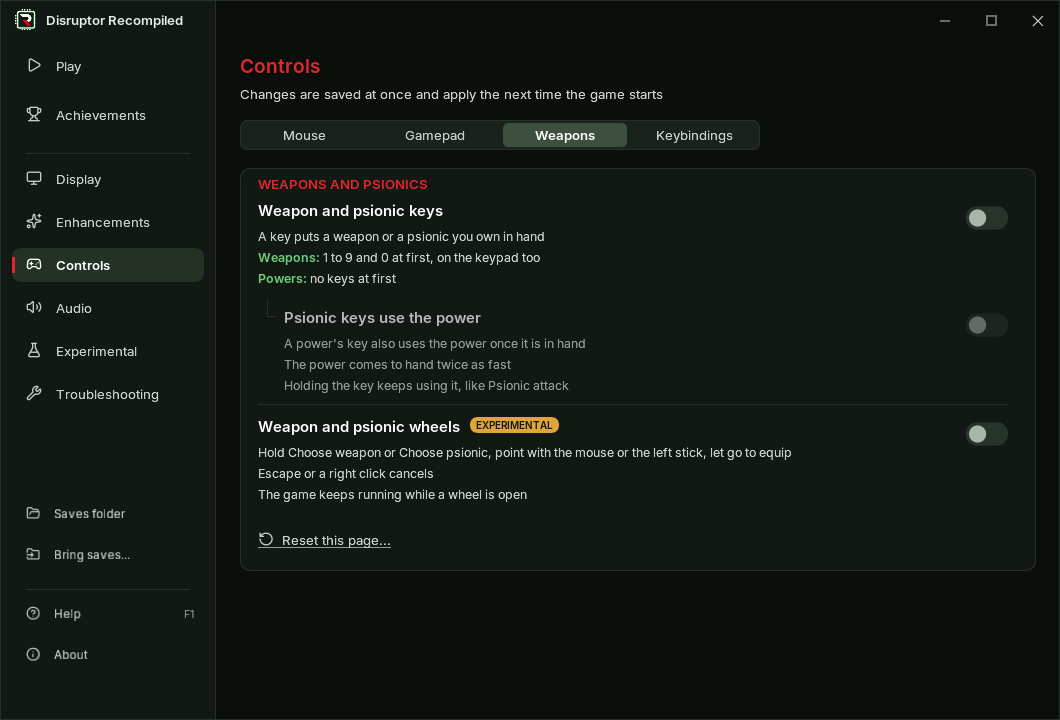
| Launcher | The Controls tabs in a new order |
| Fixes | Vertical mouse look and Draw distance after Continue from mid mission |
Note
Before you update
- Mouse aim is called Mouse turning now, Smooth mouse turning is Smooth turning
- The crosshair is on by default now, 0.12.0 had it off
- A crosshair you turned off stays off
- Save states, settings, keys and memory cards stay as they are
Mouse look
| Setting | Where | Default |
|---|---|---|
| Mouse turning | Controls, Mouse tab | On |
| Vertical mouse look | Under Mouse turning | Off |
| Crosshair | Under Vertical mouse look | On |
- Turning and looking up and down are one group, Mouse look, in the launcher and in the game's menu
- Smooth turning, Invert horizontal and Sensitivity stand under Mouse turning
- Vertical mouse look needs Mouse turning, and so does tilting the view with the turning stick
- Looking up and down answers sooner
- In the launcher, turning Mouse turning off and on again keeps Vertical mouse look and the crosshair as you left them
Sky
Looking up and down
- With Vertical mouse look the sky moves with the world now, 0.12.0 kept it still on the screen
- Looking up shows more sky above the game's own sky picture, grown from it on your machine once per level
The first mission's city
- Turning in place, the city painted in the sky no longer runs ahead of the roof in the middle of the screen
- The city is drawn a little smaller and smooth, in its own shape
Launcher
- The Controls page's tabs go Mouse, Gamepad, Weapons, Keybindings, and Keys is called Keybindings
Fixes
Continue from mid mission
- Vertical mouse look, the crosshair and the Draw distance you chose work after Continue from mid mission now, 0.12.0 turned them off to the end of the mission
Install
Your own Disruptor (USA, SLUS-00224) disc image is needed
Windows 10 or 11 x64
- Download DisruptorRecomp-win-Setup.exe and run it
- It installs the game into
%LocalAppData%\DisruptorRecomp, with shortcuts on the desktop and in the Start menu - Your files are kept in
%LocalAppData%\DisruptorRecompData - Or, without installing, unpack DisruptorRecomp-win-Portable.zip into a folder of its own and run
Disruptor Recompiled.exe - The portable copy needs the Microsoft Visual C++ x64 Redistributable
- The portable copy keeps your files in its
datafolder
Linux x64, glibc 2.35 or newer
- Download DisruptorRecomp.AppImage
- Make it executable:
chmod +x DisruptorRecomp.AppImage - Run it
- Your files are kept in
~/.local/share/DisruptorRecompData